
Introduction
The Mission 778x Integrated Amplifier is a modern audio component inspired by the classic 1980s Mission 778. This amplifier is designed to deliver high-fidelity audio performance with a range of contemporary features, including a high-quality phono stage, Bluetooth connectivity, and advanced digital audio capabilities. This manual provides essential information for setting up, operating, and maintaining your 778x amplifier to ensure optimal performance and longevity.

Figure 1: Front view of the Mission 778x Integrated Amplifier. The amplifier features two large rotary knobs for input selection and volume control, along with smaller buttons for power and headphone output.
Safety Information
Please read all safety instructions before operating this device. Keep this manual for future reference. Do not expose the unit to rain or moisture. Do not open the casing; refer all servicing to qualified personnel. Ensure proper ventilation to prevent overheating. Disconnect the power cord during lightning storms or when unused for long periods.
Package Contents
- Mission 778x Integrated Amplifier
- Power Cable
- Remote Control (batteries not included)
- User Manual (this document)
Setup
1. Placement
Place the amplifier on a stable, level surface away from direct sunlight, heat sources, and excessive moisture. Ensure adequate space around the unit for proper ventilation.
2. Connecting Speakers
Connect your passive speakers to the speaker terminals on the rear panel. Ensure correct polarity (+ to + and - to -) for each speaker. The 778x supports speaker impedances from 4 to 16 ohms.

Figure 2: Rear panel of the Mission 778x Integrated Amplifier, showing various input and output connections including analog, digital, phono, and speaker terminals.
3. Connecting Audio Sources
- Analog Inputs (AUX1, AUX2): Use RCA cables to connect devices like CD players or tuners.
- Phono Input: Connect a turntable to the PHONO input. This input is optimized for Moving Magnet (MM) cartridges. Ensure the turntable's ground wire is connected to the amplifier's ground terminal.
- Digital Inputs (OPT1, OPT2, COAX, USB): Connect digital audio sources such as TVs, Blu-ray players, or computers using optical, coaxial, or USB cables. The amplifier supports PCM up to 384kHz and DSD256.
- Bluetooth: Pair your smart device (phone, tablet, PC) wirelessly via Bluetooth for audio streaming.
4. Power Connection
Connect the supplied power cable to the AC IN socket on the rear panel and then to a suitable wall outlet.
Operating
1. Power On/Off
Press the power button on the front panel or the remote control to turn the amplifier on or off. The power indicator LED will illuminate when the unit is active.
2. Input Selection
Rotate the INPUT SELECTOR knob on the front panel or use the input selection buttons on the remote control to choose your desired audio source (e.g., CD, PHONO, OPT1, BT).
3. Volume Control
Adjust the volume using the large VOLUME knob on the front panel or the VOLUME +/- buttons on the remote control. Start with a low volume and gradually increase it to a comfortable listening level.
4. Headphone Output
Connect your headphones to the 6.35mm (1/4 inch) headphone jack on the front panel. Connecting headphones will automatically mute the main speaker outputs.
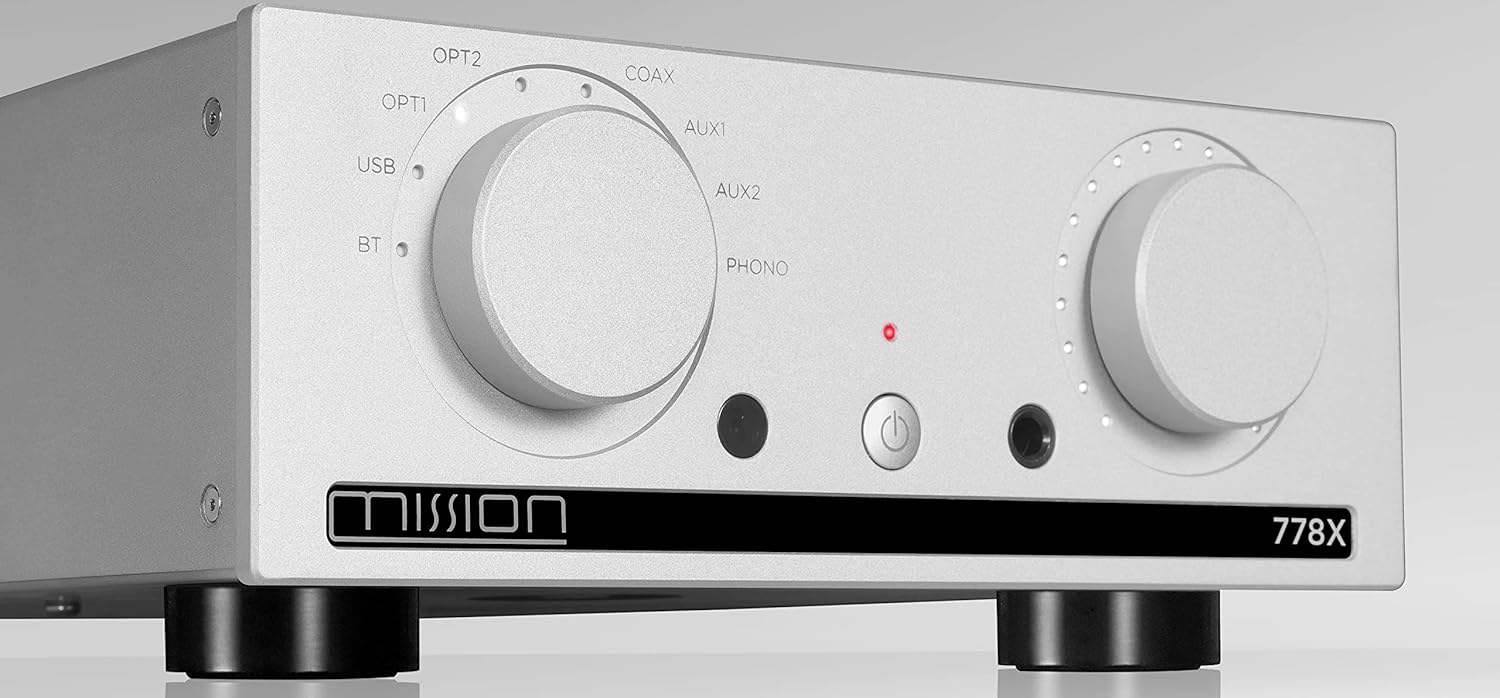
Figure 3: Close-up of the Mission 778x front panel, highlighting the input selector, volume knob, power button, and headphone jack.
5. Bluetooth Pairing
- Select 'BT' as the input source on the amplifier.
- Enable Bluetooth on your smart device.
- Search for 'Mission 778x' in your device's Bluetooth settings and select it to pair.
- Once paired, you can stream audio from your device to the amplifier.
Maintenance
- Cleaning: Use a soft, dry cloth to clean the amplifier's exterior. Do not use liquid or aerosol cleaners.
- Ventilation: Ensure that the ventilation openings on the top and sides of the amplifier are not blocked.
- Power: Disconnect the power cable from the wall outlet if the unit will be unused for an extended period.
Troubleshooting
| Problem | Possible Cause | Solution |
|---|---|---|
| No power | Power cable not connected; wall outlet faulty | Check power cable connection; try a different outlet |
| No sound | Incorrect input selected; volume too low; speaker cables loose | Select correct input; increase volume; check speaker connections |
| Distorted sound | Source device issue; speaker impedance mismatch | Check source device; ensure speakers are within 4-16 ohm range |
| Bluetooth not pairing | Amplifier not in BT mode; device too far | Select BT input; ensure device is close and in pairing mode |
Specifications
- Model: 778x
- Brand: Mission
- Digital Audio File Compatibility: Up to 384kHz (PCM), DSD256
- Phono Stage: JFET-based, optimized for MM cartridges
- Connectivity: Bluetooth, USB, Optical, Coaxial, Analog RCA
- Headphone Amplifier: Standalone
- Dimensions (Package): 17.95 x 15.79 x 7.56 inches
- Item Weight: 17.22 pounds
Warranty & Support
For warranty information and technical support, please refer to the official Mission website or contact your authorized dealer. Keep your proof of purchase for any warranty claims.


