
Beyution WY-MBE365-US
Beyution BN59-01358C Replacement Remote Control User Manual
Model: WY-MBE365-US
Product Overview
This document provides instructions for the Beyution BN59-01358C replacement infrared remote control, designed for use with various Samsung 4K OLED Smart TV models. This remote control is a direct replacement and does not require complex setup or programming.
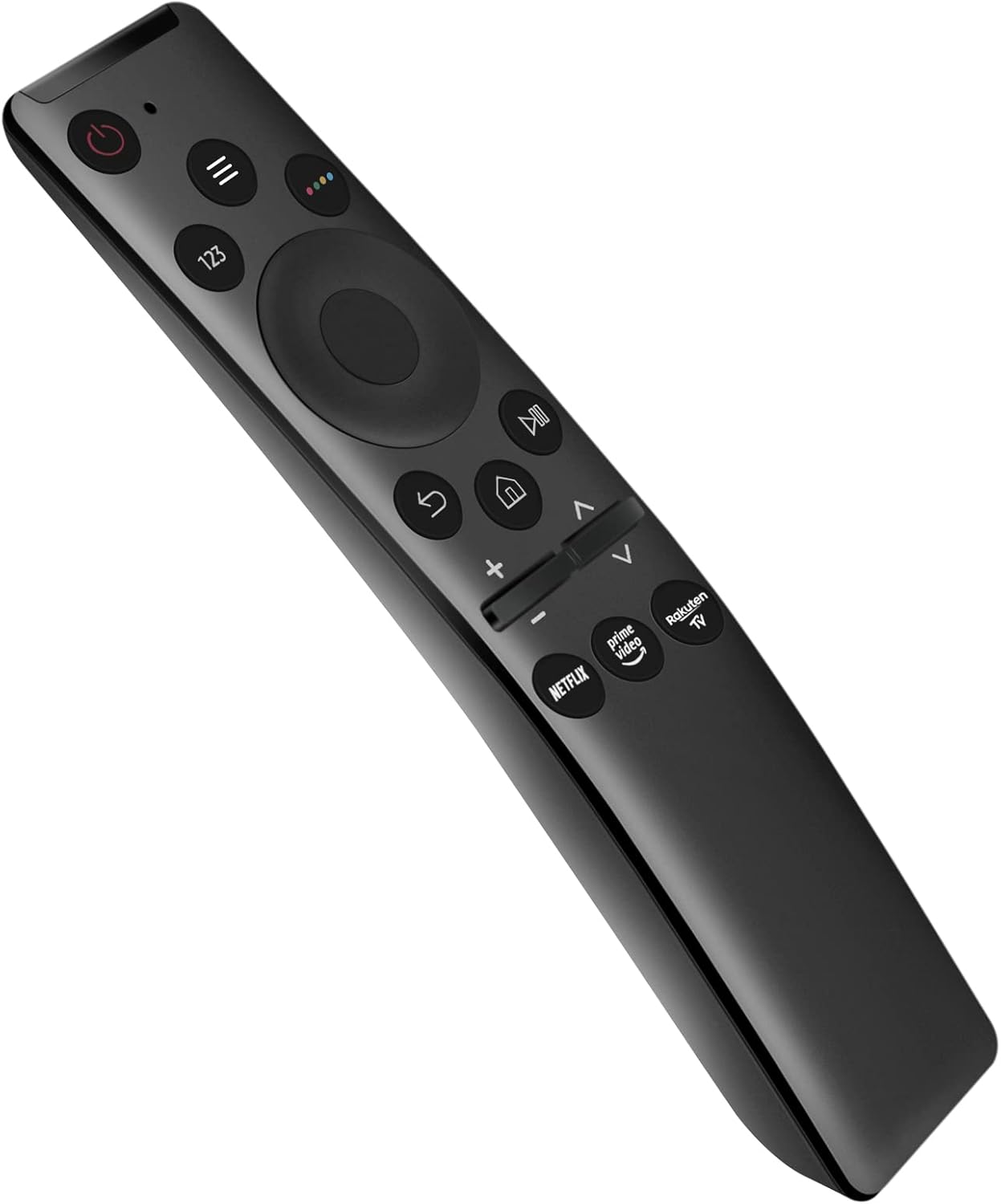
Image: Angled view of the Beyution BN59-01358C replacement remote control, showcasing its buttons and ergonomic design.
Setup
The Beyution BN59-01358C replacement remote control is designed for immediate use without the need for programming or complex setup procedures. Simply install the batteries, and the remote will be ready to operate your compatible Samsung TV.
Battery Installation
- Locate the battery compartment on the back of the remote control.
- Slide the battery compartment cover downwards or in the direction indicated by an arrow to open it.
- Insert two (2) AAA batteries, ensuring the positive (+) and negative (-) terminals align correctly with the markings inside the compartment.
- Close the battery compartment cover by sliding it back into place until it clicks securely.

Image: Rear view of the remote control with the battery compartment open, showing the slots for two AAA batteries.
Note: Batteries are not included with the remote control and must be purchased separately.
Operating Instructions
This remote control functions identically to the original Samsung remote for compatible models, providing intuitive control over your television's features.
Basic Functions
- Power Button: Turns the TV on or off.
- Directional Pad (D-Pad) and Select Button: Navigate menus and confirm selections.
- Volume Up/Down: Adjusts the television's volume.
- Channel Up/Down: Changes television channels.
- Home Button: Accesses the Smart Hub or main menu.
- Back Button: Returns to the previous screen or menu.
- Play/Pause, Fast Forward, Rewind: Controls media playback.
- Netflix, Prime Video, Rakuten TV Buttons: Direct access to these streaming services.

Image: Front view of the Beyution BN59-01358C remote control, clearly showing the layout of all buttons for power, navigation, volume, channel, and dedicated streaming service access.
The remote operates using infrared (IR) technology. Ensure there is a clear line of sight between the remote control and the TV's IR receiver for optimal performance. The maximum effective distance for operation is approximately 10 meters (33 feet).
Maintenance
To ensure the longevity and proper functioning of your remote control, follow these simple maintenance guidelines:
- Cleaning: Wipe the remote control regularly with a soft, dry cloth. For stubborn dirt, slightly dampen the cloth with water or a mild, non-abrasive cleaner. Avoid using harsh chemicals or abrasive materials.
- Battery Replacement: Replace batteries when the remote's response becomes sluggish or it stops functioning. Always replace both batteries at the same time with new ones of the same type (AAA).
- Storage: Store the remote control in a cool, dry place away from direct sunlight, extreme temperatures, and high humidity.
- Avoid Drops: Protect the remote from physical impact, as drops can damage internal components.
Troubleshooting
If you experience issues with your Beyution BN59-01358C remote control, refer to the following common problems and solutions:
| Problem | Possible Cause | Solution |
|---|---|---|
| Remote not responding | Dead or incorrectly inserted batteries. | Replace batteries with new AAA batteries, ensuring correct polarity. |
| Remote works intermittently | Weak batteries; Obstruction between remote and TV; Remote sensor on TV is blocked. | Replace batteries. Ensure clear line of sight. Remove any objects blocking the TV's IR sensor. |
| Specific buttons not working | Button stuck or damaged; Remote malfunction. | Gently press the button multiple times. If issue persists, contact customer support. |
| Remote does not control TV | Incompatible TV model; Remote malfunction. | Verify your TV model is listed as compatible. If it is, and the remote still doesn't work, contact customer support. |
If the problem persists after attempting these solutions, please refer to the "Support and Warranty" section for further assistance.
Specifications
| Model Number | WY-MBE365-US (BN59-01358C Replacement) |
| Connectivity Technology | Infrared (IR) |
| Maximum Operating Distance | Approximately 10 meters (33 feet) |
| Power Source | 2 x AAA Batteries (not included) |
| Material | ABS Plastic |
| Dimensions (L x W x H) | 6.3 x 1.57 x 0.39 inches (16.0 x 4.0 x 1.0 cm) |
| Item Weight | 2.12 ounces (60 grams) |
| Compatible Devices | Samsung 4K OLED Smart TVs (Specific models listed below) |
Compatible TV Models (Partial List):
- UE43AU7172
- UE50AU7172
- UE55AU7172
- UE55TU7172UXXH
- UE65AU7172
- UE75AU7172
- UE75RU7172U
- UE85AU7102
- And other compatible Samsung 4K OLED Smart TV models.
Support and Warranty
Your Beyution BN59-01358C replacement remote control comes with a 6-month warranty period from the date of purchase.
If you encounter any issues with your remote control, or if it arrives damaged or non-functional, please contact our customer service team immediately. We are committed to providing a satisfactory solution within 24 hours.
Contact Information:
For support inquiries, please refer to the contact method provided by your retailer or the Beyution official support channels.
Note: If your device model is not explicitly listed in the compatibility section, please contact us before purchasing to verify compatibility.
Ask a question about this manual
Ask about setup, troubleshooting, compatibility, parts, safety, or missing instructions. Manuals+ will review the question and use this page’s manual context to help answer it.