
1. Introduction
Thank you for choosing the Lefant M210P Robot Vacuum Cleaner. This manual provides essential information for the safe operation, maintenance, and troubleshooting of your device. Please read it thoroughly before use and retain it for future reference.
The Lefant M210P is designed to provide efficient and convenient cleaning for various floor types, including hard floors and low-pile carpets. It features powerful suction, intelligent navigation, and smart control options.
2. Safety Information
To reduce the risk of injury or damage, read these safety instructions carefully and keep them handy when setting up, using, and maintaining your robot.
- This appliance can be used by children aged 8 years and above and persons with reduced physical, sensory or mental capabilities or lack of experience and knowledge if they have been given supervision or instruction concerning use of the appliance in a safe way and understand the hazards involved.
- Children should be supervised to ensure they do not play with the appliance.
- Cleaning and user maintenance shall not be made by children without supervision.
- Only use the original power adapter provided by the manufacturer.
- Do not operate the robot in environments with open flames or fragile objects.
- Ensure all cables, curtains, and other loose items are cleared from the cleaning path to prevent entanglement.
- The robot is equipped with anti-drop sensors. However, always exercise caution when operating near stairs or elevated surfaces.
- Do not immerse the robot or its charging base in water.

Image: Illustration of the robot vacuum's anti-drop sensor detecting a ledge. This sensor helps prevent the robot from falling down stairs or off elevated surfaces.

Image: Illustration of the robot vacuum's anti-collision sensor detecting an obstacle. These sensors allow the robot to navigate around furniture and other objects, preventing bumps and scratches.
3. Package Contents
Please check the package contents upon unboxing to ensure all items are present and in good condition:
- Lefant M210P Robot Vacuum Cleaner
- Charging Base
- Power Adapter
- Side Brushes (2 pairs)
- HEPA Filter (pre-installed)
- Dustbin
- Cleaning Tool
- User Manual (this document)
4. Product Overview
Familiarize yourself with the components of your Lefant M210P robot vacuum cleaner.

Image: Top view of the Lefant M210P Robot Vacuum Cleaner in Champagne color, alongside a smartphone displaying the Lefant app interface with a cleaning map. This image highlights the robot's compact design and its smart control capabilities.
Key Features:
- Compact Design: With a diameter of 28 cm and a height of 7.85 cm, the M210P can easily clean under furniture.
- Powerful Suction: Up to 2200Pa suction power for effective cleaning on various surfaces.
- Brushless Suction Port: Designed to prevent hair entanglement, making it ideal for pet owners.
- Smart Navigation: Utilizes sensors for anti-collision and anti-drop, ensuring safe and efficient movement.
- App & Voice Control: Connects via Wi-Fi (2.4GHz) to the Lefant App, and compatible with Alexa and Google Home for convenient control.
- Automatic Recharging: Returns to the charging base automatically when cleaning is complete or battery is low.

Image: The Lefant M210P robot vacuum cleaning under a bedside table, illustrating its compact dimensions of 28 cm diameter and 7.9 cm height. This design allows it to access hard-to-reach areas.

Image: A visual comparison demonstrating the Lefant M210P's tangle-free suction port (left) effectively cleaning debris without entanglement, versus a traditional roller brush (right) that often gets tangled with hair and requires secondary cleaning.
5. Setup
5.1 Initial Charging
- Place the charging base against a wall in an open, uncluttered area. Ensure there are no obstacles within 1 meter to the front and 0.5 meters to the sides of the charging base.
- Connect the power adapter to the charging base and plug it into a wall outlet.
- Place the robot vacuum onto the charging base. Ensure the charging contacts on the robot align with those on the base. The indicator light on the robot will show charging status.
- Allow the robot to fully charge before its first use (approximately 4-5 hours).

Image: The Lefant M210P robot vacuum navigating back to its charging station. The image illustrates the robot's ability to automatically return to its base for recharging, guided by signals from the station.

Image: An illustration showing the robot vacuum's path as it automatically returns to its charging base. The red and blue lines indicate the signal detection and navigation process for efficient docking.
5.2 Connecting to the Lefant App
The Lefant App allows for advanced control, scheduling, and monitoring of your robot vacuum.
- Download the "Lefant" app from your mobile device's app store (Google Play Store or Apple App Store).
- Register or log in to your Lefant account.
- Ensure your phone's Bluetooth is enabled and connected to a 2.4GHz Wi-Fi network. (Note: 5GHz Wi-Fi is not supported).
- Turn on the robot by flipping the blue power button to "I".
- Press and hold the start button on the robot for 6 seconds until it enters pairing mode.
- In the Lefant App, tap "Add Device" and follow the on-screen instructions to connect your M210P robot.
- Wait for the robot to successfully pair with the app.

Image: A step-by-step guide on connecting the Lefant M210P to the Lefant App. It shows the process from downloading the app, adding the device, turning on the robot, and pairing via Wi-Fi.
5.3 Voice Control Setup (Alexa/Google Home)
Integrate your Lefant M210P with smart home assistants for hands-free control.
- Ensure your Lefant M210P is successfully connected to the Lefant App.
- Open the Alexa or Google Home app on your mobile device.
- Navigate to the "Skills & Games" (Alexa) or "Works with Google" (Google Home) section.
- Search for the "Smart Life" skill/service.
- Enable the skill/service and link your Smart Life account (which is connected to your Lefant App account).
- Once linked, you can use voice commands such as:
- "Alexa, ask M210P to clean."
- "Alexa, stop Lefant Robot."
- "Hey Google, start cleaning."

Image: A user interacting with the Lefant M210P robot vacuum using voice commands via Amazon Alexa and Google Assistant. This demonstrates the convenience of controlling the robot hands-free.

Image: A visual guide detailing the steps to connect the Lefant robot vacuum with Amazon Alexa for voice control. It shows the process within the Alexa app, including enabling the Smart Life skill.
6. Operating the Robot Vacuum
6.1 Cleaning Modes
The Lefant M210P offers multiple cleaning modes to suit different needs, accessible via the Lefant App:
- Auto Cleaning: The robot intelligently navigates and cleans the entire floor area.
- Edge Cleaning: The robot cleans along walls and furniture edges.
- Spot Cleaning: The robot focuses on a specific dirty area, cleaning in a spiral pattern.
- Zigzag Cleaning: The robot cleans in a systematic zigzag pattern, covering a larger area efficiently.
- Scheduled Cleaning: Set specific times for the robot to automatically start cleaning.
- Manual Control: Use the app to manually direct the robot's movement.

Image: An illustration showing the robot vacuum cleaning a room in a systematic zigzag pattern, which is effective for covering large open areas and minimizing missed spots.

Image: The robot vacuum performing spot cleaning, moving in a spiral motion to thoroughly clean a concentrated dirty area on the floor.

Image: The robot vacuum cleaning along the edges of a room, demonstrating its ability to reach and clean dust and debris accumulated near walls and furniture.
6.2 Carpet Detection and Boost-Intellect Technology
The M210P intelligently detects carpets and automatically increases its suction power to 2200Pa, ensuring deep cleaning of embedded pet hair and dust particles.

Image: The Lefant M210P robot vacuum cleaning a carpet, illustrating its Boost-Intellect Technology which automatically increases suction power when transitioning from hard floors to carpets for more effective cleaning.
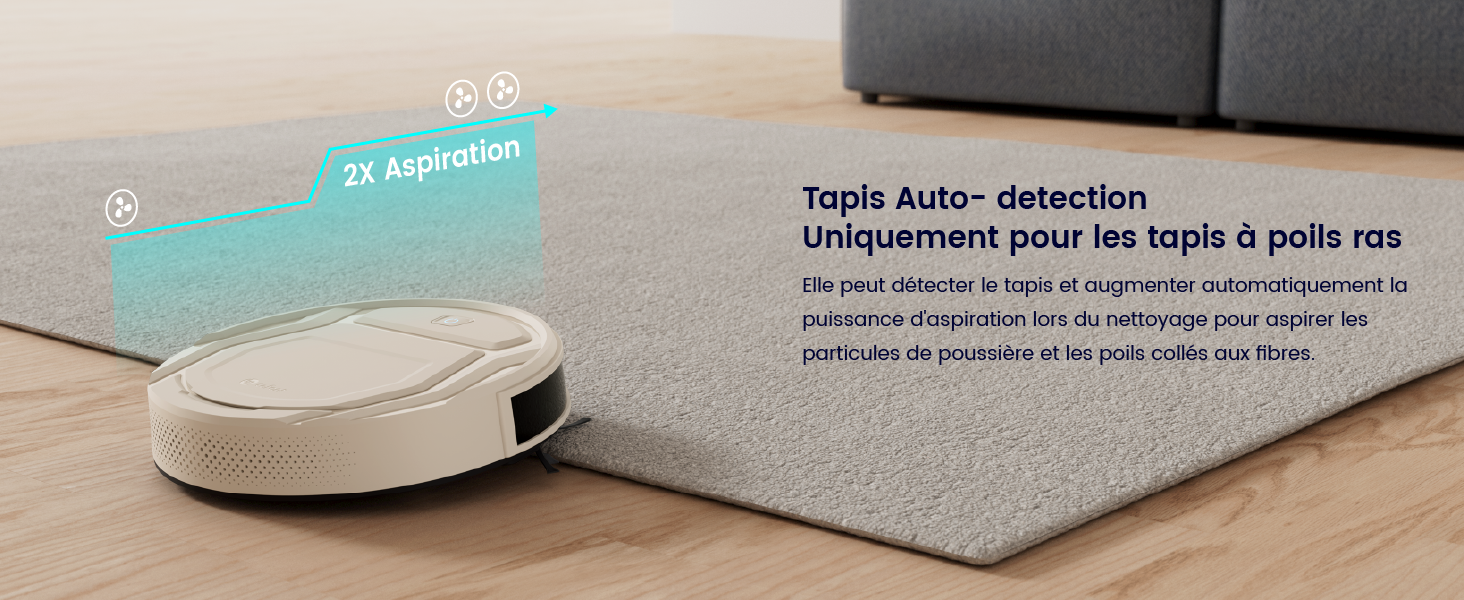
Image: A diagram illustrating the robot vacuum's automatic carpet detection feature. When the robot moves onto a low-pile carpet, its suction power is automatically boosted (2X Aspiration) to effectively remove embedded dirt and pet hair.
6.3 Obstacle Clearance
The M210P is designed to overcome obstacles up to 12mm in height, allowing it to transition smoothly between different floor types and over small thresholds.

Image: The robot vacuum demonstrating its ability to climb over a 12mm threshold, indicating its capacity to navigate between rooms with slight height differences.
7. Maintenance
Regular maintenance ensures your Lefant M210P operates at peak performance and extends its lifespan.
7.1 Emptying the Dustbin
It is recommended to empty the dustbin after each cleaning cycle, especially if you have pets.
- Press the dustbin release button to remove the dustbin from the robot.
- Open the dustbin cover and empty its contents into a trash bin.

Image: A two-part image showing the internal components of the Lefant M210P's dustbin and filter system (top), and a hand removing the dustbin filled with collected debris (bottom). This illustrates the ease of emptying and maintaining the dustbin.

Image: An illustration highlighting the 500ml capacity of the robot vacuum's dustbin, indicating its ability to hold a significant amount of debris before needing to be emptied.
7.2 Cleaning the Filter
The HEPA filter should be cleaned regularly (weekly) and replaced every 1-3 months depending on usage.
- Remove the dustbin.
- Take out the HEPA filter and foam filter from the dustbin.
- Tap the filter gently to remove dust. Do not wash the HEPA filter with water.
- Rinse the foam filter and dustbin with water. Ensure they are completely dry before reassembling.
7.3 Cleaning Side Brushes
Check the side brushes regularly for tangled hair or debris. Use the cleaning tool to cut and remove any tangled hair.
- Gently pull the side brushes to remove them.
- Remove any hair or debris wrapped around the brushes or the brush posts.
- Reattach the side brushes, ensuring they click into place.
8. Troubleshooting
If you encounter issues with your Lefant M210P, refer to the following common problems and solutions:
| Problem | Possible Cause | Solution |
|---|---|---|
| Robot does not turn on. | Low battery; Power switch off. | Charge the robot; Ensure the power switch is in the "ON" position. |
| Robot cannot connect to Wi-Fi/App. | Incorrect Wi-Fi band (5GHz); Incorrect password; Robot not in pairing mode. | Ensure you are on a 2.4GHz Wi-Fi network; Re-enter password carefully; Press and hold the start button for 6 seconds to enter pairing mode. |
| Robot gets stuck frequently. | Too many obstacles; Loose cables/rugs. | Clear the cleaning area of excessive clutter; Secure loose cables and fringes of rugs. |
| Poor cleaning performance. | Full dustbin; Clogged filter; Worn side brushes. | Empty the dustbin; Clean or replace the filter; Clean or replace side brushes. |
| Robot does not return to charging base. | Charging base obstructed; Robot too far from base. | Ensure the charging base area is clear; Manually place the robot on the base if it's too far. |
If the problem persists, please contact Lefant customer support for further assistance.
9. Specifications
| Feature | Detail |
|---|---|
| Brand | LEFANT |
| Model Number | M210P |
| Color | Champagne |
| Dimensions (L x W x H) | 27.94 x 27.94 x 7.59 cm (11 x 11 x 2.99 inches) |
| Weight | 3 Kilograms (6.61 lbs) |
| Suction Power | Up to 2200Pa |
| Dustbin Capacity | 500 Milliliters |
| Battery Life | Up to 120 minutes |
| Noise Level | 55 dB |
| Filter Type | HEPA Filter |
| Connectivity | Wi-Fi (2.4GHz), Bluetooth |
| Compatibility | Lefant App, Amazon Alexa, Google Home |
| Special Features | Anti-drop, Anti-collision, Variable suction control, Auto-empty dustbin (easy to empty), Pet hair pickup, Automatic return to dock, Boot-Intellect Technology (carpet boost) |

Image: A graphic illustrating the different suction power levels (1000Pa, 1800Pa, 2200Pa) and their corresponding noise levels (56dB, 58dB, 60dB) for the Lefant M210P robot vacuum.
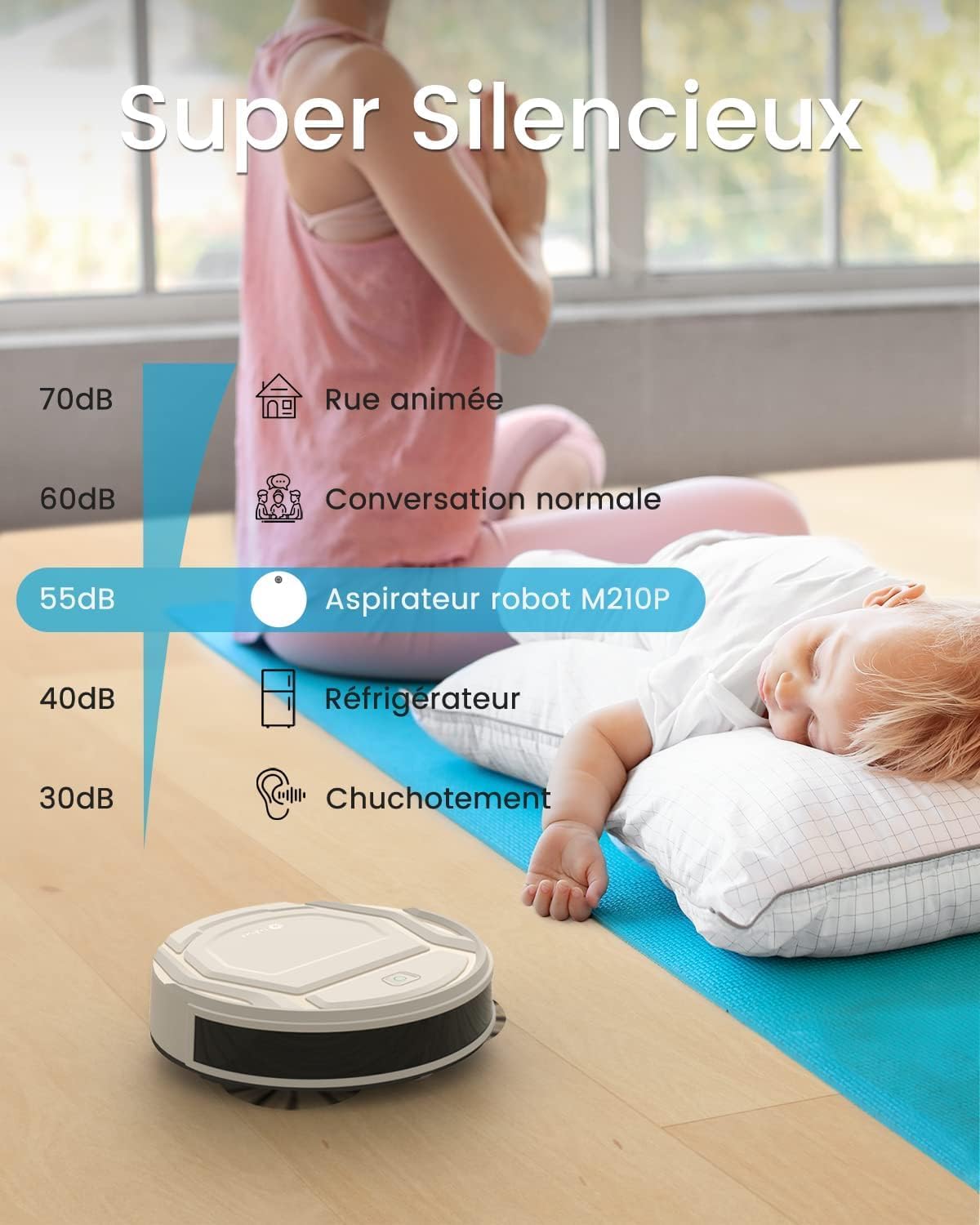
Image: A comparison chart showing the noise level of the Lefant M210P robot vacuum (55dB) relative to other common sounds like a busy street (70dB), normal conversation (60dB), a refrigerator (40dB), and whispering (30dB), highlighting its quiet operation.

Image: A graphic indicating the Lefant M210P's battery life of 120 minutes, capable of covering an area of up to 120 square meters on a single charge.
10. Warranty and Support
Lefant provides a standard warranty for the M210P robot vacuum cleaner. Please refer to the warranty card included in your package for specific terms and conditions, including warranty period and coverage details.
For technical support, troubleshooting assistance, or warranty claims, please contact Lefant customer service through the contact information provided on the official Lefant website or within the Lefant App.
Online Resources:
- Official Lefant Website: www.lefant.com (Please check for the most up-to-date contact information and FAQs)
- Lefant App: Available on Google Play Store and Apple App Store.


