
1. Introduction
This manual provides essential information for the installation and proper handling of the VANJUNN KES-495A KEM-495A Laser Lens Optical Head. This component is designed as a replacement part for specific PlayStation 3 Super Slim console models (4300 and 4301A) to restore disc reading functionality. Please read all instructions carefully before proceeding with installation.
2. Important Safety Information
- Professional Installation Required: The replacement of console internal components, including the laser lens, requires advanced technical skills and specialized tools. Attempting installation without proper expertise may result in damage to the component, the console, or personal injury. It is strongly recommended that installation be performed by a qualified professional.
- Protective Welded Joint: Most new laser lenses are shipped with a protective welded joint (solder point) on the ribbon cable or circuit board. This joint must be carefully desoldered (welded off) before the lens can function. Failure to remove this protective weld will prevent the laser lens from operating and may cause damage.
- Static Electricity: Electronic components are sensitive to static electricity. Take appropriate precautions, such as using an anti-static wrist strap, to prevent electrostatic discharge (ESD) damage during handling and installation.
- Handle with Care: The laser lens is a delicate optical component. Avoid touching the lens surface directly. Handle the unit by its edges or frame.
3. Product Overview
The VANJUNN KES-495A KEM-495A Laser Lens Optical Head is a replacement part for the PlayStation 3 Super Slim console. It is designed to replace a broken, damaged, or defective laser lens, restoring the console's ability to read game discs and Blu-ray movies.
Key Features:
- Replacement KES-495A KEM-495A Laser Lens.
- Compatible with PS3 Super Slim console models 4300 and 4301A only.
- Includes the laser lens with bracket motor set.

Image 3.1: Top view of the KES-495A KEM-495A laser lens, showing the optical component.
4. Installation Guide (Setup)
This section outlines the general steps for replacing the laser lens. Due to the complexity and delicate nature of this repair, professional installation is highly recommended.
- Preparation:
- Ensure the PlayStation 3 console is completely powered off and disconnected from all power sources and peripherals.
- Work in a clean, well-lit, and static-free environment. Use an anti-static mat and wrist strap.
- Gather necessary tools, which typically include small Phillips head screwdrivers, a spudger, tweezers, and a soldering iron for the protective weld.
- Disassembly of Console:
- Carefully disassemble the PS3 Super Slim console to access the Blu-ray drive. Refer to a specific service manual or reputable repair guide for your exact console model (4300/4301A) for detailed disassembly steps.
- Disconnect the ribbon cables and power cables from the Blu-ray drive.
- Remove the Blu-ray drive assembly from the console.
- Laser Lens Replacement:
- Within the Blu-ray drive, carefully remove the old, defective laser lens assembly. Note the orientation and connections of all components.
- Crucial Step - Remove Protective Weld: Before installing the new KES-495A KEM-495A laser lens, locate the protective welded joint (solder point) on its circuit board or ribbon cable. Using a fine-tip soldering iron, carefully desolder and remove this protective weld. Failure to do so will prevent the laser from functioning.
- Install the new VANJUNN KES-495A KEM-495A laser lens assembly into the Blu-ray drive, ensuring all connections are secure and correctly oriented.
- Reassembly and Testing:
- Reassemble the Blu-ray drive and then the console by reversing the disassembly steps.
- Reconnect all cables and peripherals.
- Power on the console and test the disc reading functionality with a known good game disc or Blu-ray movie.
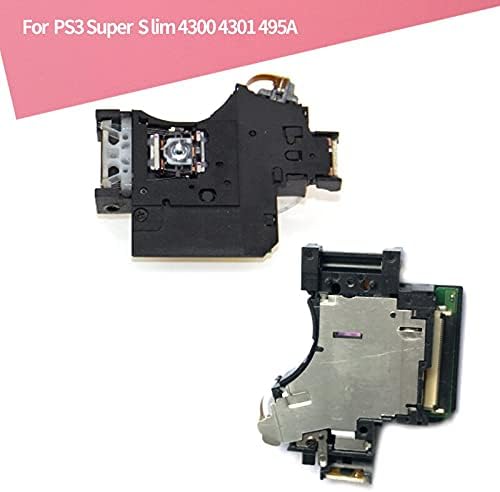
Image 4.1: The KES-495A KEM-495A laser lens and its associated deck kit, as supplied for replacement.
5. Operating Instructions
Once the VANJUNN KES-495A KEM-495A Laser Lens Optical Head has been correctly installed and the console reassembled, the PlayStation 3 Super Slim console should function as intended, reading game discs and Blu-ray movies. There are no specific operating instructions for the laser lens itself, as its function is integrated into the console's disc drive system.
To operate your console:
- Insert a compatible game disc or Blu-ray movie into the console's disc slot.
- The console should automatically detect the disc and display its content on the XMB (XrossMediaBar) menu.
- Select the disc icon to launch the game or movie.
6. Maintenance
The KES-495A KEM-495A Laser Lens Optical Head is a sealed component and does not require routine user maintenance. To ensure its longevity and optimal performance:
- Keep Console Clean: Ensure the console's environment is free from excessive dust, smoke, and pet hair, which can accumulate inside the console and on the disc drive components.
- Handle Discs Carefully: Always handle game discs and Blu-ray movies by their edges. Avoid touching the data side and keep them free from scratches, smudges, and dirt.
- Avoid Physical Shocks: Do not move or bump the console while a disc is spinning, as this can damage the disc or the laser mechanism.
7. Troubleshooting
If you encounter issues after installing the VANJUNN KES-495A KEM-495A Laser Lens, consider the following:
- Disc Not Reading / "Unrecognized Disc" Error:
- Check Protective Weld: The most common issue is forgetting to remove the protective welded joint. If you performed the installation yourself, double-check that this solder point has been completely desoldered.
- Recheck Connections: Ensure all ribbon cables and power connectors within the Blu-ray drive and to the console motherboard are securely seated and correctly oriented.
- Test with Multiple Discs: Try several different, known-good game discs or Blu-ray movies to rule out a faulty disc.
- Professional Assistance: If the issue persists, it is highly recommended to seek assistance from a professional console repair technician. Incorrect installation or component damage during installation can lead to these symptoms.
- Disc Drive Making Unusual Noises:
- This could indicate a mechanical issue within the disc drive assembly. Re-open the console and carefully inspect for any misaligned parts or obstructions.
- Ensure the laser lens assembly is properly seated and secured.
8. Specifications
| Model Number | KES-495A / KEM-495A |
| Compatibility | PlayStation 3 Super Slim (PS3 Super Slim) Console Models 4300, 4301A |
| Component Type | Laser Lens Optical Head with Deck Kit |
| Manufacturer | WIDTECH (as per product listing) |
| Brand | VANJUNN |
9. Warranty and Support
For warranty information or technical support regarding your VANJUNN KES-495A KEM-495A Laser Lens Optical Head, please contact the retailer or the VANJUNN brand directly. It is important to note that improper installation or removal of the protective weld may void any applicable warranty.
You can visit the official VANJUNN store for more information: VANJUNN Store on Amazon