
1. Safety Instructions
Always read and understand all safety warnings, instructions, illustrations, and specifications provided with this power tool. Failure to follow all instructions listed below may result in electric shock, fire, and/or serious injury.
General Power Tool Safety Warnings:
- Work Area Safety: Keep work area clean and well-lit. Cluttered or dark areas invite accidents. Do not operate power tools in explosive atmospheres, such as in the presence of flammable liquids, gases, or dust.
- Electrical Safety: Power tool plugs must match the outlet. Never modify the plug in any way. Do not use any adapter plugs with earthed (grounded) power tools.
- Personal Safety: Stay alert, watch what you are doing, and use common sense when operating a power tool. Do not use a power tool while you are tired or under the influence of drugs, alcohol, or medication.
- Tool Use and Care: Do not force the power tool. Use the correct power tool for your application. Do not use the power tool if the switch does not turn it on and off. Disconnect the plug from the power source and/or remove the battery pack, if detachable, from the power tool before making any adjustments, changing accessories, or storing power tools.
- Battery Tool Use and Care: Recharge only with the charger specified by the manufacturer. Use power tools only with specifically designated battery packs.
2. Product Overview
The Steiner 58V 5Ah Cordless Impact Drill Driver is designed for drilling into wood, metal, and masonry, as well as for screwdriving applications. It features a robust metal gearbox and a 24-piece accessory set.
Key Components:
- Chuck: Keyless chuck for quick bit changes.
- Torque Adjustment Ring: For selecting the desired torque setting.
- Mode Selector: Switch between drilling, screwdriving, and impact drilling modes.
- Speed Selector: For high or low-speed operation.
- Trigger Switch: Variable speed control.
- Forward/Reverse Switch: For changing rotation direction.
- LED Work Light: Illuminates the work area.
- Battery Pack: 58V 5Ah Lithium-Ion.
- Belt Clip: For convenient carrying.
Product Features:
- Electronic Cell Protection (ECP): Protects the battery against overload, overheating, and deep discharge.
- Electronic Motor Protection (EMP): Protects the motor against overload and extends its lifespan.
- Integrated LED Light: Illuminates dark work areas.
- Motor Brake: Ensures precise work during serial screwdriving.
- 10mm Keyless Chuck: Compatible with common accessories.
- Ergonomic Design: Compact structure for improved grip and handling.
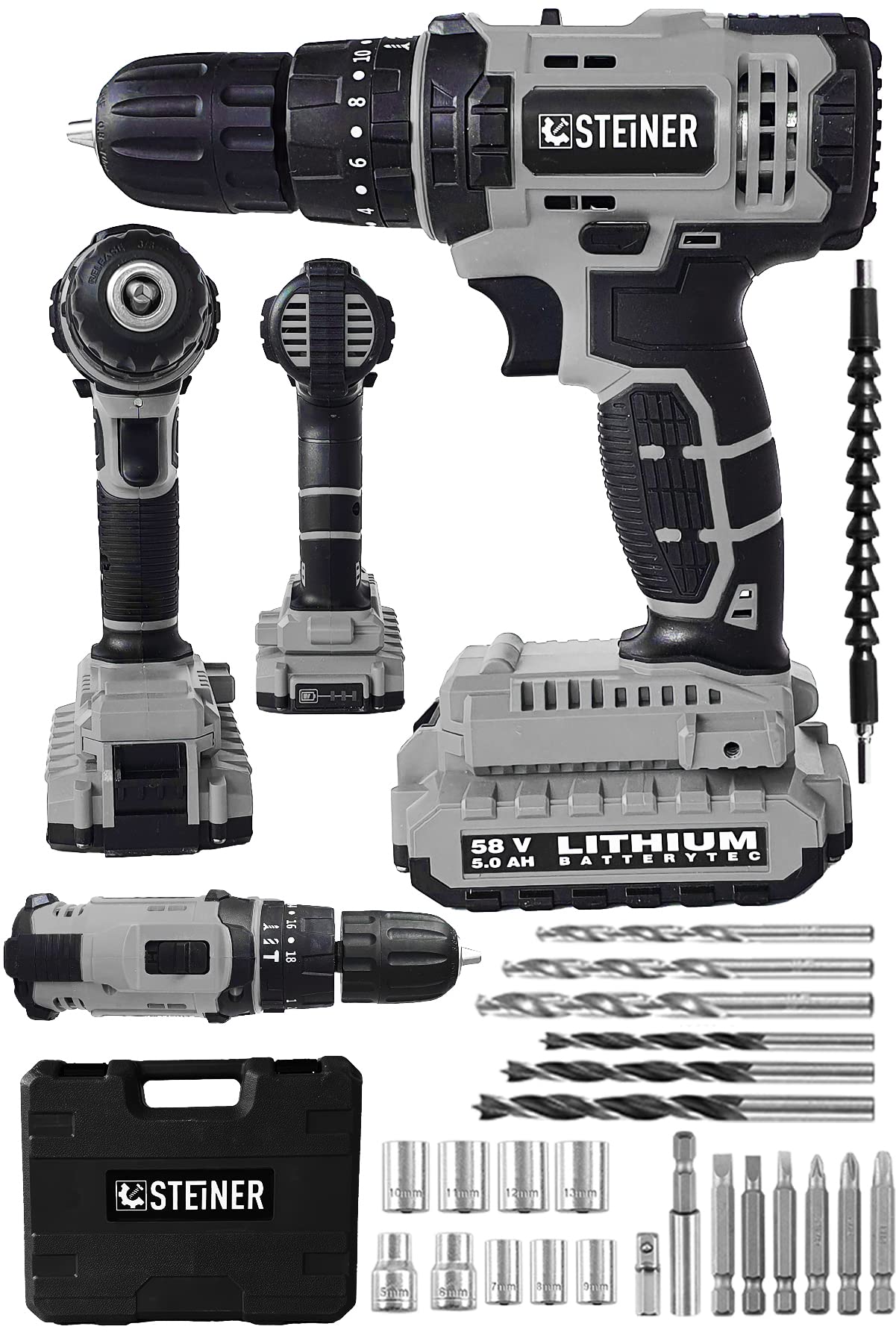
Figure 1: Steiner 58V Cordless Impact Drill Driver and included 24-piece accessory set.
3. Setup
3.1 Battery Installation and Charging
- Ensure the battery is fully charged before first use. Connect the charger to a power outlet and insert the battery pack. The charging indicator will show the charging status.
- To install the battery, slide the charged battery pack into the base of the drill handle until it clicks into place.
- To remove the battery, press the battery release buttons on the sides of the battery pack and slide it out.
Note: The product comes with two Lithium-Ion batteries. Always use the charger provided by Steiner for optimal battery life and safety.
3.2 Attaching/Removing Drill Bits and Accessories
- To open the keyless chuck, rotate the front sleeve of the chuck counter-clockwise until the jaws are wide enough to insert the bit.
- Insert the desired drill bit or screwdriver bit into the chuck. Ensure the bit is centered and fully seated.
- To secure the bit, rotate the front sleeve of the chuck clockwise until the bit is firmly gripped. Do not overtighten.
- To remove the bit, reverse the process.

Figure 2: Various drill bits and screwdriver bits from the 24-piece accessory set.
4. Operating Instructions
4.1 Selecting Operating Mode
Rotate the mode selector ring to choose between:
- Screwdriving Mode (screw icon): For driving and removing screws. Adjust the torque setting using the torque adjustment ring.
- Drilling Mode (drill bit icon): For drilling into wood, metal, and plastic.
- Impact Drilling Mode (hammer icon): For drilling into masonry and concrete.
4.2 Setting Torque and Speed
- Torque Adjustment: In screwdriving mode, rotate the torque adjustment ring to select the desired torque level (1-18). Lower numbers are for smaller screws and softer materials, higher numbers for larger screws and harder materials. The drill icon bypasses the clutch for maximum torque.
- Speed Selection: Use the speed selector switch (usually on top of the drill) to choose between low speed (1) for high torque applications (e.g., large screws, mixing) and high speed (2) for faster drilling (e.g., small holes, light materials).
4.3 Starting and Stopping the Drill
- Ensure the forward/reverse switch is set to the desired direction (forward for drilling/driving, reverse for removing screws).
- To start the drill, press the trigger switch. The speed is variable depending on how far the trigger is pressed.
- To stop the drill, release the trigger switch. The motor brake will quickly stop the chuck rotation.
Always hold the tool firmly with both hands during operation, especially when drilling or using impact mode.
5. Maintenance
Regular maintenance ensures optimal performance and extends the lifespan of your Steiner drill driver.
5.1 Cleaning
- Always remove the battery pack before cleaning.
- Keep the ventilation openings clean and free from dust. Use a soft brush or compressed air to clear debris.
- Wipe the tool housing with a soft, damp cloth. Do not use harsh chemicals or abrasive cleaners.
- Clean the chuck jaws regularly to ensure proper grip on bits.
5.2 Battery Care
- Store batteries in a cool, dry place, away from direct sunlight and extreme temperatures.
- Do not store fully discharged batteries. Charge them periodically if not in use for extended periods.
- Do not expose batteries to water or moisture.
5.3 Storage
When not in use, store the drill driver and its accessories in the provided carrying case, in a dry, secure location out of reach of children.
6. Troubleshooting
| Problem | Possible Cause | Solution |
|---|---|---|
| Drill does not start. | Battery not charged or not properly inserted. | Charge battery. Ensure battery is fully inserted until it clicks. |
| Loss of power during operation. | Battery low or tool overloaded. | Recharge battery. Reduce pressure on the tool or use a larger drill bit/lower speed. |
| Bit slips in chuck. | Chuck not tightened sufficiently or jaws are dirty. | Retighten chuck firmly. Clean chuck jaws. |
| Excessive vibration. | Bent drill bit or improper bit installation. | Replace bent bit. Ensure bit is properly seated and tightened. |
7. Specifications
| Feature | Specification |
|---|---|
| Model Number | ST0518R215400344 |
| Brand | STEINER |
| Voltage | 58 V |
| Battery Type | Lithium-Ion |
| Battery Capacity | 5 Ah |
| Chuck Size | 10 mm Keyless |
| Gearbox | Metal |
| Included Accessories | 24-Piece Set |
| Power Source | Battery Powered |
8. Warranty and Support
For warranty information, technical support, or service inquiries, please refer to the warranty card included with your product or contact Steiner customer service directly.
Please retain your proof of purchase for any warranty claims.
Steiner Customer Service:
- Contact details typically found on the product packaging or official Steiner website.