
DD Audio DM2500A
DM2500A - DD Audio 2500 Watt RMS Monoblock Amplifier User Manual
Model: DM2500A | Brand: DD Audio
Introduction
This manual provides comprehensive instructions for the installation, operation, and maintenance of your DD Audio DM2500A Monoblock Amplifier. The DM2500A is a high-performance Class D amplifier designed to deliver powerful and clear audio output for your car audio system. Please read this manual thoroughly before attempting installation or operation to ensure proper use and to maximize the performance and longevity of your amplifier.

Figure 1: Front view of the DM2500A Monoblock Amplifier, showcasing its sleek black chassis and the DD Audio logo.
Safety Information
Always observe the following safety precautions to prevent injury or damage to the amplifier and other components:
- Disconnect the vehicle's battery negative terminal before beginning any installation.
- Ensure all wiring is properly routed and secured to prevent pinching or damage.
- Use appropriate gauge wiring for power, ground, and speaker connections as specified in this manual.
- Do not mount the amplifier in areas exposed to direct sunlight, excessive heat, moisture, or dust.
- Never operate the amplifier with damaged wiring or if it has been exposed to water.
- Seek professional assistance if you are unsure about any part of the installation process.
Setup and Installation
Proper installation is crucial for optimal performance and safety. Follow these steps carefully:
1. Mounting the Amplifier
Choose a mounting location that provides adequate ventilation and is protected from moisture. Secure the amplifier firmly using appropriate hardware.

Figure 2: Angled view of the DM2500A, showing its heat sink fins for efficient cooling.
2. Power and Ground Connections
Connect the power, ground, and remote turn-on wires to the amplifier's terminals. Ensure all connections are tight and secure.
- Power (+12V): Connect a heavy-gauge power cable (recommended 4 AWG or larger) directly from the positive terminal of the vehicle's battery to the +12V terminal on the amplifier. Install an in-line fuse holder within 18 inches of the battery.
- Ground (GND): Connect a heavy-gauge ground cable (same as power cable) from the GND terminal on the amplifier to a clean, unpainted metal surface on the vehicle's chassis. Ensure a good electrical connection.
- Remote (REM): Connect a remote turn-on wire from your head unit's remote output to the REM terminal on the amplifier. This wire signals the amplifier to turn on and off with your head unit.

Figure 3: Close-up of the power (GND, REM, +12V) and speaker output terminals on the DM2500A amplifier.
3. Audio Input Connections (RCA)
Connect your head unit's RCA pre-outs to the amplifier's RCA input terminals. The DM2500A is a monoblock amplifier, so it typically uses a single RCA input or sums stereo inputs.
- Connect RCA cables from your head unit's subwoofer or full-range pre-outs to the "INPUT" L and R RCA jacks on the amplifier.
- If using a single mono signal, connect to either L or R input. The amplifier will sum the input internally.
4. Speaker Output Connections
Connect your subwoofer(s) to the amplifier's speaker output terminals. Pay close attention to polarity and impedance.
- Connect the positive (+) terminal of your subwoofer(s) to the positive (+) speaker terminal on the amplifier.
- Connect the negative (-) terminal of your subwoofer(s) to the negative (-) speaker terminal on the amplifier.
- Ensure the total impedance of your connected speakers is within the amplifier's supported range (1 Ohm minimum for continuous wattage).

Figure 4: Close-up of the input and control panel on the DM2500A, showing RCA inputs, gain, subsonic, LPF, and remote port.
Operating the Amplifier
Once installed, you can configure the amplifier settings for optimal audio performance.
1. Gain Adjustment
The "GAIN" control matches the amplifier's input sensitivity to the output voltage of your head unit. Start with the gain at minimum and slowly increase it until you hear distortion, then back off slightly. This is not a volume control.
2. Subsonic Filter (SUBSONIC)
The subsonic filter removes extremely low frequencies that are inaudible but can waste amplifier power and damage subwoofers. Adjust this filter to protect your subwoofers, typically set just below the port tuning frequency of your enclosure (10Hz - 50Hz).
3. Low-Pass Filter (LPF)
The low-pass filter allows only frequencies below the set point to pass through to the subwoofer. Adjust this to blend the subwoofer's output seamlessly with your main speakers (20Hz - 200Hz).
4. Pass Thru Output
The "PASS THRU OUT" RCA jacks allow you to send the audio signal from the DM2500A's input to another amplifier, simplifying multi-amplifier installations.
5. Remote Level Control
The included remote level control allows you to adjust the subwoofer output level conveniently from the driver's seat. Connect it to the "REMOTE" port on the amplifier.
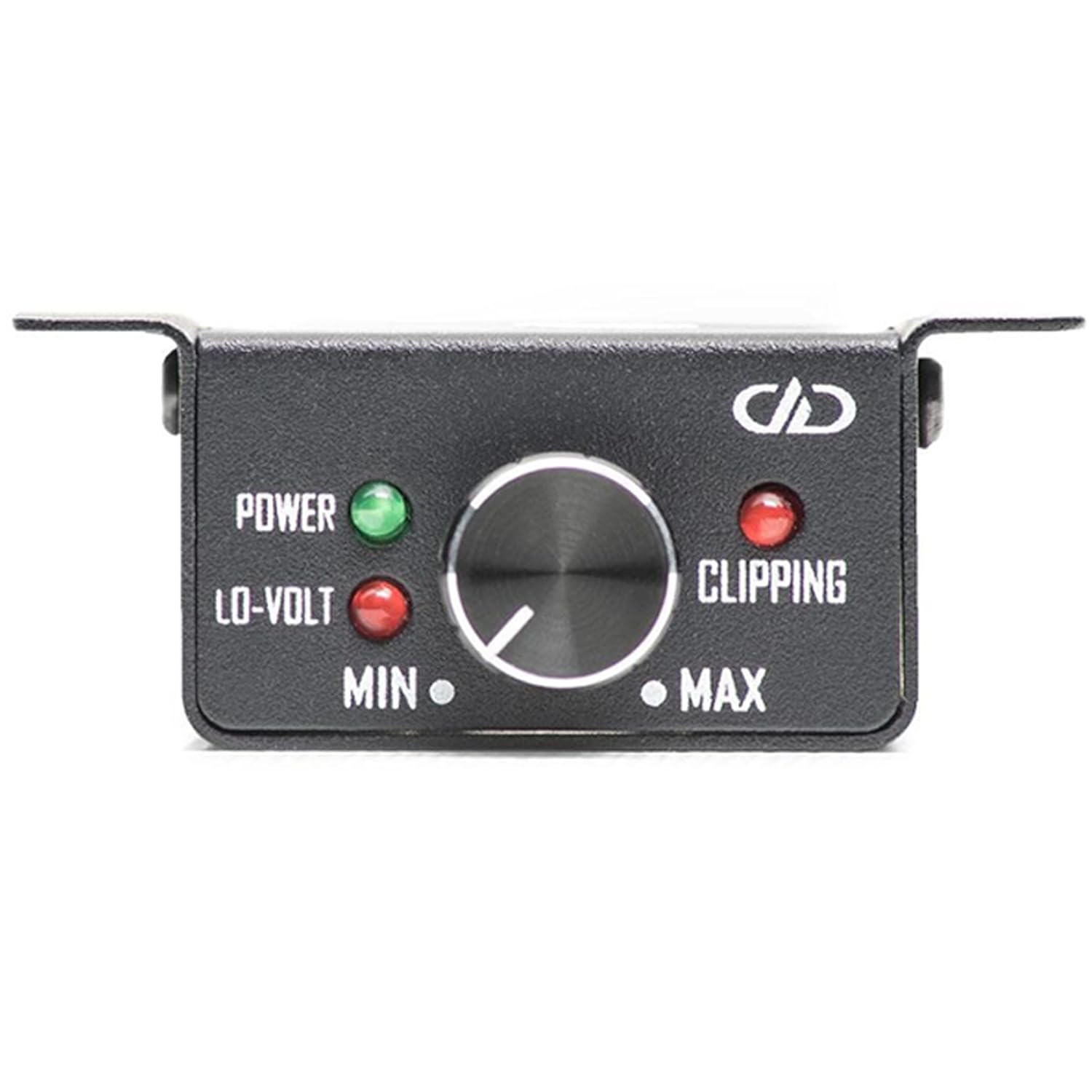
Figure 5: The wired remote level control unit, featuring power, lo-volt, and clipping indicators, along with a rotary knob for output adjustment.
Maintenance
To ensure the longevity and optimal performance of your DM2500A amplifier, follow these simple maintenance guidelines:
- Cleaning: Periodically wipe the amplifier's exterior with a soft, dry cloth. Do not use harsh chemicals or abrasive cleaners.
- Ventilation: Ensure that the amplifier's heat sinks are free from dust and debris. Good airflow is essential for cooling.
- Connections: Occasionally check all power, ground, remote, RCA, and speaker connections to ensure they remain tight and free from corrosion.
- Environment: Avoid exposing the amplifier to extreme temperatures, direct sunlight, or excessive moisture.
Troubleshooting
If you experience issues with your DM2500A amplifier, refer to the following common problems and solutions:
| Problem | Possible Cause | Solution |
|---|---|---|
| No Power / Amplifier Not Turning On | Blown fuse, loose power/ground/remote wire, faulty remote turn-on signal. | Check in-line fuse and amplifier fuses. Verify all power, ground, and remote connections are secure and receiving proper voltage. Test remote wire for +12V when head unit is on. |
| No Sound Output | Loose RCA cables, incorrect gain setting, speaker wires disconnected, amplifier in protect mode. | Ensure RCA cables are securely connected at both ends. Adjust gain. Check speaker wire connections and polarity. If protect light is on, check speaker impedance and for short circuits. |
| Distorted Sound | Gain set too high, incorrect filter settings, poor ground connection, damaged speakers. | Reduce gain setting. Adjust LPF and Subsonic filters. Verify ground connection is solid. Inspect speakers for damage. |
| Amplifier Overheating | Insufficient ventilation, impedance too low, prolonged high-volume operation. | Ensure adequate airflow around the amplifier. Check speaker impedance. Reduce volume or allow amplifier to cool down. |
Specifications
Detailed technical specifications for the DD Audio DM2500A Monoblock Amplifier:
| Feature | Specification |
|---|---|
| Model | DM2500A |
| Amplifier Type | Class D Monoblock |
| Continuous Wattage @ 4 Ohm | 810 Watts RMS |
| Continuous Wattage @ 2 Ohm | 1400 Watts RMS |
| Continuous Wattage @ 1 Ohm | 2500 Watts RMS |
| Dynamic Wattage | 3000 Watts |
| Operating Voltage | 9 - 16 Volts DC |
| Test Voltage | 14.4 Volts |
| Max Current Draw | 250 Amps |
| RCA Input Voltage Sensitivity | 0.1V - 4V |
| RCA Input S/N | > 85dB |
| Damping Factor | > 150 |
| Frequency Response | 15Hz - 200Hz |
| Subsonic Filter | 10Hz - 50Hz |
| Low-Pass Filter | 20Hz - 200Hz |
| Pass Thru Output | Yes |
| Remote Control | Included |
| Speaker Wire Gauge | 10 AWG (recommended) |
| Dimensions (L x W x H) | 19.68 x 7 x 2 inches |
| Weight | 16 Pounds |
Warranty and Support
DD Audio products are designed for reliability and performance. For specific warranty terms and conditions, please refer to the warranty card included with your product or visit the official DD Audio website. Keep your proof of purchase for warranty claims.
For technical support, troubleshooting assistance beyond this manual, or service inquiries, please contact DD Audio customer support or your authorized dealer. Contact information can typically be found on the manufacturer's website.
Manufacturer: DD Audio
First Available: November 22, 2022
Related documentsDM2500A


Ask a question about this manual
Ask about setup, troubleshooting, compatibility, parts, safety, or missing instructions. Manuals+ will review the question and use this page’s manual context to help answer it.