Introduction
The mophie powerstation Go is a versatile portable device designed to provide power in various emergency situations. It functions as a car jump starter, a portable power bank for mobile devices, and a bright LED work light. This manual provides essential instructions for safe and effective use, maintenance, and troubleshooting of your powerstation Go.
Safety Information
Read all safety warnings and instructions before using this product. Failure to follow these instructions may result in electric shock, fire, or serious injury.
- Do not expose the powerstation Go to moisture or extreme temperatures.
- Do not attempt to disassemble or modify the device.
- Keep out of reach of children.
- Ensure proper polarity when connecting jumper cables to a vehicle battery. Incorrect connection can cause damage or injury.
- Use only the provided jumper cables and charging accessories.
- Avoid prolonged exposure to direct sunlight.
- If the device becomes excessively hot, discontinue use immediately.
Package Contents
- mophie powerstation Go
- Mini Jumper Cables
- Charging Cable (USB-C to USB-A)
- User Manual
Product Overview
Familiarize yourself with the components of your mophie powerstation Go.


- LED Flashlight: Located at one end, provides bright illumination.
- Work Light: Integrated into the body, offers broad area lighting.
- Power Button: Activates the device and checks battery status.
- LED Battery Indicator: Displays the remaining charge level.
- USB-A Output Port: For charging mobile devices.
- Jumper Cable Port: Dedicated port for connecting the mini jumper cables.
- USB-C Input Port: For recharging the powerstation Go.
Setup: Initial Charging
Before first use, fully charge your mophie powerstation Go.
- Connect the provided USB-C charging cable to the USB-C input port on the powerstation Go.
- Connect the other end of the charging cable to a compatible USB wall adapter (not included) or a powered USB port.
- The LED battery indicator lights will illuminate and flash, indicating the charging status. All four lights will be solid when fully charged.
- Charging time may vary depending on the power source.
Operating Instructions
1. Jump Starting a Vehicle
Ensure the powerstation Go is at least 50% charged before attempting to jump start a vehicle.
- Connect the mini jumper cables to the jumper cable port on the powerstation Go. Ensure a secure connection.
- Connect the red clamp to the positive (+) terminal of the vehicle's dead battery.
- Connect the black clamp to a metal part of the vehicle's chassis (unpainted, non-moving part) or the negative (-) terminal of the battery, if accessible and safe.
- Once connected, the powerstation Go will automatically perform safety checks. Wait for the indicator light on the jumper cable connector to turn solid green.
- Start your vehicle. If it doesn't start immediately, wait 30 seconds and try again. Do not attempt more than three consecutive jump starts.
- Once the vehicle starts, immediately disconnect the black clamp, then the red clamp, and finally disconnect the jumper cables from the powerstation Go.
2. Charging Mobile Devices
Use the USB-A output port to charge your smartphone, tablet, or other USB-powered devices.

- Connect your device's USB charging cable to the USB-A output port on the powerstation Go.
- The powerstation Go will automatically begin charging your device. The LED battery indicator lights will show the remaining charge.
- Disconnect your device once charging is complete.
3. Using the LED Flashlight and Work Light
The powerstation Go features both a focused LED flashlight and a broad work light.
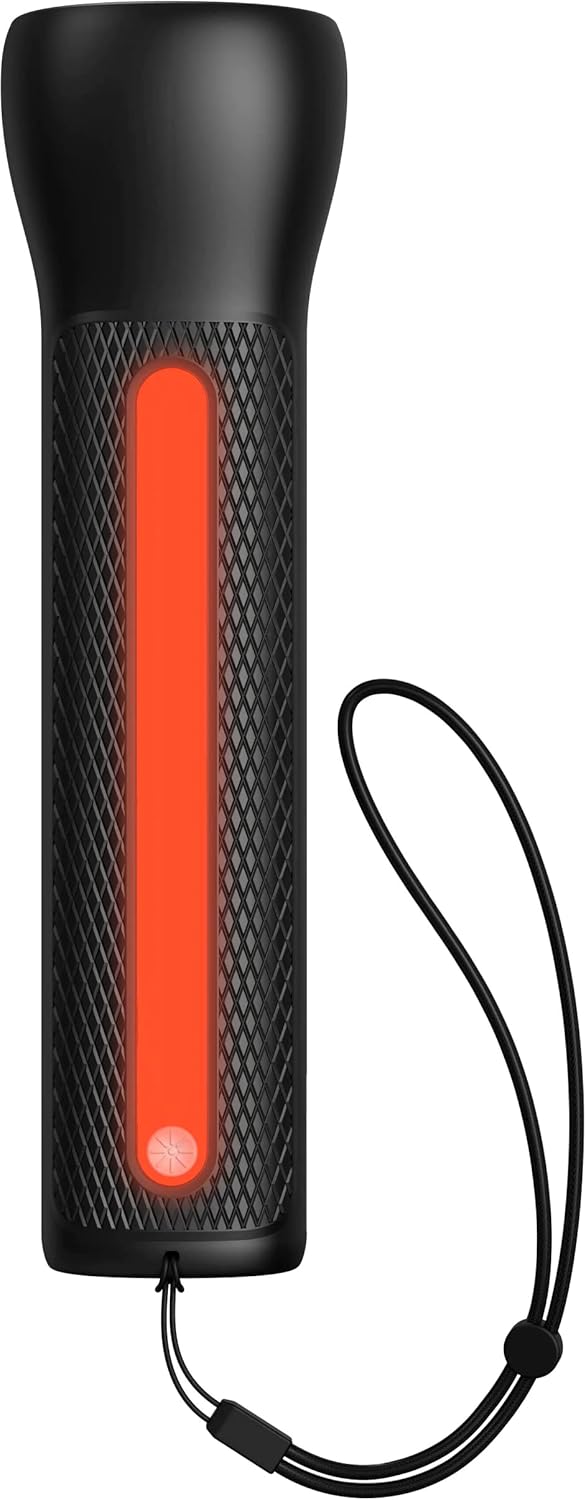

- To activate the LED Flashlight: Press and hold the power button for 2 seconds. Press again to cycle through modes (high, low, strobe, off).
- To activate the Work Light: Double-press the power button. Double-press again to cycle through modes (white, red, flashing red, off).
Maintenance
- Cleaning: Wipe the device with a soft, dry cloth. Do not use harsh chemicals or abrasive materials.
- Storage: Store the powerstation Go in a cool, dry place away from direct sunlight. For optimal battery life, recharge the device every 3 months if not in regular use.
- Battery Care: The internal battery is not user-replaceable. Do not attempt to open the device.
Troubleshooting
| Problem | Possible Cause | Solution |
|---|---|---|
| Device not charging | Charging cable or adapter faulty; port obstruction. | Try a different USB-C cable and wall adapter. Ensure ports are clean and free of debris. |
| Vehicle not jump starting | Low powerstation Go charge; incorrect cable connection; severely dead battery. | Ensure powerstation Go is fully charged. Verify correct clamp polarity. Check vehicle battery for severe damage. Consult vehicle manual. |
| Mobile device not charging | Powerstation Go battery low; faulty USB cable; device incompatibility. | Recharge powerstation Go. Try a different USB cable. Ensure your device is compatible with standard USB charging. |
| Lights not working | Powerstation Go battery low; incorrect button press. | Recharge powerstation Go. Refer to "Using the LED Flashlight and Work Light" section for correct operation. |
Specifications
- Brand: mophie
- Model Number: mpsgrgd-FL36630
- Manufacturer Part Number: 401107454
- Battery Capacity: 9900 mAh (36.6 Wh)
- Voltage: 12 Volts (for jump starting)
- Product Weight: 1.07 Kilograms
- Dimensions: 30.3 x 24.69 x 10.79 cm (Package)
- Special Features: LED Indicator Lights, 450-lumen LED Flashlight, Spark-proof Jumper Cables
- Automotive Service Type: Truck, Car
Warranty and Support
For warranty information and customer support, please visit the official mophie website or contact their customer service department. Keep your proof of purchase for warranty claims.
Online Support: www.mophie.com/support


