
1. Introduction
This manual provides detailed instructions for the safe and effective use of your PowerSmith PILC95500 Rechargeable LED Color Match Inspection Light. This device is designed to assist in tasks requiring accurate color assessment and defect detection, such as automotive paint inspection and interior paint evaluation. Please read this manual thoroughly before initial use and retain it for future reference.

Image: The PowerSmith PILC95500 inspection light, highlighting its 500 lumen output and CRI 95+ color matching capability.
2. Safety Information
Always observe basic safety precautions when using electrical appliances to reduce the risk of fire, electric shock, and personal injury.
- Do not look directly into the LED light source.
- Keep the device away from water or other liquids.
- Do not attempt to disassemble or modify the device.
- Use only the provided charging cable or a certified USB-C cable.
- Store the device in a dry, cool place when not in use.
- Keep out of reach of children.
- California Proposition 65 Warning: This product can expose you to chemicals including lead, which is known to the State of California to cause cancer and birth defects or other reproductive harm. For more information go to www.P65Warnings.ca.gov.
3. Package Contents
Verify that all items are present upon unpacking:
- PowerSmith PILC95500 Inspection Light
- USB-C Charging Cable
- Magnetic Base
- Owner's Manual
4. Product Features
The PowerSmith PILC95500 is equipped with several features designed for versatility and performance:
- High CRI (95+) LED: Provides accurate color rendering for precise color matching and defect detection.
- Dual Color Temperatures: Switch between 5000K (daylight) and 3500K (warm white) modes to suit different inspection needs.
- 500 Lumen Output: Bright illumination for clear visibility of surfaces.
- Rechargeable Lithium-Ion Battery: Built-in 3.7V, 2.6Ah battery offers up to 2.5 hours of runtime.
- USB-C Charging: Modern and convenient charging interface.
- Integrated Hanging Hook: For hands-free operation, allowing the light to be suspended.
- 180° Kickstand: Provides adjustable positioning on flat surfaces.
- Magnetic Base: Attaches securely to metallic surfaces for hands-free use.
- 1/4" Threaded Fitting: Compatible with standard tripods for stable, adjustable placement.

Image: The inspection light demonstrating its 180° kickstand, magnetic base, and hanging hook for versatile positioning.

Image: Detail of the rotatable hanging hook.
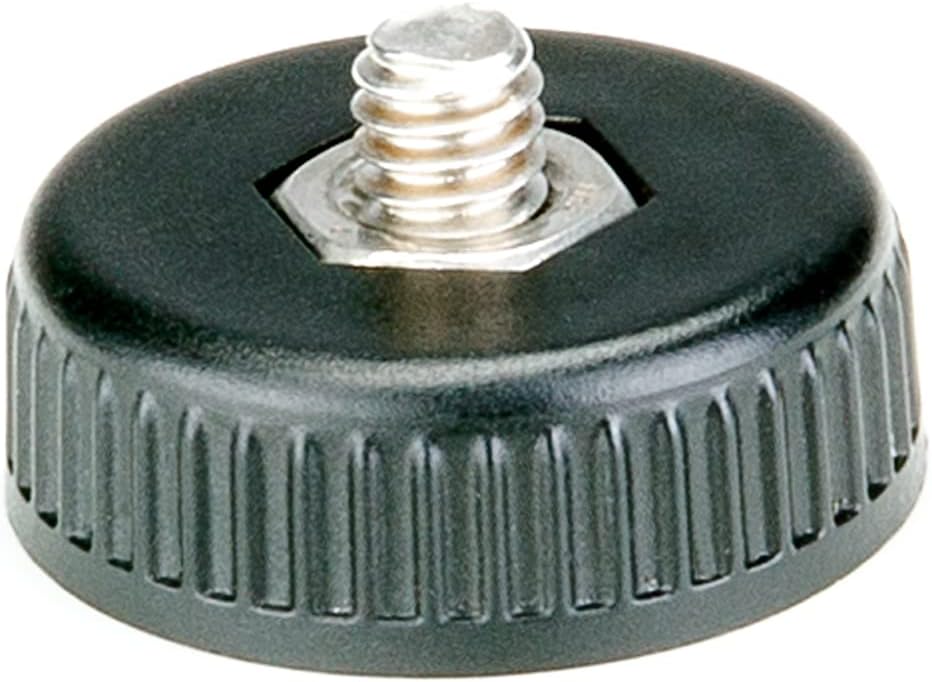
Image: The detachable magnetic base.

Image: The 1/4" threaded fitting for tripod mounting.
5. Setup
5.1 Initial Charging
Before first use, fully charge the inspection light. The battery holds its charge for up to 18 months in storage.
- Locate the USB-C charging port on the device.
- Connect the provided USB-C charging cable to the port.
- Plug the other end of the cable into a compatible USB power adapter (not included) or a powered USB port.
- The battery indicator lights will illuminate to show charging status. A full charge typically takes 3 hours.
- Once fully charged, disconnect the cable.

Image: Visual representation of the rechargeable lithium-ion battery and USB-C charging capability.
5.2 Attaching the Magnetic Base
The included magnetic base can be attached to the 1/4" threaded fitting for hands-free operation on metallic surfaces.
- Locate the 1/4" threaded fitting at the bottom of the light.
- Screw the magnetic base onto the fitting until secure.
- To remove, unscrew the base.
6. Operating Instructions
6.1 Power On/Off and Mode Selection
The device features sealed on/off and mode switches.
- Press the power button once to turn the light on.
- Press the mode button to cycle between the 5000K and 3500K color temperature settings.
- Press the power button again to turn the light off.

Image: Rear view of the inspection light, indicating the location of the power button, mode button, and battery level indicator.
6.2 Using for Inspection
The high CRI and dual color temperatures are optimized for detecting imperfections and matching colors.
- For automotive paint inspection, use the light to identify swirls, scratches, and other defects. The 5000K setting often mimics natural daylight, aiding in accurate color assessment.
- For interior paint and wallcovering defect identification, both color temperatures can be used to reveal inconsistencies under different lighting conditions.
- Position the light at various angles and distances from the surface to highlight different types of imperfections.

Image: The inspection light being used to detect scratches and swirl marks on automotive paint, demonstrating its effectiveness for paint correction.

Image: The light hanging from a ladder, illustrating hands-free operation.

Image: The light magnetically attached to a car door for stable positioning during inspection.
7. Maintenance
7.1 Cleaning
To ensure optimal performance and longevity, keep the light clean.
- Wipe the exterior with a soft, damp cloth.
- Do not use abrasive cleaners or solvents.
- Ensure the charging port is free of dust and debris.
7.2 Storage
When not in use for extended periods:
- Store the device in a cool, dry place.
- Avoid extreme temperatures.
- Periodically charge the battery to maintain its health, especially if stored for several months.
8. Troubleshooting
Refer to the table below for common issues and their solutions.
| Problem | Possible Cause | Solution |
|---|---|---|
| Light does not turn on. | Battery is depleted. | Charge the device using the USB-C cable. |
| Light output is dim. | Low battery level. | Recharge the battery. |
| Cannot change color temperature. | Mode button not pressed correctly or device malfunction. | Ensure the light is on and press the mode button firmly. If issue persists, contact customer support. |
| Device not charging. | Cable or adapter issue; charging port obstruction. | Check cable and adapter. Ensure USB-C port is clean. Try a different cable/adapter. |
9. Specifications
| Feature | Detail |
|---|---|
| Model Number | PILC95500 |
| Light Output | 500 Lumens |
| CRI (Color Rendering Index) | 95+ |
| Color Temperatures | 5000K, 3500K |
| Battery Type | 3.7V, 2.6Ah Lithium-Ion |
| Run Time | Up to 2.5 hours |
| Charge Time | Approximately 3 hours |
| Charging Port | USB-C |
| Dimensions | 6.2 x 3 x 11.2 inches |
| Weight | 9.9 ounces |
| Included Accessories | Magnetic base, USB-C charging cable |
10. Warranty and Support
10.1 2-Year Limited Warranty
The PowerSmith PILC95500 Inspection Light comes with a 2-Year Limited Warranty. This warranty covers defects in materials and workmanship under normal use. For specific terms and conditions, please refer to the warranty documentation included with your product or contact customer support.

Image: PowerSmith 2-Year Warranty emblem, indicating US-based supplier and customer service.

Image: Banner confirming the 2-Year Commercial / Industrial / Contractor Warranty.
10.2 Customer Support
For technical assistance, warranty claims, or general inquiries, please contact PowerSmith customer support. Contact information can typically be found on the product packaging or the official PowerSmith website.
Note: PowerSmith provides US-based customer support.


