
1. Introduction
Thank you for choosing the SBS Power Delivery Power Bank. This compact and portable power bank is designed to provide efficient and versatile charging for your mobile devices, including smartphones and tablets. With its 10000 mAh capacity, dual USB outputs (USB-C Power Delivery and Intelligent Charge), and robust design, it is an ideal companion for daily use.
This manual provides important information on how to set up, operate, maintain, and troubleshoot your power bank. Please read it thoroughly before use and keep it for future reference.

Image 1.1: Front view of the SBS Power Delivery Power Bank, showcasing its sleek design and LED indicators.
2. Product Features
- High Capacity: 10000 mAh Lithium polymer battery for extended power on the go.
- Dual Output Ports: Equipped with one USB-C Power Delivery (PD) port (up to 20W) and one standard USB-A port (10W Intelligent Charge).
- Fast Charging: USB-C PD port can charge compatible smartphones up to 50% in approximately 30 minutes and tablets in 60 minutes.
- Simultaneous Charging: Charge two devices at once (note: PD fast charging is not available when both outputs are in use).
- Intelligent Charge Technology: The standard USB port provides optimized and safe power delivery to prevent overcharging or short-circuiting.
- LED Indicators: Four status LEDs to easily monitor the power bank's remaining charge level.
- Compact and Durable Design: Sleek matte finish with a knurled body for enhanced grip and portability.
- USB-C Input: Conveniently recharge the power bank using its USB-C input port.
3. Package Contents
Please check the package for the following items:
- SBS Power Delivery Power Bank (10000 mAh)
- USB-A to USB-C Charging Cable
- User Manual (this document)

Image 3.1: The SBS Power Delivery Power Bank as packaged for retail, showing the product and branding.
4. Setup
Before first use, it is recommended to fully charge your SBS Power Delivery Power Bank.
- Connect the included USB-A to USB-C charging cable to the USB-C input port on the power bank.
- Connect the USB-A end of the cable to a compatible USB wall adapter (not included) or a computer's USB port. For fastest charging, use a USB-C PD compatible wall adapter.
- The LED indicators on the power bank will illuminate to show the charging progress. All four LEDs will be solid when fully charged.
5. Operating Instructions
5.1 Charging the Power Bank
To recharge your power bank:
- Use the provided USB-A to USB-C cable or any compatible USB-C cable.
- Plug the USB-C end into the power bank's USB-C port (labeled 'IN/OUT').
- Connect the other end to a power source, such as a wall charger, computer, or car charger.
- The LED indicators will flash during charging and remain solid when fully charged.
5.2 Charging Your Devices
To charge your smartphone, tablet, or other USB-powered devices:
- Connect your device's charging cable to either the USB-A output port or the USB-C output port on the power bank.
- Connect the other end of the cable to your device.
- The power bank will automatically begin charging your device. If not, briefly press the power button on the side of the power bank.
- You can charge two devices simultaneously. However, please note that Power Delivery (PD) fast charging will be disabled when both output ports are in use.
6. LED Indicators
The SBS Power Delivery Power Bank features four LED indicators to display the remaining battery level:
- 4 LEDs Solid: 75% - 100% charge remaining
- 3 LEDs Solid: 50% - 75% charge remaining
- 2 LEDs Solid: 25% - 50% charge remaining
- 1 LED Solid: 0% - 25% charge remaining (recharge soon)
- LEDs Flashing: Power bank is currently charging
7. Safety Information
To ensure safe operation and prolong the lifespan of your power bank, please observe the following safety precautions:
- Do not expose the power bank to extreme temperatures (above 45°C or below 0°C), direct sunlight, or high humidity.
- Do not disassemble, modify, or attempt to repair the power bank yourself. This will void the warranty and may cause damage or injury.
- Keep the power bank away from water, liquids, and flammable materials.
- Avoid dropping, hitting, or subjecting the power bank to strong impacts.
- Do not use the power bank if it is visibly damaged, swollen, or leaking.
- Keep out of reach of children.
- Dispose of the power bank responsibly according to local regulations. Do not dispose of it with household waste.
8. Maintenance
Proper care and maintenance will help ensure the longevity of your power bank:
- Clean the power bank with a soft, dry cloth. Do not use abrasive cleaners or solvents.
- Store the power bank in a cool, dry place when not in use.
- If storing for an extended period, charge the power bank to approximately 50% every three months to maintain battery health.
9. Troubleshooting
If you encounter issues with your power bank, please refer to the following common solutions:
- Power Bank Not Charging:
- Ensure the charging cable is securely connected to both the power bank and the power source.
- Try a different charging cable or wall adapter.
- Verify the power source is active.
- Device Not Charging from Power Bank:
- Ensure your device's charging cable is securely connected to both the power bank and your device.
- Press the power button on the power bank to activate charging.
- Check if the power bank has sufficient charge (refer to LED indicators).
- Try a different charging cable or output port on the power bank.
- Ensure your device is compatible with the power bank's output specifications.
- Slow Charging:
- Ensure you are using a high-quality cable.
- If charging two devices simultaneously, PD fast charging is disabled, resulting in slower charging for both.
- Verify your device supports fast charging standards (e.g., Power Delivery) if using the USB-C PD port.
If the issue persists after trying these steps, please contact SBS customer support.
10. Specifications
| Feature | Specification |
|---|---|
| Model Number | TEBB10000PD20RUK |
| Battery Type | Lithium Polymer |
| Battery Capacity | 10000 mAh |
| USB-C Input | Power Delivery 20W |
| USB-C Output | Power Delivery 20W |
| USB-A Output | 5VDC / 2.1A (10W Intelligent Charge) |
| Dimensions (Package) | 20.5 x 10 x 3.2 cm |
| Weight (Package) | 250 g |
| Color | Black |
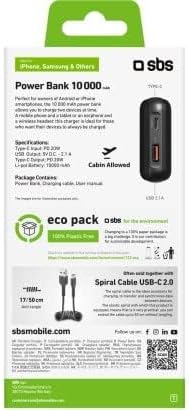
Image 10.1: Back of the retail packaging, providing a summary of specifications and features.
11. Warranty and Support
SBS products are designed and manufactured to the highest quality standards. For information regarding warranty coverage and customer support, please refer to the warranty card included with your purchase or visit the official SBS website. You may also contact the seller directly for assistance.
Please retain your proof of purchase for any warranty claims.


