
Introduction
This manual provides essential information for the setup, operation, and maintenance of your XDrum DD-250 E-Drum Set. Please read it thoroughly before using the product to ensure proper functionality and longevity.
The XDrum DD-250 is an electronic drum kit designed for versatile use in various spaces. It features velocity-sensitive mesh head pads for an authentic playing experience and a sound module with a range of preset kits and sounds.
Package Contents
Upon unpacking, verify that all components listed below are present:
- Electronic drum set frame with mesh heads
- 4 x 8-inch single-zone snare/tom pads
- 3 x 8-inch zone cymbal pads
- 2 x foot controllers (for hi-hat and kick drum)
- Drum rack
- Assembly keys
- Pair of drum sticks
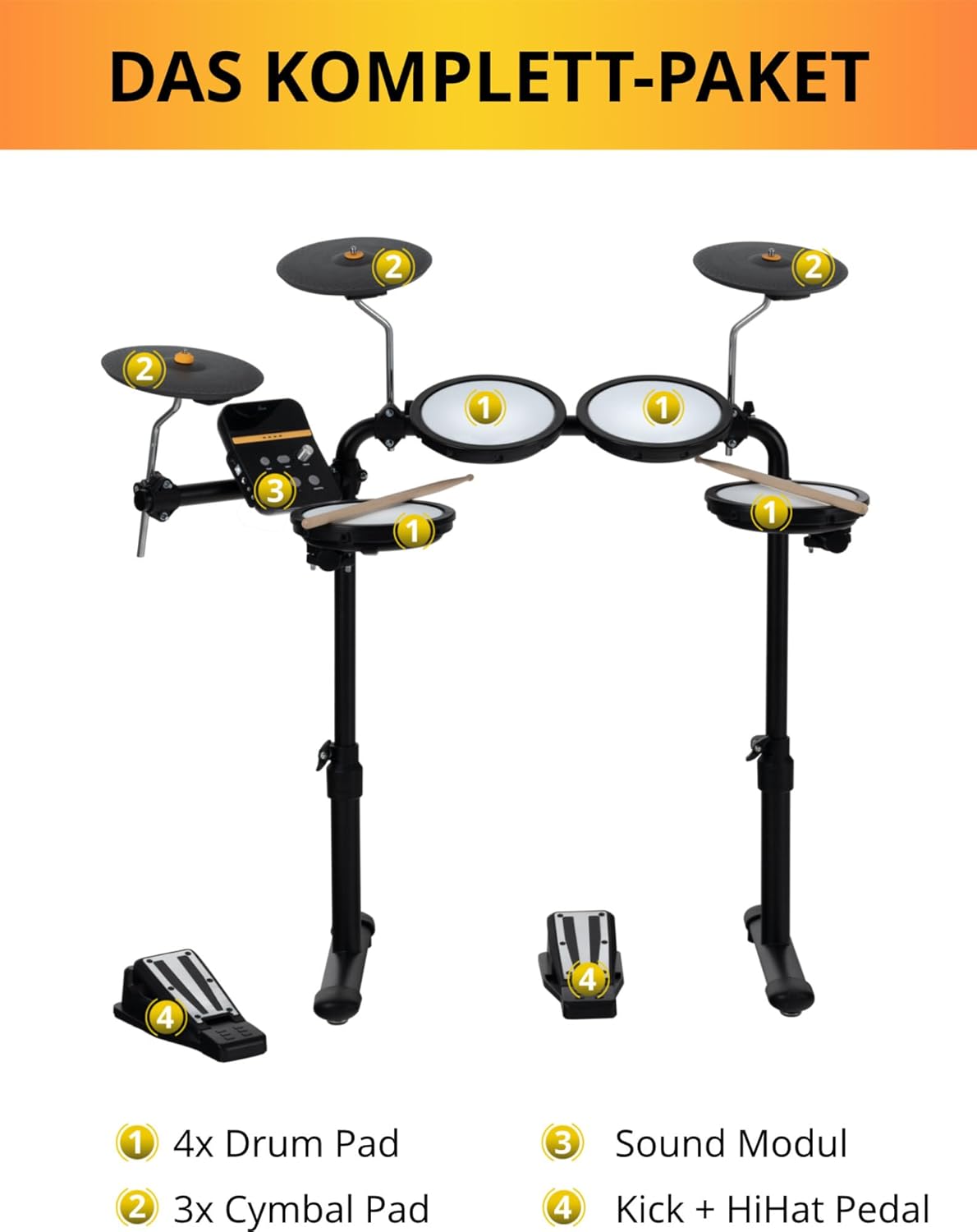
Image: Illustrated diagram showing the main components of the XDrum DD-250 E-Drum Set, including drum pads, cymbal pads, sound module, and foot pedals.
Setup Instructions
- Unpack Components: Carefully remove all parts from the packaging and lay them out.
- Assemble the Drum Rack: Follow the included assembly guide to construct the main drum rack. Ensure all connections are secure.
- Attach Pads and Cymbals: Mount the 4 drum pads and 3 cymbal pads onto the rack. Adjust their positions for comfortable playing.
- Connect Foot Controllers: Place the hi-hat and kick drum foot controllers on the floor and connect them to the sound module.
- Mount Sound Module: Secure the sound module to the drum rack in an easily accessible position.
- Connect Cables: Connect each pad and cymbal to the corresponding input on the sound module using the provided cables. Ensure all connections are firm.
- Power Connection: Connect the USB power cable to the sound module and a suitable USB power source (e.g., a USB wall adapter or computer USB port).
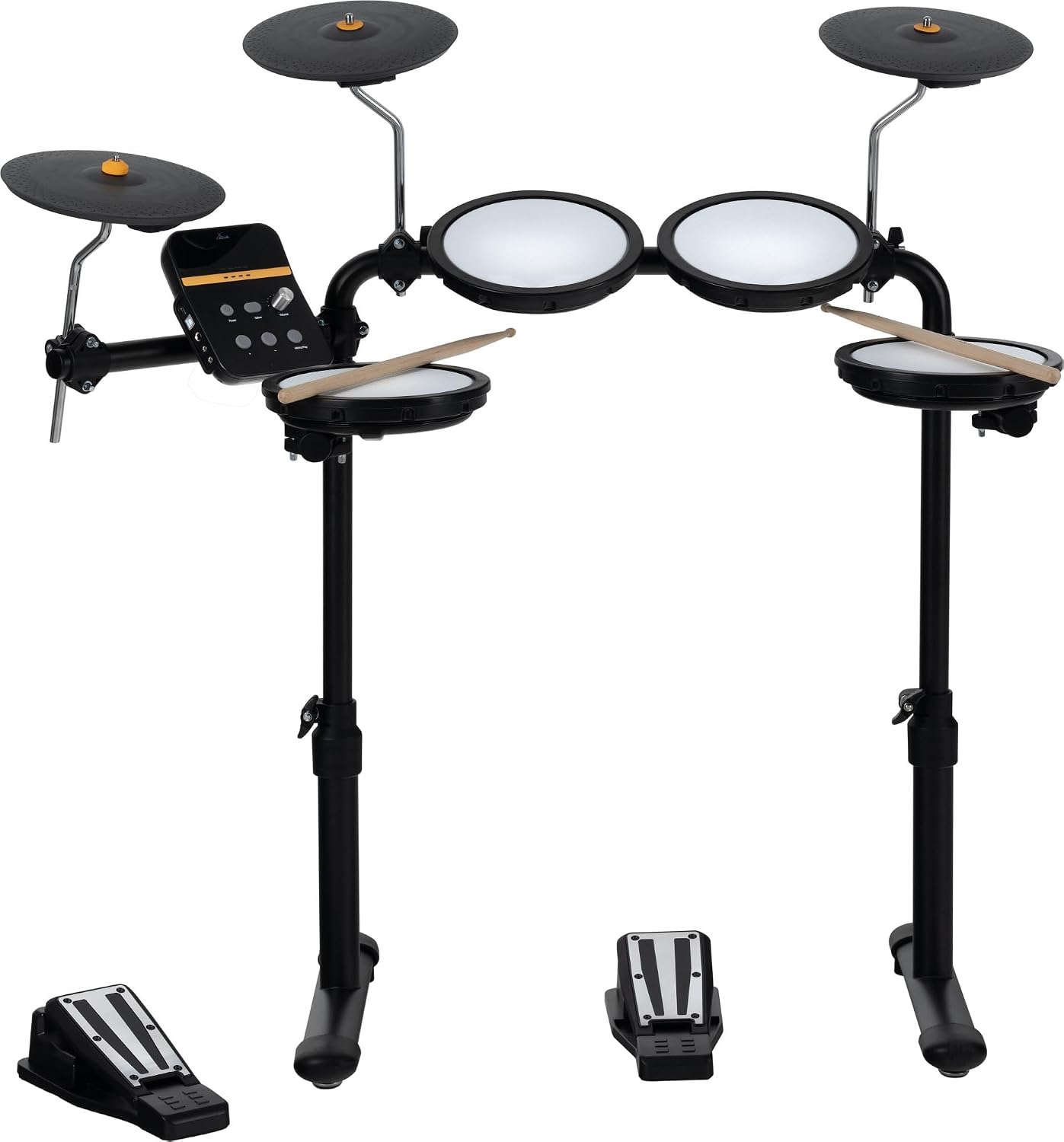
Image: The XDrum DD-250 E-Drum Set fully assembled, showing the drum pads, cymbal pads, sound module, and foot pedals in their operational configuration.
The compact design of the DD-250 allows it to fit into small spaces, requiring approximately 100 x 50 cm of floor space. It can also be folded for storage when not in use.
Operating Instructions
Sound Module Overview

Image: A detailed view of the XDrum DD-250 sound module's control panel, highlighting the Power, Select, Volume, and Metro/Play buttons, along with the display.
- Power Button: Turns the unit on or off.
- Select Button: Used to navigate through different functions and parameters (e.g., drum kits, songs, tempo).
- Volume Knob: Adjusts the overall output volume.
- Metro/Play Button: Activates or deactivates the metronome and controls song playback.
- +/- Buttons: Used to adjust values or select options.
Basic Operation
- Power On: Press the Power button to turn on the drum set.
- Select a Drum Kit: Use the Select button to cycle through the 12 preset drum kits. The display will show the kit number. Use the +/- buttons to choose your desired kit.
- Adjust Volume: Rotate the Volume knob to set the desired listening level.
- Play Along Songs: The module includes 10 integrated songs. Press the Metro/Play button to start or stop a song. Use the Select and +/- buttons to choose a song.
- Metronome Function: To practice with a metronome, press the Metro/Play button (if no song is playing). Use the Select button to access metronome settings (tempo, time signature) and adjust with +/- buttons. The metronome range is 20 - 320 bpm.
Connectivity

Image: A close-up view of the various input and output ports on the XDrum DD-250 sound module, including DC 5V, USB, L/MONO, AUX, and PHONE jacks.
- USB Port: Connects the module to a computer for MIDI data transfer or power supply.
- L/MONO Output: Connects to an amplifier, mixer, or external speaker system.
- AUX Input: Allows connection of external audio devices (e.g., smartphone, tablet) to play along with your favorite music.
- PHONE Output: For connecting headphones for private practice.
- DC 5V Input: Primary power input for the unit.

Image: The XDrum DD-250 sound module connected to a USB power adapter, demonstrating its USB power supply capability.
Mesh Head Technology

Image: A close-up of a mesh drum head, illustrating the fabric material designed for realistic rebound and quiet practice.
The DD-250 features special mesh head pads that provide a realistic playing feel and rebound, similar to acoustic drums. These velocity-sensitive pads respond to your strike strength, producing louder sounds with stronger hits. This technology ensures a nuanced and expressive performance.
Maintenance
- Cleaning: Use a soft, dry cloth to wipe down the pads, cymbals, and sound module. Avoid using abrasive cleaners or solvents.
- Cable Management: Ensure all cables are neatly organized and not kinked or strained to prevent damage.
- Storage: When not in use, the drum set can be folded for compact storage. Store in a dry environment away from extreme temperatures.
- Pad Tension: Periodically check the tension of the mesh heads. Adjust if necessary using the provided drum key to maintain optimal feel and response.
Troubleshooting
| Problem | Possible Cause | Solution |
|---|---|---|
| No sound from pads/cymbals. |
|
|
| Inconsistent pad response. |
|
|
| Sound module not powering on. |
|
|
Specifications
- Model: XDrum DD-250
- Pads: 4 x 8-inch single-zone mesh head snare/tom pads, 3 x 8-inch zone cymbal pads
- Sounds: 68
- Preset Kits: 12
- Play-along Songs: 10
- Metronome: 20 - 320 bpm, adjustable time signatures
- Connectors: USB (for power/MIDI), L/MONO Output, AUX Input, PHONE Output, DC 5V Input
- Power Supply: USB (DC 5V)
- Material: Mesh (pads), Plastic (body)
- Color: Black
- Item Weight: Approximately 11.3 kg
- Folded Dimensions: Approximately 100 x 50 cm footprint (operational)
Warranty and Support
For warranty information and technical support, please refer to the documentation provided with your purchase or visit the official XDrum website. Keep your proof of purchase for warranty claims.
Manufacturer: XDrum


