
1. Product Overview
This manual provides instructions for the installation, operation, and maintenance of the Waterdrop WD-G3P600-RO filter. This filter is specifically designed as a replacement for the Waterdrop G3P600 under-sink reverse osmosis system, ensuring optimal performance and water quality.
Key Features:
- Compatibility: Adaptable to the Waterdrop G3P600 RO system, designed for a secure, leak-free fit.
- Certified Filtration: Tested and certified by NSF/ANSI 58 for effective Total Dissolved Solids (TDS) reduction and NSF/ANSI 372 for lead-free material compliance.
- Comprehensive Contaminant Reduction: Effectively reduces various substances including TDS, chromium, PFAS, fluoride, arsenic salt, iron, radium nitrate, calcium, chloride, radioactive substances, and heavy metals like hexavalent chromium.
- Extended Lifespan: Provides up to 24 months or 8,200 liters (2,166 gallons) of clean water, depending on local water quality and usage.
- Tool-Free Replacement: Features a convenient twist-and-pull design for quick and easy filter changes in approximately three seconds, requiring no special tools.

Image 1.1: The Waterdrop WD-G3P600-RO filter shown alongside the compatible Waterdrop G3P600 Reverse Osmosis System, highlighting its perfect fit and dimensions (15 inches tall, 4.3 inches wide).

Image 1.2: Certification details for the Waterdrop WD-G3P600-RO filter, confirming compliance with NSF/ANSI 58 and 372 standards. For detailed report, visit IAPMO Product Listing Directory.
2. Setup and Filter Replacement
This section details the process for replacing the WD-G3P600-RO filter in your Waterdrop G3P600 Reverse Osmosis System. No special tools are required for this procedure.
Replacement Steps:
- Turn Off Water Supply: Locate the water inlet valve for your RO system and turn it off to prevent water flow during replacement.
- Depressurize System (Optional but Recommended): Open the RO faucet briefly to release any pressure in the system. Close the faucet once water stops flowing.
- Remove Old Filter: Identify the WD-G3P600-RO filter. Gently twist the filter counter-clockwise until it unlocks from its housing. Pull the old filter downwards to remove it.
- Prepare New Filter: Remove the new Waterdrop WD-G3P600-RO filter from its packaging. Ensure all protective caps or seals are removed.
- Install New Filter: Align the new filter with the housing. Push it upwards into the housing and then twist it clockwise until it locks securely into place. You should feel a click or firm stop.
- Restore Water Supply: Slowly turn the water inlet valve back on. Check for any leaks around the newly installed filter.
- Flush the System: Open the RO faucet and allow water to run for approximately 5-10 minutes. This flushes out any air and carbon fines from the new filter, ensuring optimal performance and taste.

Image 2.1: Illustration of the twist-and-pull design for easy and quick filter replacement, emphasizing the tool-free process.
3. Operating Principles
The Waterdrop WD-G3P600-RO filter functions as a critical component within your reverse osmosis system, utilizing advanced membrane technology to purify water.
Filtration Process:
This filter employs a superior reverse osmosis membrane with a filtration accuracy of 0.0001 micrometers. Water is forced through this semi-permeable membrane, which effectively separates dissolved solids, contaminants, and impurities from the water molecules. The purified water then proceeds to the faucet, while rejected contaminants are flushed away.

Image 3.1: Visual representation of the superior reverse osmosis membrane and the range of contaminants it effectively removes from water.
4. Maintenance
Regular maintenance, primarily filter replacement, is essential to ensure the continuous high performance and longevity of your Waterdrop G3P600 RO system.
Filter Lifespan and Replacement:
The Waterdrop WD-G3P600-RO filter has a rated lifespan of up to 24 months or 8,200 liters (2,166 gallons). It is crucial to replace the filter when either of these thresholds is reached, or if you notice a significant decrease in water flow or a change in water taste/odor. The actual lifespan may vary based on your local water quality and daily water consumption.

Image 4.1: The WD-G3P600-RO filter, highlighting its long service life of 24 months.
Cleaning:
The filter itself does not require cleaning. It is a sealed unit designed for replacement. Do not attempt to clean or reuse the filter.
5. Troubleshooting
If you encounter any issues with your Waterdrop WD-G3P600-RO filter or RO system, refer to the common problems and solutions below.
| Problem | Possible Cause | Solution |
|---|---|---|
| Reduced Water Flow | Filter is clogged or nearing end of life. Incorrect installation. | Check filter replacement schedule. Replace the filter if due. Ensure the filter is correctly installed and locked. |
| Unusual Taste or Odor | New filter not flushed adequately. Filter is exhausted. | Flush the system for 5-10 minutes. If issue persists, replace the filter. |
| Water Leakage | Filter not properly seated or locked. Damaged O-rings (rare for new filters). | Ensure the filter is fully inserted and twisted clockwise until secure. If leakage persists, contact customer support. |
| TDS Levels Not Reducing | Filter is exhausted. Incorrect filter type. | Replace the filter if due. Verify that you are using the correct WD-G3P600-RO filter for your G3P600 system. |
If the problem persists after attempting these solutions, please contact Waterdrop Customer Service for further assistance.
6. Specifications
- Brand: Waterdrop
- Model: WD-G3P600-RO
- Compatible RO Systems: Waterdrop WD-G3P600, WD-G3P800-W, WD-G3-W
- Dimensions (L x W x H): 14.2 x 14.2 x 41.48 cm (approximately 5.6 x 5.6 x 16.3 inches)
- Weight: 1.72 kg (approximately 3.79 lbs)
- Material: Polypropylene (PP), Resin, Carbon Fiber
- Certifications: NSF/ANSI 58, NSF/ANSI 372
- Filter Lifespan: Up to 24 months or 8,200 liters (2,166 gallons)
- Filtration Accuracy: 0.0001 micrometers
7. Warranty Information
The Waterdrop WD-G3P600-RO filter is designed for a lifespan of up to 24 months or 8,200 liters. This lifespan is dependent on the quality of your incoming water and your household's water consumption.
For specific warranty details regarding manufacturing defects or other product-related issues, please refer to the official Waterdrop website or contact Waterdrop Customer Service directly. Keep your purchase receipt as proof of purchase.
8. Customer Support
For any questions regarding the installation, operation, maintenance, or troubleshooting of your Waterdrop WD-G3P600-RO filter or compatible RO system, please do not hesitate to contact our customer service team.
- Phone Support: 888-352-3558
- Availability: 24/7, 365 days a year
- Online Support: Visit the official Waterdrop website for FAQs, support articles, and contact forms.
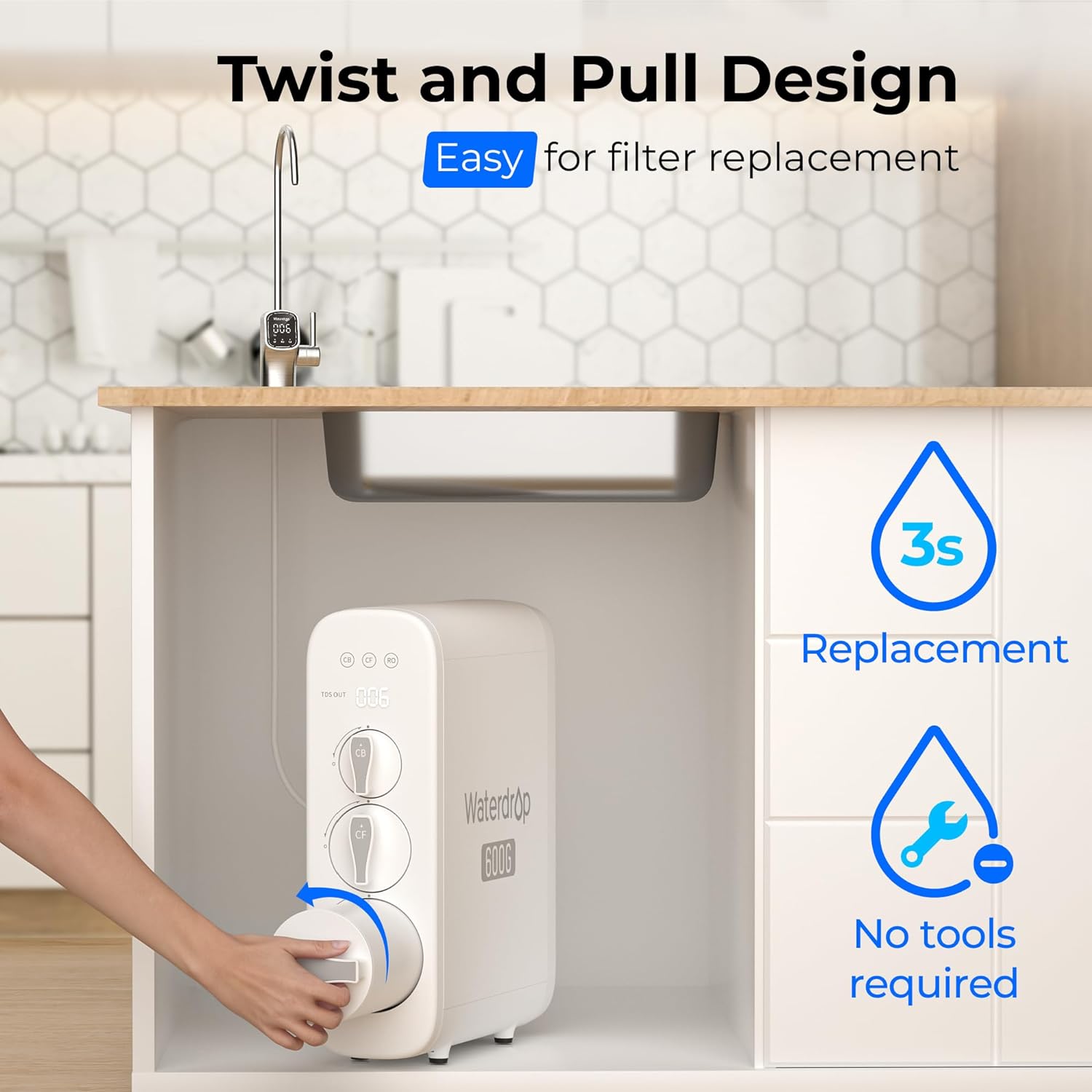
Image 8.1: Waterdrop customer service is available to assist with any product-related inquiries.


