
mifaso MFS35A
mifaso MFS35A Ultra Flat Plug Power Strip User Manual
Model: MFS35A
1. Introduction
This manual provides instructions for the safe and efficient use of your mifaso Ultra Flat Plug Power Strip, model MFS35A. This device is designed to expand your power outlets and USB charging capabilities, featuring a compact design suitable for various environments, including travel and cruise ships.

Image showing the mifaso Ultra Flat Plug Power Strip with its 5ft extension cord and compact design, connected to a wall outlet.
2. Important Safety Instructions
Please read and follow all safety instructions carefully before using this product to prevent injury or damage.
- No Surge Protection: This power strip is designed without surge protection, making it suitable for environments like cruise ships where surge protectors are often prohibited. Do not use it where surge protection is required for sensitive electronics.
- Do not exceed the maximum load capacity of 15A / 1875W.
- Do not disassemble, modify, or attempt to repair the device.
- Keep away from water, moisture, and high temperatures.
- Ensure the plug is fully inserted into the wall outlet.
- Do not use in wet conditions or outdoors.
- Keep out of reach of children.
- This product is equipped with multiple safety features including overload protection, short-circuit protection, flame retardant casing, high temperature protection, grounding protection, and over-current protection.

Graphic detailing the multiple safety protections integrated into the power strip, including overload, short-circuit, flame retardant, high temperature, grounding, and over-current protection.
3. Setup Instructions
- Unpack: Carefully remove the power strip from its packaging.
- Placement: Choose a suitable location for the power strip. Its ultra-flat plug and 5ft extension cord are designed to fit discreetly behind furniture or under carpets.
- Connect to Wall Outlet: Plug the power strip's ultra-flat, 45-degree right-angled plug into a standard 125V AC wall outlet. The flat design ensures it does not block other outlets.
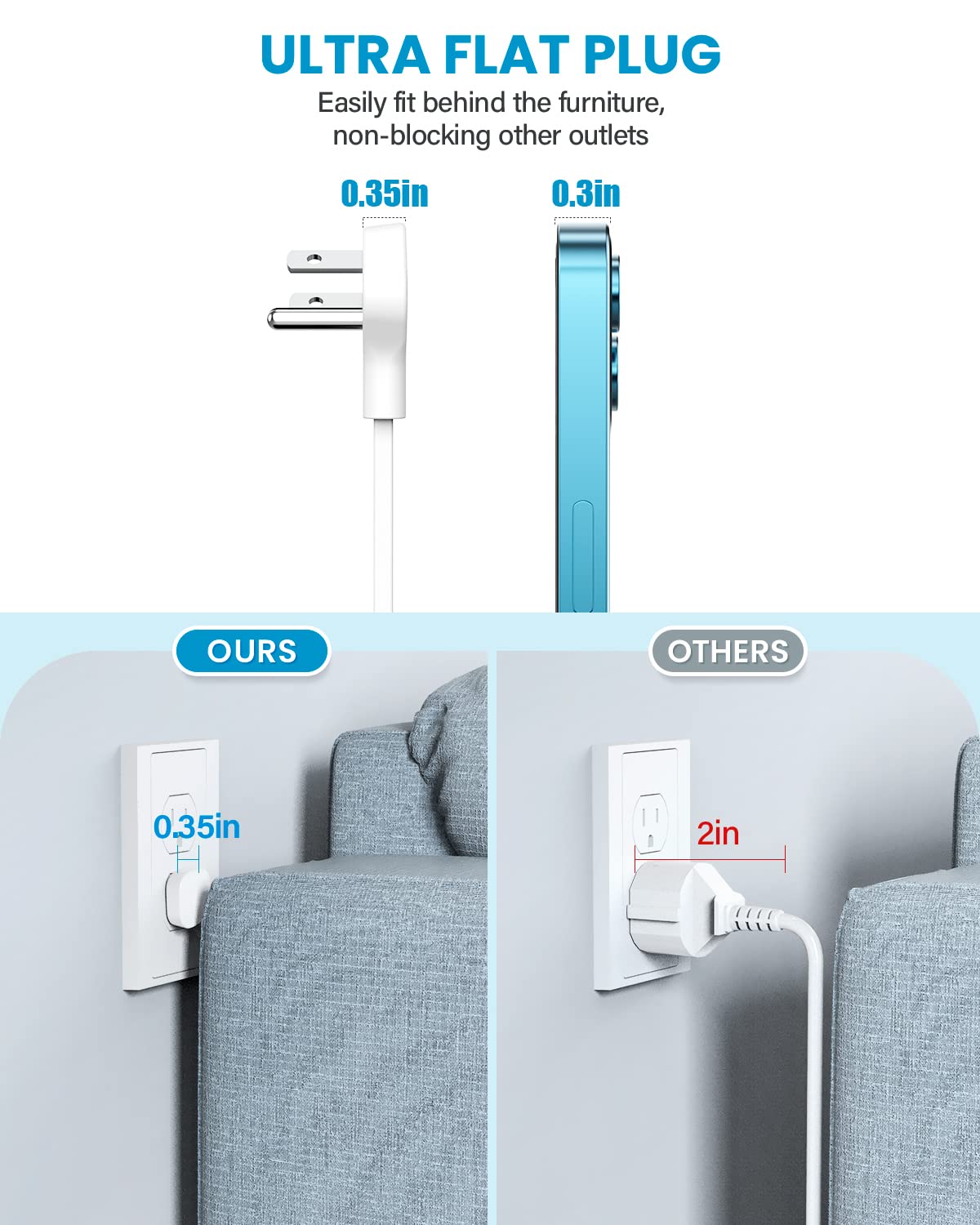
Comparison image demonstrating the ultra-flat plug design (0.35 inches) of the mifaso power strip, allowing furniture to sit closer to the wall, next to a standard plug.

Illustration of the 5ft, 45-degree right-angled flat extension cord, demonstrating how it can be discreetly routed and connected to a wall outlet behind furniture.
4. Operating Instructions
The mifaso MFS35A power strip provides 3 AC outlets, 2 USB-A ports, and 2 USB-C ports for charging multiple devices simultaneously.
- AC Outlets: Plug your electronic devices (e.g., laptops, lamps, small appliances) into the 3 AC outlets. Ensure the total power consumption does not exceed 1875W.
- USB-A Ports: Connect devices that use standard USB-A cables for charging. These ports provide up to 5V/2.4A max.
- USB-C Ports: Connect devices that use USB-C cables for charging. These ports provide up to 5V/3A max.
- Simultaneous Charging: You can charge up to 7 devices concurrently (3 AC, 2 USB-A, 2 USB-C). The total output for all USB ports is 5V/4.5A, 22.5W Max.

Diagram illustrating the 7-in-1 functionality of the power strip, highlighting 3 AC outlets, 2 USB-A ports, and 2 USB-C ports, with fast charging capabilities.
5. Maintenance
- Cleaning: Disconnect the power strip from the wall outlet before cleaning. Use a dry, soft cloth to wipe the surface. Do not use liquid cleaners or aerosols.
- Storage: When not in use, store the power strip in a cool, dry place away from direct sunlight and moisture.
- Inspection: Periodically inspect the cord and plug for any signs of damage. If damaged, discontinue use immediately and contact customer support.
6. Troubleshooting
- Device not charging:
- Ensure the power strip is securely plugged into a live wall outlet.
- Verify that the device's charging cable is properly connected to both the power strip and the device.
- Check if the device itself is functioning correctly.
- Confirm that the total power draw from all connected devices does not exceed the power strip's maximum capacity (1875W).
- Power strip feels warm:
- A slight warmth during operation is normal. If it feels excessively hot, disconnect all devices and the power strip from the wall outlet immediately. This could indicate an overload or malfunction.
7. Specifications
| Brand | mifaso |
| Model | MFS35A |
| AC Outlets | 3 |
| USB-A Ports | 2 (5V/2.4A Max per port) |
| USB-C Ports | 2 (5V/3A Max per port) |
| Total USB Output | 5V/4.5A, 22.5W Max |
| Voltage | 125 Volts |
| Max Current | 15A |
| Max Power Rating | 1875W |
| Cord Length | 5 feet |
| Plug Type | Ultra-flat, 45-degree right-angled |
| Material | Polycarbonate (Flame-retardant) |
| Dimensions (L x W x H) | 10.1 x 9.5 x 0.1 cm (Product); 3.74 x 3.97 x 1.18 inches (Power Strip body) |
| Weight | 290 g |
| Certifications | FCC, RoHS, ETL |
| Special Features | Compact for travel, No surge protection, Overload protection, Short-circuit protection, High temperature protection, Grounding protection, Over-current protection |

Image showcasing the compact size of the power strip (3.74in x 3.97in x 1.18in) with a cruise ship background, emphasizing its suitability for travel and cruise use due to no surge protection.
8. Warranty and Customer Support
The mifaso MFS35A Ultra Flat Plug Power Strip comes with a worry-free 12-month warranty.
For any questions, concerns, or technical support, please contact mifaso customer service. Refer to your purchase documentation for specific contact details or visit the official mifaso website.
Ask a question about this manual
Ask about setup, troubleshooting, compatibility, parts, safety, or missing instructions. Manuals+ will review the question and use this page’s manual context to help answer it.