
1. Introduction and Overview
Thank you for choosing the Shadowhawk XHP70.2 LED Rechargeable Flashlight. This high-performance tactical flashlight is designed for various outdoor activities, emergencies, and daily use, offering exceptional brightness and durability. It features an advanced XHP70.2 LED chip, multiple lighting modes, a zoomable beam, and IP67 waterproof rating.

Image 1.1: The Shadowhawk flashlight demonstrating its extreme brightness and long-range illumination, powered by an improved XHP70.2 LED chip.
2. Safety Instructions
- Do not shine the flashlight directly into eyes, as the intense light can cause temporary vision impairment or damage.
- Keep the flashlight out of reach of children.
- Use only the specified battery types and ensure correct polarity during installation.
- Do not disassemble or modify the flashlight, as this may void the warranty and cause damage.
- Avoid exposing the flashlight to extreme temperatures or direct sunlight for prolonged periods.
- Although IP67 waterproof, avoid prolonged submersion in water.
3. Package Contents
Upon opening your Shadowhawk flashlight package, you should find the following items:
- Shadowhawk XHP70.2 LED Flashlight
- 1 x 26700 Rechargeable Lithium-Ion Battery (6000 mAh)
- 1 x AAA Battery Adapter
- 3 x AAA Batteries (Lanen brand)
- 1 x USB-C Charging Cable
- 1 x Tactical Holster with Belt Attachment
- 1 x Lanyard
- 1 x Keychain
- User Manual (this document)
4. Setup
4.1 Battery Installation
- Unscrew the tail cap of the flashlight.
- Insert the included 26700 Lithium-Ion battery with the positive (+) end facing towards the flashlight head.
- Alternatively, if using AAA batteries, place three AAA batteries into the provided AAA battery adapter, ensuring correct polarity. Then insert the adapter into the flashlight with the positive (+) end facing towards the flashlight head.
- Screw the tail cap back on securely.

Image 4.1: The flashlight is designed to be rechargeable and durable, offering up to 12 hours of runtime. It also supports operation with 3 AAA batteries using the included adapter.
4.2 Charging the Battery
The flashlight features a USB-C charging port for convenient recharging.
- Locate the USB-C charging port on the flashlight body. It is usually covered by a rubber flap for waterproofing.
- Open the rubber flap and connect the included USB-C cable to the flashlight.
- Connect the other end of the USB-C cable to a USB power source (e.g., wall adapter, power bank, computer USB port).
- The battery indicator lights (four blue LEDs) will illuminate to show the charging progress. Each light represents approximately 25% of the battery capacity. All four lights will be solid when fully charged.
- Once charging is complete, disconnect the USB-C cable and securely close the rubber flap to maintain the waterproof seal.

Image 4.2: The flashlight features a USB input for charging and a clear battery display, allowing you to always know the current battery level (25%, 50%, 75%, 100%).
5. Operating Instructions
5.1 Power On/Off and Light Modes
The flashlight features a single power button for controlling power and cycling through light modes.
- Power On: Press the power button once to turn on the flashlight. It will typically start in High mode.
- Cycle Modes: With the flashlight on, press the power button repeatedly to cycle through the 5 available light modes: High → Medium → Low → Strobe → SOS.
- Power Off: To turn off the flashlight, either cycle through all modes until it turns off, or press and hold the power button for approximately 3 seconds from any mode.
5.2 Zoom Function
The Shadowhawk flashlight features a zoomable head to adjust the beam from a wide floodlight to a focused spotlight.
- To widen the beam (floodlight), gently push the head of the flashlight forward.
- To narrow the beam (spotlight), gently pull the head of the flashlight backward.

Image 5.1: The flashlight offers 5 distinct light modes (High, Medium, Low, Strobe, SOS) and an adjustable zoom function to control the beam width.
6. Maintenance
6.1 Cleaning
- Wipe the flashlight body with a soft, damp cloth to remove dirt or debris.
- For the lens, use a lens cleaning cloth to avoid scratches.
- Do not use harsh chemicals or abrasive cleaners.
6.2 Storage
- Store the flashlight in a cool, dry place away from direct sunlight.
- If storing for an extended period, remove the battery to prevent leakage and ensure the battery is partially charged (around 50%) to prolong its lifespan.
7. Troubleshooting
| Problem | Possible Cause | Solution |
|---|---|---|
| Flashlight does not turn on | Battery is dead or low. Incorrect battery installation. Loose tail cap. | Charge the battery. Check battery polarity. Tighten the tail cap. |
| Light is dim | Low battery. | Recharge the battery. |
| Flashlight flickers | Loose connections. Dirty contacts. Low battery. | Ensure tail cap is tight. Clean battery contacts with a dry cloth. Recharge battery. |
| Charging indicator not working | Cable not properly connected. Faulty cable or power source. | Ensure USB-C cable is fully inserted. Try a different USB-C cable or power source. |
If you encounter any issues not listed here or if the problem persists after attempting the solutions, please contact Shadowhawk customer support for assistance.
8. Specifications
| Feature | Specification |
|---|---|
| Model Number | DE-S1915 |
| Light Source | XHP70.2 LED |
| Brightness | Up to 20000 Lumens |
| Light Modes | High, Medium, Low, Strobe, SOS |
| Power Source | 1 x 26700 Lithium-Ion Battery (included) or 3 x AAA Batteries (with adapter) |
| Charging Port | USB-C |
| Waterproof Rating | IP67 |
| Material | Aerospace-grade Aluminum Alloy |
| Color | Black |
| Product Dimensions | 8.86 x 6.89 x 2.17 inches (22.5 x 17.5 x 5.5 cm) |
| Weight | 1.26 Pounds (0.57 kg) |
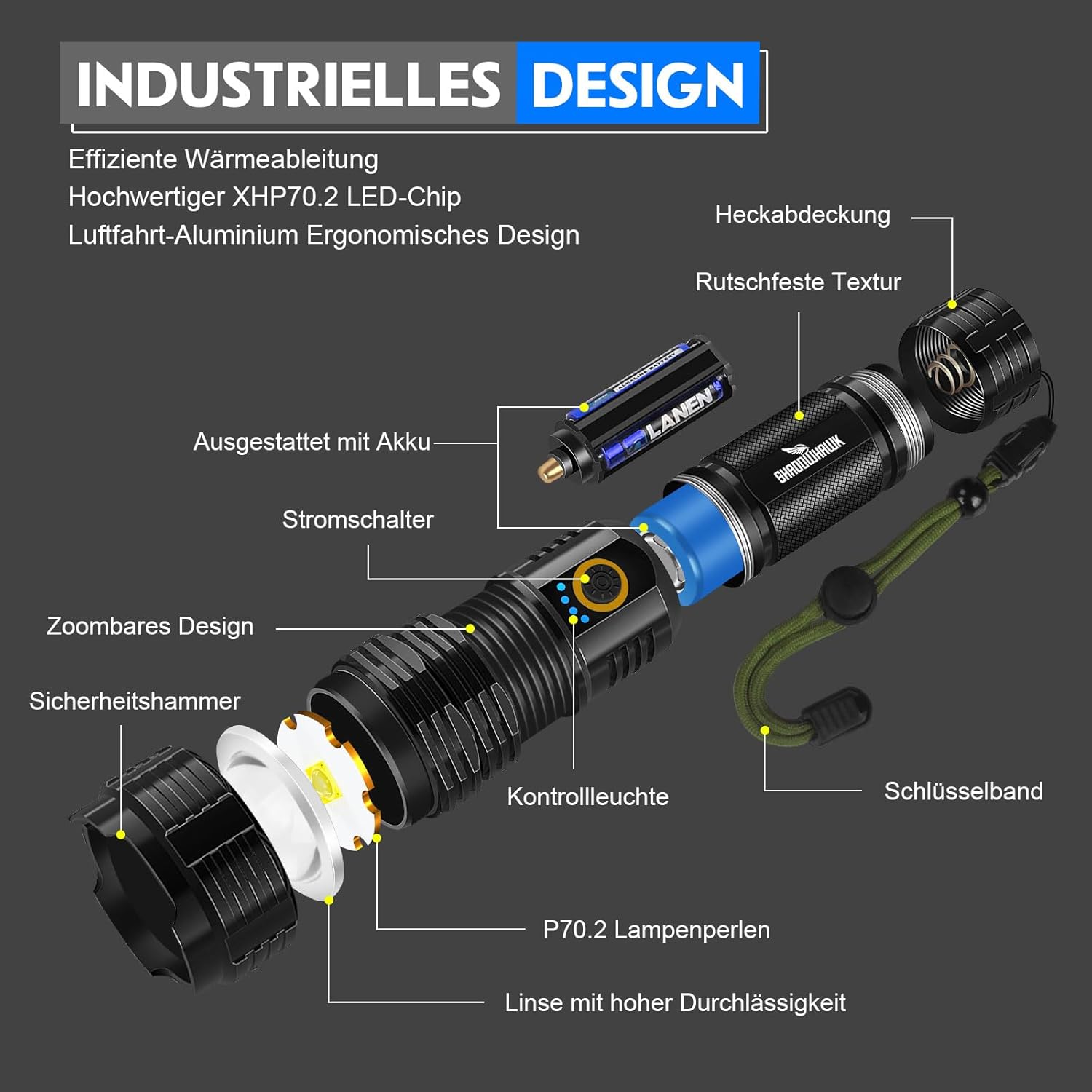
Image 8.1: An exploded view illustrating the industrial design and key components of the Shadowhawk flashlight, including the XHP70.2 LED chip, zoomable design, and robust aluminum body.

Image 8.2: The Shadowhawk flashlight is IP67 waterproof, designed to withstand various adverse weather conditions, featuring a robust sealing ring.
9. Warranty and Support
Shadowhawk products are manufactured to high-quality standards. For any warranty claims or technical support, please refer to the contact information provided with your purchase or visit the official Shadowhawk website. Please have your model number (DE-S1915) and purchase details ready when contacting support.


