
ANCEL MT500 PRO
ANCEL MT500 PRO Motorcycle Scanner User Manual
Model: MT500 PRO | Brand: ANCEL
1. Introduction
The ANCEL MT500 PRO Motorcycle Scanner is a professional diagnostic tool designed for comprehensive system analysis and maintenance of various motorcycle brands. This manual provides detailed instructions for setup, operation, and utilization of its advanced features.
1.1 What's in the Box
- 1x ANCEL MT500 PRO Motorcycle Diagnostic Tool
- 1x 12V 2A DC Power Adapter
- 1x OBD2 Main Cable
- 1x User's Manual
- 9x Adapter Cables (brand-specific)

Figure 1.1: ANCEL MT500 PRO Main Unit

Figure 1.2: Included Components
2. Setup and Initial Configuration
2.1 Initial Power-Up and Software Update
Before first use, ensure the device is fully charged using the provided 12V 2A DC Power Adapter. After charging, register the device and perform necessary software updates via Wi-Fi to ensure access to the latest diagnostic information and vehicle coverage.
2.2 Connecting to Your Motorcycle
Locate the diagnostic port on your motorcycle. This often requires removing the seat or a side panel. Select the appropriate adapter cable from the included set (e.g., 4-pin or 6-pin for Harley-Davidson, or other brand-specific adapters) and connect it to the motorcycle's diagnostic port. Then, connect the main cable to the adapter and to the MT500 PRO unit.
Video 2.1: Demonstrates unboxing, locating the diagnostic port on a Harley-Davidson, and connecting the ANCEL MT500 PRO scanner.
3. Device Components and Cables
The ANCEL MT500 PRO features a 5-inch HD touchscreen for intuitive navigation. It is powered by an Android 5.1.1 operating system and includes 32GB of ROM for storing diagnostic data and software.
3.1 Adapter Cables
The scanner comes with 9 brand-specific adapter cables to ensure wide compatibility across various motorcycle manufacturers. These include cables for Harley-Davidson, Honda, Kawasaki, Yamaha, Indian, Suzuki, Polaris, BRP, and Victory models.

Figure 3.1: Advanced Hardware & Software Configuration

Figure 3.2: MT500 PRO Features Overview
4. Operating the Scanner
4.1 Navigating the Interface
The 5-inch HD touchscreen provides an intuitive interface. Use the touch controls or physical buttons to navigate through menus and select functions. The device supports 8 languages for user convenience.
4.2 Performing Diagnostics
The MT500 PRO offers OEM-level full system diagnostics. It can automatically detect your vehicle's VIN and perform a comprehensive scan of systems including ABS, ignition, fuel injection, battery, ECU, transmission, and TPMS. This allows for quick identification of issues.
4.3 Service Functions
The tool supports over 30 service functions, including ABS bleeding, throttle reset, oil light reset, service light reset, and ECU reset. These functions assist in routine maintenance tasks.
Video 4.1: Overview of the MT510 (similar to MT500 PRO) user interface, diagnostic capabilities, and special functions.

Figure 4.1: Full System Diagnoses

Figure 4.2: 30+ Service Functions
5. Key Features
5.1 Wide Compatibility
The ANCEL MT500 PRO supports over 1000 types of motorcycles across 9 major brands: Harley-Davidson, Honda, Kawasaki, Yamaha, Indian, Suzuki, BRP, Polaris, and Victory.

Figure 5.1: Motorcycle Brand Coverage

Figure 5.2: Suitable for Many Types of Motorcycles
5.2 Accurate Problem Pinpointing
The tool supports active tests to help distinguish between software and hardware faults, enabling quick identification of the root cause of issues.
5.3 User-Friendly Design
Designed for DIY users, the MT500 PRO includes essential functions like reading/clearing fault codes, live data display, freeze frame data, one-touch Wi-Fi updates, and screenshot capabilities.
6. Maintenance
Keep the device clean and free from dust and moisture. Store it within the recommended temperature range of -4℉ to 158℉ (-20℃ to 70℃). Regularly check for and install software updates to ensure optimal performance and expanded vehicle coverage.
7. Troubleshooting and Support
If you encounter any issues, the device supports remote technical assistance. Common repair guides are also available to aid in troubleshooting. For specific technical support, you can contact the service team.
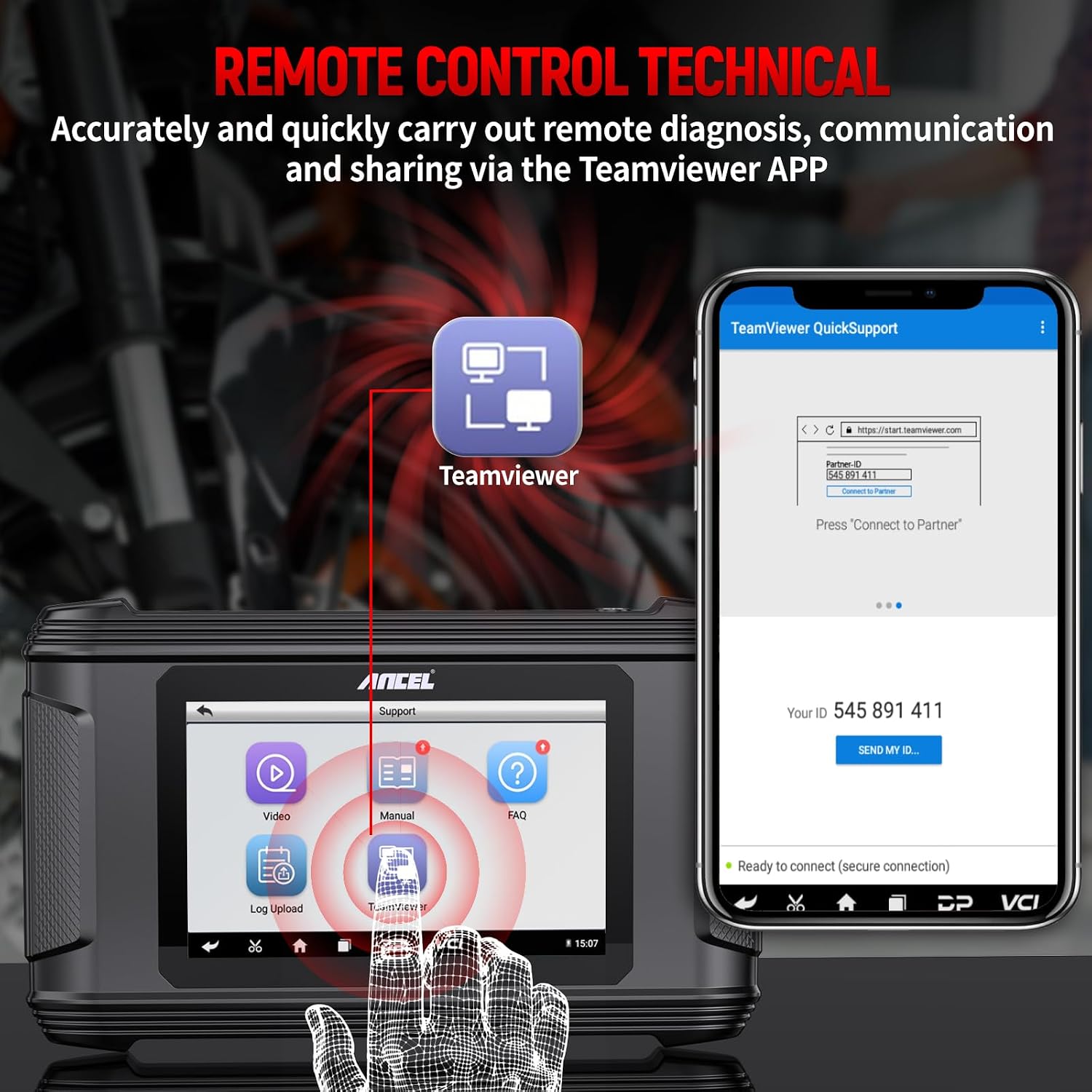
Figure 7.1: Remote Control Technical Support
8. Specifications
| Attribute | Value |
|---|---|
| Manufacturer | ANCEL |
| Item Weight | 4.95 pounds |
| Product Dimensions | 11.8 x 3.9 x 7.8 inches |
| Item Model Number | MT500 PRO |
| Batteries | 1 Lithium Ion batteries required (included) |
| Operating System | Android 5.1.1 |
| Display Resolution | 800x480 |
| Operating Temperature | 14℉ to 131℉ (-10℃ to 55℃) |
| Storage Temperature | -4℉ to 158℉ (-20℃ to 70℃) |
9. Warranty and Support
The ANCEL MT500 PRO comes with 1 year of free software updates. Optional annual updates are available thereafter. For any inquiries or technical assistance, please contact: toptool-service@outlook.com.
Related documentsMT500 PRO

Ask a question about this manual
Ask about setup, troubleshooting, compatibility, parts, safety, or missing instructions. Manuals+ will review the question and use this page’s manual context to help answer it.