
Introduction
Thank you for choosing the T-SUNUS Multicolored Solar Outdoor Spotlights. This manual provides essential information for the safe and efficient use of your new solar lights. These IP65 waterproof RGB garden lights are designed to illuminate outdoor spaces such as gardens, driveways, and garages, offering 6 vibrant color options and flexible installation.
Setup
Before first use, ensure the switch is turned ON and place the solar panel in direct sunlight for 6 to 8 hours to fully charge the battery.
Installation Options
Your T-SUNUS solar spotlights offer two primary installation methods:
- In-Ground Installation: Insert the stake into the ground in your desired location. Ensure the solar panel receives maximum sunlight.
- Wall-Mounted Installation: Use the provided screws to fix the spotlight to a wall or other vertical surface.

This image illustrates the two installation options: inserting the spotlights into the ground using stakes or mounting them on a wall with screws.
Adjusting the Solar Panel and Light Head
- The solar panel can be rotated 90° vertically (up and down) to optimize sunlight absorption.
- The light head can be rotated 270° to direct illumination precisely where needed.

This diagram provides detailed dimensions of the product components and demonstrates the adjustable angles for both the solar panel and the light head, ensuring optimal positioning for charging and illumination.
Operation
The T-SUNUS solar spotlights are designed for automatic operation, charging during the day and illuminating at night.
Power On/Off and Mode Selection
- To turn the device ON, press and hold the power button for 3 seconds.
- The spotlights feature two lighting modes:
- Color Cycling Mode: The lights will automatically cycle through multiple colors.
- Fixed Color Mode: While in color cycling mode, press the button once to select and fix the current color.
- The lights will automatically turn on at dusk and turn off at dawn.
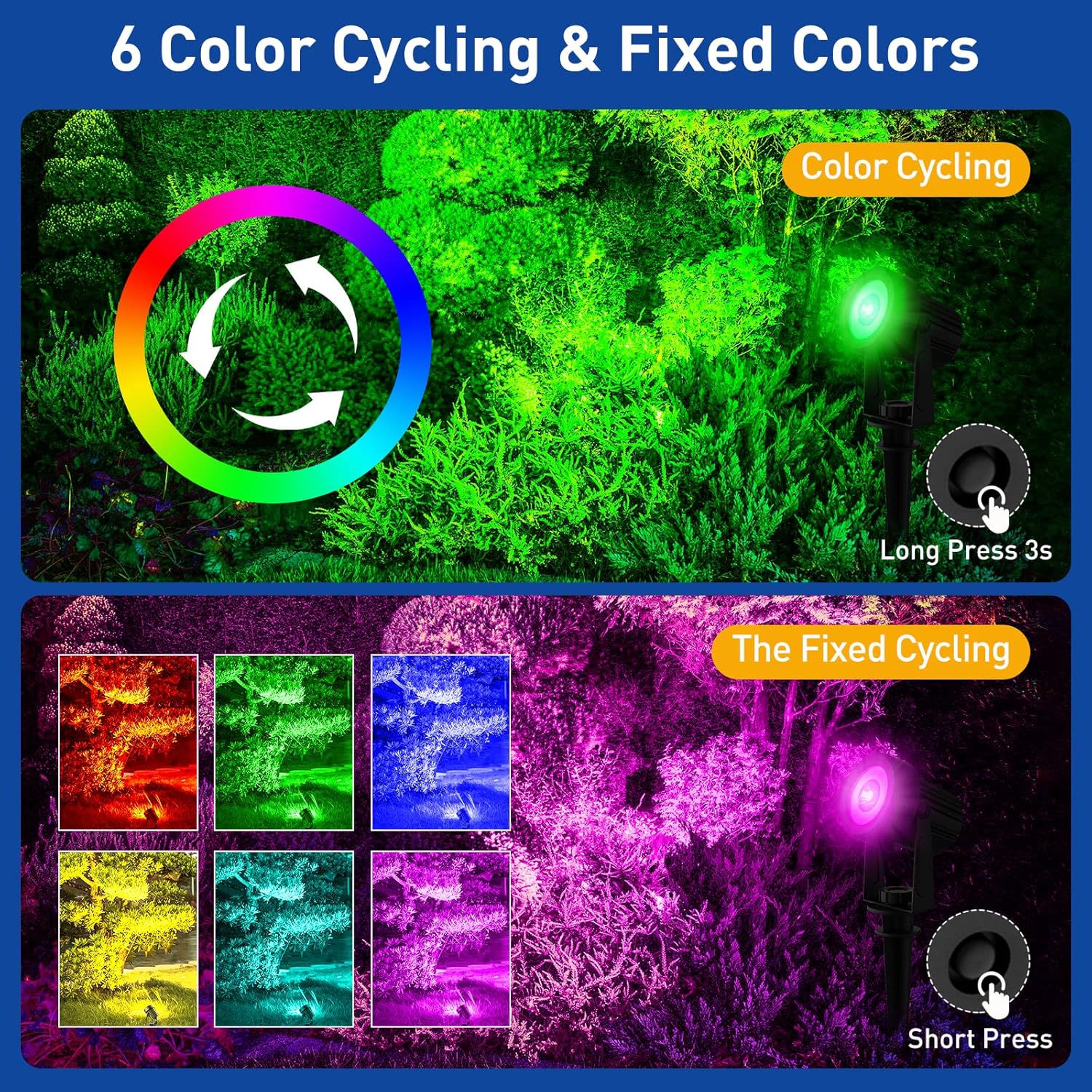
This image demonstrates how to switch between the color cycling mode (long press for 3 seconds) and fixed color mode (short press to select a specific color) for the solar spotlights.
Automatic Charging and Lighting
The integrated solar panel charges the internal battery during daylight hours. At night, the lights automatically activate, providing illumination. Ensure the solar panel is positioned to receive maximum direct sunlight throughout the day for optimal performance.

This image visually explains the automatic function of the solar spotlights: charging during the day and lighting up at night, showcasing the colorful illumination in a garden setting.
Maintenance
To ensure the longevity and optimal performance of your T-SUNUS solar spotlights, follow these simple maintenance guidelines:
- Clean Solar Panel: Regularly wipe the solar panel with a soft, damp cloth to remove dust, dirt, leaves, or snow. A clean panel ensures efficient charging.
- Clear Obstructions: Ensure no trees, bushes, or structures block direct sunlight from reaching the solar panel throughout the day.
- Inspect for Damage: Periodically check the lights and cables for any signs of wear or damage. The IP65 waterproof design protects against typical weather conditions, but extreme conditions or physical impact can cause damage.
- Battery Care: While the lithium-ion battery is designed for durability, prolonged periods of low sunlight or extreme temperatures can affect its lifespan. If storing the lights for an extended period, ensure they are fully charged first.

This image highlights the IP65 waterproof rating, indicating the product's resistance to water and its operational capability across a wide temperature range, from -20°C to 50°C, making it suitable for diverse outdoor environments.
Troubleshooting
If your T-SUNUS solar spotlights are not functioning as expected, please refer to the following common issues and solutions:
| Problem | Possible Cause | Solution |
|---|---|---|
| Lights do not turn on at night. |
|
|
| Lights illuminate for a short duration. |
|
|
| Lights are dim. |
|
|
Specifications
- Model Number: TS-S4205-4H-RGB-V2
- Brand: T-SUNUS
- Power Source: Solar Powered
- Light Type: LED
- Number of Bulbs: 4 (per pack)
- Light Color: Multicolored (RGB with 6 fixed colors and cycling mode)
- Wattage: 4 Watts
- Voltage: 5.6 Volts
- Luminous Efficiency: 200 Lumens
- Material: Plastic
- Waterproof Rating: IP65
- Control Method: Touch Button
- Battery: 1 Lithium-ion (included)
- Product Dimensions (L x W x H): 22 x 18 x 10 cm (8.66 x 7.09 x 3.94 inches)
- Item Weight: 1.04 Kilograms (2.29 lbs)
- Working Temperature Range: -20°C to 50°C
- Cable Length: 3 meters (for connecting solar panel to spotlights)
Warranty & Support
Specific warranty information for this product is not provided in this manual. For warranty details, technical support, or customer service inquiries, please refer to the product packaging or contact the retailer where the product was purchased. You may also visit the official T-SUNUS website for further assistance.