
1. Introduction
The Jinghao D590 is an ear-hook type hearing amplifier designed for ease of use and clear sound amplification. It features a high-sensitivity microphone to capture sounds, a signal processing circuit for clarity, and a high-performance speaker that amplifies ambient sounds up to approximately 20 times. This device offers clearer sound compared to many comparable models.
It includes three distinct modes (Standard, Indoor, Outdoor) to adapt to various listening environments and 6 levels of volume adjustment. The simple operation and ergonomic design make it suitable for users of all ages. The package includes four sizes of ear tips (XS, S, M, L) to ensure a comfortable and secure fit, along with a convenient storage case.
2. Package Contents
Before using your Jinghao D590, please ensure all items are present in the package:
- Jinghao D590 Hearing Amplifier (Pair)
- Charging Station
- USB Charging Cable
- Storage Case
- Ear Tips (8 pieces: 2x XS, 2x S, 2x M, 2x L)
- Cleaning Brush
- User Manual (Japanese)

Image: Contents of the Jinghao D590 package, including the hearing amplifiers, charging station, various ear tips, cleaning brush, and USB cable.
3. Setup and Charging
3.1 Initial Charging
The Jinghao D590 features a rechargeable battery, eliminating the need for frequent battery replacements. To charge the device:
- Connect the included USB charging cable to the charging station and a power source.
- Place the hearing amplifiers onto the charging station. Ensure they are correctly seated.
- An orange indicator light on the charging station signifies that charging has begun.
- Charging typically takes approximately 2 hours for a full charge. A green indicator light will illuminate when charging is complete.
A full charge provides approximately 20 hours of continuous use. Please note that actual usage time may vary depending on volume settings and environmental factors.

Image: Illustration of the Jinghao D590 charging station with hearing amplifiers. Orange light indicates charging in progress, green light indicates charging complete. Details on 20 hours operation and 2-hour charging time are also shown.
3.2 Selecting Ear Tips
The D590 comes with four sizes of ear tips (XS, S, M, L) to ensure optimal comfort and sound quality. Choose the size that provides a snug yet comfortable fit in your ear canal to prevent sound leakage and maximize amplification.
3.3 Wearing the Device
Follow these steps to properly wear your Jinghao D590 hearing amplifier:
- Prepare the Earpiece: When attaching, flip the flared part of the earpiece inside out. Push the attachment hole part into the attachment part of the earphone.
- Position the Device: Place the earpiece into your ear canal and rest the main unit behind your ear.
- Insert the Receiver Tube: Gently push the receiver tube further into your ear canal until it feels secure.

Image: Step-by-step visual guide on how to properly attach the earpiece, place the hearing amplifier behind the ear, and insert the receiver tube into the ear canal.

Image: Display of the four different ear tip sizes (S, M, L, XL) provided with the Jinghao D590, illustrating how they fit into the ear for comfortable wear.
4. Operating Instructions
The Jinghao D590 features large, easy-to-access buttons for volume control, mode switching, and power on/off, allowing for adjustments even while wearing the device.
4.1 Power On/Off
Locate the power button on the device. Press and hold to turn the device on or off.
4.2 Volume Adjustment
The device offers 6 levels of volume adjustment. Use the '+' and '-' buttons to increase or decrease the sound amplification to your preferred level. The device includes an automatic volume memory function, which restores the last used volume setting even after powering off or charging, preventing sudden loud sounds.
4.3 Mode Switching
The D590 provides three distinct listening modes to optimize sound clarity in different environments:
- Standard Mode: Suitable for general environments, facilitating smooth conversations.
- Indoor Mode: Designed for indoor settings, such as watching TV, to reduce background noise.
- Outdoor Mode: Optimizes sound for outdoor environments, making conversations clearer amidst ambient sounds.
Press the 'M' (Mode) button to cycle through these modes. The device will emit a 'beep' sound to indicate a mode change.
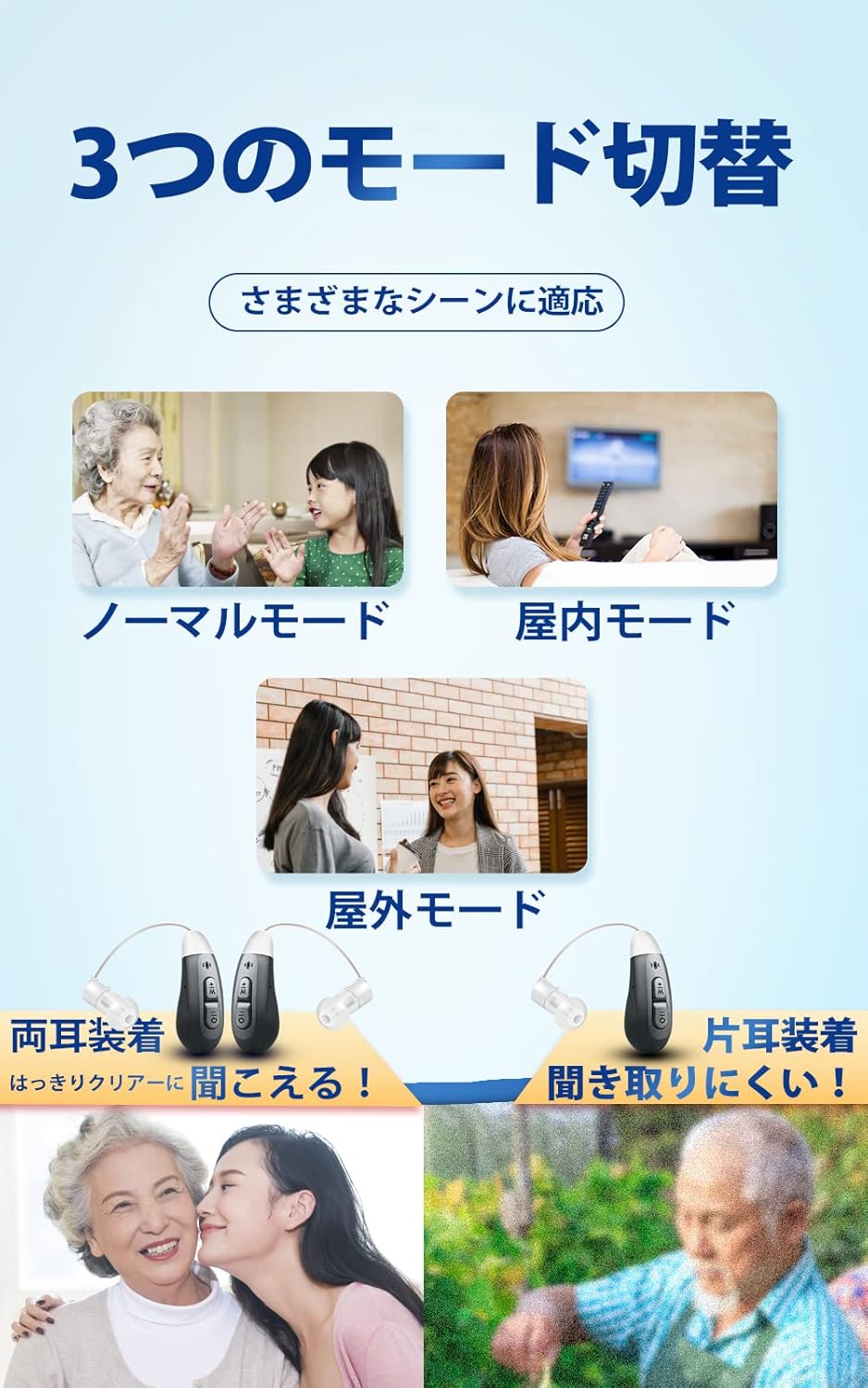
Image: Visual representation of the three operating modes (Standard, Indoor, Outdoor) for the Jinghao D590, showing different scenarios where each mode is beneficial.
4.4 Noise Reduction and Feedback Suppression
The D590 incorporates a mechanism to reduce ambient noise and suppress unpleasant feedback (squealing) and sudden loud noises, which are common issues with some in-ear devices. This design aims to provide a more comfortable listening experience and facilitate clear conversations.

Image: Diagram illustrating the noise-canceling function of the Jinghao D590, showing sound waves before and after noise reduction, and highlighting the volume adjustment and mode buttons.
5. Maintenance
Regular cleaning and proper care will extend the lifespan and maintain the performance of your Jinghao D590 hearing amplifier.
- Cleaning the Device: Use the provided cleaning brush to gently remove any earwax or debris from the earpiece and microphone port.
- Wiping the Body: Use a soft, dry cloth to wipe the main body of the amplifier. Do not use liquids or abrasive cleaners.
- Storage: When not in use, store the device in its charging station or the included storage case to protect it from dust and damage.
- Moisture Protection: The device has an IPX5 rating for sweat and water resistance, offering protection against splashes. However, avoid submerging it in water.
6. Troubleshooting
If you encounter issues with your Jinghao D590, please refer to the following common problems and solutions:
| Problem | Possible Cause | Solution |
|---|---|---|
| No sound or low sound | Low battery, clogged earpiece, incorrect volume setting, device off. | Charge the device, clean the earpiece and microphone, increase volume, turn on the device. |
| Feedback/Whistling sound | Earpiece not properly sealed, volume too high, earwax buildup. | Ensure earpiece fits snugly, reduce volume, clean ear canal. |
| Sound is distorted or unclear | Clogged earpiece/microphone, incorrect mode, low battery. | Clean the device, switch modes, charge the device. |
| Device does not charge | Charging cable/adapter faulty, device not properly seated in charger. | Check cable/adapter, ensure proper placement in charging station. |
| Discomfort or pain in ear | Incorrect earpiece size, improper insertion. | Try a different size ear tip, re-insert the device carefully. If discomfort persists, discontinue use and consult a professional. |
If the problem persists after trying these solutions, please contact customer support.
7. Specifications
| Feature | Specification |
|---|---|
| Model Number | D590 |
| Brand | Jinghao |
| Product Weight | 210 g (total package) |
| Package Dimensions | 10.9 x 10.8 x 6.9 cm |
| Battery Type | Lithium Ion (1 included) |
| Charging Time | Approx. 2 hours |
| Continuous Use Time | Approx. 20 hours (fully charged) |
| Color | Gray |
| Volume Levels | 6 levels |
| Operating Modes | Standard, Indoor, Outdoor |
| Water Resistance | IPX5 (sweat and splash resistant) |
8. Warranty and Support
Information regarding product warranty and specific customer support contact details is not available in the provided data. Please refer to the product packaging or the seller's website for warranty terms and customer service contact information.


