
1. Introduction
This manual provides comprehensive instructions for the WIWU SW01 Pro Series 8 Smartwatch. It covers essential information regarding product features, setup, operation, maintenance, and troubleshooting. Please read this manual thoroughly before using your smartwatch to ensure proper function and longevity.
2. Product Overview
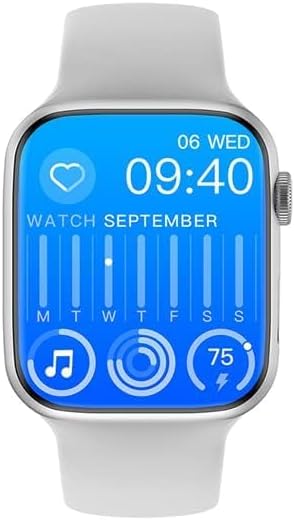
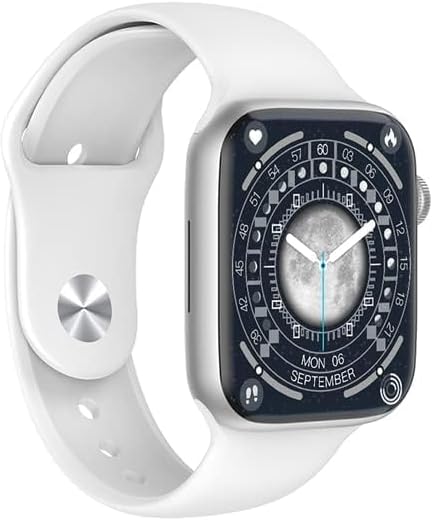
The WIWU SW01 Pro Series 8 Smartwatch is designed for durability and functionality, featuring a 1.95-inch HD IPS display, IP68 water resistance, and Bluetooth 5.0 connectivity. It includes various sports modes and smart assistant capabilities.


3. Setup
3.1 Initial Charging
Before first use, fully charge the smartwatch. Connect the provided wireless charger to a power source and place the smartwatch on it. A full charge typically takes approximately 2 hours. The battery capacity is 270 mAh.
3.2 Power On/Off
- To Power On: Press and hold the side button until the screen illuminates.
- To Power Off: Press and hold the side button, then select the 'Power Off' option on the screen.
3.3 App Installation and Pairing
- Download the App: Search for the companion fitness tracker application on your smartphone's app store (compatible with all Android smartphones).
- Enable Bluetooth: Ensure Bluetooth 5.0 is enabled on your smartphone.
- Pairing: Open the app, follow the on-screen instructions to find and connect to your WIWU SW01 Pro Smartwatch. Confirm the pairing request on both your phone and the smartwatch.
4. Operating Instructions
4.1 Basic Navigation
- Touch Screen: Swipe left, right, up, or down to navigate through menus and features. Tap to select items.
- Side Button: Press to return to the home screen or wake the device. Press and hold for power options or to access the voice assistant.
4.2 Key Features
- Long Battery Life: Enjoy up to 5 days of normal use, or up to 4 days with intensive use, on a single full charge.
- Water Resistance (IP68): The smartwatch is water-resistant up to 1.5 meters for 30 minutes, making it suitable for activities like swimming and diving.
- Sports Modes: Utilize multiple sports modes to track real-time data such as heart rate, movement speed, and calories burned during your workouts.
- Smart Assistant: Receive incoming text messages and Bluetooth calls directly on your watch. Control music playback from your wrist.
5. Maintenance
5.1 Cleaning
Regularly clean your smartwatch and strap with a soft, dry cloth. For stubborn dirt, a slightly damp cloth can be used. Avoid harsh chemicals or abrasive materials.
5.2 Water Resistance
The device has an IP68 water resistance rating. While it is suitable for swimming and shallow diving (up to 1.5 meters for 30 minutes), avoid exposing it to hot water, high-pressure water jets, or prolonged submersion beyond specified limits. Ensure the watch is dry before charging.
5.3 Charging
Always use the original wireless charger provided with your smartwatch. Do not use damaged chargers or cables. Ensure the charging contacts on the watch and charger are clean and dry before charging.
6. Troubleshooting
| Problem | Possible Cause | Solution |
|---|---|---|
| Smartwatch does not power on | Low battery | Charge the smartwatch for at least 30 minutes. |
| Cannot pair with smartphone | Bluetooth off, app not running, or watch not in pairing mode | Ensure Bluetooth is on, restart the app, and put the smartwatch in pairing mode via its settings. |
| Inaccurate activity tracking | Improper fit, software glitch | Ensure the watch is worn snugly on your wrist. Restart the watch and app. |
| Short battery life | Frequent use of power-intensive features, old battery | Reduce screen brightness, limit notifications, or disable continuous heart rate monitoring. If the issue persists, the battery may be degrading. |
| Sound not working (e.g., for calls) | Bluetooth audio connection issue, volume settings | Check Bluetooth audio settings on your phone and watch. Ensure watch volume is not muted. Re-pair the device. |
7. Specifications
| Feature | Detail |
|---|---|
| Brand | WIWU |
| Model Name | SW01 Pro |
| Model Number | 6936686409155 |
| Operating System | Android (Compatible) |
| Memory Storage Capacity | 192 MB |
| Installed RAM Memory | 128 MB |
| Special Feature | Wireless Charging |
| Battery Capacity | 270 mAh |
| Battery Life (Normal Use) | Up to 5 days |
| Battery Charge Time | 2 hours |
| Connectivity Technology | Bluetooth 5.0 |
| GPS | Without GPS |
| Screen Size | 1.95 inches |
| Display Type | IPS |
| Resolution | 320 x 380 |
| Water Resistance Level | IP68 (Waterproof) |
| Water Resistance Depth | 1.5 meters (for 30 minutes) |
| Sport Type | Diving, Swimming |
| Human Interface Input | Buttons |
| Control Type | Touch Control |
| Supported Application | Fitness Tracker |
| Compatible Devices | Smartphone (All Android smartphones) |
| Item Weight | 200 grams |
| Item Dimensions | 18.4 x 9.7 x 3.6 cm |
| Case Material | Aluminum |
| Band Material Type | Rubber |
| Color | Silver |
| Band Color | Grey |
8. Warranty Information
Based on the product specifications, this product is provided without a manufacturer's warranty. Please refer to your retailer's return policy for any issues within the return period.
9. Support
For further assistance or inquiries, please visit the official WIWU store or contact your point of purchase.