
Introduction
This manual provides essential information for the proper installation, operation, and maintenance of your THINKWARE iVolt Xtra External Dash Cam Battery Pack. Please read this manual thoroughly before using the product to ensure optimal performance and safety. The iVolt Xtra is designed to provide extended parking mode surveillance for your THINKWARE dash cam, safeguarding your vehicle even when the engine is off.

Front view of the THINKWARE iVolt Xtra External Dash Cam Battery Pack.
Setup and Installation
The THINKWARE iVolt Xtra requires a hardwiring cable for installation, which is sold separately. Ensure you have the correct hardwiring kit compatible with your vehicle and dash cam model before proceeding.
Compatibility
- Compatible with all THINKWARE Dash Cams.
- Can be safely hardwired into both electric and gasoline vehicles.
- Note: Hardwiring BAB-95 (iVolt Xtra) may not be possible in some electric vehicles, such as Teslas, due to the absence of a traditional fuse box.
Installation Overview
The iVolt Xtra connects to your vehicle's power source via the hardwiring cable and then provides power to your dash cam. This setup eliminates stress on your vehicle's main battery during parking mode operation.

Diagram illustrating the connection of the iVolt Xtra to the vehicle's fuse box and the dash cam.
For detailed, step-by-step installation instructions, please refer to the separate hardwiring kit manual or consult a professional installer.
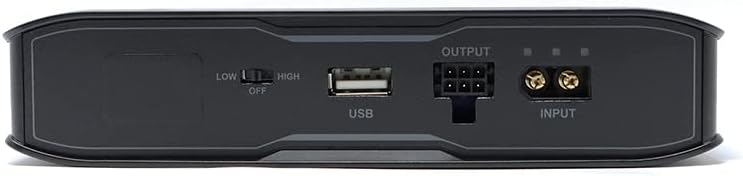
Rear panel of the iVolt Xtra, displaying input, output, and USB ports.
Operating Instructions
Charging the Battery Pack
The iVolt Xtra charges automatically while your vehicle's engine is running. It features a fast-charging capability:
- Fast Charging: Fully charges in as little as 50 minutes.
- Regular Charging: Fully charges in approximately 90 minutes.

The iVolt Xtra can be fully recharged quickly during driving.
Parking Mode Operation
Once charged, the iVolt Xtra powers your dash cam when your vehicle's ignition is off, enabling extended parking mode surveillance without draining your car's battery.
- Standard Parking Mode: Provides up to 27 hours of continuous power for your dash cam.
- Energy Saving Mode: Extends operation up to 960 hours (40 days) for prolonged parking surveillance.
The actual running time may vary depending on the dash cam model and environmental conditions.
Monitoring Battery Status
The iVolt Xtra includes built-in Bluetooth connectivity, allowing you to monitor its charge level and status via the iVolt Battery App on your smartphone.
Maintenance and Care
The iVolt Xtra is designed for durability and safety with advanced battery technology.
Battery Technology
The battery is constructed from Lithium Iron Phosphate (LiFePo4), which offers several advantages:
- Safety and Stability: LiFePo4 is inherently safer and more stable than traditional lithium-ion batteries.
- Extended Lifespan: Provides a lifespan approximately three times longer than lithium-ion and nickel-based batteries.
Protection Features
Equipped with a Protection Circuit Module (PCM), the iVolt Xtra safeguards against potential issues:
- Overcharge protection
- Over-discharge protection
- Protection against sudden input voltage changes
- Low voltage protection
General Care
- Avoid exposing the unit to extreme temperatures or direct sunlight for prolonged periods.
- Keep the unit dry and away from moisture.
- Do not attempt to open or modify the battery pack.
Troubleshooting
If you encounter issues with your iVolt Xtra, please review the following common solutions:
- No Power to Dash Cam: Ensure all connections (input from vehicle, output to dash cam) are securely fastened. Verify that the hardwiring cable is correctly installed in your vehicle's fuse box.
- Battery Not Charging: Confirm that your vehicle's ignition is on when attempting to charge. Check the hardwiring connections. If the issue persists, consult a professional for electrical system inspection.
- Short Parking Mode Duration: Ensure the battery is fully charged before entering parking mode. Environmental factors (extreme cold/heat) and dash cam power consumption settings can affect duration.
- App Connectivity Issues: Ensure Bluetooth is enabled on your smartphone and the iVolt Xtra. Try restarting both the app and your phone.
If problems persist after attempting these steps, please contact THINKWARE customer support.
Specifications
| Feature | Specification |
|---|---|
| Model Number | TWA-EXBH2 |
| Battery Capacity | 7500 mAh / 96 Wh |
| Battery Cell Composition | Lithium Iron Phosphate (LiFePo4) |
| Charging Time (Fast) | Approx. 50 minutes |
| Charging Time (Regular) | Approx. 90 minutes |
| Parking Mode Duration (Standard) | Up to 27 hours* |
| Parking Mode Duration (Energy Saving) | Up to 960 hours (40 days)* |
| Dimensions (Package) | 11.06 x 7.8 x 4.37 inches |
| Item Weight | 5.06 pounds |
| Manufacturer | Thinkware |
*Based on 2-channel dash cam in Motion & Detection Parking Mode. Charging and run time may vary depending on the dash cam model and the environment.
Warranty and Support
Warranty Information
THINKWARE products are covered by a limited warranty. Please refer to the official THINKWARE website or your product's packaging for specific warranty terms and conditions.
Further Assistance
For additional information, detailed diagrams, or technical support, please refer to the official user guide PDF or contact THINKWARE customer service.
- Official User Guide (PDF): Download Here
- THINKWARE Support: Visit the THINKWARE Store on Amazon or the official THINKWARE website for contact information.
