
1. Introduction
The PRUNUS J-150 is a versatile portable radio designed with a retro aesthetic, offering multiple listening options and power sources. It combines traditional AM/FM/SW radio functionality with modern features like Bluetooth connectivity and TF card/USB playback. Its compact size and various power options make it ideal for both indoor and outdoor use.

Image: Front view of the PRUNUS J-150 Portable Radio, showcasing its retro design, solar panel, and extended antenna.
2. Key Features
- Multiple Power Supply Options: USB charging, 2*D battery (not included), and a built-in solar panel for sustainable power.
- Portable Design: Lightweight (1.2 lb) with a convenient handle for easy transport. Dimensions: 6.7 x 3.7 x 4.2 inches.
- Excellent Radio Reception: Supports FM (88-108 MHz), AM (530-1710KHz), and Short Wave (5.9-18.0MHz) with a 13.7-inch telescopic antenna and DSP chip.
- Bluetooth 5.0 Connectivity: Wirelessly stream audio from smartphones, tablets, or other Bluetooth-enabled devices.
- MP3 Player Functionality: Supports playback from USB flash drives and TF/micro SD cards (up to 32GB).
- True Wireless Stereo (TWS): Connect two J-150 radios simultaneously for a stereo sound experience.
- Cell Phone Stand: Integrated stand to hold your phone while playing music or watching videos.
- Loud and Clear Speaker: Equipped with a deep bass diaphragm for immersive sound.

Image: The PRUNUS J-150 radio positioned outdoors, emphasizing its role as a source of pleasure and its suitability for various environments.
3. What's in the Box
Upon unboxing your PRUNUS J-150 Portable Radio, please ensure all the following components are present:
- PRUNUS J-150 Radio Unit
- USB Charging Cable
- Owner's Manual
Note: If the charging cable is not immediately visible, please check the battery compartment of the radio, as it may be stored there for shipping.
4. Setup
4.1 Initial Charging
Before first use, it is recommended to fully charge the internal 1200mAh rechargeable battery using the provided USB cable. Connect the USB cable to the DC 5V IN port on the radio and the other end to a USB power adapter (not included) or a computer USB port. The charging indicator lights will illuminate during charging and turn off when fully charged.
4.2 Battery Installation (Optional)
For extended use or as a backup power source, you can install two D-size batteries (not included) into the battery compartment located on the back of the radio. Ensure correct polarity when inserting the batteries.

Image: Illustrations of the three power supply methods: solar panel, USB charging, and D battery compartment.
5. Operating Instructions
5.1 Power On/Off and Volume Control
Turn the VOL knob clockwise to power on the radio and increase the volume. Turn it counter-clockwise to decrease the volume and power off the unit.
5.2 Mode Selection
Use the MUSIC/FM/AM/SW switch to select your desired mode: Music (for Bluetooth/TF/USB playback), FM, AM, or SW (Short Wave) radio.
5.3 Radio Tuning
Extend the telescopic antenna for optimal reception. Rotate the TUNING knob to scan for radio stations. The frequency scale will indicate the current band and approximate frequency.

Image: A user extending the radio's antenna, illustrating the enhanced signal reception.
5.4 Bluetooth Pairing
Switch the mode to MUSIC. The radio will enter Bluetooth pairing mode. On your device (smartphone, tablet), search for Bluetooth devices and select "PRUNUS J-150" to connect. A confirmation sound will indicate successful pairing.
5.5 TF Card / USB Playback
Insert a TF card or USB flash drive (with MP3 files, up to 32GB) into the respective slot. The radio will automatically switch to music playback mode. Use the PREV/REW, PAUSE/TWS, and NEXT/FFWD buttons to control playback.

Image: The radio providing music during an outdoor event, demonstrating its use for various audio sources.
5.6 True Wireless Stereo (TWS) Function
To use TWS, you need two PRUNUS J-150 radios. Power on both radios and switch them to Bluetooth mode. On one radio, long-press the PAUSE/TWS button until you hear a pairing sound. The two radios will connect to each other. Then, pair your device to one of the radios as described in section 5.4. Audio will now play in stereo through both units.
Image: Visual representation of two radios connected via TWS for stereo sound.
6. Power Supply Options
The PRUNUS J-150 offers three convenient ways to power the device, ensuring you never run out of listening time:
- USB Powered: The radio has a built-in 1200mAh rechargeable battery. Use the included USB cable to charge it via any standard USB power source (e.g., wall adapter, power bank, computer).
- D Battery Operated: For situations without access to electricity, the radio can be powered by two D-size batteries (not included). This provides a long standby time.
- Solar Panel Charge: The integrated solar panel (Size: 4.1 x 2.3 x 0.1 inches) allows for charging the internal battery using sunlight. This is particularly useful for outdoor activities and emergencies.

Image: Demonstrates the long battery life and various charging methods, including solar, D batteries, and USB.
7. Maintenance
To ensure the longevity and optimal performance of your PRUNUS J-150 radio, follow these maintenance guidelines:
- Cleaning: Wipe the radio with a soft, dry cloth. Do not use abrasive cleaners, waxes, or solvents as they may damage the finish.
- Storage: When not in use for extended periods, store the radio in a cool, dry place away from direct sunlight and extreme temperatures.
- Battery Care: If using D batteries, remove them if the radio will not be used for a long time to prevent leakage. For the internal rechargeable battery, it is advisable to fully charge it every few months to maintain battery health.
- Antenna Care: Handle the telescopic antenna gently to avoid bending or breaking it. Retract it when not in use or when transporting the radio.
8. Troubleshooting
| Problem | Possible Cause | Solution |
|---|---|---|
| No power / Radio does not turn on. | Battery is depleted or D batteries are not installed/dead. | Charge the internal battery via USB or solar. Install fresh D batteries with correct polarity. |
| Poor radio reception. | Antenna not extended, weak signal area, or interference. | Fully extend the telescopic antenna. Try moving the radio to a different location, away from electronic devices that may cause interference. |
| Bluetooth not connecting. | Radio not in Bluetooth mode, device too far, or already paired to another device. | Ensure the radio is switched to MUSIC mode. Keep your device within 33 feet (10 meters) of the radio. Disconnect from other Bluetooth devices if necessary. |
| TF card/USB not playing. | Incorrect file format, unsupported card/drive size, or card/drive not inserted correctly. | Ensure audio files are in MP3 format. Use TF cards/USB drives up to 32GB. Reinsert the card/drive firmly. |
| No sound from speaker. | Volume too low, muted, or faulty speaker. | Increase the volume using the VOL knob. Ensure the radio is not muted (if applicable). If problem persists, contact customer support. |
9. Specifications
| Feature | Detail |
|---|---|
| Model Number | J-150 |
| Product Dimensions | 6.7 x 3.7 x 4.2 inches |
| Item Weight | 1.19 pounds |
| Radio Bands Supported | AM (530-1710KHz), FM (88-108 MHz), SW (5.9-18.0MHz) |
| Connectivity Technology | Bluetooth 5.0 |
| Power Source | Solar Powered / Battery Powered (2*D batteries, not included) / USB Powered (Built-in 1200mAh rechargeable battery) |
| Antenna Length | 13.7 inches (telescopic) |
| Supported Media | TF Card, USB Flash Drive (MP3 files, up to 32GB) |
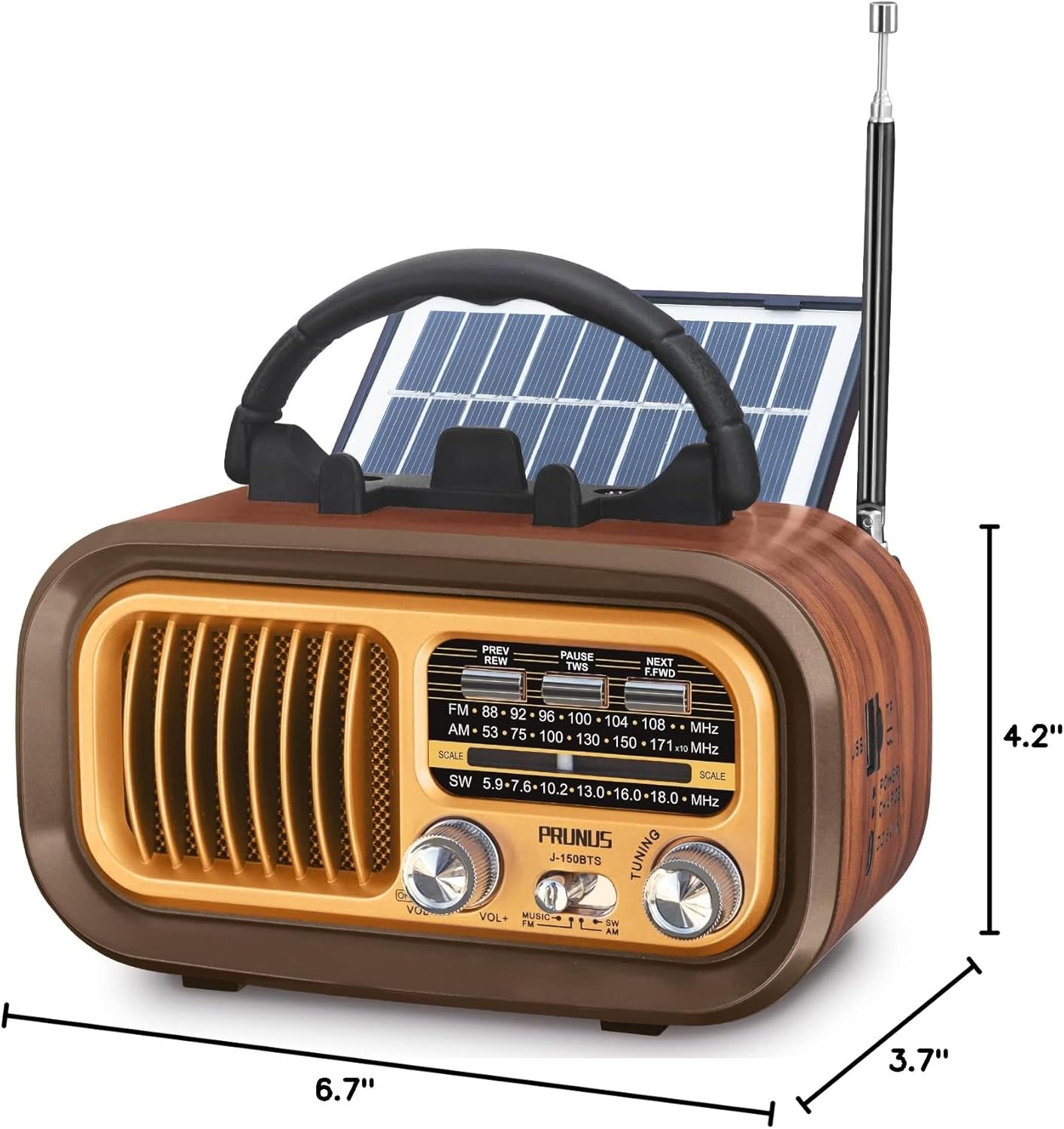
Image: Dimensions of the PRUNUS J-150 radio.
10. Warranty and Support
PRUNUS is committed to providing high-quality products and excellent customer service. As a trusted brand on Amazon since 2016, we value our customers and offer comprehensive support.
- Customer Support: For any questions, concerns, or technical assistance, please contact PRUNUS customer support. We offer 24/7 customer support to ensure your satisfaction.
- Warranty Information: Please refer to the product packaging or your purchase receipt for specific warranty details.
We hope you enjoy your PRUNUS J-150 Portable Radio!


