
1. Introduction
This manual provides essential instructions for the proper use and maintenance of your new CONTROL INN remote control for minisplit air conditioners. This remote is designed for compatibility with various models, including but not limited to Gamac, Japando, Mcquay, Chigo, Hoffwel, ZMARTECH, and specific models like ZH/LT-01, ZH/LW-01, ZH/LW-03, ZC/LW-01, ZH/LW-10, ZHLW07, KF-51GW/A, Epf261b, Epc261b, Zhf/lt-01, pf121b, epf120b, epc120b, epc121b, epf121b, epc121b, epf181b, epc181b, epf261b, epc261b, epf090b, epc090b, Egam242h/cgam242h, Egam122h, EMPRN12, Ejf121b, Ejf120b, Ejc120b, KFR-51GW, Smec1221x, EGAM362H.
Important Compatibility Note: This remote control is compatible only if your previous remote control was physically identical to the one shown in the images. If the physical appearance differs, this remote will not function with your device. Please verify this detail before use to ensure proper operation.
2. Setup
2.1 Battery Installation
- Locate the battery compartment cover on the back of the remote control.
- Slide the cover downwards to open the compartment.
- Insert two (2) AAA batteries, ensuring the positive (+) and negative (-) terminals align correctly with the markings inside the compartment.
- Slide the battery compartment cover back into place until it clicks securely.
No programming is required for this remote control. It is ready for use once batteries are installed.

Figure 1: Back of the remote control with battery compartment. Note the model number ZH/LT-01.
3. Operating Instructions
Point the remote control directly at the air conditioner's receiver. Ensure there are no obstructions between the remote and the unit.
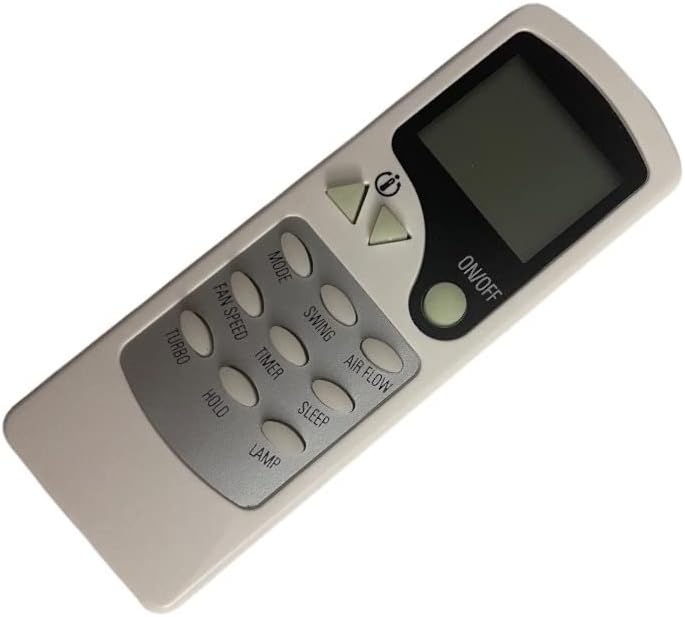
Figure 2: Front of the remote control showing the buttons and display.
3.1 Button Functions
- ON/OFF: Powers the air conditioner on or off.
- MODE: Cycles through operating modes (e.g., Cool, Heat, Fan, Dry, Auto).
- FAN SPEED: Adjusts the fan speed (e.g., Low, Medium, High, Auto).
- SWING: Controls the vertical louver movement for air distribution.
- AIR FLOW: Adjusts horizontal louver movement or specific airflow patterns.
- TURBO: Activates rapid cooling or heating for a short period.
- TIMER: Sets a timer for the unit to turn on or off automatically.
- HOLD: May function as a 'Follow Me' or 'I Feel' feature, sensing temperature at the remote's location.
- SLEEP: Activates sleep mode, which adjusts temperature and fan speed for comfortable sleep.
- LAMP: Controls the display light on the air conditioner unit.
- Temperature Up (▲): Increases the set temperature.
- Temperature Down (▼): Decreases the set temperature.
4. Maintenance
4.1 Battery Replacement
Replace batteries when the remote's operating range decreases or if the display becomes dim. Always replace both batteries simultaneously with new AAA batteries. Do not mix old and new batteries or different types of batteries.
4.2 Cleaning
Wipe the remote control with a soft, dry cloth. Do not use liquid cleaners, abrasive materials, or chemical solvents, as these can damage the remote's surface or internal components.
5. Troubleshooting
- Remote not responding:
- Check if the batteries are correctly inserted and have sufficient charge. Replace if necessary.
- Ensure there are no obstructions between the remote control and the air conditioner's receiver.
- Verify that the remote is pointed directly at the air conditioner.
- Air conditioner not performing desired function:
- Confirm that the remote control is compatible with your specific air conditioner model by checking its physical appearance against your original remote.
- Ensure the air conditioner unit itself is powered on and functioning correctly.
6. Specifications
- Brand: CONTROL INN
- Compatible Models: ZH/LW-03, ZC/LW-01, ZH/LT-01, and others as listed in the Introduction.
- Power Source: 2 x AAA Batteries (not included)
- Maximum Operating Range: Approximately 6 meters (20 feet)
- Weight: Approximately 200 grams (0.44 lbs)
- Connectivity Technology: Infrared (IR)
7. Warranty and Support
This product is designed for reliable performance. For any issues or support inquiries, please contact the seller or retailer from whom you purchased the remote control. Please retain your proof of purchase for warranty claims, if applicable.

