
Reli On RB100
RELiON RB100 Lithium-ion Battery User Manual
Model: RB100 | Brand: Reli On
1. Introduction
The RELiON RB100 is a versatile, lightweight, and powerful 12V 100Ah LiFePO4 (Lithium Iron Phosphate) battery. Designed as a group size 31 battery, it offers an optimal balance of size and capacity, making it suitable for a wide range of recreational and commercial applications, including marine, RV, solar, and off-grid systems.
Key Features:
- Waterproof (IP67 Rating): The battery is designed to completely repel dust and resist water ingress for up to 30 minutes when submerged at 1 meter.
- Constant Power Output: Unlike traditional lead-acid batteries, the RB100 provides full power throughout its discharge cycle, maintaining a stable voltage.
- Maintenance-Free Operation: This battery requires no watering or corrosion checks, offering a true plug-and-play experience.
- Lightweight Design: RELiON lithium batteries are significantly lighter than comparable lead-acid batteries, enhancing performance and agility in various applications.
- Extended Cycle Life: Expect up to 10 times longer life compared to lead-acid batteries, retaining 80% of rated capacity after 3,500 cycles.
2. Safety Information
Please read and understand all safety instructions before installing or operating the RELiON RB100 battery. Failure to follow these instructions may result in serious injury or damage to the battery and connected equipment.
WARNING: This product may contain materials cautioned by California Proposition 65. For more information, please visit www.P65Warnings.ca.gov.
- Always wear appropriate personal protective equipment (PPE), including safety glasses and insulated gloves, when handling batteries.
- Do not short-circuit the battery terminals.
- Do not disassemble, puncture, or damage the battery.
- Ensure proper ventilation when charging or discharging the battery.
- Use only compatible chargers designed for LiFePO4 batteries.
- Keep the battery away from open flames, heat sources, and flammable materials.
- In case of fire, use a Class D fire extinguisher. Water or foam may be ineffective.
3. Product Overview
The RELiON RB100 battery features a robust design with M8 terminals for secure connections. Its compact form factor allows for easy integration into various systems.

Figure 3.1: Angled view of the RELiON RB100 Lithium-ion Battery.
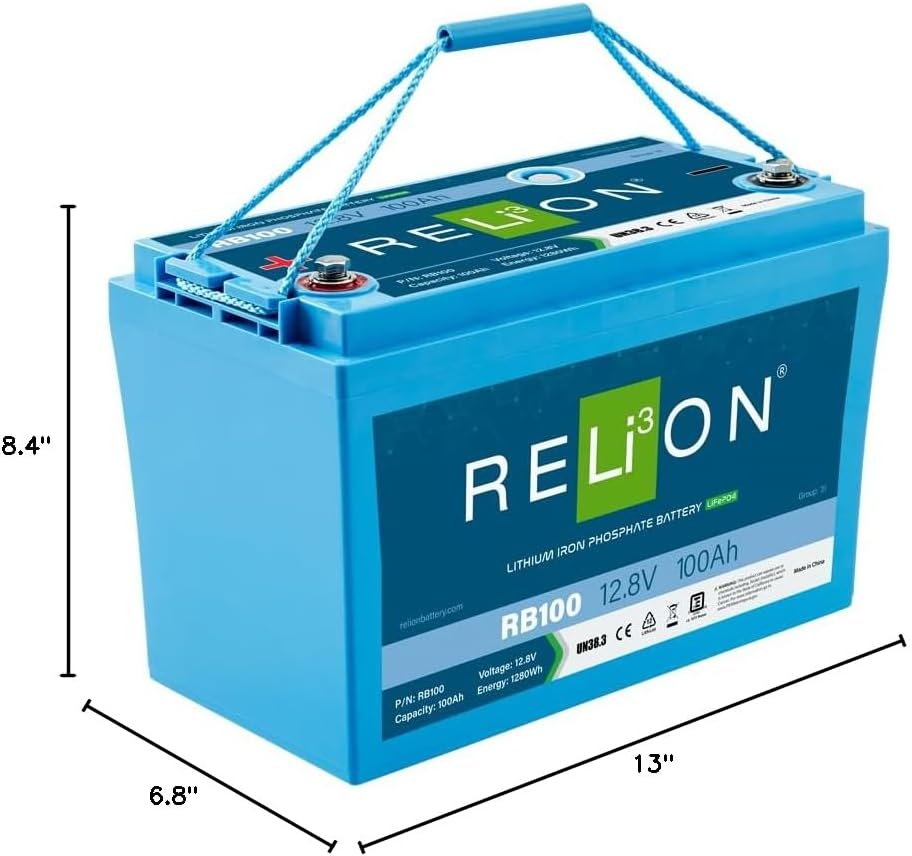
Figure 3.2: Dimensions of the RELiON RB100 battery: 13 inches (D) x 8.4 inches (W) x 6.8 inches (H).
Physical Characteristics:
- Dimensions: 13"D x 8.4"W x 6.8"H
- Weight: Approximately 26.3 pounds
- Terminal Type: M8
- Ingress Protection: IP67 (Waterproof)
4. Installation and Setup
Proper installation is crucial for the performance and longevity of your RELiON RB100 battery. Always ensure the battery is installed in a secure, well-ventilated location, protected from direct sunlight and extreme temperatures.
Installation Steps:
- Preparation: Before installation, ensure all power sources are disconnected and the area is clear of debris. Wear appropriate safety gear.
- Mounting: Secure the battery in an upright position using appropriate battery trays or straps. Ensure it is stable and cannot move during operation.
- Wiring: Connect the positive (+) terminal of the battery to the positive (+) terminal of your system, and the negative (-) terminal to the negative (-) terminal. Use appropriately sized cables and ensure all connections are tight and secure to prevent resistance and overheating.
- Multiple Batteries (if applicable): If connecting multiple RB100 batteries in series or parallel, refer to the detailed wiring diagrams in the official RELiON user manual for your specific configuration.
- Initial Charge: It is recommended to fully charge the battery before its first use.

Figure 4.1: Example of a RELiON RB100 battery being installed in a marine application.

Figure 4.2: Multiple RELiON RB100 batteries securely installed in a boat's battery compartment.
5. Operation
The RELiON RB100 battery is designed for efficient and reliable power delivery. Understanding its operational characteristics will help maximize its performance and lifespan.
Charging:
- Use a LiFePO4 compatible charger with appropriate voltage and current settings.
- The RB100 can be charged rapidly, typically within 1-5 hours depending on the charger's output.
- Partial charging is acceptable and does not harm the battery, unlike some other battery chemistries.
Discharging:
- The battery provides a consistent voltage output throughout its discharge cycle, ensuring stable power to your devices.
- Avoid deep discharge below the battery's recommended minimum voltage to protect its lifespan. The integrated Battery Management System (BMS) will typically protect against over-discharge.
Lithium vs. Lead-Acid Comparison:
The following table highlights the performance advantages of advanced lithium technology compared to traditional lead-acid batteries:

Figure 5.1: Comparison of key features between different battery types.
6. Maintenance
One of the significant advantages of the RELiON RB100 LiFePO4 battery is its minimal maintenance requirement. However, following these simple guidelines will ensure optimal performance and longevity.
- Cleaning: Periodically inspect the battery terminals for any signs of corrosion or dirt. Clean them with a dry cloth if necessary. Do not use abrasive cleaners or solvents.
- Terminal Connections: Ensure all terminal connections remain tight. Loose connections can lead to increased resistance and heat.
- Storage: If storing the battery for an extended period, ensure it is charged to approximately 50% state of charge and stored in a cool, dry place, away from direct sunlight and extreme temperatures.
- Inspection: Regularly inspect the battery casing for any physical damage. If damage is observed, contact RELiON support.
7. Troubleshooting
This section provides guidance for common issues you might encounter with your RELiON RB100 battery. For more complex problems, refer to the official user manual or contact RELiON technical support.
| Problem | Possible Cause | Solution |
|---|---|---|
| Battery not charging | Charger not compatible; Loose connections; Battery Management System (BMS) in protection mode (e.g., low voltage cutoff). | Ensure charger is LiFePO4 compatible and correctly connected. Check all cable connections for tightness. If BMS is in protection, try connecting to a compatible charger to attempt to wake it up. If issues persist, consult the full user manual or RELiON support. |
| No power output from battery | Battery discharged; BMS in protection mode (e.g., over-discharge, over-current); Loose or corroded terminals. | Check battery voltage. If low, attempt to charge. Verify all connections are secure and clean. If BMS protection is suspected, follow procedures in the full user manual or contact support. |
| Battery appears swollen or damaged | Physical damage; Internal fault. | Immediately disconnect the battery from all loads and chargers. Do NOT attempt to use or repair. Contact RELiON technical support for assistance and replacement options. |
8. Specifications
Detailed technical specifications for the RELiON RB100 Lithium-ion Battery.
| Attribute | Value |
|---|---|
| Model | RB100 (Legacy Series) |
| Nominal Voltage | 12.8V |
| Nominal Capacity | 100Ah |
| Energy | 1280Wh |
| Dimensions (D x W x H) | 13" x 8.4" x 6.8" |
| Weight | 26.3 pounds |
| Terminal Type | M8 |
| Internal Resistance | 30 Ohms |
| Cycle Life | 3,500 - 5,000 cycles (to 80% capacity) |
| Waterproof Rating | IP67 |
| Manufacturer | RELiON |
| UPC | 850025732093 |
9. Warranty and Support
RELiON batteries are backed by a comprehensive warranty, reflecting the manufacturer's confidence in their product's durability and performance.
- Warranty: The RELiON RB100 battery typically comes with a 10-year warranty. Please refer to the official RELiON warranty policy for full terms and conditions.
- Official User Manual: For detailed instructions, wiring diagrams, and advanced troubleshooting, please download the official User Manual PDF from the RELiON website or via the provided link: RELiON RB100 User Manual (PDF).
- Customer Support: For technical assistance, warranty claims, or any other inquiries, please contact RELiON customer support through their official website or authorized distributors.
Related documentsRB100


Ask a question about this manual
Ask about setup, troubleshooting, compatibility, parts, safety, or missing instructions. Manuals+ will review the question and use this page’s manual context to help answer it.