
1. Introduction
This manual provides essential instructions for the safe and effective use of your CS BATTERY BP-298 Replacement Battery. This high-capacity Li-ion battery is designed to replace original batteries in compatible two-way radio models, ensuring reliable power for your communication devices.
Compatible Radio Models:
- IC-V86
- IC-V80
- IC-T70A
- IC-T70E
- IC-F30
Compatible Battery Part Number: BP-298
2. Safety Information
Please read and understand all safety warnings before using this battery. Failure to follow these instructions may result in fire, electric shock, or injury.
- Do Not Disassemble: Never attempt to open, disassemble, or modify the battery pack.
- Avoid Short Circuits: Do not short-circuit the battery terminals. Keep metal objects away from the terminals.
- Fire Hazard: Do not dispose of the battery in fire or expose it to high temperatures.
- Temperature Range: Ensure charging occurs within the recommended temperature range of 40°F to 105°F (4°C to 40°C).
- Water Exposure: Do not expose the battery to water or moisture.
- Damage: If the battery appears damaged, swollen, or leaks, discontinue use immediately and dispose of it properly.
- Children: Keep batteries out of reach of children.
This battery features built-in protection against over-charge, over-discharge, over-heat, over-current, and short-circuit conditions, ensuring safe operation.
3. Product Overview
The CS BATTERY BP-298 is a high-quality Li-ion replacement battery designed for specific two-way radio models. It features a robust casing and a built-in belt clip for convenience.

Figure 1: Front and back view of the BP-298 battery, showing the label with model number and specifications on the front, and the belt clip and charging contacts on the back.

Figure 2: Close-up view of the battery's front label, displaying "Model No.: BP-298", "Replacement Battery", "Li-ion Rechargeable Battery Pack", "DC 7.4V", "16.28Wh", and "2200mAh".
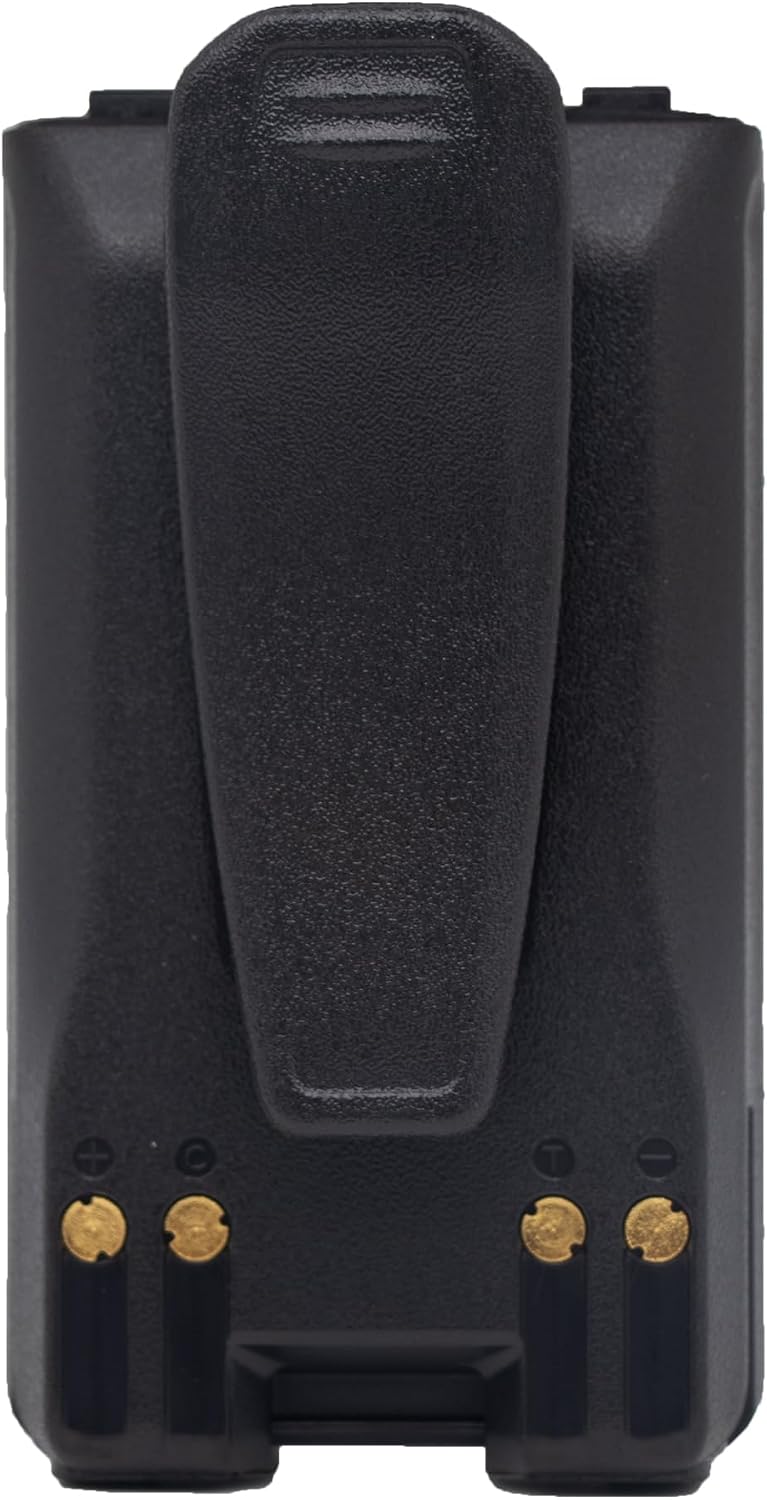
Figure 3: Rear view of the BP-298 battery, highlighting the integrated belt clip and the three metallic charging contacts at the bottom.
4. Setup and Installation
Follow these steps to install the replacement battery into your compatible two-way radio:
- Power Off Radio: Ensure your two-way radio is powered off before attempting battery installation or removal.
- Remove Old Battery: Locate the battery release latch on your radio (refer to your radio's manual if unsure). Slide the latch and carefully remove the existing battery.
- Align New Battery: Align the CS BATTERY BP-298 replacement battery with the battery compartment of your radio. Ensure the contacts on the battery align with the contacts in the radio.
- Insert Battery: Gently push the battery into the compartment until it clicks securely into place. Verify that the battery is firmly seated and does not wobble.
- Initial Charge: For optimal performance, fully charge the new battery before its first use.
5. Operating Instructions
To ensure maximum battery life and performance, follow these operating guidelines:
- Charging: Use only chargers compatible with your two-way radio and Li-ion batteries. Charge the battery when the radio indicates low power.
- First Use: It is recommended to fully charge the battery before its initial use to calibrate the battery meter and ensure full capacity.
- Temperature: Operate the battery within normal environmental temperatures. Extreme cold or heat can affect performance and lifespan.
- Storage: If storing the battery for an extended period, charge it to approximately 50% capacity and store it in a cool, dry place. Recharge every 3-6 months to prevent deep discharge.
6. Maintenance
Proper maintenance can extend the life of your battery:
- Cleaning: Periodically clean the battery contacts and the radio's battery terminals with a clean, dry cloth to ensure good electrical connection.
- Inspection: Regularly inspect the battery for any signs of physical damage, swelling, or leakage. Discontinue use if any issues are observed.
- Disposal: When the battery reaches the end of its life, dispose of it responsibly according to local regulations for Li-ion batteries. Do not discard with household waste.
7. Troubleshooting
If you experience issues with your replacement battery, consider the following:
- Reduced Operating Time: If your radio's operating time is significantly reduced, it may indicate that the battery needs replacement. Ensure the battery is fully charged.
- Battery Not Charging:
- Check that the battery is correctly seated in the radio or charger.
- Ensure the charger is functioning correctly and connected to a power source.
- Clean the battery and charger contacts.
- Radio Not Powering On:
- Verify the battery is fully charged and properly installed.
- Test with another known-good battery if available.
If problems persist, contact customer support for further assistance.
8. Specifications
| Specification | Detail |
|---|---|
| Model Number | BP-298 |
| Battery Type | Li-ion (Lithium Ion) |
| Voltage | 7.4V |
| Capacity | 2200mAh |
| Energy Rating | 16.28Wh |
| Dimensions | 110.50 x 58.16 x 33.10mm |
| Gross Weight | 310.5g / 10.95oz |
| Reusability | Rechargeable |
| Certifications | ROSH, CE, UL |
9. Warranty and Support
This product is manufactured by CS BATTERY. For specific warranty details, please refer to the warranty information provided at the time of purchase or contact your retailer.
If you have any questions or require technical assistance, please contact CS BATTERY customer support. When contacting support, please have your product model number (BP-298) and purchase information ready.
Note: No specific warranty period or direct contact information was provided in the product details. Please refer to your purchase documentation for warranty claims.


