
1. Introduction
This manual provides instructions for the Beyution TH-WL709H-RC replacement infrared remote control. This remote is designed to function with JVC 2.1 Sound Bar Audio Systems, specifically models TH-WL709H and TH-WL709S, without requiring any programming or setup.
The remote control operates using infrared technology and has a maximum effective range of 10 meters (approximately 33 feet).
2. Package Contents
- 1 x Beyution TH-WL709H-RC Replacement Remote Control
Note: AAA batteries are not included and must be purchased separately.
3. Setup and Battery Installation
The Beyution TH-WL709H-RC remote control is pre-programmed and does not require any additional setup or coding. Simply install the batteries to begin operation.
3.1 Battery Installation
- Locate the battery compartment on the back of the remote control.
- Slide the battery compartment cover downwards and remove it.
- Insert two (2) AAA batteries, ensuring the positive (+) and negative (-) terminals align correctly with the markings inside the compartment.
- Replace the battery compartment cover by sliding it upwards until it clicks into place.

Image 3.1: Rear view of the remote control showing the open battery compartment. The compartment is designed for two AAA batteries, with spring contacts visible for the negative terminals. The model number "TH-WL709H-RC" is printed on the back casing.
Note: Always use new alkaline batteries for optimal performance. Do not mix old and new batteries, or different types of batteries.
4. Operating Instructions
Point the remote control directly towards the infrared receiver on your JVC Sound Bar Audio System. Ensure there are no obstructions between the remote and the sound bar.
4.1 Remote Control Layout and Button Functions
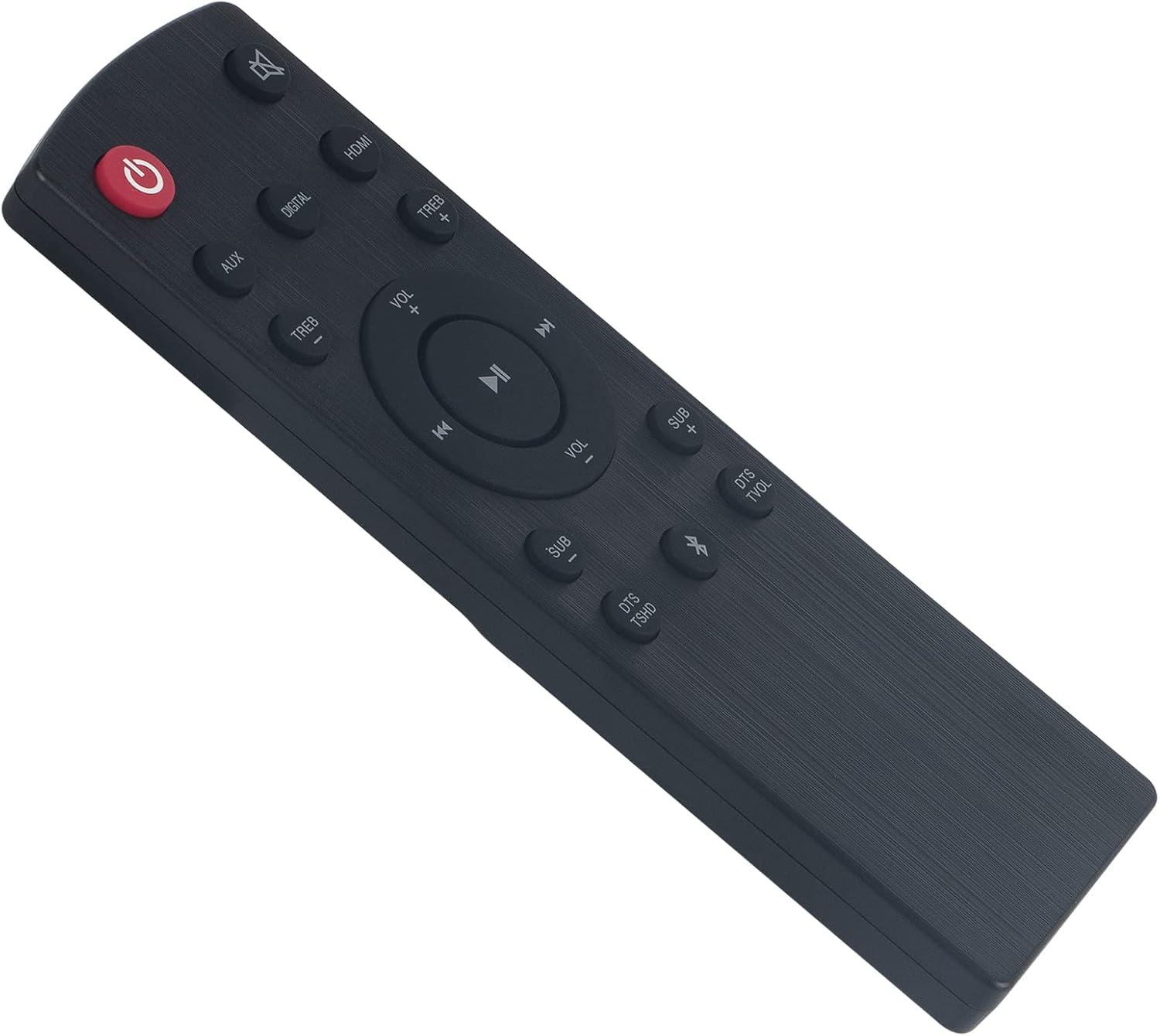
Image 4.1: Front view of the Beyution TH-WL709H-RC remote control, displaying all buttons. The remote is black with a brushed texture.

Image 4.2: Angled view of the remote control, highlighting the button layout and labels.
| Button | Function |
|---|---|
| Power (Ⓢ) | Turns the sound bar on or off. |
| Mute (🔇) | Mutes or unmutes the sound. |
| AUX | Selects the Auxiliary input source. |
| DIGITAL | Selects the Digital input source. |
| HDMI | Selects the HDMI input source. |
| TREB + / - | Adjusts the treble level (increase / decrease). |
| VOL + / - | Adjusts the main volume level (increase / decrease). |
| Playback Controls (|<, >||, >|) | Controls media playback (Previous Track, Play/Pause, Next Track). |
| SUB + / - | Adjusts the subwoofer level (increase / decrease). |
| DTS TSHD | Activates or deactivates DTS TruSurround HD mode. |
| Bluetooth (␦) | Selects the Bluetooth input source or initiates pairing. |
| DTS TVOL | Activates or deactivates DTS TruVolume mode. |
5. Maintenance
5.1 Cleaning
To clean the remote control, wipe it with a soft, dry cloth. Do not use liquid cleaners, abrasive pads, or chemical solvents, as these may damage the surface or internal components.
5.2 Battery Replacement
Replace batteries when the remote control's response becomes sluggish or stops functioning. Follow the battery installation steps outlined in Section 3.1. Dispose of used batteries according to local regulations.
5.3 Storage
Store the remote control in a cool, dry place away from direct sunlight and extreme temperatures. If the remote will not be used for an extended period, it is recommended to remove the batteries to prevent leakage.
6. Troubleshooting
- Remote not responding:
- Check if the batteries are inserted correctly with the correct polarity.
- Replace old batteries with new AAA alkaline batteries.
- Ensure there are no obstructions between the remote control and the sound bar's infrared receiver.
- Confirm you are within the operating range of 10 meters.
- Limited operating range:
- Ensure batteries are fresh.
- Minimize sources of infrared interference (e.g., direct sunlight, strong fluorescent lights).
- Remote functions incorrectly or partially:
- Verify that your sound bar model is one of the compatible models (TH-WL709H, TH-WL709S).
- If your device model is not listed, or if the remote is damaged or not working as expected, please contact customer support for assistance.
7. Specifications
| Feature | Detail |
|---|---|
| Model | TH-WL709H-RC |
| Connectivity Technology | Infrared |
| Material | ABS Plastic |
| Maximum Operating Distance | 10 meters (approx. 33 feet) |
| Power Source | 2 x AAA Batteries (not included) |
| Product Dimensions | 6.3 x 1.57 x 0.39 inches (16 x 4 x 1 cm) |
| Item Weight | 2.12 ounces (60 grams) |
| Compatible JVC Sound Bar Models | TH-WL709H, TH-WL709S |
| Programming Required | No |
8. Warranty and Support
8.1 Warranty Information
This Beyution remote control comes with a 6-month warranty period from the date of purchase. This warranty covers manufacturing defects and ensures the product functions as intended under normal use.
8.2 Customer Support
For any questions, concerns, or issues regarding your Beyution TH-WL709H-RC remote control, including if the remote is damaged or not working, please contact our customer service. We are committed to providing a satisfactory solution within 24 hours.
Please refer to your purchase documentation or the seller's contact information for specific support channels (e.g., email address).