
Introduction
Thank you for choosing the Ledwood Apollo S True Wireless Stereo (TWS) Earphones. This manual provides essential instructions for setting up, operating, and maintaining your earphones to ensure optimal performance and longevity. The Apollo S earphones feature a sleek design, sensitive touch controls, and a wireless charging case with a digital battery level display.
Package Contents
- Ledwood Apollo S TWS Earphones (Left and Right)
- Wireless Charging Case
- USB Charging Cable
- User Manual
Note: Please check all items are present upon unboxing.
Setup
1. Charging the Earphones and Case
Before first use, fully charge the earphones and the charging case. The charging case features a digital screen that displays the battery level percentage.
- Charging the Case: Connect the provided USB charging cable to the charging port on the case and to a USB power adapter (not included). The digital display will show the charging progress.
- Charging the Earphones: Place the earphones into their respective slots in the charging case. Ensure they are correctly seated. The earphones will automatically begin charging. The case's digital display may indicate the charging status of the earphones.
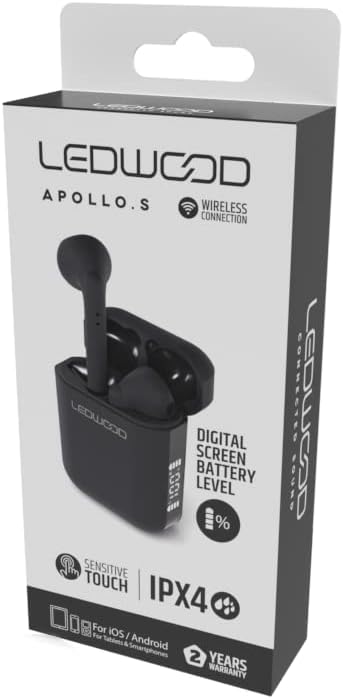
Image: Ledwood Apollo S TWS Earphones shown inside their open charging case. The earphones are black, and the case is also black with a sleek design. This image illustrates the product components.
2. Pairing with a Bluetooth Device
- Step 1: Ensure the earphones are charged. Open the charging case. The earphones will automatically enter pairing mode, indicated by a flashing LED light on one or both earphones.
- Step 2: On your mobile device (smartphone, tablet, etc.), go to the Bluetooth settings.
- Step 3: Turn on Bluetooth. Search for available devices.
- Step 4: Select "Ledwood Apollo S" from the list of available devices.
- Step 5: Once connected, the LED indicator on the earphones will stop flashing, and you will hear a confirmation tone.
- Note: The earphones will automatically reconnect to the last paired device when taken out of the case, if Bluetooth is enabled on the device.
Operating Instructions
Wearing the Earphones
Gently insert the earphones into your ears, ensuring a comfortable and secure fit. Adjust them slightly to achieve optimal sound quality and passive noise isolation.
Touch Controls
The Ledwood Apollo S earphones feature sensitive touch controls on each earbud. The functions may vary slightly depending on your device and operating system.
- Play/Pause: Single tap on either earbud.
- Next Track: Double tap on the right earbud.
- Previous Track: Double tap on the left earbud.
- Answer/End Call: Single tap on either earbud during an incoming call or active call.
- Reject Call: Press and hold either earbud for 2 seconds during an incoming call.
- Activate Voice Assistant: Triple tap on either earbud (e.g., Siri, Google Assistant).
- Power On/Off: Earphones power on automatically when removed from the case and power off when placed back into the case. Manual power on/off may be available by pressing and holding the touch area for an extended period (refer to specific device behavior).
Maintenance
- Cleaning: Use a soft, dry, lint-free cloth to clean the earphones and charging case. Do not use abrasive cleaners or solvents.
- Storage: When not in use, store the earphones in their charging case to protect them and keep them charged.
- Water Resistance: The earphones are rated IPX4, meaning they are resistant to splashing water from any direction. They are not waterproof and should not be submerged in water. Avoid exposure to heavy rain or sweat for extended periods.
- Temperature: Avoid exposing the earphones to extreme temperatures (hot or cold) or high humidity.
Troubleshooting
- Earphones not pairing:
- Ensure both earphones are charged.
- Turn off Bluetooth on your device and turn it back on.
- Forget "Ledwood Apollo S" from your device's Bluetooth list and try pairing again.
- Place earphones back in the case, close the lid, wait a few seconds, then open again to reset.
- No sound from one earbud:
- Ensure both earbuds are charged.
- Try placing both earbuds back in the case and taking them out again.
- Check your device's audio balance settings.
- Charging case not charging:
- Ensure the charging cable is securely connected to both the case and the power source.
- Try a different USB cable or power adapter.
- Touch controls not responding:
- Ensure your fingers are clean and dry.
- Restart your device and try again.
Specifications
| Brand | Ledwood |
| Model Name | APOLLO S (LD-APOLLO-S-BLK) |
| Form Factor | In Ear |
| Connectivity Technology | Wireless (Bluetooth) |
| Control Method | Touch |
| Water Resistance Rating | IPX4 |
| Built-In Media | Wireless Charging Case |
| Additional Features | Fast Charging |
| Material | Plastic |
| Colour | Black |
| Compatibility | For iOS / Android (Tablets & Smartphones) |
Warranty and Support
The Ledwood Apollo S TWS Earphones come with a 2-year warranty from the date of purchase. This warranty covers manufacturing defects. Please retain your proof of purchase for warranty claims.
For technical support or warranty inquiries, please contact your retailer or visit the official Ledwood website for customer service information. Ensure you have your model number (LD-APOLLO-S-BLK) and purchase details ready.


