
1. Introduction
This manual provides essential information for the proper use and maintenance of your ERJIGO CCA HM20 Hybrid In-Ear Monitors. Please read it thoroughly before using the product to ensure optimal performance and longevity.
2. Package Contents
- CCA HM20 In-Ear Monitors (Left and Right)
- Detachable 3.5mm Audio Cable with Microphone
- Assorted Silicone Ear Tips (various sizes)
- User Manual
3. Product Overview
The ERJIGO CCA HM20 In-Ear Monitors feature a 16-unit hybrid driver configuration, including a 3rd generation "XUN-7" dynamic driver and multiple balanced armature units. They are designed for high-fidelity audio reproduction with a focus on clear bass, natural vocals, and smooth treble extension.

Figure 1: ERJIGO CCA HM20 Hybrid In-Ear Monitors with detachable cable.
Key Features:
- Advanced Hybrid Driver System: Incorporates a 3rd generation "XUN-7" dynamic driver and multiple balanced armature units for detailed sound.
- 3D Printed Sound Duct Structure: Ensures precise sound delivery and optimal acoustic performance.
- High-End Military Grade Zinc Alloy Faceplate: Provides durability and a premium aesthetic.
- Professional Acoustic Tuning: Delivers a wide soundstage with rich details, powerful bass, clear vocals, and smooth treble.
- Ergonomic Design: Shaped for comfortable and secure wearing, fitting the ear canal.
- Detachable 0.75mm 2-Pin Cable: Allows for easy replacement or upgrade to a wireless Bluetooth module (sold separately).
- In-line Microphone and Controls: For high-definition calls and media playback management.

Figure 2: Visual representation of CCA HM20 key features.
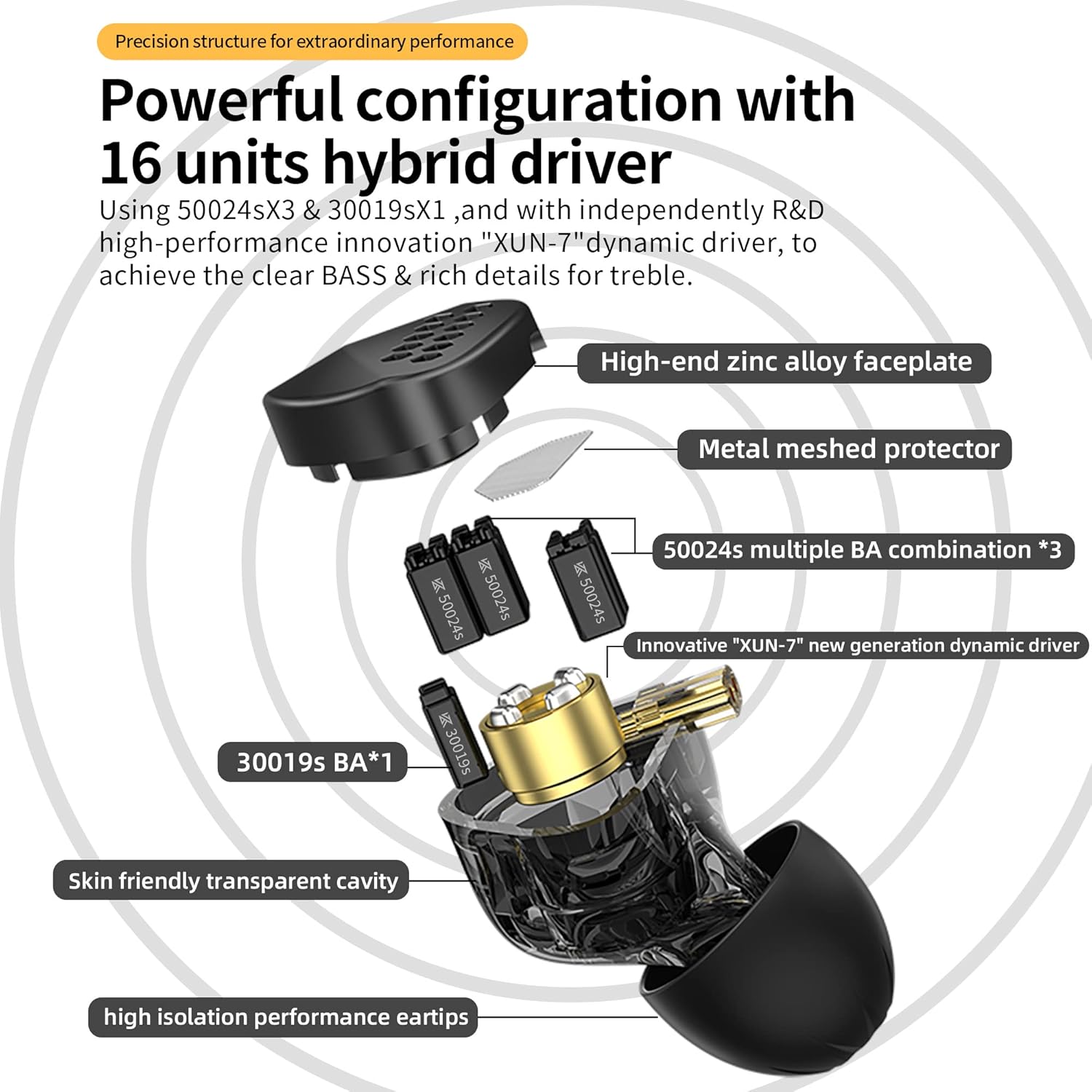
Figure 3: Exploded view illustrating the internal driver configuration of the HM20.
4. Setup
4.1 Attaching the Detachable Cable
- Identify the left (L) and right (R) earpieces and the corresponding connectors on the cable. The cable connectors are 0.75mm 2-pin type.
- Align the pins on the cable with the sockets on the earpieces. Ensure correct orientation to avoid damage.
- Gently push the cable connectors into the earpiece sockets until they are firmly seated. Do not force the connection.

Figure 4: Illustration of attaching the detachable cable and wearing the earphones.
4.2 Selecting and Installing Ear Tips
Choose the ear tips that provide the best seal and comfort for your ears. A proper seal is crucial for optimal sound quality and noise isolation.
- Gently remove the pre-installed ear tips from the earpieces.
- Select a pair of ear tips that fit snugly in your ear canal without causing discomfort.
- Push the chosen ear tips onto the nozzle of the earpieces until they are securely attached.
4.3 Wearing the Earphones
The HM20 earphones are designed to be worn with the cable looped over your ears for a secure and comfortable fit.
- Insert the earpieces into your ear canals.
- Gently loop the cable over the top of your ears, adjusting for comfort.
- Ensure a good seal by trying different ear tip sizes if necessary.
5. Operating Instructions
5.1 Connecting to a Device
Connect the 3.5mm jack of the cable to the audio output port of your smartphone, tablet, computer, or other compatible audio device.
5.2 Using the In-line Controls
The in-line remote and microphone allow for convenient control of music playback and calls.
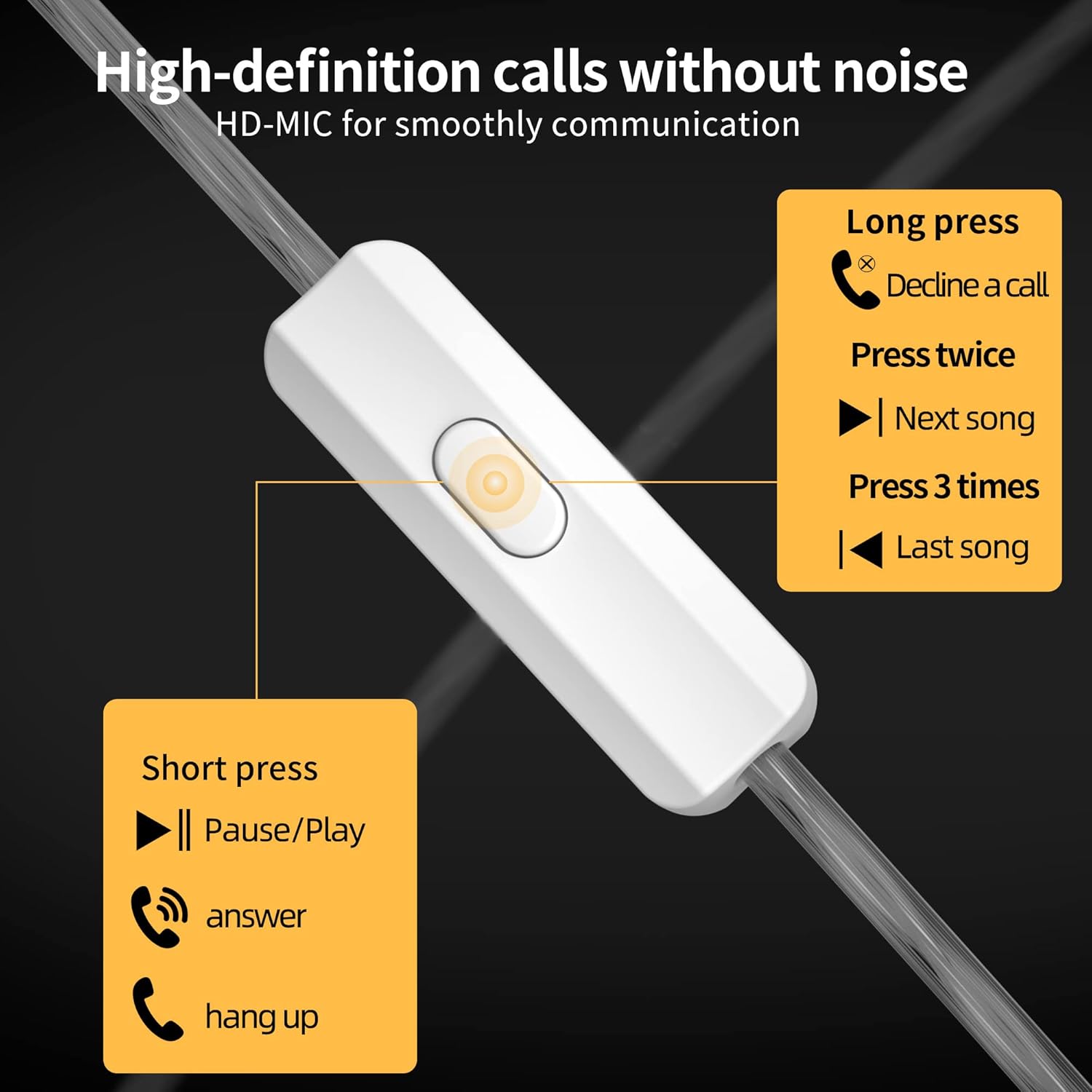
Figure 5: Diagram of in-line remote control functions.
- Short Press (1 time): Play/Pause music, Answer/Hang up a call.
- Press Twice (2 times): Next song.
- Press 3 times: Last song.
- Long Press: Decline a call.
5.3 Optional Bluetooth Connectivity
The detachable cable design allows for an upgrade to wireless functionality. A compatible Bluetooth earhook module (sold separately) can be purchased and connected to the 0.75mm 2-pin interface of the earphones.
6. Maintenance
6.1 Cleaning
- Regularly clean the ear tips with a soft, damp cloth to remove earwax and debris.
- Use a dry, soft cloth to wipe the earpieces and cable. Avoid using harsh chemicals or abrasive materials.
- Ensure the earpieces are dry before reattaching ear tips or using them.
6.2 Storage
- When not in use, store the earphones in a clean, dry place, preferably in a protective case, to prevent tangling and damage.
- Avoid exposing the earphones to extreme temperatures, humidity, or direct sunlight.
7. Troubleshooting
| Problem | Possible Cause | Solution |
|---|---|---|
| No sound or low volume | Incorrect connection, low device volume, dirty ear tips. | Ensure cable is fully connected. Increase device volume. Clean ear tips. Test with another audio source. |
| Sound distortion or poor quality | Loose cable connection, damaged cable, improper ear tip seal. | Check cable connections. Replace cable if damaged. Ensure ear tips provide a good seal. |
| Microphone not working | Loose cable connection, device incompatibility, damaged microphone. | Ensure cable is fully connected. Check device settings for microphone input. Test with another device. |
| Earphones fall out easily | Incorrect ear tip size, improper wearing. | Try different sizes of ear tips for a more secure fit. Ensure the cable is looped over your ears correctly. |
8. Specifications
| Feature | Detail |
|---|---|
| Model Name | HM20 In-ear Earbuds |
| Connectivity Technology | Wired (3.5 mm Jack) |
| Audio Driver Type | Hybrid Driver (16-Units) |
| Earpiece Shape | Rounded Tips |
| Special Feature | Lightweight, Microphone Included, Noise Isolation |
| Material | Metal (Zinc Alloy Faceplate) |
| Cable Feature | Detachable (0.75mm 2-Pin) |
| Control Type | Media Control, Remote |
| Item Weight | 2.88 ounces |
| Color | Black |
9. Safety Information
- Do not use the earphones at excessively high volumes for prolonged periods, as this may cause permanent hearing damage.
- Do not use the earphones in situations where inability to hear ambient sounds may pose a danger (e.g., driving, cycling, walking in traffic).
- Keep the earphones and accessories out of reach of children and pets to prevent accidents or damage.
- Avoid dropping or subjecting the earphones to strong impacts.
- Do not attempt to disassemble or modify the earphones, as this will void the warranty and may cause damage.
10. Warranty and Support
For warranty information and customer support, please refer to the documentation provided with your purchase or contact the seller directly. Keep your proof of purchase for any warranty claims.