
ODK B01XS011256SA
ODK 66" L-Shaped Computer Desk Instruction Manual
Model: B01XS011256SA
Introduction
This manual provides comprehensive instructions for the assembly, operation, and maintenance of your ODK 66-inch L-Shaped Computer Desk. Please read this manual thoroughly before beginning assembly or use to ensure proper setup and long-term durability of your product. Keep this manual for future reference.
Safety Information
- Ensure all components are present and undamaged before assembly. Do not use if any parts are missing or damaged.
- Assemble the desk on a soft, clean surface to prevent scratches.
- Do not overtighten screws during assembly to avoid stripping threads. Tighten to approximately 70% initially, then a final 1/4 turn after all components are aligned.
- Keep small parts away from children during assembly.
- Do not stand or sit on the desk.
- Distribute weight evenly across the desk surface.
- Regularly check and tighten all fasteners to ensure stability.
Package Contents
Your ODK L-Shaped Computer Desk package includes all necessary components for assembly, such as P2 MDF boards, metal frame parts, a PC stand, storage shelves, a monitor stand, and iron hooks. All required hardware (screws, adjustable leg pads) is also included.
Note: A detailed parts list with labels is typically provided within the product packaging. Please refer to that list to verify all components.
Setup and Assembly Instructions
Follow these general steps for assembling your ODK L-Shaped Computer Desk. For detailed, step-by-step diagrams, please refer to the assembly guide included in your product packaging.
- Unpack and Identify Parts: Carefully unpack all components and lay them out on a clean, soft surface. Identify each part using the provided labels and the parts list.
- Assemble the Frame: Begin by connecting the metal frame components. Ensure all connections are secure but do not fully tighten screws yet.
- Attach Desktop Panels: Secure the P2 MDF desktop panels to the assembled frame. The desk features finished sides on all planks, ensuring a consistent aesthetic.
- Install Storage Elements: Attach the PC stand, two-tier storage shelves, and monitor stand as indicated in your specific assembly guide.
- Attach Iron Hooks: Secure the two iron hooks to the designated locations on the desk frame.
- Final Tightening: Once all components are in place and aligned, gradually tighten all screws to approximately 70% tightness. After confirming alignment, give each screw an additional 1/4 turn to secure the desk firmly. Avoid overtightening.
- Adjust Leg Pads: Adjust the leg pads on the bottom of the desk to compensate for uneven floors.
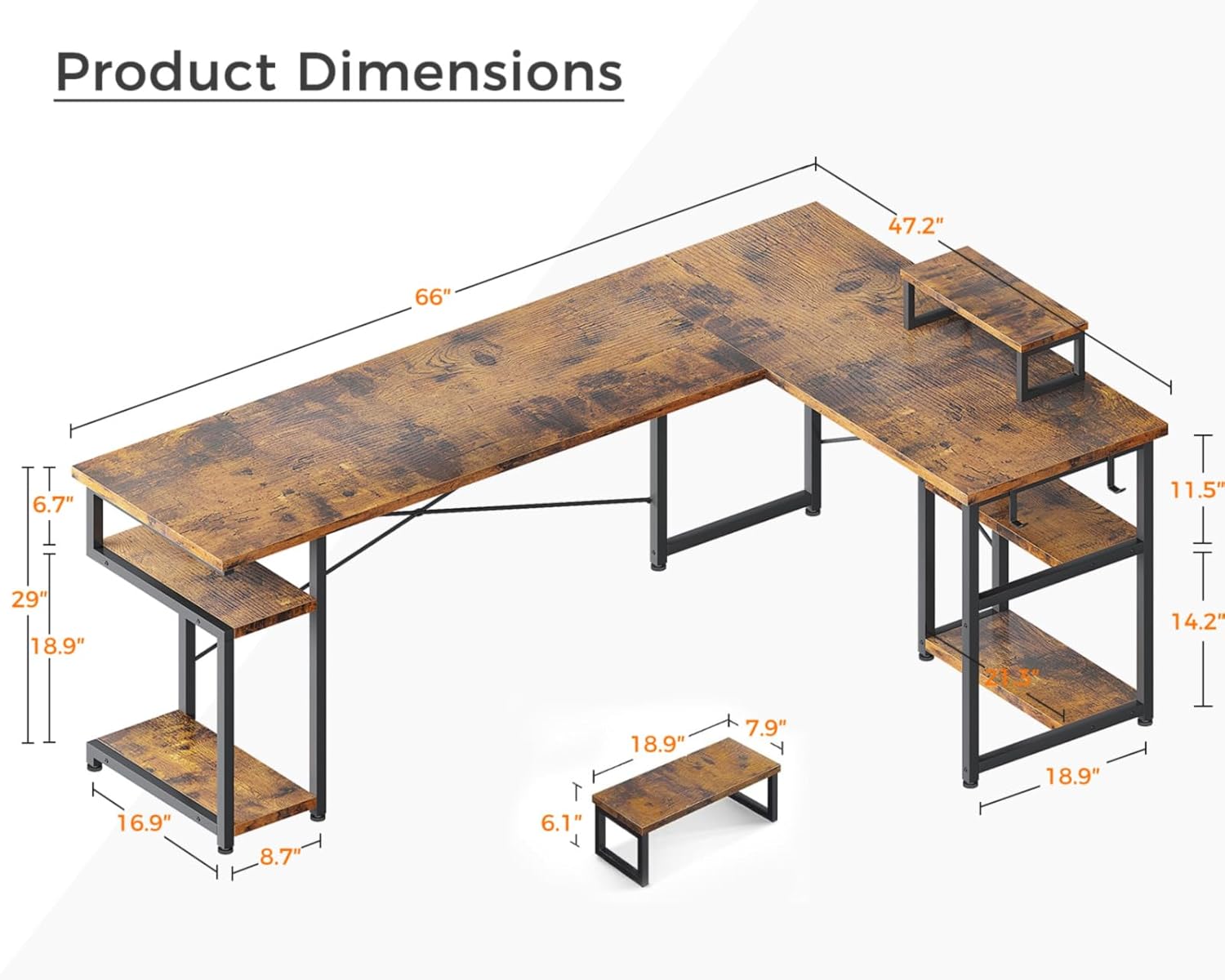
Image: Detailed product dimensions for the ODK 66-inch L-Shaped Computer Desk, showing overall length, width, height, and dimensions of the integrated shelves and monitor stand.

Image: Close-up view highlighting the movable monitor stand, two integrated iron hooks for accessories, and the high-quality, scratch-resistant desktop surface of the ODK L-Shaped Desk.

Image: Illustration of the ample storage shelves on both the left and right sections of the ODK L-Shaped Desk, designed to accommodate a PC tower and various office supplies or gaming accessories.
Operating Guidelines
The ODK L-Shaped Computer Desk is designed for versatile use in home offices, gaming setups, and writing environments. Its L-shaped design maximizes corner space, providing ample room for multiple monitors and accessories.
- Monitor Stand: Utilize the movable monitor stand to elevate your screen to an ergonomic viewing height, reducing neck and eye strain.
- Storage Shelves: The two-tier storage shelves and PC stand provide dedicated space for your computer tower, books, documents, and other office or gaming essentials.
- Iron Hooks: Use the integrated iron hooks to hang headphones, cables, or other accessories, keeping your workspace tidy.
- Weight Distribution: While the desk is sturdy, avoid placing excessively heavy items on one section. Distribute the weight of your equipment and belongings evenly across the desktop and shelves.
- Legroom: The 29.1-inch height from the floor to the desktop provides comfortable legroom for most users.
Maintenance
Proper maintenance will extend the life and appearance of your ODK L-Shaped Computer Desk.
- Cleaning: The desk surface is easily cleanable. Wipe regularly with a soft, damp cloth. Avoid harsh chemicals or abrasive cleaners that could damage the finish.
- Spills: The textured surface is designed to be anti-skidding and anti-scratching. In case of spills, wipe them immediately to prevent staining or damage.
- Fasteners: Periodically check all screws and bolts to ensure they remain tight. Retighten as necessary to maintain the desk's stability.
- Protection: While the desk is scratch-resistant, using coasters for drinks and pads under heavy or sharp objects is recommended to preserve the surface.
Troubleshooting
If you encounter any issues with your ODK L-Shaped Computer Desk, refer to the following common solutions:
- Desk Wobbles:
- Ensure all screws are securely tightened.
- Adjust the leg pads on the bottom of the desk to compensate for uneven flooring.
- Parts Not Fitting:
- Double-check the assembly instructions to ensure parts are oriented correctly.
- Do not force parts together. If a part does not fit, re-examine the steps and part identification.
- Missing or Damaged Parts:
- If any parts are missing or damaged upon arrival, contact ODK customer service immediately for assistance.
For further assistance, please contact ODK customer service.
Specifications
| Brand | ODK |
| Model Number | B01XS011256SA |
| Shape | L-Shape |
| Desk Design | Computer Desk |
| Product Dimensions (D x W x H) | 47.24"D x 66.14"W x 29.53"H |
| Color | Vintage |
| Style | Vintage |
| Base Material | Alloy Steel |
| Top Material Type | Engineered Wood, Metal |
| Finish Type | Wooden |
| Special Features | Monitor Stand, Scratch Resistant |
| Recommended Uses | Gaming, Working, Writing |
| Item Weight | 59 Pounds |
| Required Assembly | Yes |
Warranty and Support
ODK is committed to customer satisfaction. If you encounter any issues regarding product quality or experience problems during use, please contact ODK customer service. Easy and fast replacement is guaranteed for eligible issues.
For more information or to contact support, please visit the official ODK store or contact your retailer.
Related documentsB01XS011256SA


Ask a question about this manual
Ask about setup, troubleshooting, compatibility, parts, safety, or missing instructions. Manuals+ will review the question and use this page’s manual context to help answer it.