
1. Introduction
The Arcchio Dakari LED outdoor wall light is a modern, dimmable smart home lighting solution designed for exterior use. Crafted from durable aluminum with a dark gray finish, this fixture integrates seamlessly into contemporary outdoor spaces. It features smart control capabilities via WiFi and the Tuya App, allowing for adjustable brightness and light color, along with a convenient memory function.
This manual provides essential information for the safe installation, operation, and maintenance of your Arcchio Dakari LED outdoor wall light.

Image: The Arcchio Dakari LED outdoor wall light mounted on an exterior wall, illuminated with a warm glow.
2. Safety Information
Please read all safety instructions carefully before installation and operation. Failure to follow these instructions may result in electric shock, fire, or other hazards.
- Electrical Safety: Installation must be performed by a qualified electrician in accordance with local electrical codes and regulations. Ensure the power supply is disconnected before any installation, maintenance, or repair work.
- Voltage: This product operates on 230 Volts. Verify your power supply matches this requirement.
- IP54 Rating: The fixture has an IP54 protection rating, meaning it is protected against dust ingress and splashing water from any direction. While suitable for outdoor use, avoid direct high-pressure water jets.
- Integrated LED: The LED light source is integrated and not user-replaceable. Do not attempt to disassemble the light source.
- Operating Environment: Designed for outdoor use. Ensure the mounting surface is stable and can support the weight of the fixture.
3. What's Included
Upon unpacking, please verify that all components are present and undamaged:
- Arcchio Dakari LED Outdoor Wall Light fixture (with integrated LED light source)
- Mounting hardware (screws, wall plugs)
- User Manual (this document)

Image: Exploded view of the light, showing the main cylindrical body and the separate mounting base.
4. Setup & Installation
Important: Ensure the main power supply is switched off at the circuit breaker before beginning installation.
- Prepare the Mounting Location: Choose a suitable outdoor location on a solid wall. Consider the light distribution and aesthetic placement.
- Mark Drilling Points: Detach the mounting bracket from the light fixture. Hold the bracket against the wall at the desired installation height and mark the drilling points.
- Drill Holes: Drill holes at the marked points using an appropriate drill bit for your wall material. Insert wall plugs if necessary.
- Secure Mounting Bracket: Fasten the mounting bracket to the wall using the provided screws. Ensure it is securely attached.
- Electrical Connection: Connect the household electrical wires to the terminals on the light fixture. Ensure correct polarity (Live, Neutral, Earth). All connections must be secure and insulated.
- Attach Fixture: Carefully align the light fixture with the mounting bracket and secure it. Ensure all seals are properly seated to maintain the IP54 rating.
- Restore Power: Once installation is complete and all connections are secure, restore power at the circuit breaker.

Image: Dimensional drawing of the light, indicating a height of 23.9 cm, a width of 11 cm, and an installation depth of 17.6 cm.
5. Operating Instructions
The Arcchio Dakari LED outdoor wall light is a smart fixture controlled via the Tuya App.
5.1 Initial Power On
After successful installation and restoring power, the light will turn on. It may enter a pairing mode if not previously configured.
5.2 Tuya App Connection
- Download App: Download the "Tuya Smart" or "Smart Life" app from your smartphone's app store (iOS or Android).
- Register/Login: Create an account or log in to your existing account.
- Add Device: In the app, tap "+" to add a new device. Select "Lighting" or "Light Source (Wi-Fi)".
- Pairing Mode: Follow the app's instructions to put the light into pairing mode (often involves cycling power on/off a few times). The light will typically flash to indicate pairing mode.
- Connect to Wi-Fi: Enter your Wi-Fi network details (2.4GHz network required).
- Control: Once connected, you can control the light's functions directly from the app.
5.3 Smart Functions via Tuya App
- Brightness Adjustment: Use the dimmer slider in the app to adjust the light intensity from 1% to 100%.
- Color Temperature Control: Adjust the light color from warm white (e.g., 2700K) to cool white (e.g., 6500K) to suit your preference or mood.
- Memory Function: The light retains its last brightness and color temperature setting when turned off and on again.
- Scheduling: Set schedules for the light to turn on/off automatically at specific times.
- Scene Modes: Utilize pre-set scene modes or create custom scenes for different occasions.
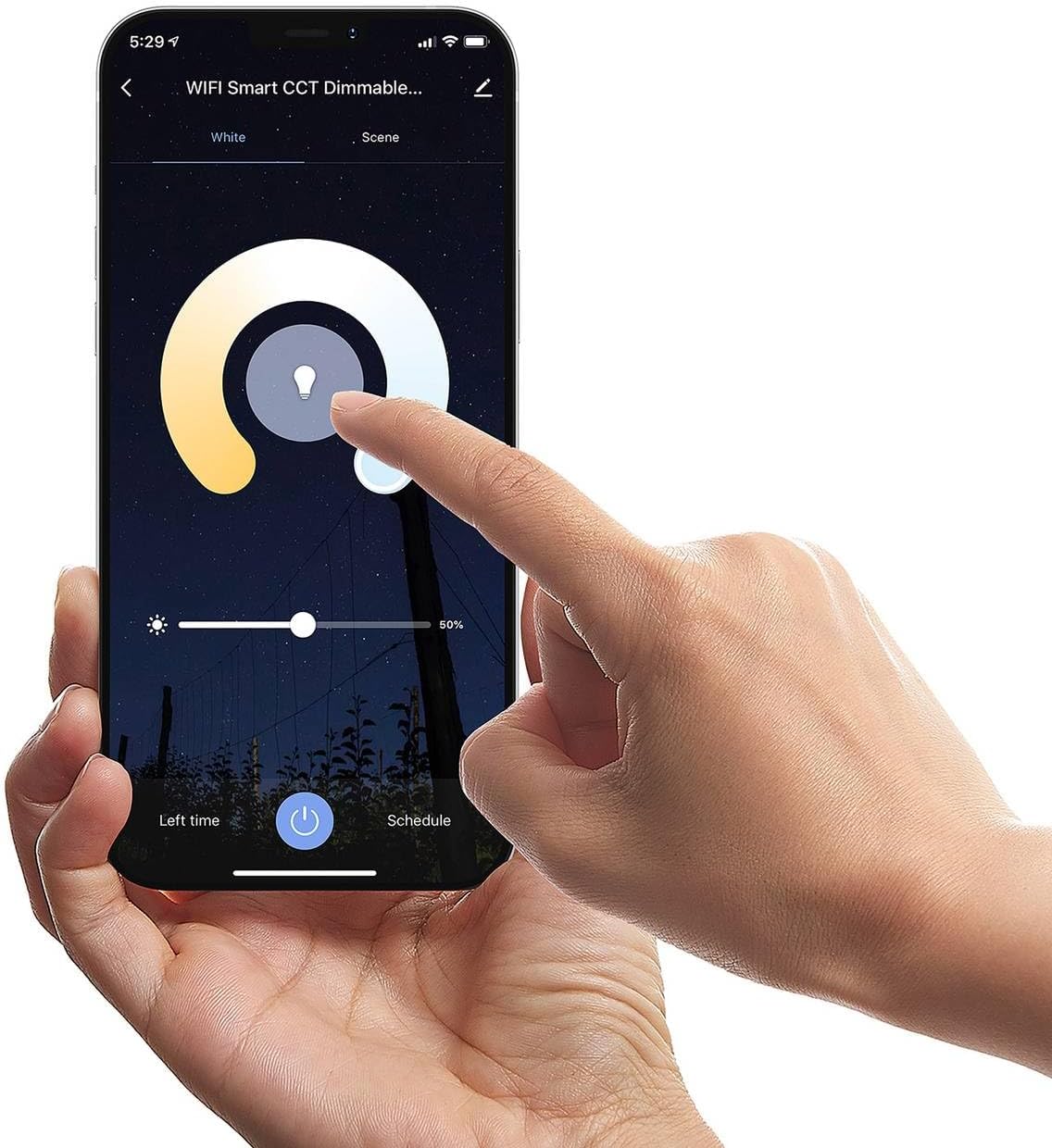
Image: A hand interacting with a smartphone displaying the Tuya app, demonstrating the light control interface for brightness and color temperature.

Image: A collage of four images illustrating the Arcchio Dakari light's ability to display various light temperatures, from warm to cool white, and its off state.
6. Maintenance
Regular maintenance ensures the longevity and optimal performance of your Arcchio Dakari LED outdoor wall light.
- Cleaning: Disconnect power before cleaning. Wipe the fixture with a soft, damp cloth. Do not use abrasive cleaners, solvents, or harsh chemicals, as these can damage the finish or plastic components.
- Inspection: Periodically inspect the fixture for any signs of damage, loose connections, or wear. Ensure the seals are intact to maintain the IP54 rating.
- LED Light Source: The LED light source is integrated and does not require replacement. If the light source fails, the entire fixture may need to be replaced.
7. Troubleshooting
If you encounter issues with your Arcchio Dakari LED outdoor wall light, refer to the following common problems and solutions:
| Problem | Possible Cause | Solution |
|---|---|---|
| Light does not turn on. | No power supply; loose wiring; faulty fixture. | Check circuit breaker. Verify electrical connections are secure. If issues persist, consult a qualified electrician. |
| Cannot connect to Tuya App. | Incorrect Wi-Fi password; 5GHz Wi-Fi network; light not in pairing mode; network interference. | Ensure you are using a 2.4GHz Wi-Fi network. Re-enter Wi-Fi password. Cycle power to the light to re-enter pairing mode. Move router closer or reduce interference. |
| Light flickers or dims unexpectedly. | Unstable power supply; loose connection; app interference. | Check power supply stability. Verify all wiring connections. Restart the Tuya App or your smartphone. |
If the problem persists after attempting these solutions, please contact customer support.
8. Specifications
| Attribute | Value |
|---|---|
| Brand | Arcchio |
| Model Number | 9618160 |
| Product Dimensions | 17.6 x 11 x 23.9 cm (Depth x Width x Height) |
| Weight | 1.2 Kilograms |
| Material | Aluminum, Plastic |
| Color | Dark Gray |
| Style | Modern |
| Light Source Type | Integrated LED |
| Total Wattage | 10 Watts |
| Luminous Flux | 560 lm |
| Color Temperature | 3000 Kelvin (Adjustable via app) |
| Color Rendering Index (CRI) | 80.00 |
| Voltage | 230 Volts |
| Protection Rating | IP54 |
| Special Features | Energy Efficient, Dimmable, Smart Home (Tuya App) |
| Energy Efficiency Class | E (as per new EU energy label) |

Image: EU Energy Efficiency Label. For the most current information, please refer to the EPREL database (QR code link).
9. Warranty Information
Arcchio products are manufactured to high-quality standards. For specific warranty terms and conditions, please refer to the warranty card included with your product or visit the official Arcchio website. Keep your proof of purchase for any warranty claims.
10. Support & Contact
If you require further assistance, have questions about your product, or need technical support, please contact Arcchio customer service through their official website or the retailer from whom you purchased the product.
For more information about Arcchio products, visit the official Arcchio store: Arcchio Store on Amazon.de