
Introduction
Thank you for choosing the MalTec DH-2200 Dehumidifier. This manual provides essential information for the safe and efficient operation, maintenance, and troubleshooting of your new appliance. Please read it thoroughly before use and keep it for future reference.
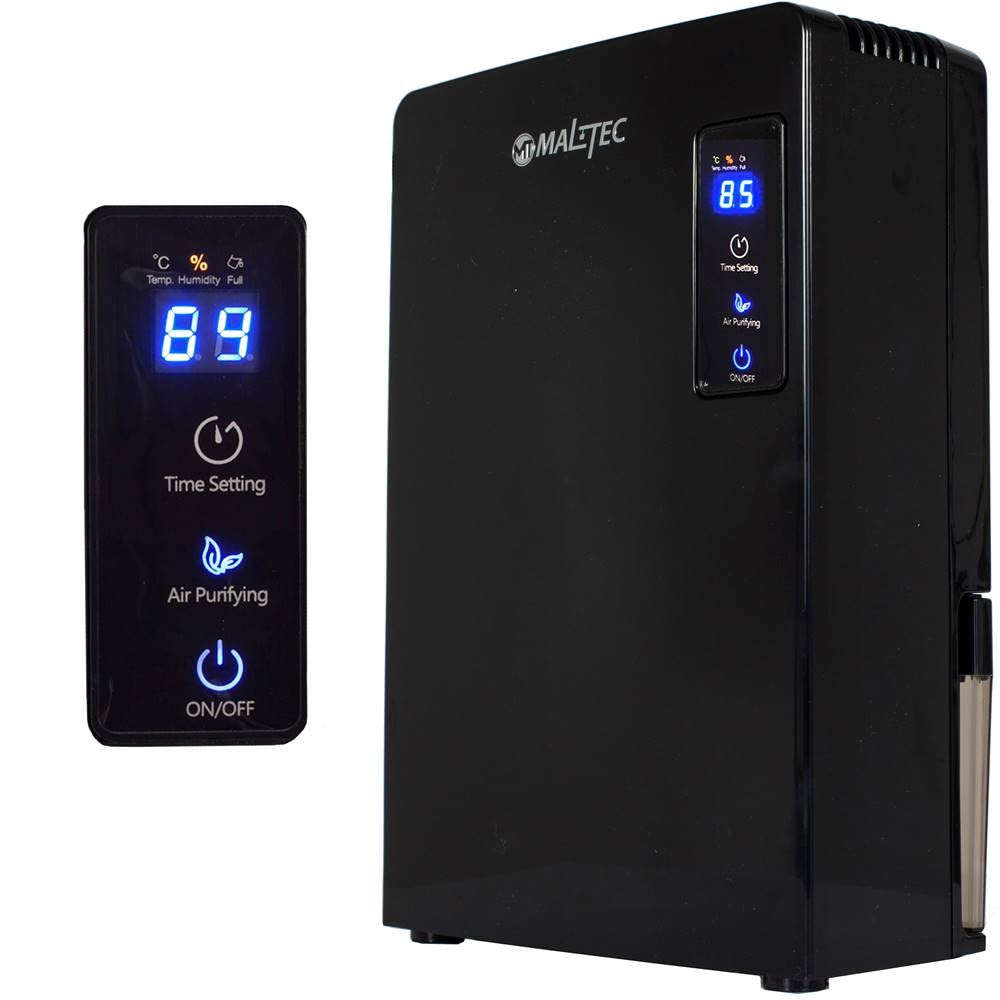
Image: The MalTec DH-2200 Dehumidifier, a compact black unit, positioned in a room with a blue wall and a sofa, demonstrating its discreet design.
Safety Instructions
To prevent injury to the user or others and property damage, the following instructions must be followed. Incorrect operation due to ignoring instructions may cause harm or damage.
- Always ensure the power supply voltage matches the rating label on the unit (220-240V).
- Do not operate the dehumidifier with a damaged cord or plug.
- Keep the unit upright during transport and operation to prevent water leakage.
- Do not block the air inlet or outlet. Maintain at least 20 cm clearance from walls or furniture.
- Do not insert fingers or foreign objects into the air inlets or outlets.
- Unplug the unit before cleaning or performing any maintenance.
- Do not use the appliance in bathrooms or other excessively humid environments where it could come into contact with water.
- This appliance is not intended for use by persons (including children) with reduced physical, sensory or mental capabilities, or lack of experience and knowledge, unless they have been given supervision or instruction concerning use of the appliance by a person responsible for their safety.
Product Overview
Familiarize yourself with the main components and control panel of your MalTec DH-2200 Dehumidifier.
Control Panel

Image: The front control panel of the dehumidifier, featuring a digital display showing humidity (e.g., "85"), and touch buttons for "Time Setting," "Air Purifying," and "ON/OFF."
- Digital Display: Shows current humidity level or timer settings.
- Time Setting Button: Activates and adjusts the timer function.
- Air Purifying Button: Activates the air purifying mode.
- ON/OFF Button: Powers the unit on or off.
Rear View and Water Tank

Image: The back of the dehumidifier, showing the air outlet grille at the top and the transparent water tank visible at the bottom right.
- Air Outlet: Located at the top rear, where dry air is expelled.
- Air Inlet: Typically located at the back or sides, where humid air is drawn in.
- Water Tank: A removable 2200 ml transparent tank for collecting condensed water.
Setup
- Unpacking: Carefully remove the dehumidifier from its packaging. Retain packaging for future storage or transport.
- Placement: Place the unit on a firm, level surface in the desired location. Ensure there is at least 20 cm of clear space around the air inlet and outlet for proper airflow. Avoid placing it near heat sources or in direct sunlight.
- Power Connection: Plug the power cord into a grounded electrical outlet (220-240V, 50Hz).
- Initial Check: Ensure the water tank is correctly inserted and empty before starting operation.
Operating Instructions
Follow these steps to operate your MalTec DH-2200 Dehumidifier.
Power On/Off
- To turn the unit ON, press the ON/OFF button once. The digital display will illuminate, showing the current room humidity.
- To turn the unit OFF, press the ON/OFF button again. The display will turn off.
Timer Setting
- While the unit is running, press the Time Setting button.
- Each press will cycle through available timer durations (e.g., 1 hour, 2 hours, etc.). The display will show the selected time.
- The unit will automatically turn off after the set time has elapsed.
Air Purifying Mode
- Press the Air Purifying button to activate this function.
- The unit will operate in a mode designed to circulate and purify the air.
- Press the button again to deactivate the air purifying mode.
Automatic Defrost
The MalTec DH-2200 is equipped with an automatic defrost function. If frost builds up on the evaporator coils, the unit will automatically enter defrost mode to melt the ice. During this time, dehumidification may temporarily stop, and the fan may continue to run. This is normal operation.
Maintenance
Regular maintenance ensures optimal performance and extends the lifespan of your dehumidifier. Always unplug the unit before performing any maintenance.
Emptying the Water Tank
- When the water tank is full, the dehumidifier will automatically stop operating, and an indicator (if present) may light up.
- Gently pull out the water tank from the side of the unit.
- Carefully empty the collected water into a sink or drain.
- Rinse the tank with clean water periodically to prevent mold or mildew growth. Do not use harsh detergents.
- Reinsert the empty water tank firmly back into the unit until it clicks into place. The dehumidifier will resume operation.

Image: The MalTec DH-2200 Dehumidifier with its transparent water tank being slid out from the side of the main unit.

Image: A closer view of the transparent water tank fully removed from the dehumidifier, showing its internal structure.
Cleaning the Exterior
- Wipe the exterior of the dehumidifier with a soft, damp cloth.
- Do not use abrasive cleaners, solvents, or harsh chemicals, as these can damage the surface.
Cleaning the Air Filter (if applicable)
While not explicitly detailed in the product description, most dehumidifiers have an air filter. If your model includes one, locate it (usually behind the air inlet grille) and clean it regularly according to the following general steps:
- Remove the filter.
- Wash it with warm, soapy water, or vacuum it to remove dust.
- Allow the filter to dry completely before reinserting it.
Troubleshooting
Refer to this section for common issues and their solutions.
| Problem | Possible Cause | Solution |
|---|---|---|
| Unit does not turn on. | No power supply. Power cord not properly plugged in. Water tank is full or incorrectly inserted. | Check power outlet. Ensure power cord is securely plugged in. Empty and correctly reinsert the water tank. |
| Dehumidifier is not collecting water. | Room humidity is too low. Air inlet/outlet blocked. Temperature is too low (unit may be in defrost mode). | Dehumidifier will not collect water if humidity is already low. Ensure proper airflow around the unit. Allow the unit to complete its defrost cycle. |
| Unit is noisy. | Unit is not on a level surface. Obstruction in fan. | Place the unit on a flat, stable surface. Turn off and unplug the unit, then check for any obstructions. |
If the problem persists after trying these solutions, please contact customer support.
Specifications
Technical data for the MalTec DH-2200 Dehumidifier.

Image: The MalTec DH-2200 Dehumidifier shown with its key dimensions: height 36.5 cm, width 24 cm, and depth 13.5 cm.
| Feature | Detail |
|---|---|
| Brand | MalTec |
| Model | DH-2200 |
| Model Number (ASIN) | 5901924230779 (B0BMGL9GHM) |
| Power Supply | 220-240 V, 50 Hz |
| Power Consumption | 90 Watts |
| Water Tank Capacity | 2200 ml (2.2 Liters) |
| Noise Level | < 36 dB |
| Features | Automatic Defrost, Timer, Air Purifying Function |
| Color | Black |
| Item Weight | 2.4 Kilograms |
| Dimensions (H x W x D) | 36.5 cm x 24 cm x 13.5 cm |

Image: The underside of the dehumidifier, displaying the product label with "Dehumidifier Model: DH-2200," electrical specifications (AC220V-240V, 50Hz, 90W), and compliance marks.
Disposal
Do not dispose of electrical appliances as unsorted municipal waste. Use separate collection facilities. Contact your local government for information regarding the collection systems available. If electrical appliances are disposed of in landfills or dumps, hazardous substances can leak into the groundwater and get into the food chain, damaging your health and well-being.

