
1. Introduction
Thank you for choosing the LIMETA R8 Smart 8-Bay AA/AAA Battery Charger. This intelligent universal charger is designed to efficiently charge various rechargeable battery types, including Li-Ion, LiHv, Ni-MH, Ni-Cd, LiFePO4, NiZn, and Eneloop batteries. It features an 8-channel fast charging system, a clear LCD display for real-time data, and multiple function modes for comprehensive battery management. Please read this manual thoroughly before use to ensure safe and optimal operation.
2. Package Contents
The LIMETA R8 Smart 8-Bay Battery Charger package includes the following items:
- 1 x LIMETA R8 8-Slot Battery Charger
- 1 x USB-C Cable
- 1 x Multi-language User Manual

Figure 1: LIMETA R8 Smart 8-Bay Battery Charger and included USB-C cable.
3. Setup
3.1 Charger Components
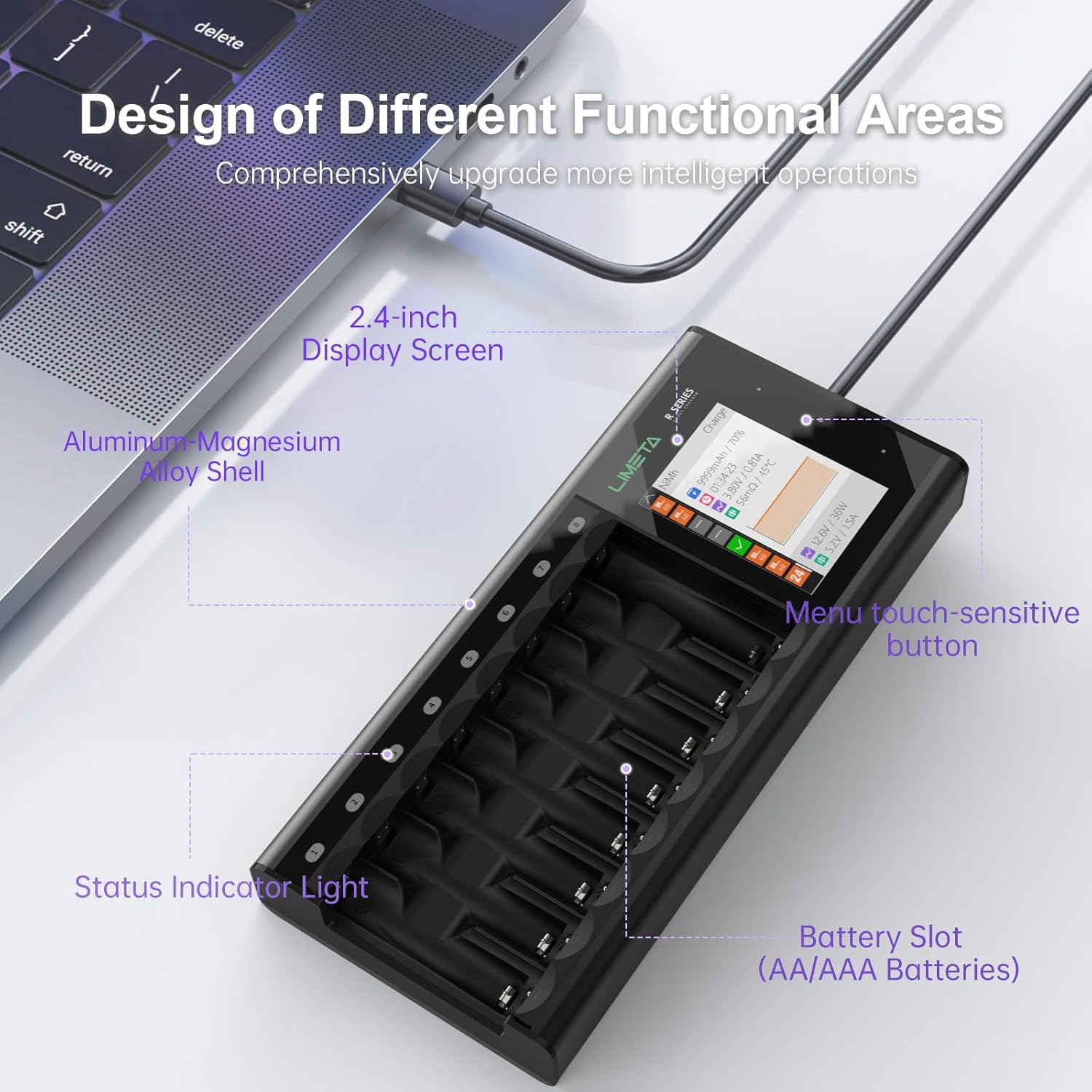
Figure 2: Key components of the LIMETA R8 charger, highlighting the 2.4-inch display screen, aluminum-magnesium alloy shell, menu touch-sensitive buttons, status indicator lights, and battery slots for AA/AAA batteries.
3.2 Power Connection
- Connect the provided USB-C cable to the USB-C port on the side of the charger.
- Connect the other end of the USB-C cable to a compatible USB power adapter (not included). For optimal fast charging, use a Power Delivery (PD) USB-C power supply.
- The charger will power on, and the LCD display will illuminate.
3.3 Initial Language Selection
Upon first use or after a reset, you may need to select your preferred language:
- When the charger powers on, navigate to the 'Settings' menu using the touch-sensitive buttons next to the display.
- Scroll down to 'Language' and select 'English' or your desired language.
Video 1: Unboxing, initial setup, battery insertion, and navigating basic settings like language and buzzer on the LIMETA R8 charger.
4. Operating Instructions
4.1 LCD Display Overview
The 2.4-inch IPS high-definition screen provides real-time information about each battery slot. Use the touch-sensitive buttons to navigate the interface.
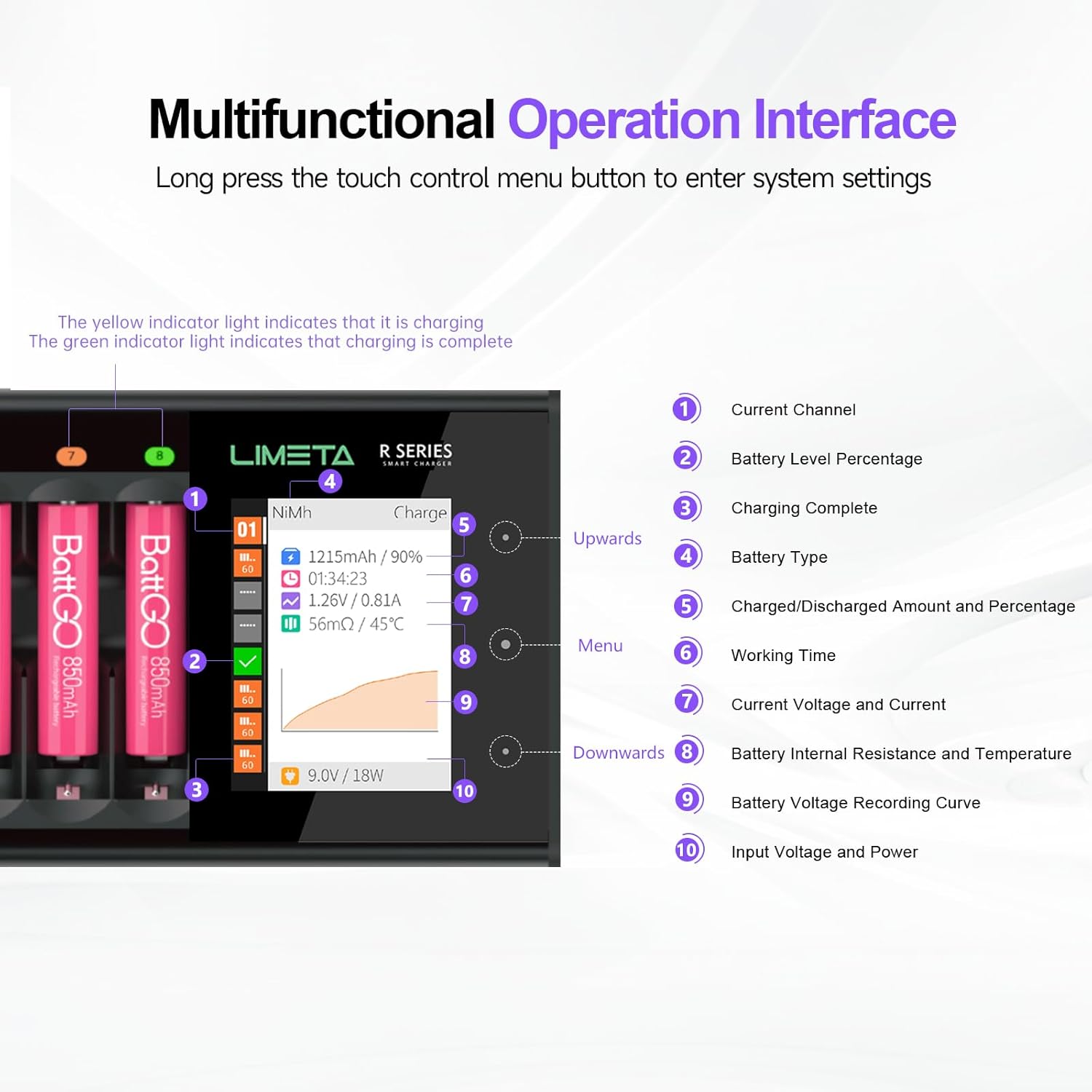
Figure 3: Multifunctional Operation Interface. The display shows current channel, battery level percentage, charging complete status, battery type, charged/discharged amount and percentage, working time, current voltage and current, battery internal resistance and temperature, battery voltage recording curve, and input voltage and power.
4.2 Inserting Batteries
Gently insert AA or AAA rechargeable batteries into the designated slots. Ensure correct polarity (+/-) alignment. Each slot operates independently.
4.3 Automatic Battery Identification
The charger automatically identifies most common battery types. For Ni-Zn and LiHv batteries, manual selection is required.
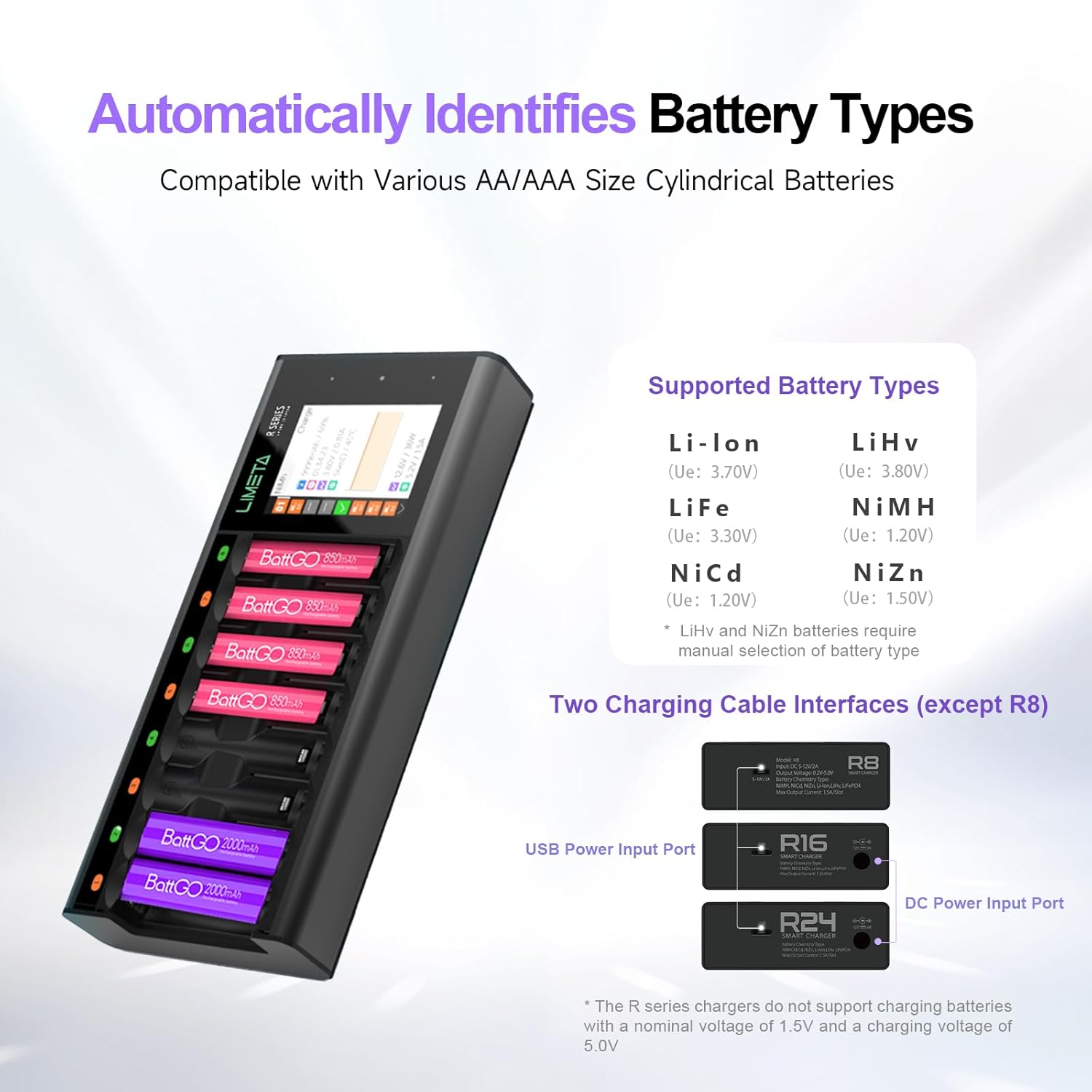
Figure 4: The charger automatically identifies battery types compatible with various AA/AAA size cylindrical batteries. Supported types include Li-Ion, LiHv, LiFe, NiMH, NiCd, and NiZn. Note: LiHv and NiZn batteries require manual selection.
4.4 Manual Battery Type Selection
If charging Ni-Zn or LiHv batteries, or if the automatic detection is incorrect:
- Select the desired battery slot on the display.
- Navigate to 'Battery Type' in the settings.
- Manually select the correct battery chemistry (e.g., Ni-Zn, LiHv).
Important: Ni-Zn batteries must be charged individually; mixed charging with other types is not supported. Do not use this charger with 1.5V Li-ion batteries (nominal voltage 1.5V, charging voltage 5.0V).
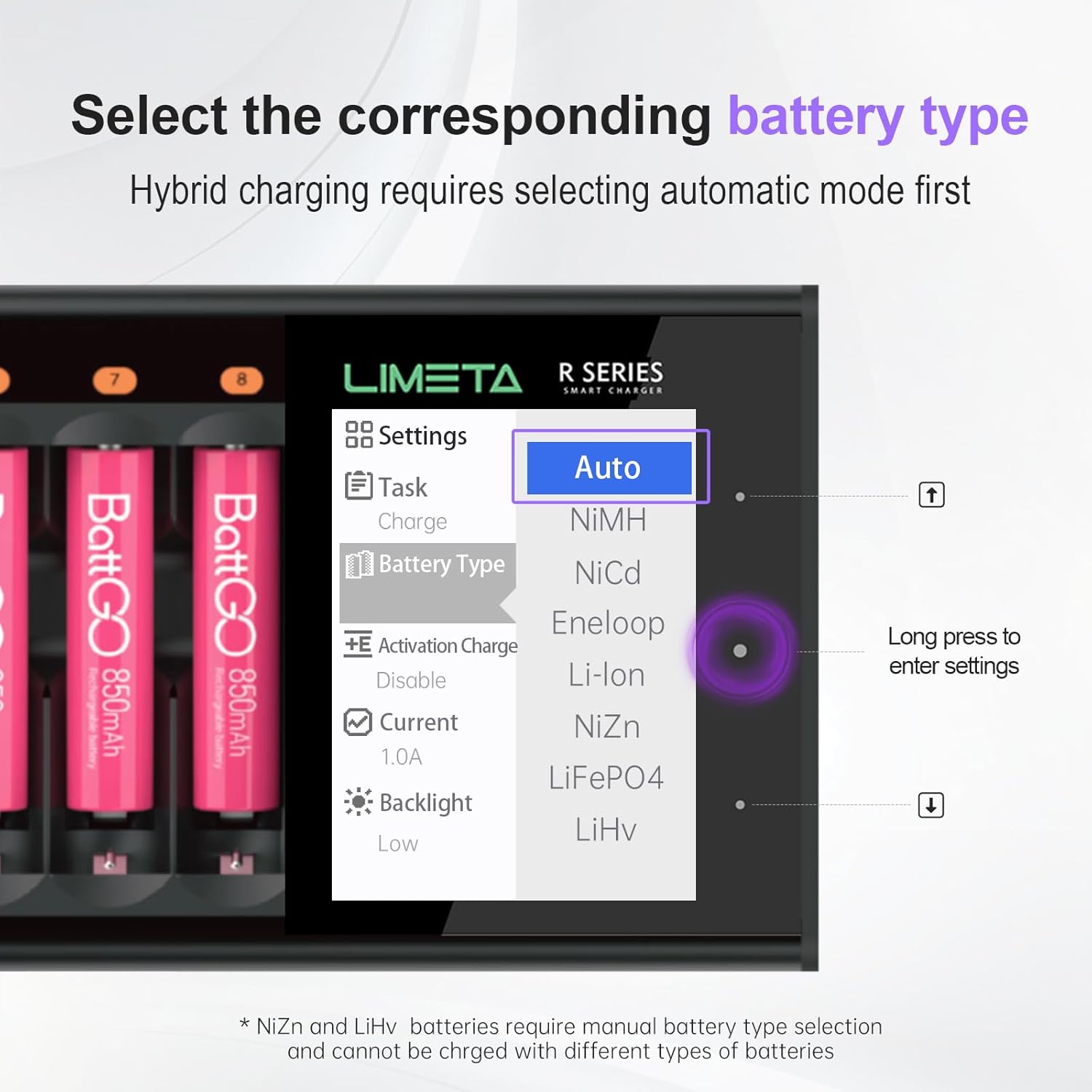
Figure 5: Menu for selecting the corresponding battery type. Options include Auto, NiMH, NiCd, Eneloop, Li-Ion, NiZn, LiFePO4, and LiHv. Long press to enter settings.
4.5 Charging Modes
The charger offers several professional modes to manage your batteries:
- Charge Mode: Standard charging of the battery.
- Discharge Mode: Discharges the battery.
- Analysis Mode: Analyzes battery performance and identifies its working capacity. Useful if you suspect battery issues.
- Activation Mode: For NiMH/NiCd batteries that are over-discharged to 0V, this mode performs a charge-discharge-charge cycle to activate and restore them.

Figure 6: Four working mode options: Charge, Discharge, Activation, and Analysis. These modes help with battery health analysis and maintenance.
4.6 Adjusting Charging Current
Each slot offers a maximum current of 1.5A. You can adjust the charging current for individual slots:
- Select the desired battery slot on the display.
- Navigate to 'Current' in the settings.
- Adjust the current as needed.
4.7 Buzzer Settings
The charger features an audible buzzer for alerts, such as full charge. You can adjust its volume or turn it off:
- Navigate to the 'Settings' menu.
- Scroll to 'Buzzer' and select your preferred setting (High, Middle, Low, or Off).
4.8 Charging Indicators
The charger provides visual indicators for charging status:
- A yellow indicator light signifies that charging is in progress.
- A green indicator light signifies that charging is complete.
Video 2: Demonstration of the LIMETA R8 charger's features, including battery insertion, automatic detection, and display information during charging.
5. Maintenance
5.1 Firmware Upgrade
To ensure optimal performance and access new features, regularly check for and install firmware upgrades:
- Connect the charger to your computer using the USB-C cable.
- Download and install the ISD GO app on your computer.
- Follow the instructions within the ISD GO app to upgrade the charger's firmware.
5.2 Cleaning
Keep the charger clean to maintain its functionality and appearance:
- Disconnect the charger from power before cleaning.
- Use a soft, dry cloth to wipe the exterior of the charger.
- Avoid using harsh chemicals or abrasive cleaners.
- Ensure battery slots are free of dust and debris.
5.3 Storage
When not in use, store the charger in a cool, dry place away from direct sunlight and extreme temperatures.
6. Troubleshooting
This section addresses common issues you might encounter with your LIMETA R8 charger.

Figure 7: Frequently Asked Questions regarding the charger's operation and potential issues.
Common Issues and Solutions:
- Q: What should I do if the battery is difficult to remove?
A: The product is designed with dedicated grooves for removing batteries. The correct method is to pry out the batteries in order (e.g., from left to right or from right to left). - Q: Why is the measured contact resistance value high and inconsistent?
A: This product uses a contact plate charging design, and the contact resistance may vary depending on the battery's placement angle and contact position. Oxidation or rust on the battery's positive or negative terminals can also lead to poor contact and thus increased resistance. - Q: Why do some batteries catch fire?
A: Fast charging requires extremely high battery consistency. Some batteries have low internal resistance and good consistency, ensuring stable charging and discharging. However, some batteries have high internal resistance and poor consistency, which can easily cause overheating risks during fast charging. It is strongly recommended to prioritize well-known brand batteries. If you are unsure whether the battery has good consistency, please reduce the charging current to below 500mAh. - Q: What is independent operation of each channel?
A: The independent channel operation means that the R series support mixed charging of multiple battery types. It does not mean that multiple operating modes are supported simultaneously. Because the R series has many slots, individually setting the working mode of each slot may cause inconvenience in your operation. If you need to use multiple functions simultaneously such as charging and analysis, please consider the R4 Evo model. - Q: What if the product emits a beeping sound?
A: This could indicate:
1. Battery malfunction: Try replacing the battery.
2. Charger malfunction: Please power off or try a different slot for testing.
3. Incorrect parameter settings: Please consult the manual and check and reset the charging parameters. - Q: Why are the temperature or current measurement values inaccurate?
A: Software updates: Ensure the device is upgraded to the latest firmware. Environmental factors: Fluctuations in ambient temperature and other environmental conditions can also cause variations in usage and measurements. The current contact plate design may lead to some measurement fluctuations (especially in temperature). For temperature measurement, products will continue to be optimized and upgraded. - Q: Is it normal for the battery or charger to heat up during charging?
A: It is common for chargers that support fast charging to generate heat during operation. This product's operating temperature strictly complies with international safety standards. The temperature measurement for the R series is located between the metal contact and the plastic casing of the charging slot, so the temperature reading may have some deviation. However, the temperature monitoring system is set within the battery's allowable maximum charging temperature. Once the temperature approaches the upper limit, the charger will automatically reduce the charging current to ensure safety. - Q: Why does the battery sometimes show as fully charged but actually have insufficient capacity?
A: This is related to the battery itself. Some batteries have exaggerated capacity ratings or the battery has aged.
1. It is recommended to charge batteries from reputable brands.
2. After the display shows fully charged, please continue trickle charging for a period of time (e.g., 15-30 minutes) to supplement the capacity.
3. It is recommended to use the product's analysis function to check the actual capacity before charging. Avoid using batteries with exaggerated capacity ratings. Some malfunction issues may appear to be caused by the charger but are actually due to the battery.
7. Specifications
| Feature | Detail |
|---|---|
| Product Dimensions | 7.4 x 3.11 x 1.1 inches (3.1"D x 1.1"W x 7.4"H) |
| Item Weight | 9.5 ounces (269 Grams) |
| Model Number | R8 |
| Brand | LIMETA |
| Manufacturer | isdt |
| Output Voltage | 12 Volts |
| Charging Channels | 8 (Independent) |
| Max Current per Slot | 1.5A |
| Display | 2.4-inch IPS High-Definition LCD |
| Housing Material | Aluminum-Magnesium Alloy |
| Supported Battery Types | Li-Ion, LiHv, Ni-MH, Ni-Cd, LiFePO4, NiZn, Eneloop (AA/AAA) |
| Safety Protections | Over-Charge, Overcurrent, Short Circuit, Overheat, Reverse Polarity |

Figure 8: The charger incorporates five key safety protections: Short Circuit Protection, Overheat Protection, Overcurrent Protection, Overcharge Protection, and Reverse Polarity Protection.
8. Warranty and Support
LIMETA is committed to providing high-quality products and excellent customer service. If you encounter any issues during the use of your LIMETA R8 Smart 8-Bay Battery Charger, please contact our friendly customer service team for assistance. Refer to the product packaging or the official LIMETA website for contact information.


