
Redi-Remote RTPSVCJWM6A
Replacement Remote for Jensen JWM6A User Manual
Model: RTPSVCJWM6A
Introduction
This manual provides comprehensive instructions for the Redi-Remote replacement remote control, specifically designed for Jensen JWM6A units. This remote is a custom replacement and is not an original Jensen product. It is engineered to perform all functions of the specific Jensen unit it is designed to control.
Product Overview
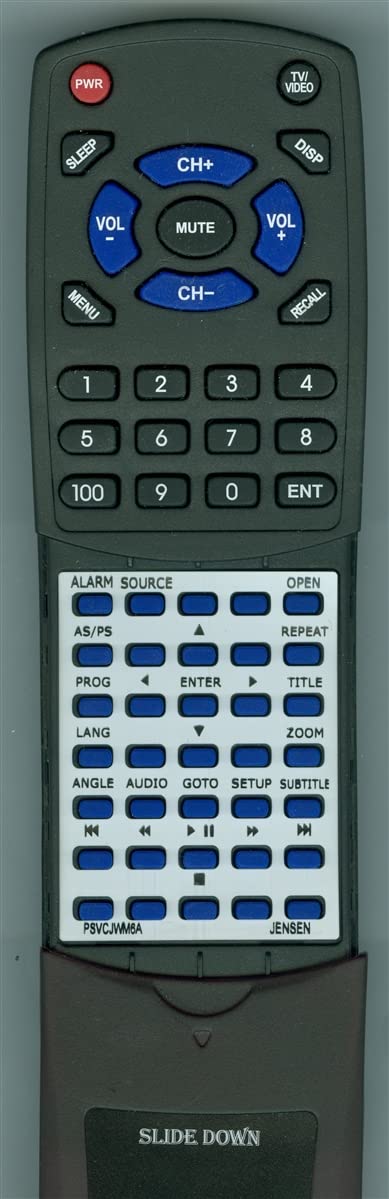
Image: Front view of the Redi-Remote replacement remote control for Jensen JWM6A. The remote is black with blue and black buttons. The top section includes buttons for power, volume control, channel selection, menu access, and a numeric keypad. The lower section, which is typically covered by a sliding panel, contains media playback controls and other model-specific functions.
The Redi-Remote replacement remote control is designed for ease of use and direct compatibility with Jensen JWM6A units. It features a standard layout for common functions and a unique sliding cover that reveals additional, model-specific controls.
- Dimensions: Approximately 7 1/2" x 2 1/4" x 3/4" (17.78 cm x 5.72 cm x 1.91 cm).
- Color: Black.
- Special Feature: No programming required.
Setup
Battery Installation
The remote requires 4 AAA batteries for operation. Follow these steps to install the batteries:
- Locate the battery compartment on the back of the remote control.
- Slide open the battery compartment cover.
- Insert 4 AAA batteries, ensuring the positive (+) and negative (-) terminals align correctly with the markings inside the compartment.
- Close the battery compartment cover securely.
Note: Always use fresh batteries and replace all batteries at the same time. Do not mix old and new batteries, or different types of batteries.
Operating Instructions
This remote is designed for immediate use with compatible Jensen JWM6A units without any programming.
Basic Functions (Top Section)
- PWR (Power): Turns the Jensen unit on or off.
- VOL + / VOL - (Volume): Adjusts the audio volume up or down.
- CH+ / CH- (Channel): Changes the channel up or down.
- MUTE: Mutes or unmutes the audio output.
- MENU: Accesses the unit's main menu.
- DISP (Display): Toggles display information.
- RECALL: Recalls the previously viewed channel or input.
- TV/VIDEO: Switches between TV and video input modes.
- SLEEP: Activates the sleep timer function.
- Numeric Keypad (0-9, 100, ENT): Used for direct channel entry or inputting numerical values.
Advanced Functions (Lower Section - Slide Down Cover)
The lower half of the remote is covered by a sliding panel. To access these functions, gently slide the cover down as indicated by "SLIDE DOWN" on the remote.
- ALARM: Controls alarm settings.
- SOURCE: Selects input sources.
- OPEN: Opens disc tray or similar function.
- AS/PS: Auto Scan / Program Scan.
- REPEAT: Repeats playback.
- PROG (Program): Enters programming mode.
- ENTER: Confirms selections.
- TITLE: Accesses disc title menu.
- LANG (Language): Changes audio language.
- ZOOM: Adjusts screen zoom.
- ANGLE: Changes camera angle (for compatible media).
- AUDIO: Selects audio tracks.
- GOTO: Jumps to specific time or chapter.
- SETUP: Accesses system setup menu.
- SUBTITLE: Toggles subtitles.
- Media Playback Controls (|<, <<, >||, >>, >|): Standard controls for previous track, rewind, play/pause, fast forward, and next track.
Maintenance
- Cleaning: Use a soft, dry cloth to clean the remote. Do not use liquid cleaners or abrasive materials.
- Battery Care: Remove batteries if the remote will not be used for an extended period to prevent leakage. Dispose of used batteries responsibly.
- Storage: Store the remote in a cool, dry place away from direct sunlight and extreme temperatures.
Troubleshooting
| Problem | Possible Cause | Solution |
|---|---|---|
| Remote not responding. | Dead or incorrectly installed batteries. | Replace batteries with new ones, ensuring correct polarity (+/-). |
| Remote only works intermittently. | Weak batteries or obstruction between remote and unit. | Replace batteries. Ensure clear line of sight to the Jensen unit's IR receiver. |
| Certain buttons do not work. | Remote not compatible with specific function or unit. | Verify the remote is for the correct Jensen JWM6A model. This remote is a replacement and cannot be programmed for auxiliary devices. |
If issues persist, please contact Redi-Remote customer support.
Specifications
| Feature | Detail |
|---|---|
| Product Model Number | RTPSVCJWM6A |
| Compatible Devices | Jensen JWM6A (DVD Stereo) |
| Dimensions (L x W x H) | 7.5 x 2.25 x 0.75 inches (approx.) |
| Item Weight | 5 ounces (approx.) |
| Batteries Required | 4 AAA batteries |
| Color | Black |
| Special Feature | No Programming Required |
| Manufacturer | Redi-Remote |
Warranty and Support
This remote is a custom replacement made by Redi-Remote. For any concerns or issues with the remote after purchase, please contact Redi-Remote directly. Information regarding specific warranty terms should be obtained from the seller or manufacturer at the time of purchase.
Redi-Remotes are designed to perform every function for the specific unit they are designed to control and cannot be programmed to control any auxiliary devices.
Ask a question about this manual
Ask about setup, troubleshooting, compatibility, parts, safety, or missing instructions. Manuals+ will review the question and use this page’s manual context to help answer it.