1. Safety Instructions
Read and understand all safety warnings and instructions before operating this truck crane. Failure to follow these instructions may result in serious injury or property damage.
- Weight Capacity: Never exceed the maximum lifting capacity of 1100 lbs (499 kg). Overloading can cause structural failure and severe injury.
- Stable Mounting: Ensure the crane is securely mounted to a stable, reinforced surface capable of supporting the crane's weight and the maximum load.
- Clearance: Maintain a safe distance from power lines, obstacles, and personnel during operation.
- Inspection: Before each use, inspect the crane, cables, hooks, and mounting hardware for any signs of wear, damage, or corrosion. Do not operate if any components are compromised.
- Personal Protective Equipment (PPE): Always wear appropriate PPE, including safety gloves, hard hat, and safety footwear.
- Operator Awareness: Keep hands and body clear of moving parts. Never leave a suspended load unattended.
- Electrical Safety: Ensure all electrical connections for the winch are secure and properly insulated. Avoid operating in wet conditions.
2. Product Overview
The VEVOR Truck Crane is designed for efficient lifting and moving of heavy loads in various applications such as construction, forestry, factory, and transport environments. It features a robust steel construction, a wireless electric winch, and an adjustable telescopic boom for versatile operation.

Image 2.1: VEVOR Truck Crane with wireless electric winch, demonstrating its use in various industrial settings.
Key Features:
- Wireless Electric Winch: Provides convenient and safe operation from a distance.
- Adjustable Telescopic Boom: Allows for varying reach and lifting capacities based on extension.
- 360° Rotation: Enables flexible positioning and movement of loads.
- Durable Construction: Made from galvanized welded steel with spray paint for rust prevention.
- Reinforced Base: Ensures stability during lifting operations.
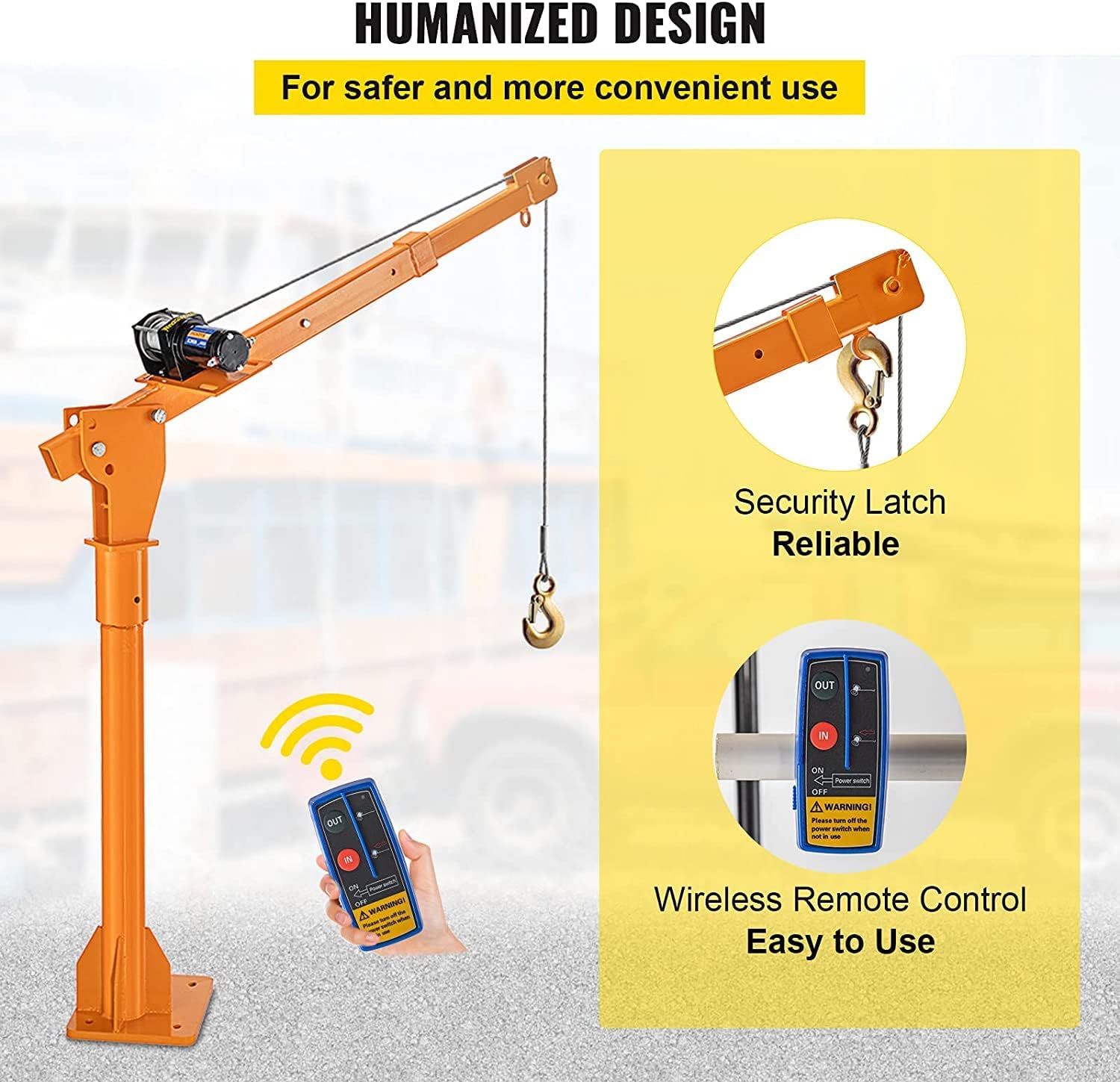
Image 2.2: Close-up of the crane's security latch and wireless remote control for enhanced safety and ease of use.

Image 2.3: Illustrates the durable, rust-resistant, and securely fixed components of the crane.
3. Setup and Installation
Proper installation is crucial for the safe operation of the VEVOR Truck Crane. Ensure all components are present and undamaged before beginning assembly.
3.1 Component Check
Verify that all parts listed in the packing list are included. Refer to the image below for a visual representation of the main components.

Image 3.1: Main components of the VEVOR Truck Crane, including the wireless remote, crane assembly, and electrical wiring.
3.2 Mounting the Crane
- Select Location: Choose a mounting location on your truck bed or other stable surface that can withstand the crane's weight and maximum load. The surface must be flat and reinforced.
- Position Base: Place the reinforced base of the crane in the desired position.
- Mark Holes: Use the base plate as a template to mark the drilling points for the mounting bolts.
- Drill Holes: Drill appropriate size holes through the mounting surface.
- Secure Base: Fasten the crane base securely using heavy-duty bolts, washers, and nuts (not included, purchase separately based on your mounting surface). Ensure all fasteners are tightened to the manufacturer's specifications.
- Assemble Boom: Attach the boom assembly to the base according to the provided hardware. Ensure all pins and bolts are correctly inserted and secured with cotter pins or locking mechanisms.
3.3 Electrical Connection
The electric winch requires a 12V DC power source. Connect the winch wiring to your vehicle's battery or a dedicated 12V power supply, ensuring correct polarity (red to positive, black to negative). It is recommended to install an inline fuse for circuit protection.
4. Operating Instructions
Familiarize yourself with the crane's controls and capabilities before attempting to lift any loads.

Image 4.1: The VEVOR Davit Crane positioned for lifting, highlighting its 1100 lbs capability, wireless remote, and adjustable boom.
4.1 Wireless Remote Control
The crane is operated using a wireless remote control. Ensure the remote has fresh batteries and is within operational range of the winch receiver.
- Power Switch: Turn on the power switch on the remote.
- IN Button: Press and hold the "IN" button to retract the cable and lift the load.
- OUT Button: Press and hold the "OUT" button to extend the cable and lower the load.
- Safety Warning: Always turn off the power switch on the remote when not in use to prevent accidental operation.

Image 4.2: Illustrates the wireless remote control and the security latch on the hook for safe load handling.
4.2 Adjusting the Telescopic Boom
The boom can be adjusted to different lengths and angles to suit various lifting requirements. This adjustment affects the maximum lifting capacity.
- Extension Points: The boom has multiple extension points (A, B, C) with corresponding maximum load capacities.
- Capacity at Full Extension (A): 1100 lbs (499 kg)
- Capacity at Mid Extension (B): 550 lbs (249 kg)
- Capacity at Shortest Extension (C): 220 lbs (100 kg)
- Adjustment: To adjust, remove the locking pin, extend or retract the boom to the desired position, and re-insert the locking pin securely. Ensure the pin is fully engaged before lifting.

Image 4.3: Diagram showing the adjustable telescopic boom with different extension lengths and their corresponding maximum lifting capacities.
4.3 Lifting Procedures
- Secure Load: Attach the load securely to the hook, ensuring the safety latch is closed. Use appropriate slings or chains for the load.
- Clear Area: Ensure the lifting path is clear of obstructions and personnel.
- Lift Slowly: Use the wireless remote to slowly lift the load. Avoid sudden movements.
- Rotate Crane: The crane can rotate 360 degrees. Use the handle to manually rotate the boom to position the load. Ensure smooth rotation while bearing heavy loads.
- Lower Load: Slowly lower the load to the desired position. Once the load is stable on the ground, release tension and detach the hook.

Image 4.4: Depicts the crane's flexible structure, allowing for 360-degree rotation to maintain smooth movement under load.
4.4 Lifting Capacity (Single vs. Double Cable)
The crane supports both single and double cable configurations. The maximum lifting capacity remains 1100 lbs for both, but double cabling can offer increased stability and reduced strain on the winch for certain loads.
Image 4.5: Diagram illustrating the 1100 lbs lifting capability for both single and double cable setups. Note: Pulley for double cable not included.
5. Maintenance
Regular maintenance ensures the longevity and safe operation of your VEVOR Truck Crane.
- Cable Inspection: Regularly inspect the steel cable for fraying, kinks, or corrosion. Replace the cable if any damage is observed.
- Hook and Latch: Check the hook and safety latch for deformation, cracks, or wear. Ensure the latch operates freely.
- Mounting Hardware: Periodically check all mounting bolts and pins for tightness. Re-tighten as necessary.
- Lubrication: Apply a suitable lubricant to moving parts, such as the rotation mechanism and boom extension points, to ensure smooth operation and prevent rust.
- Cleaning: Clean the crane regularly to remove dirt, debris, and corrosive materials. The crane features spray paint for rust prevention, but regular cleaning helps maintain this protection.
- Electrical Connections: Inspect electrical wiring for damage or loose connections.

Image 5.1: Highlights the durable galvanized welded steel, spray paint for rust prevention, thickened mounting plate, and reinforced base, all contributing to the crane's longevity and ease of maintenance.
6. Troubleshooting
This section addresses common issues you might encounter with your VEVOR Truck Crane.
| Problem | Possible Cause | Solution |
|---|---|---|
| Winch does not operate | No power to winch; Remote control batteries dead; Loose electrical connection; Winch motor fault. | Check 12V power supply and fuse; Replace remote batteries; Inspect and secure all electrical connections; Contact VEVOR support if motor fault is suspected. |
| Crane struggles to lift load | Load exceeds capacity; Boom extended too far; Low battery voltage. | Reduce load weight; Retract boom to a shorter extension (higher capacity); Check vehicle battery voltage. |
| Boom rotation is stiff | Lack of lubrication; Dirt or debris in rotation mechanism. | Apply lubricant to the rotation points; Clean the base and rotating parts. |
| Cable is frayed or damaged | Wear and tear; Improper use. | Immediately cease operation. Replace the steel cable with a suitable replacement. |
7. Specifications
Detailed technical specifications for the VEVOR Truck Crane Model VEVORQZJW1100-110VDQMXV1US.
| Feature | Specification |
|---|---|
| Model Number | VEVORQZJW1100-110VDQMXV1US |
| Max. Lifting Capacity | 1100 lbs (499 kg) |
| Max. Lifting Height | 6.9 ft (2.1 m) |
| Boom Length (Max) | 62.9 inches (1.6 m) |
| Overall Height (Max) | 84.6 inches (2.15 m) |
| Base Width | 45.6 inches (1.16 m) |
| Item Weight | 97 lbs (44 kg) |
| Material | Steel |
| Color | Orange |
| Power Source | 12V DC |
| Control | Wireless Remote Control |
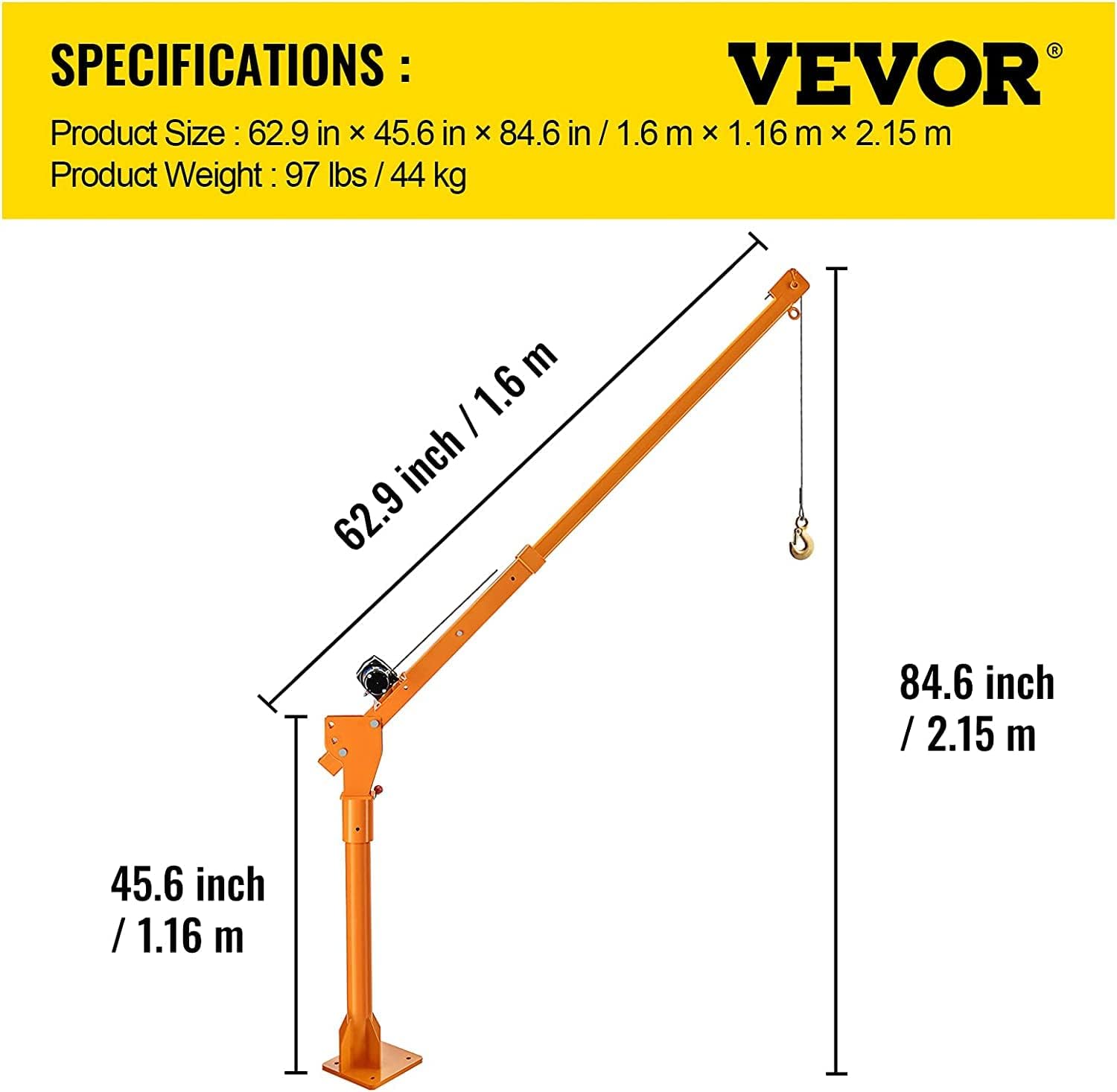
Image 7.1: Detailed diagram showing the key dimensions of the VEVOR Truck Crane.
8. Warranty and Support
For warranty information, technical support, or to order replacement parts, please contact VEVOR customer service. Refer to your purchase documentation for specific warranty terms and contact details.
You can typically find support information on the official VEVOR website or through the retailer where the product was purchased.


