
RECCAZR B0BM95VXSV
RECCAZR Wireless Keyboard and Mouse Combo Instruction Manual
Model: B0BM95VXSV
Brand: RECCAZR
Introduction
Thank you for choosing the RECCAZR Wireless Keyboard and Mouse Combo. This manual provides essential information for setting up, operating, and maintaining your new wireless peripheral set. Please read these instructions carefully before use to ensure optimal performance and longevity of your product.
This combo features a full-sized keyboard and an adjustable DPI mouse, connecting wirelessly via a 2.4GHz USB receiver. It is designed for compatibility with various operating systems including Windows and Mac OS, making it suitable for PC, desktop, and laptop use.
Package Contents
Please ensure all items are present in your package:
- 1 x RECCAZR Full-Sized Wireless Keyboard
- 1 x RECCAZR Wireless Mouse (Adjustable DPI)
- 1 x 2.4GHz USB Nano Receiver (stored in the mouse battery compartment)
- 1 x User Manual (this document)
Setup Guide
Follow these steps to set up your RECCAZR Wireless Keyboard and Mouse Combo:
- Install Batteries:
- For the keyboard: Open the battery compartment on the underside of the keyboard and insert two AAA batteries (not included), ensuring correct polarity.
- For the mouse: Open the battery compartment on the underside of the mouse and insert one AA battery (not included), ensuring correct polarity.
- Locate USB Receiver: The 2.4GHz USB Nano receiver is stored in the battery compartment of the mouse for safekeeping. Carefully remove it.
- Connect to Computer: Plug the USB Nano receiver into an available USB port on your computer (PC, desktop, or laptop).
- Power On: Turn on the keyboard and mouse using their respective ON/OFF switches, usually located on the underside.
- Automatic Connection: The keyboard and mouse should automatically connect to your computer. No additional drivers are typically required for most operating systems.

Image: RECCAZR Wireless Keyboard and Mouse Combo in Tiffany Blue, ready for use.
Operating Instructions
Keyboard Functions
- Full-Sized Layout: The keyboard features a standard full-sized layout, including a numeric keypad, for comfortable and efficient typing.
- Multimedia Keys: Utilize the 12 multimedia function keys (Fn + F1-F12) for quick access to media player controls, volume adjustment, email, and other common functions. Refer to the key legends for specific functions.
- Quiet Typing: The low-profile keys are designed for smooth and quiet operation, minimizing typing noise.
- Adjustable Stand: The keyboard includes an ergonomic adjustable stand on the underside to customize your typing angle for comfort.

Image: Multimedia Keys and Number Pad layout on the keyboard.
Mouse Functions
- Adjustable DPI: The mouse offers 800-1200-1600 adjustable DPI settings. Press the DPI button (usually located near the scroll wheel) to cycle through the sensitivity levels to match your preference and task.
- Silent Click: The mouse is designed for silent clicking, providing a quiet working environment.
- Wireless Range: Enjoy a stable wireless connection up to 10 meters (33 feet).
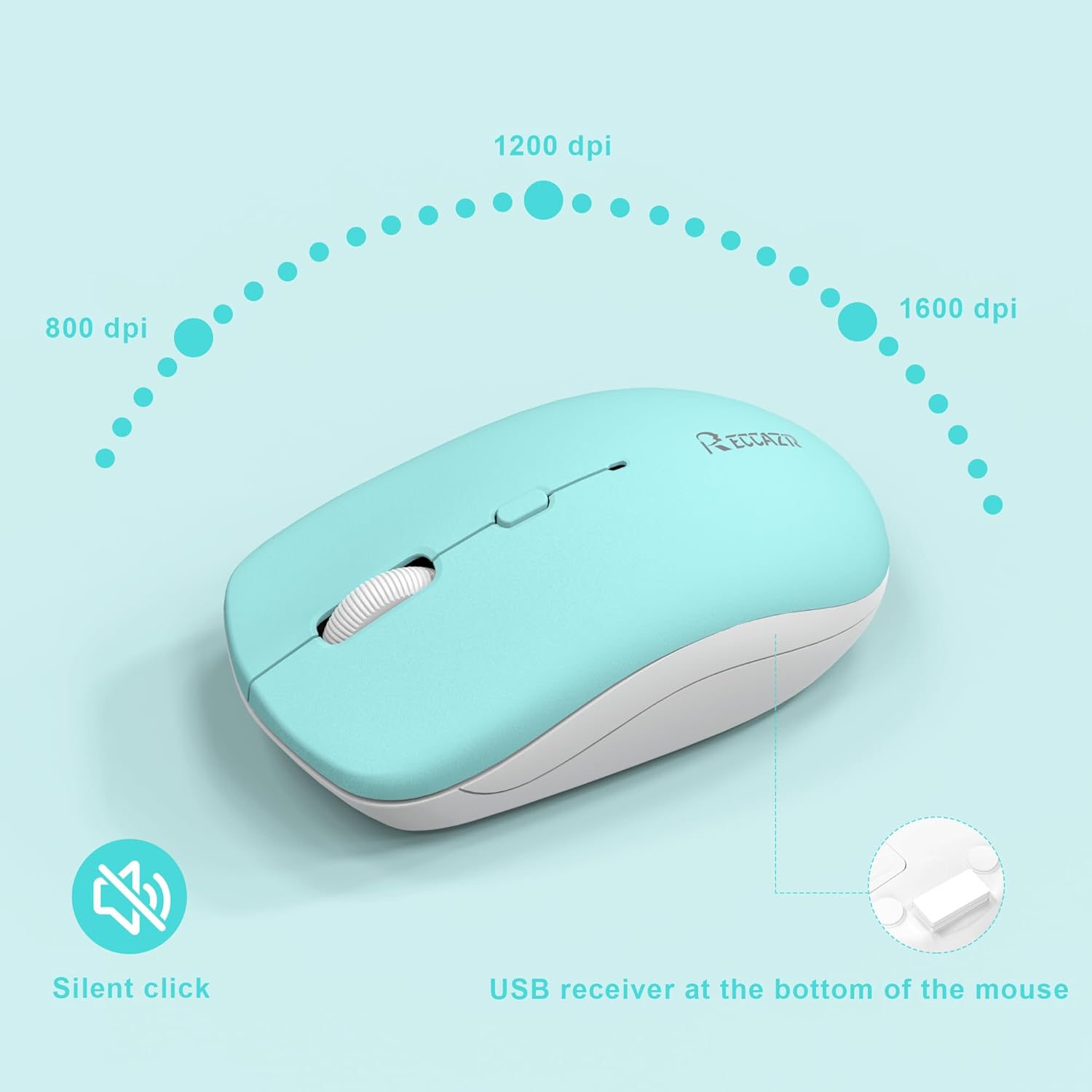
Image: Mouse DPI settings and USB receiver storage location.

Image: Features of the silent wireless mouse.
Smart Power Management
The RECCAZR Wireless Keyboard and Mouse Combo is designed with smart power-saving features to extend battery life:
- Automatic Sleep Mode: The keyboard will enter standby mode after 5 seconds of inactivity, and its indicator light will turn off. You can continue using the keyboard without any wake-up operations; the indicator light will resume after continued use.
- The mouse will enter sleep mode after 15 minutes of inactivity. Unplugging the receiver or after PC shutdown, the mouse will enter sleep mode too. You can press any button or scroll the wheel to wake up the mouse. The first keystroke used to wake up will not generate an instruction (to prevent wrong action).
- ON/OFF Switch: Both the keyboard and mouse have dedicated ON/OFF switches to conserve battery power when not in use for extended periods.

Image: Smart Power Management features.
Compatibility
This wireless keyboard and mouse combo is compatible with a wide range of operating systems and devices:
- Windows 2000 / XP / 2003 / 2007 / Vista / Win7 / Win8 / Win10
- Mac OS
- Linux
- Compatible with office or home use, notebooks, desktops, and PC computers.

Image: Wide Compatibility with various operating systems.
Maintenance and Care
To ensure the longevity and optimal performance of your wireless keyboard and mouse, follow these maintenance guidelines:
- Cleaning: Use a soft, damp cloth to clean the surfaces of the keyboard and mouse. Avoid using harsh chemicals or abrasive cleaners.
- Splash-Proof Design: The keyboard features a splash-proof design, offering protection against accidental spills. However, it is not fully waterproof; avoid submerging it in liquids.
- Storage: When not in use for extended periods, turn off both devices and store the USB receiver in the mouse's battery compartment to prevent loss.
- Battery Replacement: Replace batteries when performance degrades. Ensure correct battery type (AAA for keyboard, AA for mouse) and polarity.

Image: Splash-proof design of the keyboard.
Troubleshooting
If you encounter issues with your RECCAZR Wireless Keyboard and Mouse Combo, try the following solutions:
- No Connection/Lag:
- Ensure batteries are correctly installed and not depleted. Replace if necessary.
- Verify both keyboard and mouse are switched ON.
- Plug the USB receiver into a different USB port on your computer.
- Move the keyboard and mouse closer to the USB receiver to rule out range issues (max 10m).
- Avoid placing the receiver near strong interference sources like other wireless devices or large metal objects.
- Mouse Cursor Jumps/Inaccurate:
- Clean the optical sensor on the underside of the mouse.
- Try using the mouse on a different surface or a mouse pad.
- Adjust the DPI setting using the DPI button on the mouse.
- Keys Not Responding:
- Check keyboard batteries.
- Ensure the keyboard is not in sleep mode (press any key to wake).
- Re-establish connection by unplugging and re-plugging the USB receiver.
If problems persist, please contact RECCAZR customer support.
Specifications
| Feature | Specification |
|---|---|
| Connectivity Technology | 2.4GHz Wireless (USB Receiver) |
| Keyboard Type | Full-Sized |
| Mouse DPI | 800-1200-1600 Adjustable DPI |
| Wireless Range | Up to 10 meters (33 feet) |
| Keyboard Battery | 2 x AAA Batteries (not included) |
| Mouse Battery | 1 x AA Battery (not included) |
| Special Features | Water Resistant Keyboard, Auto-Sleep Function, Silent Click Mouse |
| Compatible Devices | Laptop, Personal Computer (Windows, Mac OS, Linux) |
| Keyboard Dimensions | 16.5 inches (length) x 5.1 inches (width) |
| Mouse Dimensions | 4 inches (length) x 2.3 inches (width) x 1.4 inches (height) |
| Item Weight | 1.5 pounds (total combo) |

Image: Product dimensions.
Warranty and Support
RECCAZR is committed to providing quality products and excellent customer service.
- Warranty: Your RECCAZR Wireless Keyboard and Mouse Combo comes with a 1-year worry-free warranty.
- Refund Policy: We offer a 30-day no-reason refund policy.
- Customer Support: If you have any questions, suggestions, or encounter any problems with this product, please contact the RECCAZR Service Team. We are available 24 hours a day, 365 days a year to assist you.

Image: RECCAZR Service Team for support.
Related documentsB0BM95VXSV


Ask a question about this manual
Ask about setup, troubleshooting, compatibility, parts, safety, or missing instructions. Manuals+ will review the question and use this page’s manual context to help answer it.