
DYNAVIN D9-A3 Premium Flex
DYNAVIN D9-A3 Premium Flex Android Car Radio with Navigation for Audi A3 S3 User Manual
Model: D9-A3 Premium Flex (DS-A3)
For Audi A3 (2003-2013) and Audi S3 (2006-2013)
1. Introduction
This manual provides detailed instructions for the installation, operation, and maintenance of your DYNAVIN D9-A3 Premium Flex Android Car Radio. Please read this manual thoroughly before using the product to ensure proper functionality and safety. This device is designed to integrate seamlessly into Audi A3 (2003-2013) and S3 (2006-2013) vehicles.
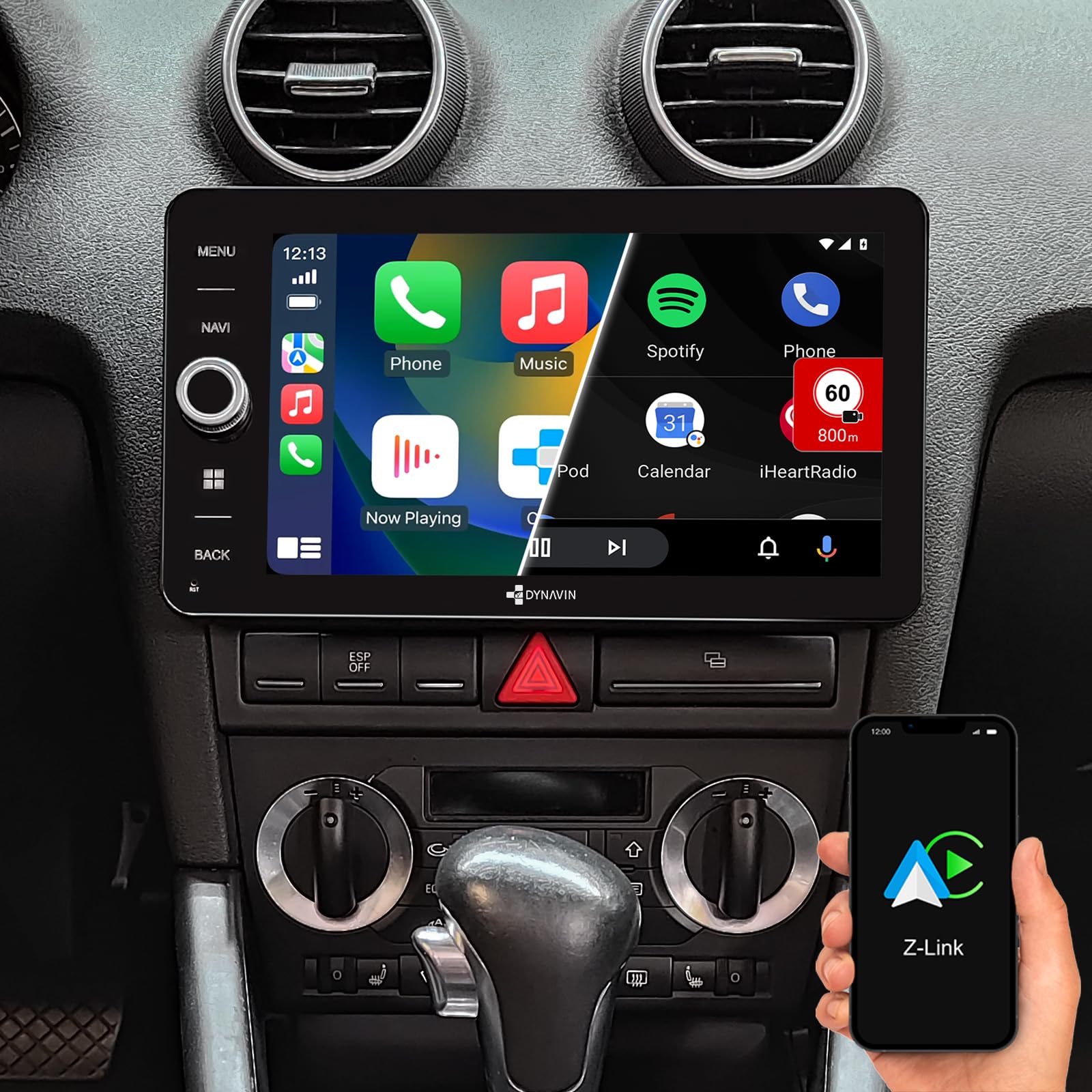
Image: The DYNAVIN 8 Premium Multimedia Navigation System, showcasing various car radio models for different car brands.

Image: The DYNAVIN D9-A3 Premium Flex unit installed in an Audi A3/S3 dashboard, displaying the main menu with various application icons such as Z-Link, Radio, Media, Phone, and Dynavin Connect.
2. Safety Information
Always prioritize safety. Do not operate the device in a way that distracts you from driving. Ensure all connections are secure and correctly installed to prevent electrical hazards. For detailed safety guidelines, please refer to the official safety document:
3. Package Contents
Verify that all components listed below are included in your package:

Image: An overview of the accessories included with the DYNAVIN D9-A3 Premium Flex, showing the display screen, main unit, trim bezel, connection cables, RCA cables, display connection cable, USB extension cable, microphone, dual Fakra adapter, BT/Wi-Fi antenna, plastic holders, installation frame, disassembly tools, radio removal tools, and a quick guide.
- Display Screen
- Main Unit
- Trim Bezel
- Connection Cables
- RCA Cables
- Display Connection Cable
- USB Extension Cable
- Microphone
- Dual Fakra Adapter
- BT/Wi-Fi Antenna
- Plastic Holders
- Installation Frame
- Disassembly Tools
- Radio Removal Tools
- Quick Guide
Note: A USB cable is specifically mentioned as an included component in the specifications.
4. Setup and Installation
The DYNAVIN D9-A3 Premium Flex is designed for direct fitment in Audi A3 (2003-2013) and S3 (2006-2013) models. Professional installation is recommended.
4.1 Pre-Installation Checks
- Ensure the vehicle's ignition is off and the battery is disconnected before starting installation.
- Confirm all package contents are present.
- Review your vehicle's specific wiring diagrams if available.
4.2 Installation Steps (General Guidelines)
- Remove Existing Radio: Use the provided radio removal tools to carefully extract the factory radio unit.
- Connect Wiring Harness: Connect the DYNAVIN wiring harness to the vehicle's factory harness. Ensure all connections are secure.
- Antenna Connections: Connect the BT/Wi-Fi antenna and the Dual Fakra adapter for radio reception.
- Microphone Installation: Install the compact digital dual microphone. This microphone is designed to be small and unobtrusive, typically mounted near the instrument cluster. Its advanced noise reduction algorithm ensures clear call quality.

Image: A close-up view of the compact digital dual microphone, designed for discreet installation and superior call quality.
- USB and Other Peripherals: Connect the USB extension cable and any other peripheral devices (e.g., reverse camera, external amplifier) as needed. The unit supports USB Type A for media storage.
- Mounting: Secure the main unit using the installation frame and plastic holders.
- Display Connection: Connect the display screen to the main unit using the display connection cable.
- Final Assembly: Attach the trim bezel and reassemble the dashboard components.
- Reconnect Battery: Reconnect the vehicle battery and test the unit.
4.3 Bose Sound System Compatibility
This unit is compatible with the original Bose sound system found in some Audi A3/S3 models. No additional adapters are typically required for basic audio functionality with Bose systems.

Image: A close-up view of a car's steering wheel, highlighting the multifunction controls. The DYNAVIN unit supports integration with these controls.

Image: The car's instrument cluster, featuring a multifunction display (MFD+) that can show information from the DYNAVIN unit.
5. Operating Instructions
Your DYNAVIN D9-A3 Premium Flex runs on Android 11, offering a wide range of features and connectivity options.
5.1 Basic Interface and Navigation
The unit features a 9-inch high-resolution 1280 x 720 pixel display with an optimized anti-glare screen. Navigate through menus using the touchscreen or physical buttons.

Image: The DYNAVIN D9-A3 Premium Flex display showing the Dynavin Connect interface with traffic notifications, smart traffic notify, and speed camera/road hazard reports. A connected smartphone displaying "My Device" is also visible, indicating successful pairing.
5.2 Wireless CarPlay and Android Auto
The unit supports wireless Apple CarPlay and Android Auto for seamless smartphone integration. Connect your smartphone wirelessly to access navigation, music, calls, and messages directly on the car radio display.
Note: After a 31-day trial period, an activation code may be required for permanent use of CarPlay, Android Auto, and Smartphone Mirroring. This code can be purchased online.

Image: The DYNAVIN D9-A3 Premium Flex unit displaying the Apple CarPlay interface, showing icons for Phone, Music, Spotify, Maps, and other applications. A smartphone with the Z-Link app is also shown, indicating connectivity.
5.3 Navigation and Head-up Display (HUD)
The integrated GPS navigation system includes a 31-day test phase and is part of the Dynapp-Pack. It features navigation software with Blitzer.de (speed camera) data.
The Head-up Display (HUD) feature projects navigation information from Dynaway, Apple Maps (via CarPlay), and Google Maps (via Android Auto) onto your windshield. It also displays vehicle speed and speed camera information from the Blitzer.de database.
Dynapp-Pack: This package, available after a 31-day trial with an online activation code, includes Dynaway navigation, Google Playstore access, third-party app installation, and speed limit display with Blitzer.de data on the Head-up Display.
5.4 Audio Features
The unit features an integrated 4 x 60 W RMS Class D DSP amplifier with less than 1% distortion (THD+N). It includes an adjustable frequency crossover and speaker gain settings for optimized sound.

Image: The DYNAVIN D9-A3 Premium Flex display showing a dynamic DJ setup, illustrating the unit's capability for multimedia playback and audio enjoyment.
- Professional Equalizer: Adjust audio frequencies for a personalized sound experience.

Image: The DYNAVIN D9-A3 Premium Flex display showing the Professional Equalizer interface, with sliders for adjusting various frequency bands to customize audio output.
- Fader Balance and Time Correction: Optimize sound staging within your vehicle.

Image: The DYNAVIN D9-A3 Premium Flex display showing the Fader Balance and Time Correction interface, allowing adjustment of sound distribution within the car cabin.
- DAB/DAB+: Enjoy high-quality digital radio broadcasts.

Image: The DYNAVIN D9-A3 Premium Flex display showing the DAB+ radio interface, with various digital radio station logos.
- USB Media Storage: Play multimedia files from a USB drive.
- Preamp and Subwoofer Output: Connect external amplifiers and subwoofers for enhanced audio.
5.5 Bluetooth Hands-Free Calling
The integrated Bluetooth module allows for hands-free calling. The compact digital dual microphones with noise reduction ensure excellent voice quality during calls.
5.6 Reverse Camera Input and Parking System
The unit includes a reverse camera input. When a compatible camera is connected, the display automatically switches to the camera view when the vehicle is in reverse.
It also supports Optical Parking System (OPS) for visual parking assistance, displaying sensor data on the screen.

Image: The DYNAVIN D9-A3 Premium Flex display showing the Optical Parking System (OPS) interface, illustrating the car's position and proximity to obstacles using color-coded zones.
5.7 Steering Wheel Control and Multifunction Display (MFD+)
The unit supports control via the vehicle's original steering wheel controls and integrates with the Multifunction Display (MFD+) in the instrument cluster, displaying relevant information.
5.8 Google Play Store Access
With the Dynapp-Pack (activation required after trial), you gain access to the Google Play Store, allowing you to install and use various third-party applications.

Image: The DYNAVIN D9-A3 Premium Flex display showing the Google Play Store icon among other application icons.
6. Maintenance
- Screen Cleaning: Use a soft, lint-free cloth to clean the display screen. Do not use abrasive cleaners or solvents.
- Software Updates: Periodically check for available software updates to ensure optimal performance and access to new features. Updates can typically be performed via Wi-Fi or USB.
- General Care: Keep the unit free from dust and extreme temperatures.
7. Troubleshooting
If you encounter issues, refer to the following common problems and solutions:
| Problem | Possible Cause | Solution |
|---|---|---|
| Unit does not power on. | Incorrect wiring, blown fuse, vehicle battery issue. | Check power connections, inspect vehicle fuses, ensure battery is charged. |
| No sound. | Volume too low, incorrect audio source, speaker wiring issues, amplifier problem. | Increase volume, select correct audio source, check speaker connections, verify amplifier status (if external). |
| CarPlay/Android Auto not connecting. | Bluetooth/Wi-Fi off on phone, incorrect pairing, trial period expired. | Ensure phone's Bluetooth/Wi-Fi is on, re-pair the device, purchase activation code if trial expired. |
| GPS signal lost or inaccurate. | Poor antenna placement, environmental interference, software issue. | Ensure GPS antenna has a clear view of the sky, move away from tall buildings/tunnels, restart unit, check for software updates. |
| Touchscreen unresponsive. | Temporary software glitch, screen damage. | Restart the unit. If problem persists, contact support. |
For further assistance, please contact DYNAVIN customer support.
8. Specifications
| Feature | Detail |
|---|---|
| Model Number | DS-A3 (Part Number: D8-A3 Premium Flex) |
| Compatibility | Audi A3 (2003-2013), Audi S3 (2006-2013) |
| Display | 9-inch, 1280 x 720 pixels, anti-glare |
| Operating System | Android 11 |
| Processor | Quad-core |
| RAM | 4 GB |
| Amplifier | 4 x 60 W RMS Class D DSP, THD+N <1% |
| Audio Output Mode | Built-in, Preamp, Subwoofer Output |
| Surround Sound Config | 2.1 |
| Connectivity | Bluetooth, USB Type A, Wi-Fi |
| Special Features | DAB+, Wireless CarPlay, Android Auto, Smartphone Mirroring, Head-up Display, GPS Navigation, Blitzer.de data, Google Playstore access (via Dynapp-Pack), Reverse Camera Input, Optical Parking System (OPS), Steering Wheel Control, MFD+ support. |
| Included Components | USB cable, Digital Dual Microphones |

Image: The DYNAVIN brand logo, representing quality and innovation in car audio and navigation systems.
9. Warranty Information
The DYNAVIN D9-A3 Premium Flex comes with a 1-year warranty from the date of purchase. This warranty covers manufacturing defects and malfunctions under normal use. Please retain your proof of purchase for warranty claims.
For warranty service, please contact DYNAVIN customer support with your product details and a description of the issue.
10. Customer Support
If you have any questions, require technical assistance, or need to report an issue, please contact DYNAVIN customer support through their official website or the contact information provided with your purchase.
For additional resources and frequently asked questions, visit the official DYNAVIN support page.
Related documentsD9-A3 Premium Flex


Ask a question about this manual
Ask about setup, troubleshooting, compatibility, parts, safety, or missing instructions. Manuals+ will review the question and use this page’s manual context to help answer it.