
Aroepurt Sky Device Elite B65, DYH-SSG
Aroepurt Instruction Manual for Sky Device Elite B65 Phone Case
Model: DYH-SSG
Compatible with Sky Device Elite B65 Smartphone
Introduction
This manual provides comprehensive instructions for the installation, operation, and maintenance of your Aroepurt Sky Device Elite B65 Phone Case with Tempered Glass Screen Protector. Please read this manual carefully before use to ensure proper installation and to maximize the lifespan of your product.
Setup and Installation
1. Installing the Tempered Glass Screen Protector
Follow these steps to correctly apply the tempered glass screen protector to your Sky Device Elite B65 phone.

Image: Step-by-step visual guide for installing the tempered glass screen protector.
- Step 1: Clean the Screen
Gently clean your phone screen using the included wet wipe (Wipes 1), then dry it thoroughly with the dry wipe (Wipes 2). Ensure no dust or smudges remain. - Step 2: Remove Dust
Use the provided dust absorber sticker to remove any remaining dust particles from the phone screen. - Step 3: Prepare Protector
Carefully peel off the protective film from the adhesive side of the tempered glass screen protector. Avoid touching the adhesive surface. - Step 4: Align and Apply
Align the screen protector precisely with your phone's screen, ensuring it matches the edges and cutouts. Once aligned, gently press the middle part of the protector with your finger. The adhesive will spread automatically.
2. Installing the Phone Case
After the screen protector is applied, install the protective case.
- Step 1: Insert Phone
Gently place your Sky Device Elite B65 phone into the soft silicone frame of the case, ensuring all edges are securely fitted. - Step 2: Check Fit
Verify that all buttons, ports, and camera cutouts align correctly with the case.
Operating Instructions and Features
Case Design and Protection
The Aroepurt case for Sky Device Elite B65 is engineered for robust protection and enhanced usability.

Image: Front and back view of the Aroepurt case, showing the integrated ring stand and included screen protector.
- Dual-Layer Construction: The case features a combination of a hard PC (Polycarbonate) back panel and a soft silicone frame, providing comprehensive protection against drops and impacts.
- Shock Airbags: Equipped with four-corner shock airbags, the case effectively absorbs impact from accidental drops, safeguarding your device.
- Elevated Edges: The case design includes raised edges around the camera and screen areas, offering additional protection when the phone is placed on flat surfaces.
- Silver Reflective Plating Style: The back panel features a frosted surface with a silver reflective plating, offering a delicate feel and a unique aesthetic. This design incorporates an ultra-high definition pattern layer and a clear, scratch-resistant surface layer.

Image: Illustration highlighting the 2-in-1 hard PC + soft silicone construction and four-corner shock airbags for enhanced protection.

Image: Diagram showing the multi-layered back panel with silver reflective coating and ultra HD print pattern, providing a frosted, scratch-free, and fingerprint-free surface.
Integrated Ring Support and Magnetic Car Mount Compatibility
The case includes an adhesive metal finger ring support for added functionality.

Image: Illustration demonstrating how the ring stand facilitates comfortable one-hand operation, allowing easier access to all areas of the screen.
- Finger Ring Stand: The adhesive metal finger ring can be attached to the case or used separately. It rotates 360 degrees, providing a secure grip and functioning as a multi-angle kickstand for hands-free viewing.
- Magnetic Car Mount Compatibility: The metal ring allows for direct attachment to magnetic car mounts, offering convenient navigation and accessibility while driving. Note: This product does not support wireless charging when the metal ring is attached.

Image: Visual representation of the 180-degree and 360-degree rotation of the ring stand, and its compatibility with magnetic car mounts. A note indicates that wireless charging is not supported.
Tempered Glass Screen Protector Features
The included tempered glass screen protector offers additional screen defense.

Image: Icons illustrating key features of the screen protector: 9H High Hardness, Perfect Adhesion, Shatterproof, Case Friendly, 99.9% Super Transparency, and Anti-fingerprint properties.
- 9H High Hardness: Provides superior scratch resistance against sharp objects.
- Shatterproof: Designed to resist shattering into dangerous shards upon impact.
- High Transparency: Maintains 99.9% optical clarity for an uncompromised viewing experience.
- Anti-fingerprint: Features an oleophobic coating to reduce smudges and fingerprints.
- Case Friendly: Designed to fit seamlessly with most phone cases, including the Aroepurt case.
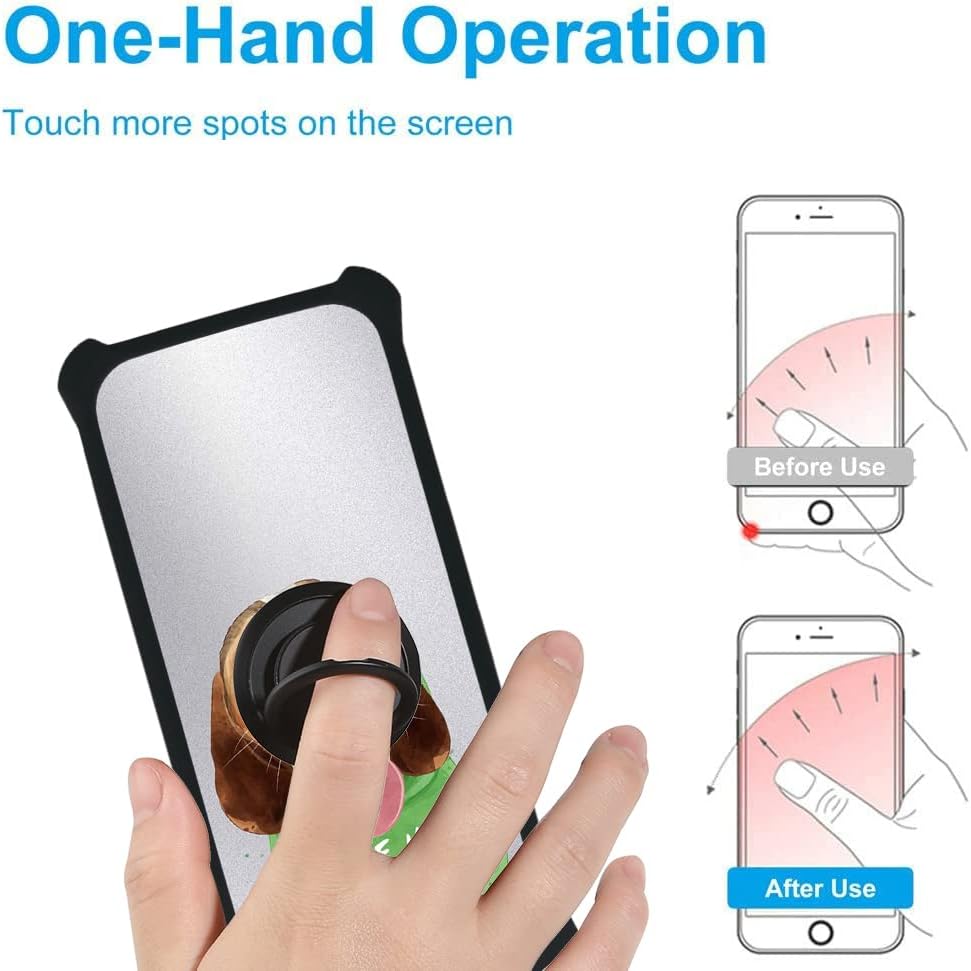
Image: Visual demonstration of the screen protector's scratch-proof capabilities, showing resistance against sharp objects like a hammer.
Maintenance
Proper care will extend the life and appearance of your phone case and screen protector.
- Cleaning the Case: To clean the silicone frame and PC back panel, gently wipe with a soft, damp cloth. For stubborn dirt, a small amount of mild soap can be used, followed by wiping with a clean, damp cloth and air drying. Avoid harsh chemicals or abrasive materials.
- Cleaning the Screen Protector: Use a microfiber cloth to wipe away fingerprints and smudges. For deeper cleaning, a screen cleaner spray designed for electronics can be applied to the cloth (not directly to the screen) and then used to wipe the protector.
- Ring Stand Care: Ensure the ring stand mechanism remains free of debris. If it becomes loose, check its adhesive attachment.
Troubleshooting
Here are solutions to common issues you might encounter.
- Screen Protector Bubbles: If small bubbles appear after installation, gently push them towards the nearest edge using a soft cloth or a credit card wrapped in cloth. For persistent bubbles, lift the nearest edge slightly and re-apply, ensuring no dust is trapped.
- Case Not Fitting Properly: Ensure your phone model is indeed the Sky Device Elite B65. Remove the phone from the case and re-insert it, making sure all corners and edges snap into place correctly. Check for any obstructions.
- Buttons Difficult to Press: If the case buttons feel stiff, ensure the phone is seated correctly within the case. Over time, the silicone material may soften slightly, making buttons easier to press.
- Ring Stand Loosening: If the adhesive ring stand becomes loose, ensure the surface it's attached to is clean and dry. Re-apply pressure for a few seconds. If the adhesive has lost its stickiness, it may need replacement.
Specifications
| Feature | Detail |
|---|---|
| Brand | Aroepurt |
| Model Number | DYH-SSG |
| Compatible Devices | Sky Device Elite B65 |
| Material Type | PC hard back panel + soft silicone frame + metal support finger ring |
| Special Features | Finger ring + support + car bracket magnetic suction, Shock Airbags, Silver Reflect Light finish |
| Form Factor | Solid protection with support |
| Mounting Hardware | Screen Protector |
| Product Dimensions | 1 x 1 x 1 cm; 70 g (approximate) |
Warranty and Support
For warranty information or technical support, please refer to the retailer's policy or contact Aroepurt customer service directly. Contact details are typically available on the product packaging or the official Aroepurt website.
When contacting support, please have your product model number (DYH-SSG) and purchase details ready.
Ask a question about this manual
Ask about setup, troubleshooting, compatibility, parts, safety, or missing instructions. Manuals+ will review the question and use this page’s manual context to help answer it.