
1. Introduction
This manual provides essential instructions for the proper installation, operation, and maintenance of your Cooler Master MWE Gold V2 FM 1050W ATX 3.0 Power Supply. Please read this manual thoroughly before installation and retain it for future reference. This power supply is designed to deliver reliable and efficient power to your personal computer system, featuring 80 PLUS Gold efficiency and a fully modular design for enhanced flexibility.
2. Safety Information
WARNING: Improper installation or use can result in equipment damage, electric shock, or serious injury. Always follow these safety guidelines:
- Ensure the power supply is disconnected from the AC power outlet before installation or handling.
- Do not open the power supply unit. High voltages are present inside, and there are no user-serviceable parts. Opening the unit will void the warranty.
- Install the power supply in a well-ventilated area, away from heat sources, direct sunlight, and moisture.
- Use only the modular cables provided with this power supply. Using incompatible cables may damage the unit and connected components.
- Ensure all cables are securely connected before powering on the system.
- This product is intended for use in personal computer systems only. Do not use it for any other purpose.
3. Package Contents
Verify that all items are present in your package:
- Cooler Master MWE Gold V2 FM 1050W ATX 3.0 Power Supply
- Modular Cable Set (various types for motherboard, CPU, PCIe, SATA, Peripherals)
- AC Power Cord
- Mounting Screws
- User Manual (this document)
4. Product Features
- 1050W Continuous Power Output: Provides ample power for high-performance gaming PCs and workstations.
- 80 PLUS Gold Certified: Ensures high efficiency, reducing heat generation and operating costs.
- ATX 3.0 Compatibility: Designed to meet the latest power delivery standards for modern components.
- Fully Modular Cabling: Allows for easy customization and improved cable management within your PC case.
- 120mm HDB Fan: Features a Hydro-Dynamic Bearing fan for quiet operation and extended lifespan.
- Semi-Fanless Mode: The fan remains off under low load conditions for silent operation, activating only when needed.
5. Installation Guide
5.1. Preparation
- Unpack the power supply and all accessories.
- Ensure your PC case is compatible with ATX form factor power supplies.
- Turn off your computer and disconnect the AC power cord from the wall outlet.
- Open your computer case to access the power supply mounting area.
5.2. Mounting the Power Supply
Carefully slide the Cooler Master MWE Gold V2 FM 1050W power supply into the designated PSU bay in your PC case. Ensure the fan is oriented correctly (typically facing downwards or upwards, depending on your case design and airflow strategy). Secure the power supply to the case using the provided mounting screws.

Figure 1: Main view of the Cooler Master MWE Gold V2 FM 1050W Power Supply, showing the fan grill and branding.
5.3. Connecting Modular Cables
The fully modular design allows you to connect only the cables your system requires, improving airflow and reducing clutter. Refer to your motherboard and component manuals for specific connection requirements.

Figure 2: Overview of the modular cable connection ports on the power supply unit.
- 24-pin ATX Motherboard Cable: Connect the large 24-pin connector to your motherboard's main power socket.
- 8-pin CPU (EPS) Cable: Connect the 8-pin (or 4+4 pin) CPU power cable to the corresponding socket on your motherboard. High-end motherboards may require two 8-pin CPU connectors.
- PCIe Cables: Connect the 6+2 pin PCIe cables to your graphics card(s). Ensure all required power connectors on your GPU are populated.
- SATA Cables: Connect SATA power cables to your SSDs, HDDs, and optical drives.
- Peripheral (Molex) Cables: Use these for older peripherals or case fans if needed.

Figure 3: Detailed view of the labeled modular ports for motherboard, CPU, PCIe, HDD, and SATA connections.
5.4. AC Power Connection
Once all internal components are connected, connect the AC power cord to the power supply's AC inlet and then to a wall outlet or surge protector. Ensure the power switch on the back of the PSU is in the 'OFF' (0) position before connecting the AC cord.
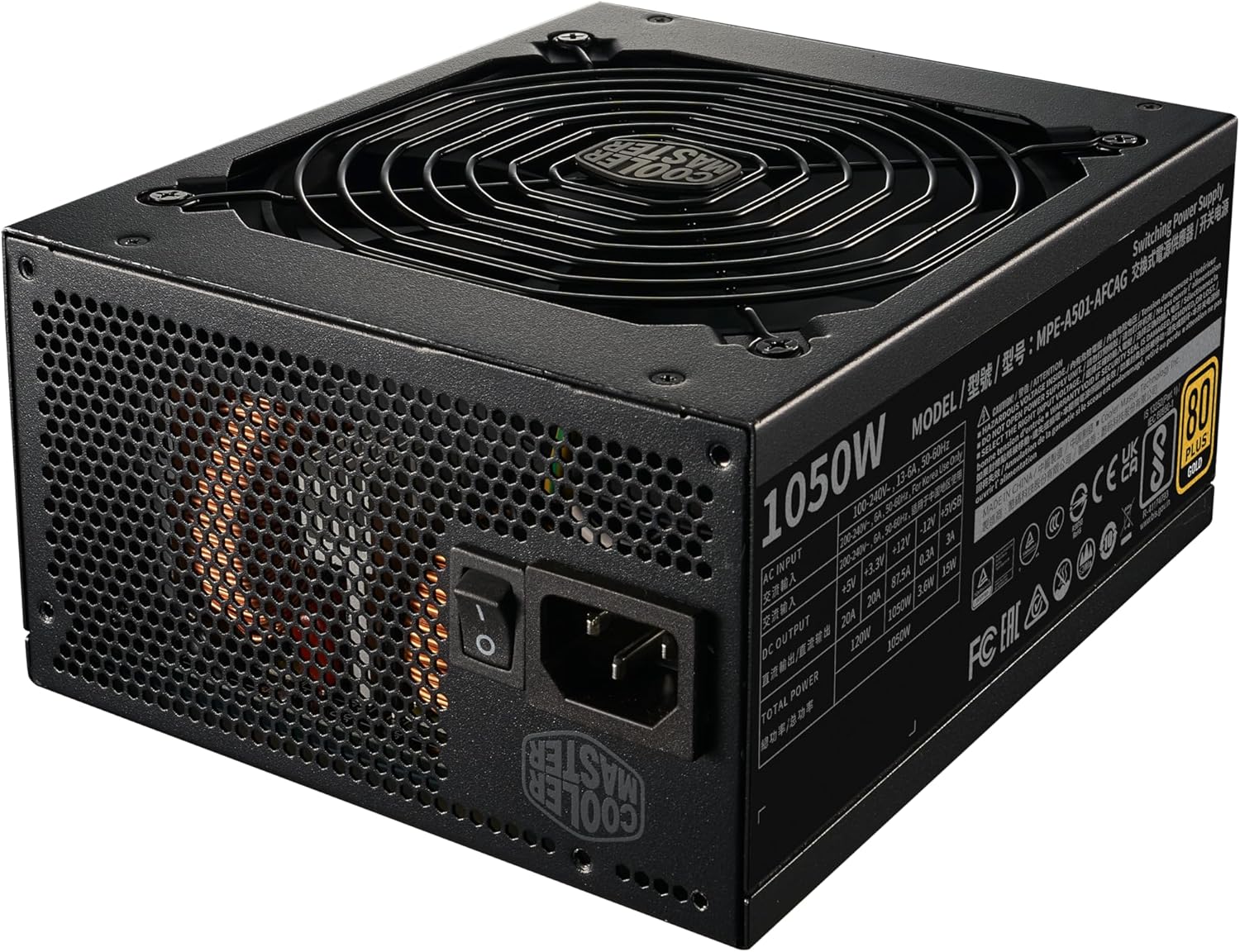
Figure 4: Rear panel of the power supply, featuring the AC power input and the main power switch.
6. Operating Instructions
6.1. Initial Power-On
- After completing all cable connections, ensure the power switch on the back of the PSU is in the 'ON' (I) position.
- Press the power button on your computer case to start the system.
6.2. Fan Operation (Semi-Fanless Mode)
The MWE Gold V2 FM 1050W features a semi-fanless mode. The 120mm HDB fan will remain inactive under low system loads to provide silent operation. As the system load increases and the internal temperature rises, the fan will automatically activate to maintain optimal cooling. This intelligent control ensures quiet performance when not under heavy demand and efficient cooling when required.
7. Maintenance
7.1. Cleaning
To ensure optimal performance and longevity, periodically clean your power supply:
- Disconnect the AC power cord from the wall outlet and the PSU.
- Use compressed air to gently clear dust from the fan grill and ventilation openings. Do not insert any objects into the fan or vents.
- Wipe the exterior of the power supply with a soft, dry cloth. Avoid using liquid cleaners.

Figure 5: Top view of the power supply, highlighting the 120mm fan grill for cooling.
7.2. General Care
- Ensure adequate airflow around the power supply within your PC case.
- Avoid placing objects on top of the power supply that could obstruct ventilation.
- Regularly check cable connections to ensure they remain secure.
8. Troubleshooting
If you encounter issues with your power supply, refer to the following common problems and solutions:
- No Power:
- Check if the AC power cord is securely connected to both the power supply and the wall outlet.
- Ensure the power switch on the back of the PSU is in the 'ON' (I) position.
- Verify all modular cables (24-pin ATX, CPU, PCIe) are correctly and firmly seated in both the PSU and the components.
- Test the wall outlet with another device to confirm it has power.
- System Instability/Crashes:
- Ensure your system's power requirements do not exceed the 1050W capacity of the PSU.
- Check for loose cable connections.
- Verify that your components are not overheating.
- Excessive Fan Noise:
- Under heavy load, the fan will operate at higher speeds, which is normal.
- If noise is persistent at low loads, ensure the fan grill is clear of obstructions and dust. Refer to the Maintenance section.
- Ensure the power supply is securely mounted to prevent vibrations.
If problems persist after attempting these solutions, please contact Cooler Master customer support.
9. Specifications
| Feature | Specification |
|---|---|
| Brand | Cooler Master |
| Model Number | MPE-A501-AFCAG-3EU |
| Wattage | 1050 Watts |
| Efficiency Rating | 80 PLUS Gold |
| Form Factor | ATX |
| Compatible Devices | Personal Computer |
| Cooling Method | Air (120mm HDB Fan) |
| Modular Type | Fully Modular |
| Product Dimensions (LxWxH) | 7.09 x 5.91 x 3.39 inches (180 x 150 x 86 mm) |
| Item Weight | 5.65 pounds (2.57 Kilograms) |
| Date First Available | August 1, 2023 |
10. Warranty and Support
Cooler Master products are backed by a limited warranty. For detailed warranty terms, conditions, and registration information, please visit the official Cooler Master website or refer to the warranty card included with your product.
For technical support, troubleshooting assistance, or to inquire about replacement parts, please contact Cooler Master customer service through their official website or the contact information provided in your product packaging.
Website: www.coolermaster.com