
1. Product Overview
The OpenRock Pro Open Ear Headphones are designed to provide high-fidelity audio while maintaining environmental awareness. Featuring Bluetooth 5.2 connectivity, a comfortable open-ear design, and extended battery life, these headphones are suitable for various activities.

Image 1.1: OpenRock Pro Open Ear Headphones with their charging case.
2. Package Contents
Verify that all items are present in your package:
- OpenRock Pro Open Ear Headphones (Left and Right)
- Charging Case
- USB-C Charging Cable
- User Manual (this document)
3. Setup and First Use
3.1 Charging the Headphones and Case
Before first use, fully charge the headphones and the charging case.
- Place the headphones into the charging case, ensuring they are correctly seated.
- Connect the USB-C charging cable to the charging port on the case and to a power source.
- The indicator light on the case will show charging status. A full charge typically takes 1.5 hours.

Image 3.1: The headphones offer up to 19 hours of playtime, with an additional 27 hours provided by the charging case.
3.2 Pairing with a Device
The headphones will automatically enter pairing mode when removed from the charging case for the first time.
- Open the charging case and remove both headphones.
- On your device (smartphone, tablet, laptop), enable Bluetooth.
- Search for "OpenRock Pro" in the list of available Bluetooth devices and select it to connect.
- Once connected, a voice prompt will confirm successful pairing.
3.3 How to Wear
Proper wearing ensures comfort and optimal sound experience.
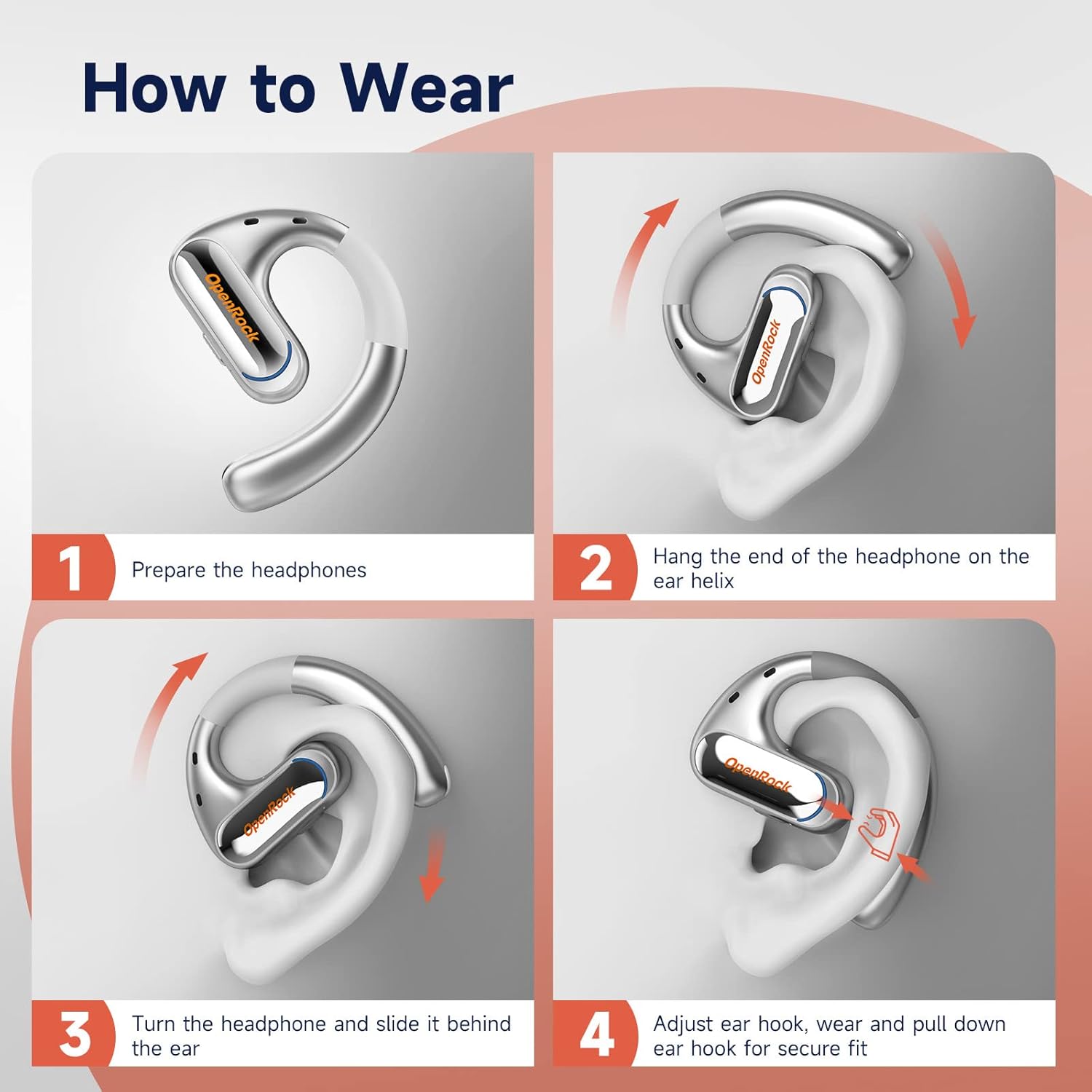
Image 3.2: Step-by-step instructions for wearing the OpenRock Pro headphones.
- Prepare the headphones.
- Hang the end of the headphone on the ear helix.
- Turn the headphone and slide it behind the ear.
- Adjust the ear hook, wear, and pull down the ear hook for a secure fit.

Image 3.3: The lightweight design (only 13g) ensures comfort without ear pain.
4. Operating Instructions
4.1 Touch Controls
The OpenRock Pro headphones feature touch controls for various functions. Specific touch gestures may vary; refer to the quick start guide for detailed commands.
- Play/Pause: Single tap on either earbud.
- Next Track: Double tap on the right earbud.
- Previous Track: Double tap on the left earbud.
- Answer/End Call: Single tap on either earbud.
- Reject Call: Press and hold either earbud.
- Activate Voice Assistant: Triple tap on either earbud.
4.2 Audio Features
The headphones incorporate advanced audio technologies for a rich listening experience.
- High-Fidelity Audio: Equipped with a powerful dynamic driver and aptX high-resolution audio support for clear and vivid sound.
- TubeBass Tech: Patented TubeBass acoustic technology enhances bass frequencies for deeper and richer sound.

Image 4.1: TubeBass™ Technology for enhanced sound.
4.3 Call Features
The OpenRock Pro headphones are designed for clear communication.
- cVc 8.0 4-Mic Call Noise Cancelling: Two high-quality microphones utilize beam-forming technology to reduce environmental noise during calls, ensuring your voice is heard clearly.

Image 4.2: cVc 8.0 Noise Cancelling for clear calls.
4.4 Environmental Awareness
The open-ear design allows you to remain aware of your surroundings while listening to audio, enhancing safety during outdoor activities.

Image 4.3: The open-ear design promotes security and awareness of your environment.
5. Maintenance
5.1 Cleaning
Regular cleaning helps maintain performance and hygiene.
- Wipe the headphones and charging case with a soft, dry, lint-free cloth.
- Do not use abrasive cleaners, alcohol, or chemical solvents.
- Ensure charging contacts are clean and dry before placing headphones in the case.
5.2 Water Resistance
The headphones are rated IPX5 water resistant.
- IPX5 rating means the headphones can resist a sustained, low-pressure water jet spray.
- They are suitable for use during workouts and in light rain, but are not designed for submersion in water.
- Ensure the headphones are dry before placing them back into the charging case to prevent damage.

Image 5.1: OpenRock Pro headphones feature IPX5 water and dust resistance.
5.3 Storage
When not in use, store the headphones in their charging case to protect them and keep them charged.
6. Troubleshooting
If you encounter issues with your OpenRock Pro headphones, try the following solutions:
- No Sound/Low Volume:
- Ensure headphones are properly paired and connected to your device.
- Check the volume level on both your device and the headphones.
- Ensure the headphones are clean and free of debris, especially the speaker grilles.
- If one earbud has low volume after sweating, ensure it is completely dry before use.
- Cannot Pair:
- Make sure Bluetooth is enabled on your device.
- Ensure the headphones are in pairing mode (indicator lights flashing).
- Turn off Bluetooth on other nearby devices to avoid interference.
- Forget "OpenRock Pro" from your device's Bluetooth list and try pairing again.
- Charging Issues:
- Ensure the charging cable is securely connected to both the case and the power source.
- Verify that the charging contacts on the headphones and inside the case are clean and dry.
- Try a different USB-C cable or power adapter.
- Ensure headphones are correctly seated in the charging case.
- Intermittent Connection:
- Ensure your device is within the Bluetooth range (up to 10 meters) without significant obstacles.
- Avoid strong electromagnetic interference.
7. Specifications
| Feature | Specification |
|---|---|
| Model Name | OpenRock Pro |
| Connectivity Technology | Wireless (Bluetooth 5.2) |
| Bluetooth Range | 10 Meters |
| Audio Driver Type | Dynamic Driver |
| Frequency Range | 20 Hz - 20 kHz |
| Battery Life (Headphones) | Up to 19 Hours |
| Carrying Case Battery Capacity | Adds 27 Hours (Total 46 Hours) |
| Charging Time | 1.5 Hours |
| Water Resistance Level | IPX5 Water Resistant |
| Item Weight | 26 Grams (0.917 ounces) |
| Control Method | Touch |
| Microphones | cVc 8.0 4-Mic Call Noise Cancelling |
| Earpiece Shape | Around-the-ear hook |
8. Warranty and Support
For warranty information and technical support, please refer to the official OpenRock website or contact their customer service directly. You may also find additional resources, including a PDF user guide and manual, at the following links:
Please retain your proof of purchase for warranty claims.


