
ANDELI MCT-416
ANDELI MCT-416 Multi-Function Welder User Manual
Model: MCT-416
1. Introduction
Thank you for choosing the ANDELI MCT-416 Multi-Function Welder. This versatile 5-in-1 machine is designed for a wide range of welding and cutting tasks, including CUT, MIG (CO2 / MIX / FLUX), Lift TIG, PULSE, and Arc Welding (MMA). Its dual voltage compatibility (100V/200V) makes it suitable for various power environments, from household use to professional applications. The integrated LED screen and synergic function simplify operation, making it accessible even for beginners.

Figure 1.1: The ANDELI MCT-416 Multi-Function Welder and its included accessories, showcasing its compact design and various components for different welding processes.
2. Safety Information
Always prioritize safety when operating welding equipment. Read and understand all safety warnings and instructions before use. Failure to do so may result in electric shock, fire, serious injury, or death.
- Wear appropriate personal protective equipment (PPE), including welding helmet, gloves, and protective clothing.
- Ensure proper ventilation to avoid inhaling fumes and gases.
- Do not operate in damp or wet conditions.
- Keep children and unauthorized personnel away from the work area.
- Disconnect power before performing any maintenance or changing accessories.
3. Product Overview
The MCT-416 features an intuitive LED display and control panel for easy parameter adjustment. It supports various welding processes and is designed for high versatility across different materials.
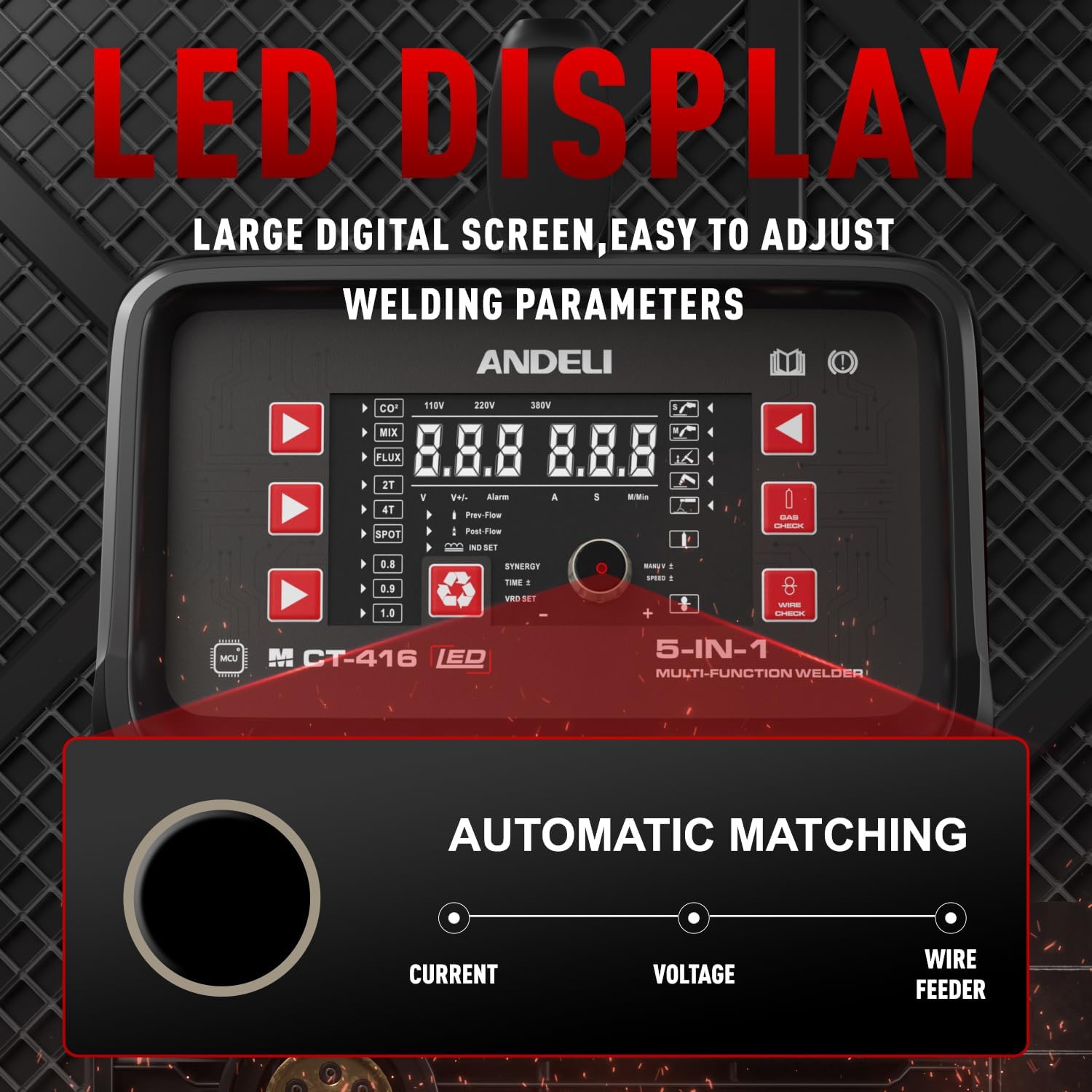
Figure 3.1: Detailed view of the MCT-416's LED display, showing the large digital screen and various indicators for welding parameters, including voltage, current, and wire speed. The display also indicates the selected welding mode and features an automatic matching function for simplified setup.

Figure 3.2: The LED panel of the MCT-416, highlighting the automatic matching feature that simplifies welding parameter settings based on selected wire diameter and plate thickness.
4. Setup
4.1 Power Connection
The MCT-416 is compatible with both 100V and 200V power supplies. Ensure the correct voltage is selected or automatically detected by the machine. Use an appropriate power outlet and cable for your chosen voltage.

Figure 4.1: Illustration of the MCT-416's 100V/200V dual voltage compatibility, making it suitable for both household and professional use.
4.2 Torch and Ground Clamp Connection
Connect the appropriate torch and ground clamp based on the welding or cutting process you intend to use. Refer to the diagrams below for correct connections.

Figure 4.2: Connection methods for various welding torches, including Arc welding, Lift TIG welding, Plasma cutting, Gas MIG welding, and Non-Gas MIG welding.
4.3 Wire Installation (for MIG)
For MIG welding, install the welding wire spool into the machine. The MCT-416 supports both 1KG (2-pound) and 5KG (11-pound) welding wire spools.

Figure 4.3: Illustration showing the compatibility of the MCT-416 with both 1KG and 5KG welding wire spools, indicating the wire feeding mechanism.
5. Operating Instructions
The MCT-416 offers multiple welding and cutting functions. Select the desired mode and adjust parameters using the LED display and control knob.

Figure 5.1: Examples of the 4-in-1 multi-process capabilities: MIG welding, Plasma CUT, Lift TIG welding, and Arc welding (MMA).
5.1 Synergic Function
The synergic function automatically sets optimal welding conditions based on your selected wire diameter and plate thickness. This feature simplifies setup, especially for beginners, while still allowing fine-tuning of voltage and current for precise control.
5.2 Welding Modes
- MIG Welding (CO2 / MIX / FLUX): Suitable for various materials. Adjust wire speed and voltage for optimal results.
- CUT (Plasma Cutting): For cutting various metals. Ensure proper air pressure and torch distance.
- Lift TIG Welding: Provides precise control for thin materials. Use with appropriate shielding gas.
- Arc Welding (MMA): For general welding tasks with coated electrodes.

Figure 5.2: Examples of welding and cutting results from the MCT-416, including CO2 semi-automatic welding, Mix gas welding, Non-gas semi-automatic welding, Lift TIG welding, Plasma cutting, and Arc welding.
6. Maintenance
Regular maintenance ensures the longevity and optimal performance of your welder.
- Cleaning: Periodically clean the machine's exterior and ventilation openings to prevent dust buildup.
- Consumables: Inspect and replace worn-out consumables such as MIG nozzles, contact tips, TIG collets, and plasma cutting electrodes/nozzles.
- Wire Feeder: Ensure the wire feeder mechanism is clean and free of debris for smooth wire feeding.
7. Troubleshooting
If you encounter issues, refer to the following common problems and solutions. For persistent problems, contact customer support.
| Problem | Possible Cause | Solution |
|---|---|---|
| No power | Power cable disconnected, circuit breaker tripped | Check power connections, reset circuit breaker |
| Poor weld quality | Incorrect parameters, dirty material, wrong wire/electrode | Adjust settings, clean workpiece, use correct consumables |
| Plasma cutting unstable | Insufficient air pressure, worn consumables | Check air supply, replace plasma torch consumables |
| Wire feeding issues | Tangled wire, clogged liner, incorrect tension | Untangle wire, clean/replace liner, adjust tension |
8. Specifications
| Feature | Specification |
|---|---|
| Brand | ANDELI |
| Model Name | MCT-416 |
| Item Weight | 20.7 Kilograms |
| Package Dimensions | 58.79 x 56.5 x 31.4 cm |
| Functions | CUT, MIG (CO2 / MIX / FLUX), Lift TIG, PULSE, Arc Welding (MMA) |
| Voltage Compatibility | 100V/200V |
| Warranty | 2 years |

Figure 8.1: Detailed product parameters and dimensions for the ANDELI MCT-416 welder.
9. Warranty and Support
The ANDELI MCT-416 Multi-Function Welder comes with a 2-year warranty. We also offer returns and exchanges within 30 days of product arrival. Please note that the warranty applies only to purchases made from the ANDELI-JP official store. For customer service or warranty claims, please contact our efficient customer service team.
Related documentsMCT-416


Ask a question about this manual
Ask about setup, troubleshooting, compatibility, parts, safety, or missing instructions. Manuals+ will review the question and use this page’s manual context to help answer it.