
Runleader RL-BI025A-BT
Runleader RL-BI025A-BT Bluetooth LED Battery Indicator User Manual
Model: RL-BI025A-BT
Introduction
The Runleader RL-BI025A-BT is a versatile Bluetooth-enabled LED battery indicator, voltage gauge, and hour meter designed for 12V to 48V battery systems. It provides real-time monitoring of battery capacity, voltage, and operational hours, with programmable alerts and remote control via the 'Moresee' mobile application. This manual provides detailed instructions for installation, operation, and maintenance of your device.
Key Features:
- Bluetooth remote control via the 'Moresee' app for programming and data export.
- Management of multiple devices through the app with customized interfaces.
- Battery capacity monitoring displayed by 10 LED bars and power percentage.
- Real-time voltage monitoring with configurable over-voltage and under-voltage alerts.
- Hour meter function for tracking operational time and setting maintenance reminders.
- IP67 waterproof design for enhanced durability.
Setup
1. Component Checklist:
Before installation, ensure all components are present:
- Runleader RL-BI025A-BT Battery Indicator
- Connector wiring harness
- Connector plug
- Mounting bracket
- M4 Flange nuts (x2)
- Mounting screws (x8)
- Cut-out sticker (for template)
- User manual (digital via QR code)

Image: Dimensions and included accessories for the Runleader RL-BI025A-BT.
2. Physical Installation:
Follow these steps for mounting and wiring the battery indicator:
- Mounting: Use the provided cut-out sticker as a template to create a Ø52mm (2.04 inches) hole in your desired mounting surface. Insert the indicator into the hole, then secure it from the rear using the mounting bracket and M4 flange nuts.
- Wiring - Direct Connection: Connect the RED wire to the battery's positive (+) terminal and the BLACK wire to the battery's negative (-) terminal. The indicator will be continuously powered.
- Wiring - Key Switch Connection: Connect the RED wire to the battery's positive (+) terminal, the BLACK wire to the battery's negative (-) terminal, and the GREEN wire to a key switch or ignition source that provides power when the vehicle/equipment is operational. This allows the hour meter to track run time only when the equipment is in use.

Image: Detailed diagrams illustrating the direct and key switch wiring methods, along with the four-step physical mounting process.
3. App Installation and Device Pairing:
To utilize the full functionality of the RL-BI025A-BT, install the 'Moresee' application on your smartphone:
- Download App: Search for 'Moresee' in your device's official app store (e.g., Google Play Store for Android, Apple App Store for iOS) and install it. Avoid downloading from unofficial sources for security reasons.
- Enable Bluetooth: Ensure Bluetooth is enabled on your smartphone.
- Pair Device: Open the 'Moresee' app, navigate to the device management section, and search for available Bluetooth devices. Select the RL-BI025A-BT to pair.
- Customize: Once paired, you can customize the device name and usage scenario within the app.

Image: Visual guide for installing the 'Moresee' app and an overview of the product's physical installation.
Operating Instructions
1. Display Overview:
The indicator's display provides immediate information:
- LED Bar Graph: 10 LED segments visually represent the battery's state of charge (E for Empty, F for Full).
- Digital Display: Shows total hours (TOT), service countdown (SVC), battery percentage (BAT%), or real-time voltage (VOLT).
- Bluetooth Icon: Indicates active Bluetooth connection.
- SVC, BAT%, Alarm Indicators: Light up to show active service reminders, battery percentage mode, or alert conditions.

Image: The main display of the Runleader RL-BI025A-BT, illustrating its various indicators and readings.
2. Battery Type Configuration:
For accurate battery capacity readings, it is essential to select the correct battery type in the 'Moresee' app:
- Open the 'Moresee' app and navigate to the battery settings for your device.
- Select the applicable battery type from the list: Lead Acid, Trojan, 18650 Lithium, GEL, AGM, or LiFePO4. The app also supports custom user settings.
- Incorrect selection may lead to inaccurate battery percentage displays.
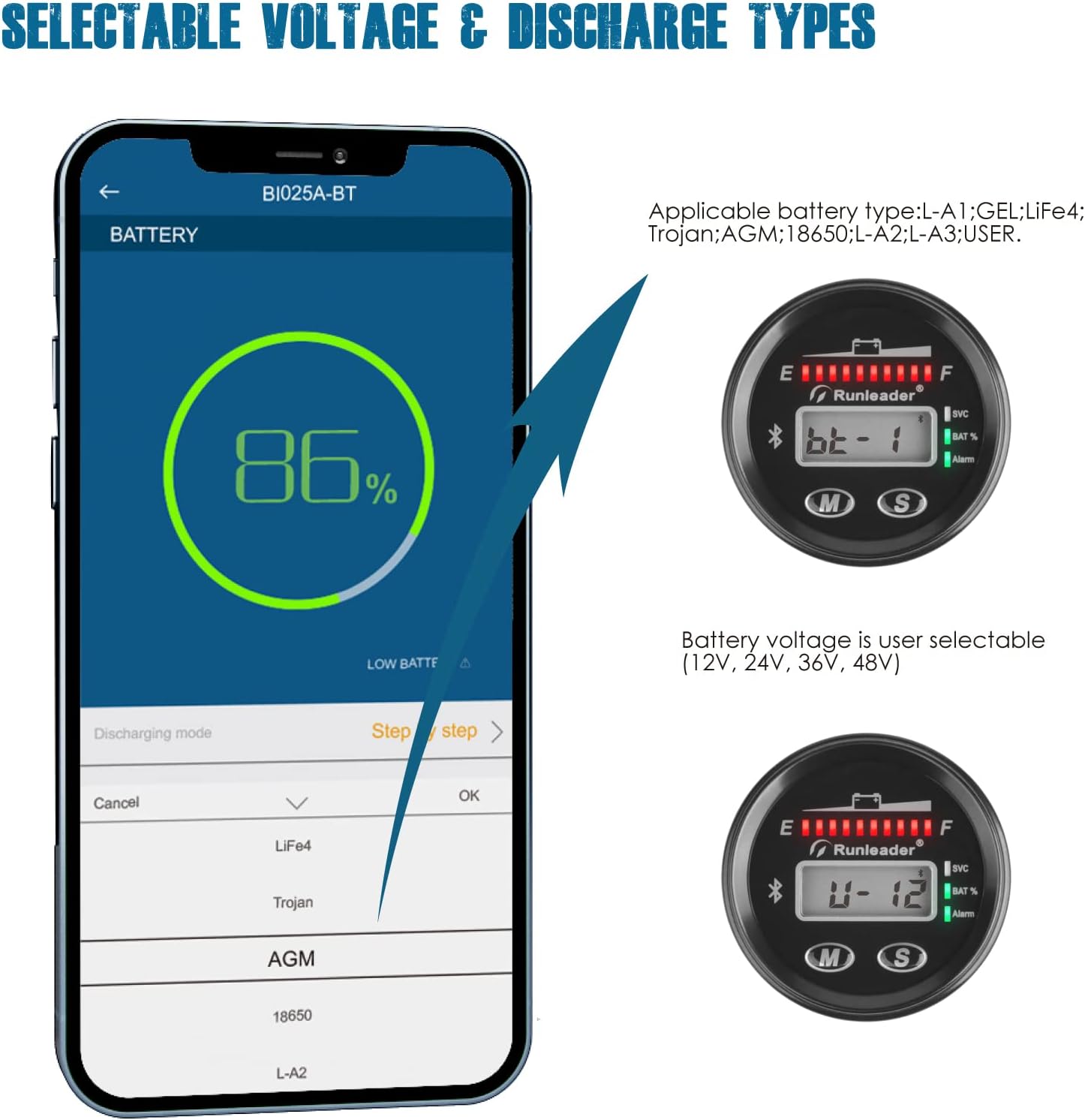
Image: The 'Moresee' app interface demonstrating how to select the appropriate battery type for precise monitoring.
3. Hour Meter and Maintenance Reminders:
The device tracks total operational hours and can be configured for maintenance alerts:
- The hour meter records total working hours from 0 to 99,999 hours with 0.1-hour accuracy.
- An initial hour value can be set when replacing an old meter.
- Up to 35 groups of regular maintenance reminders can be programmed with intervals ranging from 5 to 2000 hours. The SVC indicator will activate when a maintenance interval is due.

Image: The 'Moresee' app's multi-function display, showing total hours, service countdown, battery percentage, and voltage readings.
4. Voltage Monitoring and Alerts:
The RL-BI025A-BT monitors real-time battery voltage and provides alerts for critical levels:
- The digital display shows the current voltage.
- Configurable low voltage alerts (8.5V to 59V) and high voltage alerts (12V to 60V) can be set via the app.
- The 'Alarm' indicator on the device will illuminate when a voltage alert condition is met.

Image: The indicator display showing various warning messages, including SVC reminders and configurable low and high voltage alerts.
5. App Functionality:
The 'Moresee' app extends the device's capabilities:
- Remote Monitoring: View all battery and hour meter data remotely on your smartphone.
- Multiple Device Management: Monitor and manage several RL-BI025A-BT devices simultaneously, each with customized names and usage scenarios (e.g., Golf Cart, Forklift, Scrubber Machine, Lawn Mower).
- Data Export: Historic data can be exported from the app for analysis and maintenance planning.

Image: The 'Moresee' app's interface for managing and monitoring multiple Runleader devices, each assigned to a specific equipment type.

Image: Examples of customizable usage scenarios within the 'Moresee' app, such as for a scrubber machine, golf cart, forklift, or lawn mower.
Maintenance
1. General Care:
- The RL-BI025A-BT features an IP67 waterproof design, making it resistant to dust and water immersion up to 1 meter for 30 minutes.
- Clean the device with a soft, damp cloth. Avoid abrasive cleaners or solvents.
- The device is designed with anti-collision features for durability in various environments.

Image: An exploded diagram highlighting the PC transparent board and waterproof construction of the device, ensuring IP67 protection.
2. Firmware Updates:
Periodically check the 'Moresee' app for available firmware updates to ensure optimal performance and access to new features. Follow the in-app instructions for any update procedures.
Troubleshooting
- Inaccurate Battery Percentage: Ensure the correct battery type (e.g., Lead Acid, LiFePO4) is selected in the 'Moresee' app settings. Incorrect battery type selection will lead to inaccurate capacity readings.
- No Display/Power: Verify that the RED wire is securely connected to the battery's positive terminal and the BLACK wire to the negative terminal. If using the key switch connection, ensure the GREEN wire receives power when the ignition is on.
- App Connectivity Issues: Confirm that Bluetooth is active on your smartphone and the RL-BI025A-BT. Try restarting the 'Moresee' app or cycling power to the indicator.
- Alerts Not Functioning: Check the low and high voltage alert thresholds configured in the 'Moresee' app to ensure they are set to desired values.
Specifications
| Feature | Specification |
|---|---|
| Model Number | RL-BI025A-BT |
| Product Dimensions | 2.53 x 2.53 x 1.44 inches |
| Item Weight | 4.4 ounces |
| Operating Voltage Range | 12V to 48V |
| Supported Battery Types | Lead Acid, Trojan, 18650 Lithium, GEL, AGM, LiFePO4 |
| Hour Meter Range | 0 to 99,999 hours (0.1H accuracy) |
| Maintenance Timer Range | 5 to 2000 hours (35 groups) |
| Low Voltage Alert Range | 8.5V to 59V |
| High Voltage Alert Range | 12V to 60V |
| Waterproof Rating | IP67 |
Warranty and Support
The Runleader RL-BI025A-BT comes with a 2-year warranty, as indicated by the manufacturer. For technical support, troubleshooting assistance, or after-sales service, please refer to the contact information provided with your purchase documentation or visit the official Runleader website for further resources.
Safety Information
WARNING:
- Please keep this device away from fire.
- Please keep this device out of reach of children or babies.

Image: Safety warning labels in multiple languages, emphasizing fire safety and keeping the device away from children.
Related documentsRL-BI025A-BT


Ask a question about this manual
Ask about setup, troubleshooting, compatibility, parts, safety, or missing instructions. Manuals+ will review the question and use this page’s manual context to help answer it.