Introduction
Congratulations on your purchase of the Zeppelin Men's Watch Model 8076-5. This timepiece combines classic design with reliable quartz movement, featuring day, date, and moon phase complications. This manual provides detailed instructions to help you understand and operate your watch effectively, ensuring its longevity and accurate performance.
Components Overview
Familiarize yourself with the key components of your Zeppelin 8076-5 watch:
- Crown: Located on the right side of the watch case, used for setting time, day, and date.
- Pushers: Small buttons on the side of the case, typically used for adjusting specific complications like the moon phase or day.
- Dial: The watch face displaying hours, minutes, seconds, day, date, and moon phase indicators.
- Hands: Hour, minute, and second hands for time indication.
- Sub-dials/Windows: Dedicated displays for day, date, and moon phase.
- Case: The main body of the watch, made of stainless steel.
- Crystal: The protective cover over the dial, made of mineral glass.
- Strap: The brown leather band with a buckle clasp.
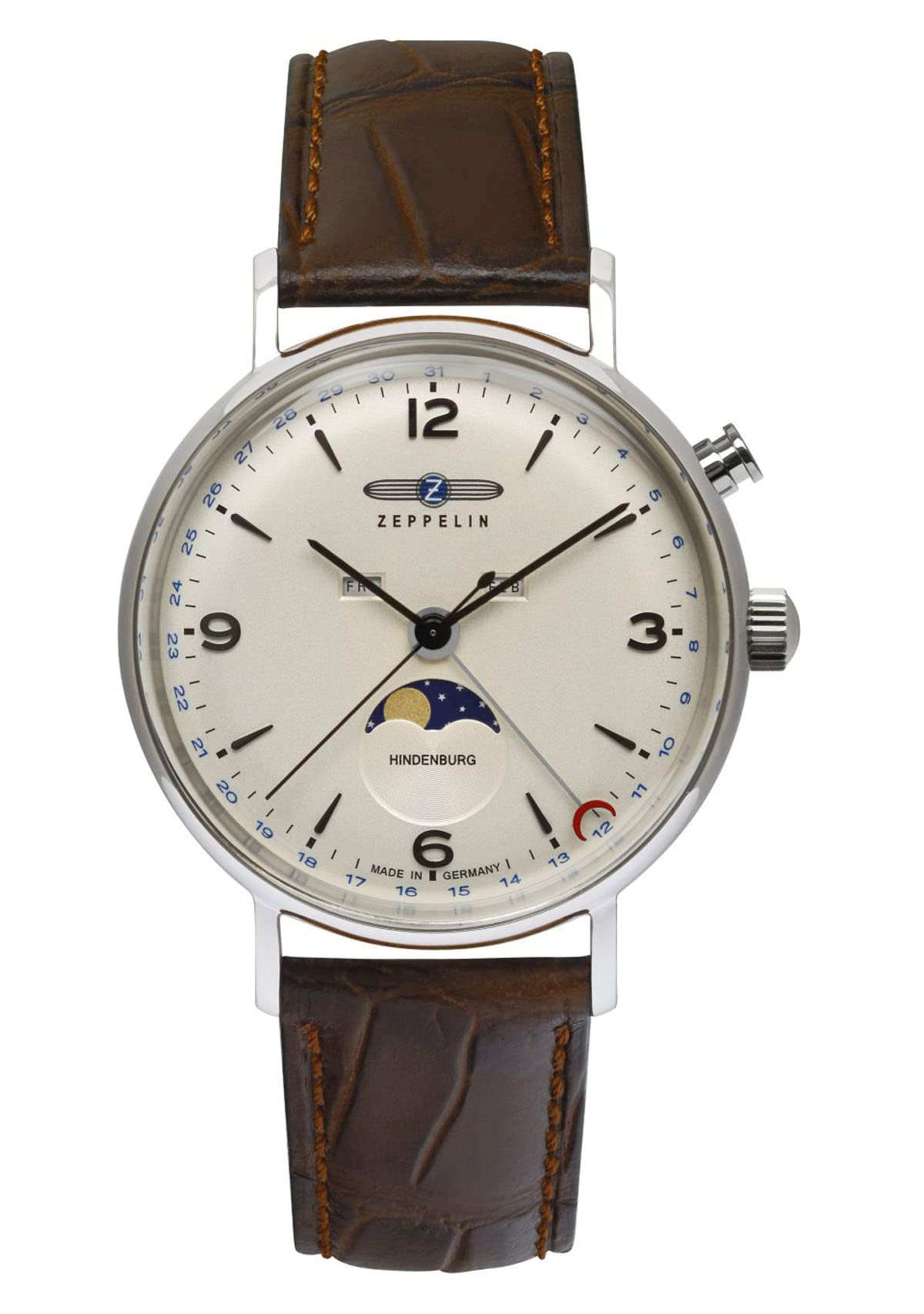
Image: Close-up of the Zeppelin 8076-5 watch dial, highlighting the moon phase, day, and date displays, and the crown for adjustments.
Setup
Before wearing your watch, perform the initial setup:
- Setting the Time:
- Pull the crown out to position 2 (farthest position).
- Rotate the crown clockwise or counter-clockwise to set the correct time. Ensure to distinguish between AM and PM for accurate date change.
- Once the time is set, push the crown back into position 0 (normal operating position).
- Setting the Date and Day:
- Pull the crown out to position 1 (intermediate position).
- Rotate the crown in one direction to adjust the date and in the other direction to adjust the day. Refer to the specific markings on your watch for direction.
- Avoid setting the date or day between 9 PM and 3 AM, as this can interfere with the automatic date change mechanism. If you need to adjust during this period, first set the time outside this window, adjust the date/day, then reset the time.
- Push the crown back into position 0.
- Setting the Moon Phase:
- The moon phase is typically adjusted using a small pusher on the side of the case, often requiring a small tool (like a toothpick) to press.
- Press the pusher repeatedly until the correct moon phase is displayed. Consult a current moon phase calendar for accuracy.
- Avoid adjusting the moon phase between 9 PM and 3 AM.
Your watch comes with 1 LR44 battery included, which powers the quartz movement.
Operating Your Watch
Once set, your Zeppelin 8076-5 watch operates automatically. The quartz movement ensures precise timekeeping. The day, date, and moon phase indicators will advance automatically at midnight. For months with fewer than 31 days, you will need to manually adjust the date at the beginning of the new month.
Water Resistance
Your watch has a water resistance rating of 5 bar (50 meters). This means it is suitable for everyday use and can withstand splashes, rain, and brief immersion in water. It is not suitable for swimming, showering, or diving. Always ensure the crown is fully pushed in to maintain water resistance.

Image: The Zeppelin 8076-5 watch, showcasing its full design with a brown leather strap and beige dial.
Maintenance
Proper care will help preserve the appearance and function of your watch:
- Cleaning: Wipe the watch case and crystal regularly with a soft, dry cloth. For stubborn dirt, a slightly damp cloth can be used, followed by a dry one. Avoid harsh chemicals.
- Leather Strap Care: Avoid prolonged exposure to water, direct sunlight, and extreme temperatures, which can damage the leather. Clean with a specialized leather cleaner if necessary.
- Battery Replacement: When the battery runs out, have it replaced by a qualified watchmaker or authorized service center to ensure proper sealing and function. The watch uses one LR44 battery.
- Storage: When not in use, store your watch in a cool, dry place, away from strong magnetic fields.
Troubleshooting
If you encounter issues with your watch, consider the following:
- Watch Not Running:
- Check if the crown is fully pushed into position 0.
- The battery may be depleted. Seek professional replacement.
- Incorrect Time/Date/Day:
- Refer to the 'Setup' section to reset the time, date, and day.
- Ensure adjustments are not made between 9 PM and 3 AM for date/day/moon phase.
- Condensation Under Crystal:
- This indicates moisture has entered the watch. Seek immediate professional service to prevent damage to the movement.
For issues not covered here, please contact an authorized Zeppelin service center.
Specifications
| Model Number | 8076-5 |
| Movement Type | Quartz |
| Display Type | Analog |
| Case Material | Stainless Steel |
| Case Diameter | 41.0 mm |
| Case Thickness | 11.5 mm |
| Crystal Type | Mineral |
| Strap Material | Leather |
| Strap Color | Brown |
| Dial Color | Beige |
| Clasp Type | Buckle |
| Water Resistance | 5 bar (50 meters) |
| Functions | Day, Date, Moon Phase |
| Battery | 1 x LR44 (included) |
| Item Weight | 200 Grams |
Warranty and Support
Your Zeppelin watch is covered by a manufacturer's warranty against defects in materials and workmanship. Please refer to the warranty card included with your purchase for specific terms and conditions, including the warranty period and coverage details.
For warranty claims, service, or additional support, please visit the official Zeppelin website or contact an authorized Zeppelin service center. Keep your proof of purchase for any warranty-related inquiries.
Official Zeppelin Website: zeppelin-watch.com


