
1. Introduction
Thank you for choosing the ODK Corner Desk, model ZJZ-DCZWJ. This L-shaped desk is designed to maximize your workspace, offering a versatile solution for your home office or study area. It features a reversible design, an integrated bookshelf, and an adjustable monitor stand to enhance your productivity and comfort. This manual provides detailed instructions for assembly, operation, and maintenance to ensure optimal use and longevity of your desk.

Figure 1: ODK Corner Desk ZJZ-DCZWJ, showcasing its L-shaped design with integrated bookshelf and monitor stand.
2. Safety Information
Please read all safety warnings carefully before assembly and use.
- Assemble the desk carefully, following all instructions provided in the assembly guide.
- Always use the desk on a stable and level surface to prevent tipping or instability.
- Keep children and pets away from the assembly area to prevent injury from small parts or tools.
- Do not overload the shelves or desktop beyond their recommended weight capacity.
- Regularly check all fasteners to ensure they remain tight and secure.
3. Setup and Assembly
The ODK Corner Desk is designed for straightforward assembly. Please ensure all components are present before beginning. Refer to the separate assembly guide included with your product for detailed step-by-step instructions and diagrams.
3.1 Unpacking and Component Check
- Carefully unpack all contents from the packaging.
- Verify that all parts listed in the assembly guide are present and undamaged. If any parts are missing or damaged, contact customer support immediately.
3.2 Reversible Configuration
A key feature of your ODK Corner Desk is its reversible design. The bookshelf can be installed on either the right or left side of the L-shaped desk, allowing you to adapt it to your room layout and personal preference. This decision should be made during the initial assembly steps.

Figure 2: Illustration of the reversible L-shaped desk, demonstrating how the bookshelf can be positioned on either side.
3.3 Adjustable Monitor Stand
The desk includes an adjustable monitor stand designed to elevate your screen to an ergonomic height. This stand can be set at different heights (e.g., 10cm, 13cm, 16cm) during assembly to suit your comfort and viewing needs. Ensure the monitor stand is securely attached according to the assembly instructions.

Figure 3: The monitor stand offers multiple height adjustments for ergonomic positioning.
4. Operating Instructions
Once assembled, your ODK Corner Desk is ready for use. Its design is optimized for various activities, including writing, gaming, studying, and general home office tasks.
4.1 Maximizing Workspace
The L-shaped design allows you to utilize corner spaces efficiently, providing a large surface area for multiple monitors, laptops, and other equipment. Arrange your setup to create distinct zones for different tasks, such as a computer area and a writing area.
4.2 Utilizing Storage
The integrated bookshelf offers five tiers of storage for books, documents, office supplies, and decorative items. The under-desk shelves provide additional space for a computer tower or storage boxes, keeping your main desktop clear and organized.

Figure 4: The five-tier bookshelf provides ample storage for various items.

Figure 5: Under-desk shelves offer convenient storage for a computer tower or other items.
4.3 Ergonomic Benefits
Position your monitor(s) on the adjustable stand to achieve an optimal viewing height, which can help reduce neck and eye strain. Ensure your chair is also adjusted to support a healthy posture while working at the desk.
5. Maintenance
Proper maintenance will help preserve the appearance and functionality of your ODK Corner Desk.
- Cleaning: Wipe surfaces with a soft, damp cloth. Avoid harsh chemicals or abrasive cleaners, as these can damage the finish.
- Spills: Clean up spills immediately to prevent staining or damage to the wood material.
- Stability Check: Periodically check all screws and bolts to ensure they are tight. Re-tighten if necessary to maintain the desk's stability.
- Avoid Direct Sunlight: Prolonged exposure to direct sunlight can cause fading or discoloration of the desk's finish.
6. Troubleshooting
This section addresses common issues you might encounter with your ODK Corner Desk.
6.1 Desk is Unstable/Wobbly
- Check Fasteners: Ensure all screws, bolts, and connectors are securely tightened. Refer to the assembly guide to confirm all parts are correctly installed.
- Level Surface: Verify that the desk is placed on a flat, level surface. Adjust the leveling feet (if present) on the bottom of the desk legs to compensate for uneven floors.
- Correct Assembly: Double-check that all frame components are assembled in the correct orientation as per the instructions.
6.2 Missing or Damaged Parts
- If you discover any missing or damaged parts upon unpacking, do not proceed with assembly.
- Contact ODK customer support immediately with your purchase details and a description of the issue. They will assist you with replacement parts.
7. Specifications
| Feature | Specification |
|---|---|
| Brand | ODK |
| Model Number | ZJZ-DCZWJ |
| Color | Black |
| Product Dimensions (L x W x H) | 140 x 137 x 139.5 cm (approx. 55.1 x 53.9 x 54.9 inches) |
| Weight | 28.6 kg (approx. 63 lbs) |
| Material | Wood (top), Metal (base) |
| Special Features | Reversible, Adjustable Monitor Stand, Integrated Bookshelf |
| Desk Design | L-Shape Computer Desk |
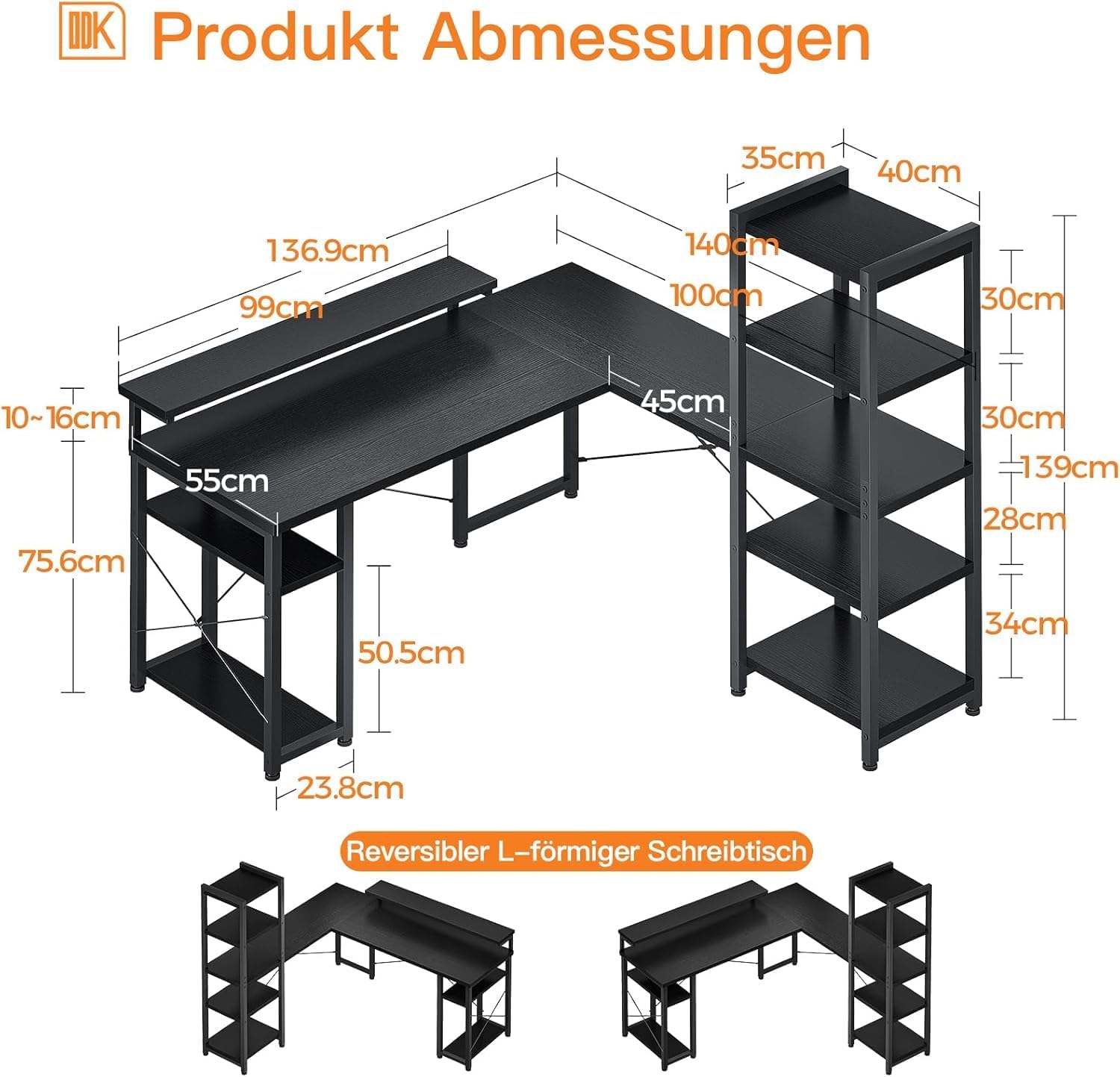
Figure 6: Detailed dimensions of the ODK Corner Desk.
8. Warranty and Support
ODK products are manufactured to high-quality standards. For specific warranty information, please refer to the documentation provided with your purchase or visit the official ODK website. If you encounter any issues or require assistance, please contact ODK customer support.
When contacting support, please have the following information ready:
- Product Model: ZJZ-DCZWJ
- Date of Purchase
- Place of Purchase
- Detailed description of the issue
For further assistance, you may visit the ODK Brand Store.


