Introduction
This manual provides essential instructions for the safe assembly, operation, and maintenance of your Baby Trend Sonar Seasons Stroller. Please read all instructions carefully before use and retain this manual for future reference. The Baby Trend Sonar Seasons Stroller is designed for children from birth up to 50 pounds with a maximum height of 42 inches.
Important Safety Information
- Always secure your child with the 5-point harness.
- Never leave your child unattended in the stroller.
- Ensure the stroller is fully open and locked before placing a child inside.
- Engage the brakes when the stroller is stationary.
- Do not overload the storage basket or parent/child trays.
- Regularly inspect the stroller for loose parts, damaged components, or worn fabric.
- Refer to the full safety warnings in the printed instruction manual for complete details.
Included Components
Before assembly, verify all parts are present:
- Stroller Frame with Seat and Canopy
- Rear Wheel Assembly (2 wheels, axle, washers, pins)
- Front Wheel Assemblies (2 wheels)
- Child Tray
- Parent Tray
- Storage Basket (pre-attached)

Image: The Baby Trend Sonar Seasons Stroller in Liberty Grey, fully assembled.
Setup Instructions
Follow these steps to assemble your stroller:
1. Unfolding the Stroller
- Place the folded stroller on a flat surface.
- Locate and release the fold latch on the side of the stroller frame.
- Lift the handlebar upwards until the stroller frame fully extends and locks into place with an audible click. Ensure all locking mechanisms are engaged.
Video: Official Baby Trend Sonar Seasons Stroller Setup Guide. This video demonstrates the complete assembly process, including unfolding, wheel attachment, and accessory installation.
2. Rear Wheel Assembly
- Remove the pin and one washer from both ends of the rear axle.
- Slide a rear wheel onto the axle bar with the teeth facing inward.
- Place the removed washer onto the axle, followed by the pin. Rotate the pin to secure it in a locked position.
- Repeat for the other rear wheel.
- Align both sides of the rear axle with the stroller frame and press them in simultaneously until they click into place. Ensure the brake levers face outward.
3. Front Wheel Assembly
- Push each front wheel assembly into the stroller frame until the button has clicked in.
- Ensure the black rivet in the wheel center faces outward.
- Pull on all wheels to confirm they are securely attached before use.
4. Child Tray Attachment
- Align the child tray with the connectors on the stroller frame.
- Push the tray down firmly until it clicks into place.
- To access the child seat, pull one release trigger and lift the tray simultaneously to rotate it out of the way.

Image: The Sonar Seasons Stroller showcasing its key features: breathable mesh backrest, UPF 50+ canopy, parent tray, and child tray.
5. Parent Tray Attachment
- Locate the three open slots on the parent tray and face them towards the canopy.
- Align the parent tray tabs with the inner tabs on both sides of the stroller handlebar.
- Press the tray down firmly until both tabs click into position.
- Insert the center elastic band from underneath the canopy and hook it to the tray tab. Repeat for the other elastic band.

Image: A detailed view of the parent tray, featuring two cup holders and a central storage compartment for personal items.
6. Canopy Attachment
- From underneath the frame, secure the canopy sides using the attached bands.
- Fasten each hook and strap onto the stroller frame to ensure the canopy is fully extended and secure.
7. Storage Basket Assembly
The storage basket is typically pre-attached. Ensure all straps with snap closures are correctly fastened, with the straps pointing downwards, away from the stroller. Once secured, the basket is ready for use.
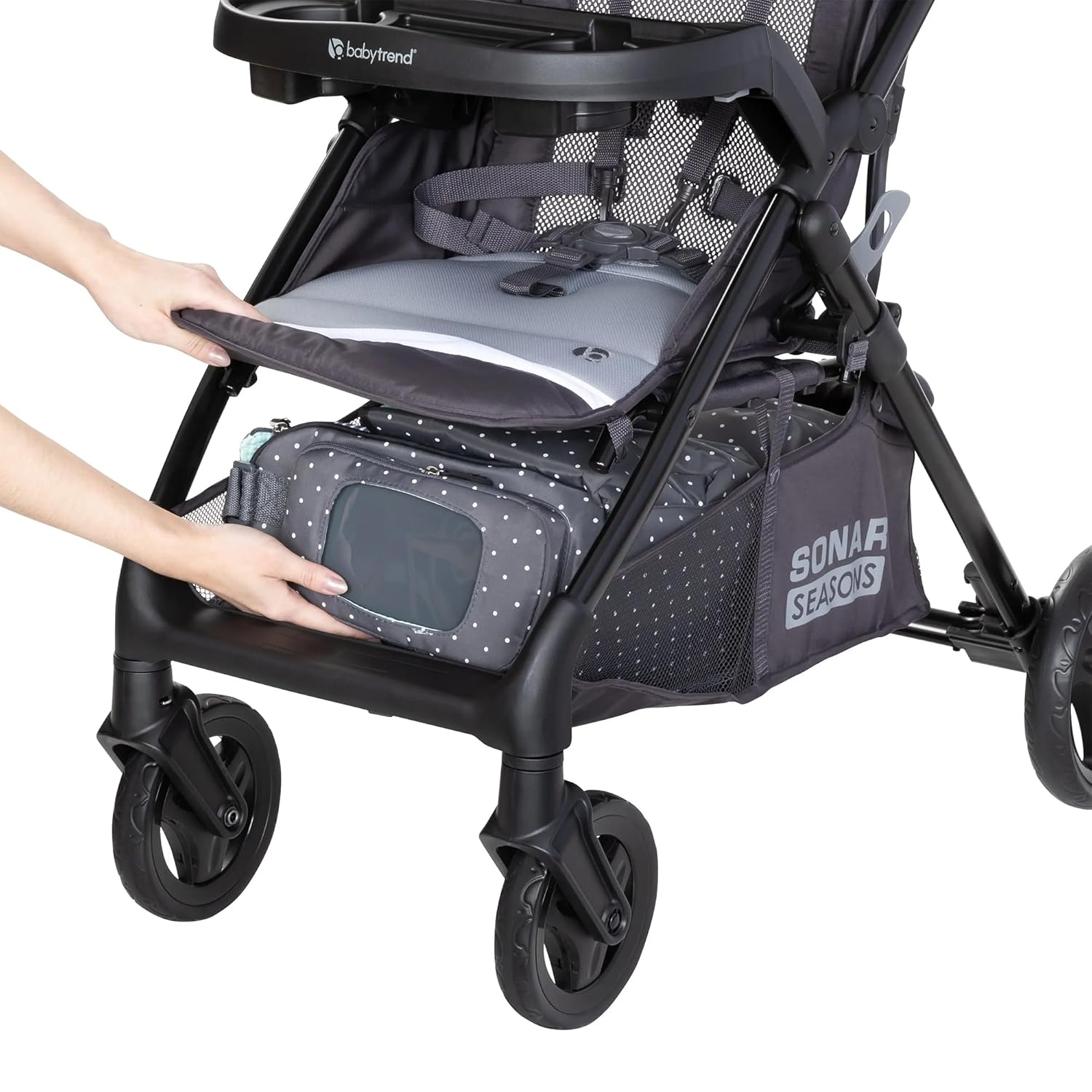
Image: Demonstrates front access to the large storage basket by lifting the leg rest, ideal for retrieving items easily.
Operating Instructions
1. Airflow Seatback Feature (Seasonal Conversion)
- To convert to the breathable mesh backrest for "cool mode," unhook the shoulder straps and remove them from the padding.
- Roll the padded seat back neatly upwards and secure it using the hook-and-loop fastener located on top of the seat pad. This creates a seatback pillow feature.
- To revert to the full padded seat, reverse these steps.

Image: Shows the versatility of the seatback, converting from a padded backrest to a breathable mesh backrest for different seasons.
2. Reclining the Seat
- Locate the recline clip at the back of the stroller seat.
- Press the clip ends together to release the recline mechanism.
- Adjust the seat to the desired recline position and release the clip to lock it in place.
3. Folding the Stroller
- Ensure the front wheels are turned forward.
- Locate the fold strap in the seat pocket.
- Using one hand, pull the strap firmly upwards to unlock the frame.
- Continue holding the strap and lift the stroller frame until it fully closes.
- Compress the stroller and secure it with the fold latch on the side.
Video: Overview of the Baby Trend Sonar Seasons Stroller features, including the one-hand fold mechanism and car seat compatibility.
Maintenance
- Cleaning: Use a mild soap and warm water solution to clean the fabric. Do not use bleach or harsh abrasives. The frame can be wiped clean with a soft, damp cloth.
- Wheels: Periodically check wheels for debris and ensure they rotate freely. Lubricate axles if necessary.
- Storage: Store the stroller in a dry, cool place away from direct sunlight to prevent fading and material degradation.
Troubleshooting
- Stroller not unfolding/folding: Ensure all locking mechanisms are disengaged before unfolding. For folding, ensure the seat is in the upright position and the fold strap is pulled firmly.
- Wheels not locking: Check for any obstructions in the wheel mechanism. Ensure the pins are fully engaged after assembly.
- Harness issues: Ensure straps are not twisted and buckles are free of debris. Adjust straps for a snug fit.
Product Specifications
| Feature | Detail |
|---|---|
| Brand | Baby Trend |
| Model Number | ST12D91B |
| Color | Liberty Grey |
| Material | Metal, Fabric, Plastic (100% Polyester fabric) |
| Age Range | Newborn, Infant, Baby, Toddler, Kid |
| Maximum Weight Recommendation | 50 Pounds |
| Maximum Height Recommendation | 42 Inches |
| Item Weight | 20 Pounds |
| Item Dimensions (L x W x H) | 38.5"L x 22.5"W x 42"H |
| Folded Size (L x W x H) | 30.75"L x 22.5"W x 16.38"H |
| Harness Type | 5 Point |
| Number of Cup Holders | 4 (2 on Parent Tray, 2 on Child Tray) |
| Additional Features | Adjustable Canopy, Breathable Mesh Back, One-Hand Fold, Swivel Wheels |

Image: Visual representation of the stroller's dimensions, maximum weight, and height limits.
Warranty and Customer Support
For detailed warranty information, product registration, or to contact customer support, please visit the official Baby Trend website or refer to the warranty card included with your purchase. Keep your proof of purchase for warranty claims.
Official Baby Trend Website: www.babytrend.com


