
1. Introduction
This manual provides comprehensive instructions for setting up, operating, and maintaining your 8Bitdo Ultimate Bluetooth Controller. Designed for versatility, this controller offers seamless compatibility with Nintendo Switch, Steam Deck, and PC Windows systems, providing an enhanced gaming experience.
The 8Bitdo Ultimate Bluetooth Controller features advanced Hall Effect Sensing Joysticks for precision and durability, two pro-level back buttons for customizable controls, and a multifunctional charging dock for convenient power management. Utilize the 8Bitdo Ultimate Software to personalize your controller settings, including button mapping, stick dead zones, trigger responsiveness, and vibration intensity.

Image: Two 8Bitdo Ultimate Bluetooth Controllers, one white and one black, showcasing the available color options and sleek design.
2. Package Contents
- 8Bitdo Ultimate Bluetooth Controller (White)
- Charging Dock
- USB-C Cable
- 2.4G Wireless Adapter (integrated into dock)
- User Manual

Image: The 8Bitdo Ultimate Bluetooth Controller in white, resting on its charging dock, with its packaging box in the background. This illustrates the primary components included in the package.
3. Setup
3.1 Charging the Controller
Place the controller onto the charging dock. The controller will automatically begin charging. The built-in 1000mAh battery supports up to 22 hours of play with only 3 hours of charging time.

Image: A visual representation of the controller's 1000mAh battery capacity, indicating 2 hours of charge for 22 hours of play, highlighting its long-lasting performance.
3.2 Connecting to Devices
The 8Bitdo Ultimate Bluetooth Controller offers multiple connection methods:
- Bluetooth: For Switch, Switch 2, and Steam Deck. Ensure your device's Bluetooth is enabled and pair the controller.
- 2.4G Wireless: Use the included 2.4G wireless adapter (integrated into the charging dock) for PC Windows and Steam Deck.
- Wired: Connect the controller directly to your device using the USB-C cable.
Note: For Switch 2 compatibility, please visit the 8BitDo official website to upgrade to the latest configuration.

Image: The controller being used with a screen displaying compatibility icons for PC, Switch, and Steam Deck, illustrating its universal connectivity options.
4. Operating Instructions
4.1 Hall Effect Sensing Joysticks
The controller is equipped with Hall Effect Sensing Joysticks, which use magnetic fields instead of physical contact, significantly reducing stick drift and boasting a longer lifespan compared to traditional joysticks.

Image: A detailed diagram illustrating the internal mechanism of Hall Effect Joysticks, emphasizing their magnetic sensing technology for enhanced durability and precision.
4.2 Pro-Level Back Buttons
Two customizable back buttons provide additional control, allowing you to execute complex actions without removing your thumbs from the thumbsticks. These buttons can be assigned functions and macros via the 8BitDo Ultimate Software.
4.3 Multifunctional Charging Dock
The controller automatically switches ON when undocked and OFF when docked, streamlining your gaming setup. A simple shake can also wake your controller from sleep mode.

Image: The controller resting on its charging dock next to a computer monitor, highlighting the automatic start-stop feature and how it helps keep the gaming area organized.
4.4 8BitDo Ultimate Software
Unlock full customization with the 8BitDo Ultimate Software, available on PC, Android, and iOS. This software allows you to:
- Tweak dead zones for sticks and triggers.
- Adjust vibration intensity.
- Customize button layouts.
- Assign macros for complex command sequences.
- Manage multiple profiles for different games or users.

Image: A screenshot of the 8Bitdo Ultimate Software interface on a computer screen, showing various customization options for mapping, sticks, triggers, vibration, and macros, with the controller and dock in the foreground.
5. Maintenance
5.1 Cleaning
To clean your controller, use a soft, dry cloth. For stubborn dirt, slightly dampen the cloth with water. Avoid using harsh chemicals or abrasive materials, as these can damage the controller's finish and internal components.
5.2 Battery Care
The controller contains a built-in Lithium Polymer battery. To prolong battery life:
- Avoid exposing the controller to extreme temperatures.
- Do not fully discharge the battery frequently.
- Store the controller in a cool, dry place when not in use for extended periods.
6. Troubleshooting
| Problem | Possible Cause | Solution |
|---|---|---|
| Controller not connecting | Low battery, incorrect mode, out of range, interference. | Charge the controller. Ensure correct mode (Bluetooth/2.4G) is selected. Move closer to the device. Reduce wireless interference. |
| Stick drift or inaccurate input | Software calibration needed, rare hardware issue. | Use 8BitDo Ultimate Software to recalibrate joysticks and adjust dead zones. Ensure firmware is updated. |
| Controller not charging | Improper placement on dock, faulty cable/dock, power source issue. | Ensure controller is seated correctly on the dock. Try a different USB-C cable or power adapter. |
| Buttons unresponsive | Firmware issue, physical obstruction. | Update controller firmware via 8BitDo Ultimate Software. Clean around buttons if debris is present. |
7. Specifications
- Model: Ultimate Bluetooth White
- Compatibility: Nintendo Switch, Switch 2, Steam Deck, PC Windows
- Connectivity: Bluetooth, 2.4G Wireless, Wired (USB-C)
- Battery: 1000mAh Lithium Polymer (included)
- Battery Life: Approximately 22 hours of play on a 3-hour charge
- Joysticks: Hall Effect Sensing Joysticks
- Special Features: 2 Pro-level back buttons, Multifunctional Charging Dock, 8BitDo Ultimate Software support, Adjustable Vibration, Turbo Function, Shake to Wake
- Product Dimensions: 5.8 x 6 x 2.5 inches
- Item Weight: 12 ounces
- Manufacturer: Nargos
8. Warranty and Support
Nargos is committed to providing high-quality gaming accessories and excellent customer service.
- Returns/Exchanges: 30-day return or exchange policy.
- Technical Support: Lifetime technical support is available.
- Response Time: Quick replies to inquiries within 24 hours.
For further assistance, please refer to the contact information provided on the product packaging or the official Nargos website.
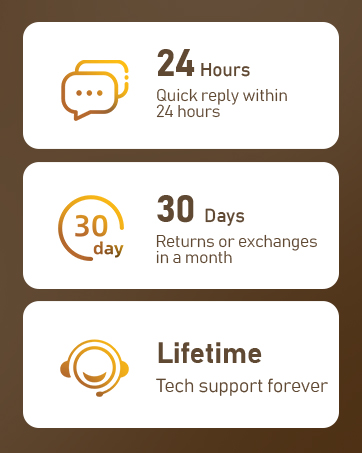
Image: An illustration detailing Nargos's customer support commitments: 24-hour quick reply, 30-day returns or exchanges, and lifetime tech support.