
Introduction
This manual provides essential information for the setup, operation, and maintenance of your ONN 24-Inch HD 720p Smart LED TV. Please read this manual thoroughly before using your television to ensure proper and safe operation. This Smart TV offers crystal clear 720p resolution, access to popular streaming services like Netflix and YouTube, and compatibility with Alexa and Google Assistant for convenient voice control.
What's in the Box
- ONN 24-Inch HD 720p Smart LED TV
- TV Stand (2 pieces)
- Remote Control (batteries not included)
- Power Cord
- Quick Start Guide

Figure 1: Front view of the ONN 24-Inch HD 720p Smart LED TV, showcasing its display with streaming service logos.
Setup
1. Attaching the TV Stand
- Carefully place the TV face down on a soft, clean surface to prevent screen damage.
- Align each stand piece with the corresponding screw holes on the bottom of the TV.
- Secure the stands using the provided screws. Ensure they are firmly attached.

Figure 2: Angled view of the TV with its stands properly installed.
2. Connecting Devices
Your ONN TV comes with multiple connection options:
- HDMI Ports (3): For connecting Blu-ray players, game consoles, cable boxes, etc.
- Composite Input (1): For older devices using RCA cables (red, white, yellow).
- USB Port (1): For media playback from USB drives.
- Optical Digital Audio Output (1): For connecting to soundbars or home theater systems.
- Coaxial/Cable Input (1): For connecting an antenna or cable TV.
- Headphone Jack (1): For private listening.
Connect the power cord to the TV and then to a wall outlet. Ensure all connections are secure before powering on the TV.
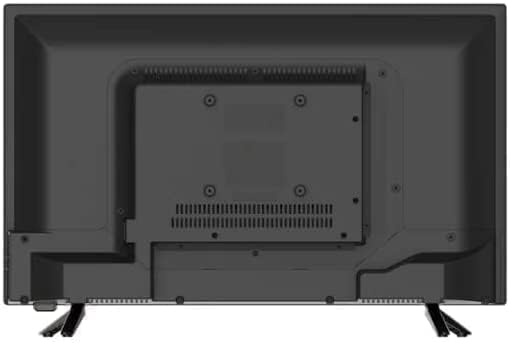
Figure 3: Rear panel of the TV, highlighting the available input and output ports.
Operating Instructions
Initial Setup and Network Connection
- Power on the TV using the remote control or the power button on the TV.
- Follow the on-screen instructions to select your language, country, and time zone.
- Connect the TV to your Wi-Fi network by selecting your network from the list and entering the password. A stable internet connection is required for Smart TV features.
- Sign in to your Roku account or create a new one to activate the Smart TV features and access streaming services.
Using Smart TV Features
Your ONN Smart TV provides instant access to a wide range of streaming services. Navigate through the home screen using your remote control to select apps like Netflix, YouTube, Disney+, and more.
Voice Control: This TV is compatible with Alexa and Google Assistant. Once set up, you can use voice commands to:
- Turn the TV on or off.
- Change channels.
- Adjust volume.
- Launch streaming apps.
- Search for content.
Figure 4: The TV delivers a 720p HD viewing experience.
Maintenance
Cleaning Your TV
- Always unplug the TV before cleaning.
- Use a soft, dry cloth to wipe the screen and cabinet.
- For stubborn marks on the screen, lightly dampen the cloth with water or a specialized screen cleaner. Never spray cleaner directly onto the screen.
- Avoid using abrasive cleaners, waxes, or solvents as they can damage the finish.
General Care
- Do not block ventilation openings on the back of the TV.
- Keep the TV away from direct sunlight, heat sources, and excessive dust.
- Avoid placing heavy objects on top of the TV.
Troubleshooting
| Problem | Possible Cause | Solution |
|---|---|---|
| No Power | Power cord not connected; outlet not working. | Ensure power cord is securely plugged into TV and a working outlet. Try a different outlet. |
| No Picture/Sound | Incorrect input source; loose cable connection. | Press the "Input" or "Source" button on your remote to select the correct input. Check all cable connections. |
| Poor Picture Quality | Low resolution source; antenna signal weak. | Ensure your source device is outputting at 720p or higher. Adjust antenna position or consider a stronger antenna. |
| Smart Features Not Working | No internet connection; Roku account issue. | Check Wi-Fi connection. Restart your router. Verify Roku account login details. |
Specifications
- Model Number: 100012590
- Screen Size: 24 Inches (61 cm diagonal)
- Display Technology: LED
- Resolution: 720p HD
- Refresh Rate: 60 Hz
- Aspect Ratio: 16:9
- Connectivity: 3 HDMI, 1 Composite, 1 USB, 1 Optical Digital Audio Out, 1 Coaxial/Cable, 1 Headphone
- Supported Internet Services: Netflix, YouTube, and more via Roku OS
- Special Features: Flat Screen, Built-In Speakers, Compatible with Alexa & Google Assistant
- Product Dimensions: 6.5 x 21.9 x 14.5 inches
- Item Weight: 5.8 pounds
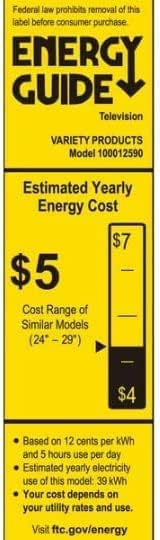
Figure 5: Energy Guide label for the ONN 24-Inch HD 720p Smart LED TV, indicating its estimated annual energy cost.
Warranty and Support
As an Amazon Renewed product, this item is backed by the Amazon Renewed Guarantee. This typically provides a replacement or refund within 90 days of receipt if the product does not work as expected. For specific warranty details and support, please refer to the Amazon Renewed program terms and conditions or contact Amazon customer service directly.
For technical assistance or further inquiries, please visit the official ONN support website or contact their customer service. Keep your purchase receipt and model number handy for faster service.
Online Support: www.onn.com/support (Example link, actual link may vary)


