
Blukar K9111
Blukar LED Headlamp User Manual
Model: K9111
Introduction
Thank you for choosing the Blukar LED Headlamp. This versatile and powerful headlamp is designed for various outdoor and indoor activities, providing super bright illumination, multiple lighting modes, and convenient features like motion sensing and USB-C recharging. Please read this manual thoroughly to ensure proper use and maintenance of your headlamp.

Image: Two Blukar LED Headlamps, showcasing the product and included USB-C charging cables.
Package Contents
- Blukar LED Headlamp (2 units)
- USB-C Charging Cable (2 units)
- User Manual (this document)
Product Features
Super Bright Illumination & Stepless Dimming
The headlamp utilizes first-class LED chips with advanced COB and XPG LED technology, providing a bright and stable beam. It offers stepless dimming, allowing you to adjust brightness from 100% down to 30% by long-pressing the power button, catering to various lighting requirements.

Image: Illustration demonstrating the stepless dimming functionality of the headlamp.

Image: A person in a dark, mountainous landscape, highlighting the super bright output of the headlamp.
8 Lighting Modes & Motion Sensor
The headlamp features 8 distinct lighting modes, including 5 normal modes and 3 motion sensor modes. The normal modes are: XPG white, COB white, XPG+COB white, COB red, and COB red strobe. The motion sensor modes (XPG white, COB white, XPG+COB white) allow for hands-free operation by simply waving your hand to turn the light on or off.

Image: Visual representation of the 8 lighting modes and the motion sensor functionality.

Image: A user activating the motion sensor switch by waving their hand, illustrating hands-free operation.
Rechargeable & IPX5 Waterproof
Equipped with a built-in 1200mAh rechargeable battery, the headlamp can be easily charged via USB-C. Its IPX5 waterproof rating ensures reliable performance in various weather conditions, including rain and snow, making it suitable for both indoor and outdoor use.

Image: Visual guide on how to charge the 1200mAh large capacity battery using different USB-C compatible devices.

Image: A cyclist in rainy conditions, showcasing the headlamp's IPX5 waterproof capability.
Lightweight & Adjustable Comfort
Weighing only 2.96 ounces (approximately 84 grams), this headlamp is designed for comfort during extended wear. The breathable elastic headband is adjustable, removable, and washable, ensuring a perfect fit for various head sizes. The lamp head can also be adjusted up and down by 45° for optimal light direction.
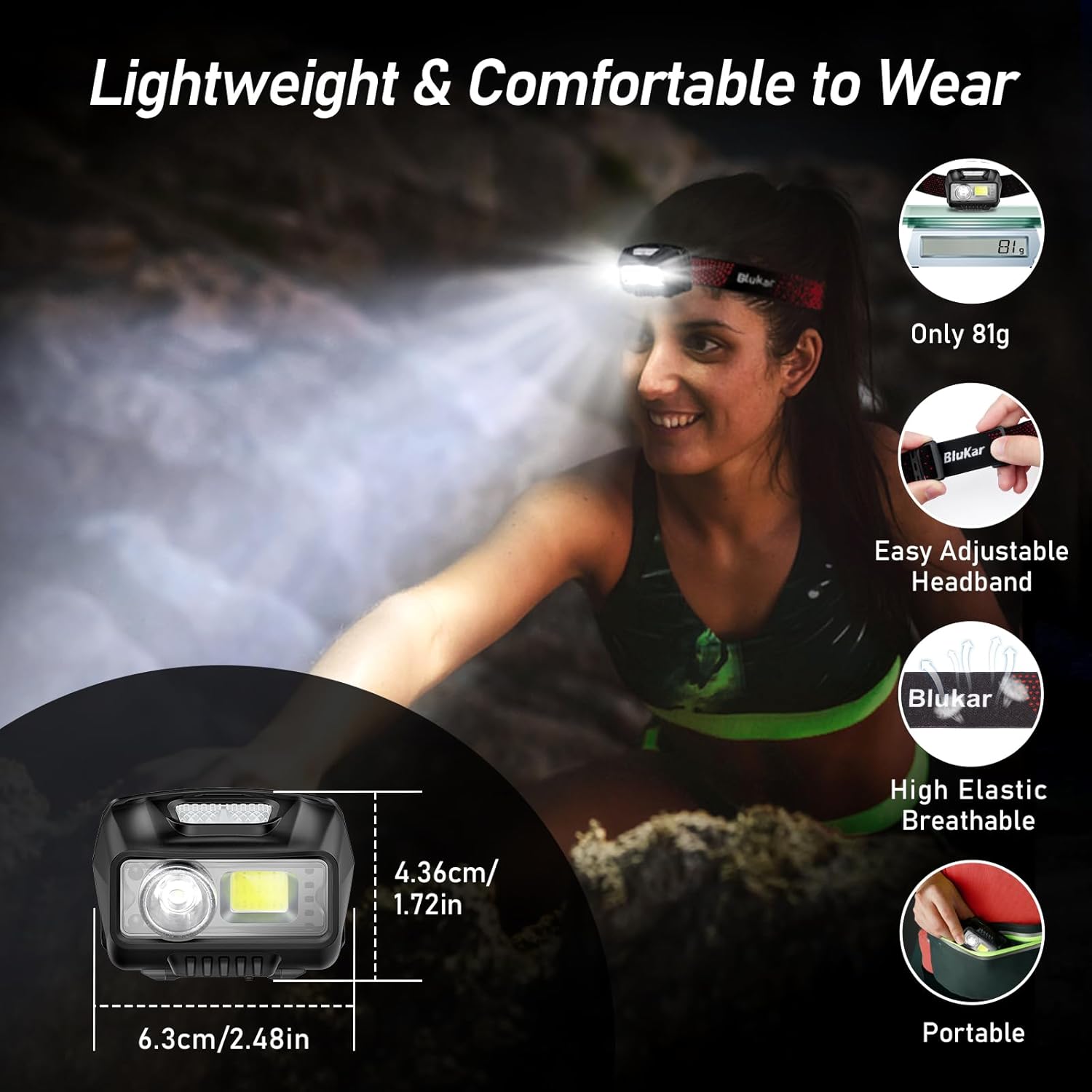
Image: A person wearing the headlamp, emphasizing its lightweight nature and adjustable, comfortable headband.
Wide Usage
The Blukar LED Headlamp is an ideal tool for a wide range of activities, including jogging, cycling, camping, hiking, car repairing, emergency situations, night fishing, night reading, dog walking, and various DIY projects. Its hands-free design provides convenience and safety in low-light conditions.

Image: A collage showcasing diverse applications of the headlamp, including climbing, cycling, car repair, and hiking.
Setup
- Initial Charge: Before first use, fully charge the headlamp using the provided USB-C cable. Connect the cable to the headlamp's charging port and a compatible USB power source (e.g., AC charger, power bank, computer). The charging indicator lights will show the charging status.
- Adjust Headband: Place the headlamp on your head. Adjust the elastic headband by sliding the buckles until it fits snugly and comfortably. Ensure the headlamp unit is centered on your forehead.
- Adjust Lamp Angle: Tilt the lamp head up or down to direct the light beam as needed. The headlamp allows for a 45° vertical adjustment.
Operating Instructions
Power Button Functions:
- Short Press: Cycles through the 5 normal lighting modes: XPG white (spotlight) → COB white (floodlight) → XPG+COB white (combined) → COB red → COB red strobe.
- Long Press (from any white light mode): Activates stepless dimming. Hold the button to gradually adjust brightness from 100% to 30%. Release to set the desired brightness.
- Power Off: In any normal mode, short press the switch button to turn off the light directly.
Motion Sensor Button Functions:
- Short Press: Activates motion sensor mode. Cycles through 3 sensor modes: XPG white → COB white → XPG+COB white.
- Hands-Free Operation: Once a sensor mode is active, wave your hand in front of the headlamp to turn the light on or off.
- Exit Sensor Mode: Press the power button to exit motion sensor mode and return to normal operation.
Note: If the light flickers on and off unexpectedly, it may be in sensor mode. Press the power button to exit this mode.
Demonstration Videos:
Video: Blukar LED Headlamp 9111A-ACTION. This video demonstrates the headlamp's performance during active use, showcasing its brightness and stability.
Video: Blukar LED Headlamp 9111A-FLASH. This video highlights the various lighting modes and the quick response of the headlamp's features.
Maintenance
- Cleaning: Wipe the headlamp body with a soft, damp cloth. Do not use abrasive cleaners or solvents. The headband is removable and washable.
- Battery Care: To prolong battery life, charge the headlamp regularly, even if not in frequent use. Avoid fully discharging the battery before recharging. Store in a cool, dry place.
- Storage: When storing for extended periods, ensure the headlamp is fully charged and stored in a dry environment away from extreme temperatures.
Troubleshooting
| Problem | Possible Cause | Solution |
|---|---|---|
| Headlamp does not turn on. | Low battery; Power button not pressed correctly. | Charge the headlamp fully; Ensure a firm press on the power button. |
| Light flickers or turns off unexpectedly. | Accidental activation of motion sensor mode. | Press the power button to exit motion sensor mode. |
| Motion sensor not responding. | Sensor mode not active; Obstruction in front of sensor. | Ensure motion sensor mode is activated; Clear any obstructions from the sensor area. |
| Reduced brightness or short runtime. | Battery not fully charged; Battery degradation over time. | Fully charge the headlamp; Consider replacing the unit if battery life significantly diminishes after prolonged use. |
Specifications
| Feature | Detail |
|---|---|
| Brand | Blukar |
| Model Number | K9111 |
| Light Source Type | LED (COB & XPG) |
| Brightness | 2000 Lumens (White Light) |
| Power Source | Battery Powered (Rechargeable) |
| Battery Capacity | 1200mAh Lithium Polymer |
| Charging Port | USB-C |
| Runtime | Up to 30 hours |
| Water Resistance Level | IPX5 Waterproof |
| Product Dimensions | 2.48"D x 1.72"W x 1.52"H (approx.) |
| Item Weight | 2.96 ounces (approx. 84 grams) |
| Special Features | Adjustable, Ultra-Lightweight, Motion Sensor, Dimmable Brightness, Spotlight & Floodlight, 8 Lighting Modes |
Warranty & Support
For warranty information or technical support, please refer to the product packaging or contact Blukar customer service directly through the retailer's platform where the product was purchased. Keep your purchase receipt for warranty claims.
Related documentsK9111


Ask a question about this manual
Ask about setup, troubleshooting, compatibility, parts, safety, or missing instructions. Manuals+ will review the question and use this page’s manual context to help answer it.