
1. Introduction
Thank you for choosing the jioeuinly Sky Device Elite A6/B6 Phone Case. This product is designed to provide robust protection for your Sky Device Elite A6 or B6 4G phone, combining a hard PC back with a soft silicone frame. It features a luminous effect, a versatile finger ring support, and compatibility with magnetic car mounts. This package also includes a tempered glass screen protector for comprehensive device safeguarding.
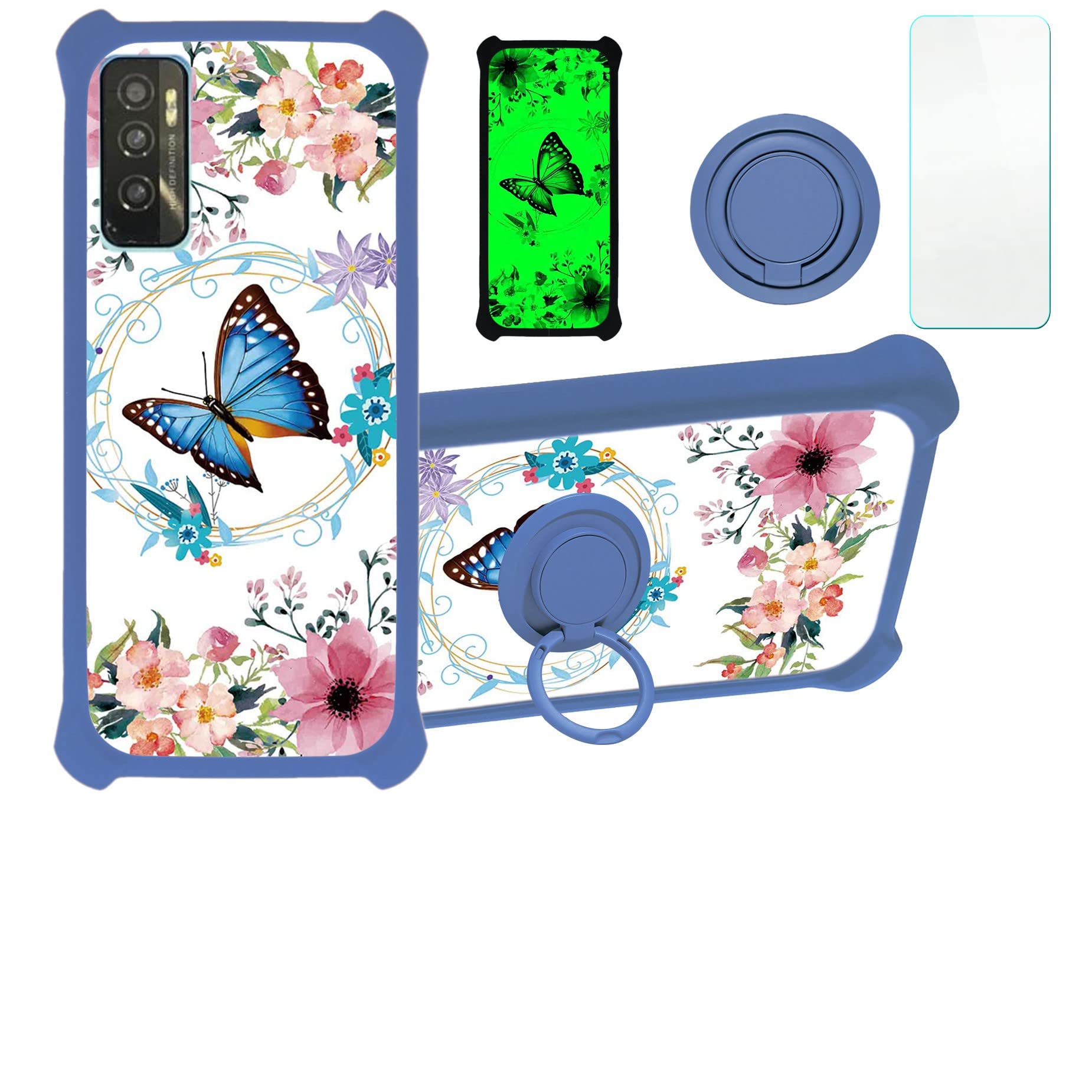
Image 1.1: Overview of the jioeuinly Sky Device Elite A6/B6 Phone Case.
2. Package Contents
- 1 x jioeuinly Sky Device Elite A6/B6 Phone Case (YGL-LHD)
- 1 x Tempered Glass Screen Protector
- 1 x Adhesive Metal Finger Ring Support (pre-attached or separate)
3. Setup and Installation
3.1 Installing the Phone Case
- Ensure your Sky Device Elite A6 or B6 phone is clean and free of dust or debris.
- Align the phone with the soft silicone frame of the case.
- Gently press the phone into the case, starting from one corner and working your way around, ensuring all edges are securely seated within the silicone frame.
- Verify that all ports, buttons, and camera cutouts align correctly with your phone.

Image 3.1: The case features four-corner thickening and shock airbags for enhanced protection.
3.2 Installing the Tempered Glass Screen Protector
- Clean your phone screen thoroughly using the provided cleaning wipes (if included) or a microfiber cloth to remove all dust, smudges, and fingerprints.
- Carefully peel off the protective film from the adhesive side of the tempered glass screen protector.
- Align the screen protector precisely with your phone's screen, ensuring the cutouts for the speaker and camera match.
- Gently lower the screen protector onto the screen. It will adhere automatically.
- If any air bubbles appear, gently push them towards the edges of the screen using a soft cloth or your finger.

Image 3.2: Key features of the included tempered glass screen protector.
3.3 Attaching the Adhesive Metal Finger Ring Support
The metal finger ring support can be used separately or adhered to the phone case. If it is not pre-attached:
- Clean the desired area on the back of your phone case where you wish to attach the ring support.
- Peel off the protective film from the adhesive backing of the finger ring support.
- Carefully place the ring support onto the cleaned area and press firmly for several seconds to ensure strong adhesion.
4. Operating Instructions
4.1 Luminous Effect
The phone case features a special luminous effect. To activate this, expose the case to light or sunlight. The case will absorb the light energy and then glow in a dark environment, providing a unique visual effect.

Image 4.1: The luminous effect is achieved by absorbing light and glowing in the dark.
4.2 Using the Finger Ring Support
The integrated or attached metal finger ring support offers multiple functionalities:
- Enhanced Grip: Insert your finger through the ring for a more secure hold on your phone, reducing the risk of accidental drops.
- Kickstand Function: Rotate the ring 360 degrees and adjust it to an optimal angle to prop up your phone for hands-free viewing of videos or video calls.

Image 4.2: The finger ring support facilitates comfortable one-hand operation.
4.3 Magnetic Car Mount Compatibility
The metal plate integrated into the finger ring support allows the phone case to be securely attached to magnetic car mounts. Simply place the back of the case onto a compatible magnetic car mount for hands-free navigation or calls while driving.
Note: This case does not support wireless charging when the metal finger ring is attached or integrated, as metal can interfere with wireless charging functionality.

Image 4.3: The case is compatible with magnetic car mounts.
5. Maintenance
5.1 Cleaning the Phone Case
To clean your phone case, gently wipe it with a soft, damp cloth. For stubborn dirt, a mild soap solution can be used. Avoid harsh chemicals or abrasive materials, as these may damage the case's finish or luminous properties.
5.2 Cleaning the Screen Protector
The tempered glass screen protector can be cleaned with a microfiber cloth. For smudges, a screen cleaning spray designed for electronics can be used. Avoid excessive pressure when cleaning to prevent damage.
6. Troubleshooting
6.1 Luminous Effect Not Visible
- Solution: Ensure the case has been exposed to sufficient light (natural sunlight or artificial light) for a period of time to absorb energy. The luminous effect is most noticeable in complete darkness.
6.2 Screen Protector Bubbles
- Solution: Small bubbles often disappear within 24-48 hours. For larger bubbles, gently lift the nearest edge of the screen protector and reapply, pushing the bubble out with a soft cloth. Ensure the screen is completely dust-free before reapplication.
6.3 Finger Ring Loosening
- Solution: If the adhesive finger ring becomes loose, it may need to be re-adhered or replaced. Ensure the surface is clean and dry before applying any new adhesive.
7. Specifications
| Brand | jioeuinly |
| Compatible Phone Models | Sky Device Elite A6, Sky Device Elite B6 |
| Model Number | YGL-LHD |
| Material | PC hard back panel + soft silicone frame + metal support finger ring |
| Item Dimensions (L x W x H) | 0.39 x 0.39 x 0.39 inches (approximate) |
| Built-In Media | Screen Protector |
| Additional Features | Camera Protector, Finger ring, Car bracket magnetic suction, Luminous effect |
| Form Factor | Solid protection with support |
8. Warranty and Support
For any questions, concerns, or support regarding your jioeuinly product, please contact the manufacturer directly through the retailer's platform or their official website. Please retain your proof of purchase for warranty claims, if applicable.