
1. Introduction
This manual provides essential information for the safe and efficient use of your PHILODO Front Controller H8. Please read this manual thoroughly before installation and operation to ensure proper function and to prevent damage to the product or injury to yourself. Keep this manual for future reference.
The PHILODO Front Controller H8 is designed to manage the electrical functions of your PHILODO H8 electric bike, including motor control, display interface, and sensor integration. It is a critical component for the overall operation of the electric bicycle system.
2. Safety Instructions
- Always disconnect the battery before performing any installation, maintenance, or repair work on the controller or electric bike system.
- Ensure all connections are secure and properly insulated to prevent short circuits.
- Do not attempt to open or modify the controller casing. This may void the warranty and could lead to electrical hazards.
- Keep the controller away from water, excessive moisture, and extreme temperatures.
- If you are unsure about any installation or troubleshooting steps, consult a qualified bicycle technician or contact PHILODO customer support.
- Wear appropriate safety gear, such as gloves and eye protection, when handling electrical components.
3. Package Contents
Please check the package carefully to ensure all items are present and undamaged. If any items are missing or damaged, contact your retailer immediately.
- PHILODO Front Controller H8 Unit
- Mounting Hardware (screws, brackets, if applicable)
- User Manual (this document)
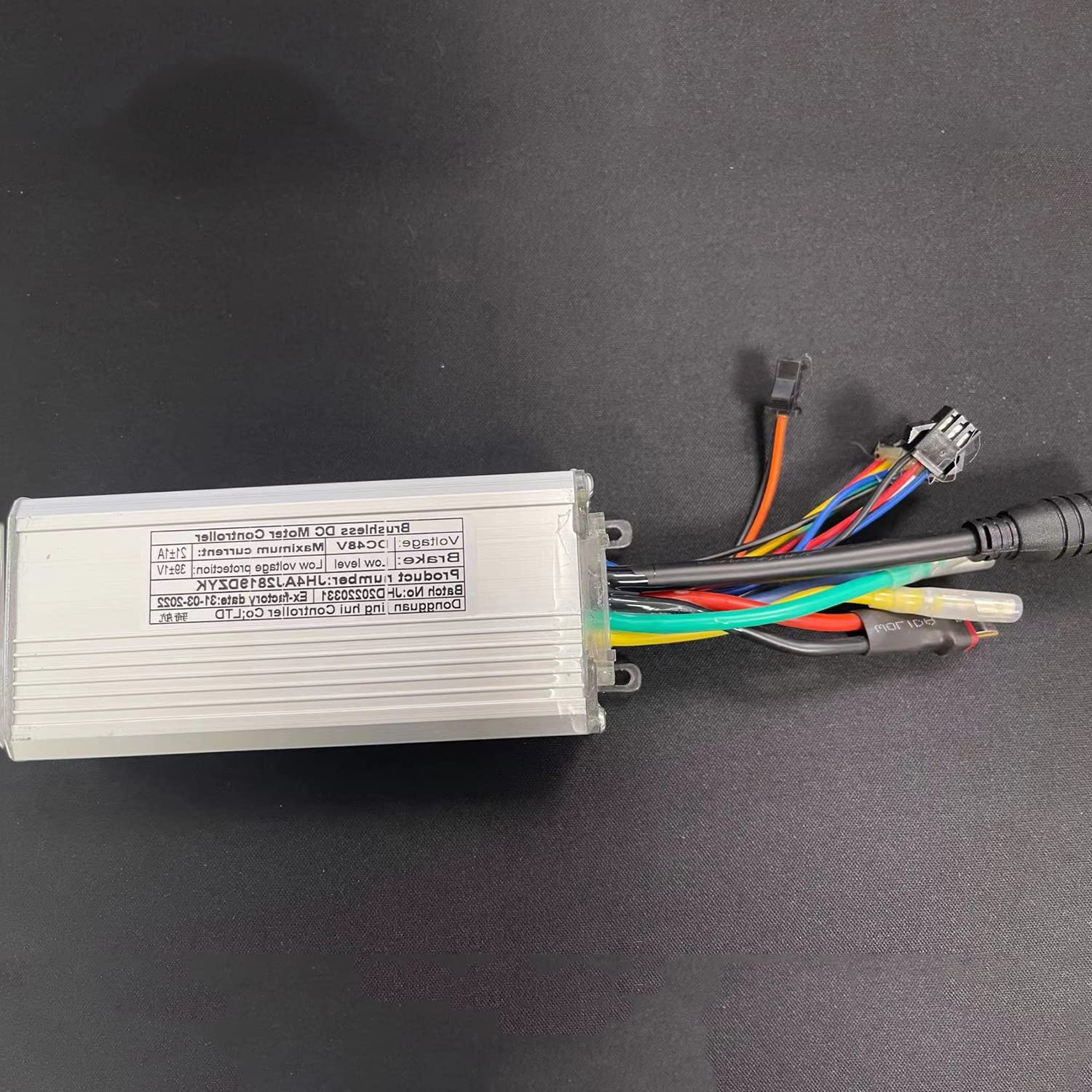
Image 1: PHILODO Front Controller H8. This image displays the main unit of the PHILODO Front Controller H8, showing its compact design and connection ports.
4. Setup and Installation
Installation of the PHILODO Front Controller H8 requires basic mechanical and electrical knowledge. If you are not confident in your ability to perform the installation, it is highly recommended to seek assistance from a professional bicycle mechanic.
4.1 Pre-Installation Checklist
- Ensure your PHILODO H8 electric bike is powered off and the battery is removed or disconnected.
- Gather necessary tools (e.g., screwdrivers, wrenches, cable ties).
- Identify the mounting location for the controller on your bike.
4.2 Installation Steps
- Mounting: Securely attach the controller to the designated location on your PHILODO H8 electric bike using the provided mounting hardware. Ensure it is protected from physical impact and moisture.
- Electrical Connections:
- Connect the motor phase wires (usually three thick wires) to the corresponding ports on the controller.
- Connect the Hall sensor wires (usually five thin wires) to the controller.
- Connect the battery power input wires (red for positive, black for negative) to the controller.
- Connect the display unit, throttle, brake levers, and pedal assist sensor (PAS) to their respective ports on the controller. Refer to your PHILODO H8 electric bike's wiring diagram for specific port identification.
- Cable Management: Route all cables neatly and secure them with cable ties to prevent them from interfering with moving parts or getting snagged.
- Final Check: Double-check all connections for security and correctness before reconnecting the battery.
5. Operating Instructions
Once the controller is correctly installed and the battery is connected, you can begin operating your PHILODO H8 electric bike.
5.1 Power On/Off
- To Power On: Press and hold the power button on your electric bike's display unit (connected to the controller) for a few seconds. The display should illuminate.
- To Power Off: Press and hold the power button again until the display turns off.
5.2 Basic Functions
- Pedal Assist Levels: Use the '+' and '-' buttons on your display to cycle through different pedal assist levels (e.g., 0-5). Level 0 provides no motor assistance, while higher levels provide more power.
- Throttle: If your bike is equipped with a throttle, gently twist or press it to engage motor power without pedaling. Use with caution.
- Display Information: The display will show various data such as speed, battery level, assist level, trip distance, and total distance. Refer to your specific display unit's manual for detailed information on navigating its features.
6. Maintenance
Proper maintenance ensures the longevity and optimal performance of your PHILODO Front Controller H8.
- Cleaning: Wipe the controller's exterior with a soft, damp cloth. Do not use harsh chemicals or abrasive cleaners. Ensure no moisture enters the casing.
- Connection Checks: Periodically inspect all electrical connections to ensure they are tight and free from corrosion.
- Cable Inspection: Check cables for any signs of wear, fraying, or damage. Replace damaged cables immediately.
- Environmental Protection: Store your electric bike in a dry, temperate environment when not in use to protect the controller and other electronic components.
7. Troubleshooting
If you encounter issues with your PHILODO Front Controller H8, refer to the following common problems and solutions. If the problem persists, contact PHILODO customer support.
| Problem | Possible Cause | Solution |
|---|---|---|
| Controller does not power on. | Battery disconnected or low charge; loose power connection; faulty display. | Check battery connection and charge level. Ensure power cables are securely connected. Test with a known good display if possible. |
| Motor not assisting. | Pedal assist level set to 0; loose motor or Hall sensor connections; faulty PAS sensor. | Increase pedal assist level. Check all motor and sensor connections. Inspect PAS sensor for damage or misalignment. |
| Erratic display readings. | Loose display connection; electromagnetic interference. | Ensure display cable is securely connected. Try to isolate the bike from other electronic devices. |
| Unusual noises from motor. | Loose motor phase wires; internal motor issue. | Check motor phase wire connections. If problem persists, motor may require professional inspection. |
8. Specifications
- Brand: PHILODO
- Model Name: H8
- Model Number: 7158332326072
- Compatible Bike Type: Electric Bike (PHILODO H8)
- Suspension Type: Front (Note: This refers to the bike's suspension, not the controller's.)
- Brake Style: Linear Pull (Note: This refers to the bike's brake system.)
- Material: Plastic (for certain components, likely casing)
- Assembly Required: Yes
9. Warranty and Support
9.1 Limited Warranty
The PHILODO Front Controller H8 comes with a limited warranty. Please refer to the warranty card included with your product or visit the official PHILODO website for detailed terms and conditions regarding coverage, duration, and claims process. The warranty typically covers manufacturing defects under normal use.
9.2 Customer Support
For technical assistance, troubleshooting not covered in this manual, or warranty inquiries, please contact PHILODO customer support. You can usually find contact information on the official PHILODO website or through your retailer.
Consider purchasing additional protection plans for extended coverage, such as the 2-Year Protection Plan or Complete Protect, if available from your retailer.


