
ANCEL MT700
ANCEL MT700 Motorcycle Diagnostic Scanner User Manual
Model: MT700
Product Overview
The ANCEL MT700 is a professional motorcycle diagnostic scanner designed to provide comprehensive system diagnostics and maintenance functions for a wide range of motorcycle brands. It features a 7-inch touch screen, runs on Android 5.1.1, and supports over 30 special functions.

Image: The ANCEL MT700 diagnostic scanner, showing its 7-inch touch screen interface with various application icons.
Key Features
- All System Diagnosis: Reads and clears DTCs, views live data, freeze frame, and vehicle information for various motorcycle systems including Engine, ABS, Trans, Headlight, Chassis Body, TPMS, SRS, EPB, SAS, ESP.
- 30+ Advanced Functions: Includes Oil/Service Reset, ABS Bleed, ECU Reset, A/F Value Reset, Instrument Coding, Throttle Handle Reset, Idle Speed Adjustment, EOL Mode, Clear Computer Memory, CO Adjustment, Tire Pressure Monitoring System, Control Module Programming, Transmission Memory Reset, and more.
- Wide Motorcycle Compatibility: Supports major brands including Harley, Honda, Yamaha, Victory, Indian, Polaris, BRP, Ducati, KTM, Triumph, Piaggio, Aprilia, Benelli, BMW, Kawasaki, Suzuki, and more. Compatible with various motorcycle types like Road, Enduro, Side-by-side, 3-Wheel Scooters, Snowmobiles, ATVs, and UTVs.
- Remote Technical Support: Allows users to receive remote assistance from technical engineers via TeamViewer software.
- One-Click Free Online Update: Software updates are available online with a single click, ensuring the device always has the latest features and vehicle coverage.
- Multi-Language Support: Supports 8 languages including English, Portuguese, Spanish, German, French, Polish, Italian, and Russian.

Image: A diagram illustrating the comprehensive system diagnostic capabilities of the MT700, highlighting various motorcycle components it can analyze.

Image: A visual representation of various advanced functions available on the MT700, such as Auto VIN & Scan, Oil/Service Reset, and ABS Bleed.

Image: An illustration showing the diverse range of motorcycle types and brands compatible with the ANCEL MT700 scanner.

Image: A visual demonstrating the remote technical support feature, where a user can receive assistance by allowing remote access to the device.

Image: The device screen displaying the one-click online update interface, showing various software packages available for download.
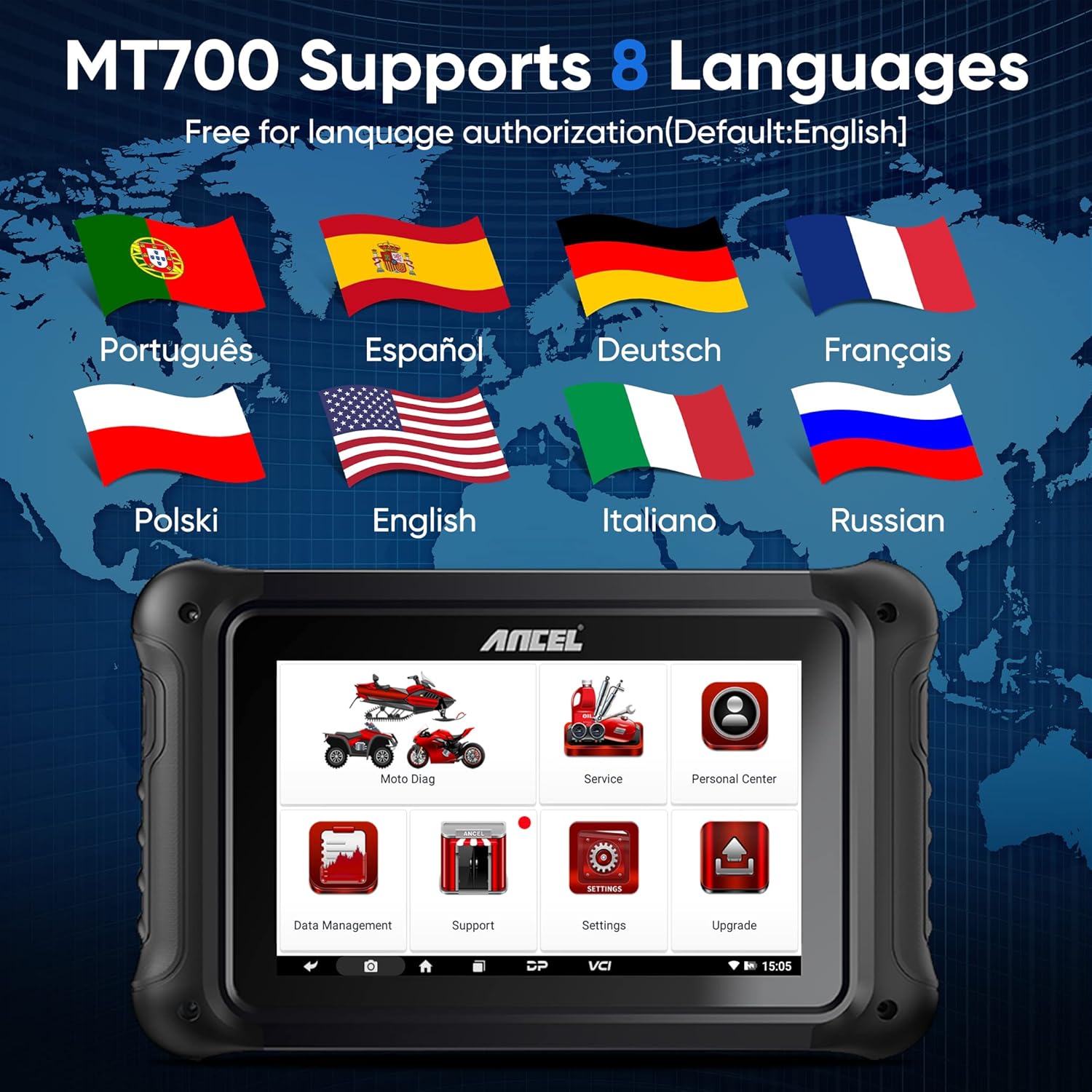
Image: A world map with flags representing the 8 languages supported by the MT700 scanner.
Package Contents
The ANCEL MT700 package includes the following items:
- MT700 Tablet PC
- User's Manual
- Quick Start Guide/Certificate
- Power Cable (M002)
- Diagnostic Cables for various motorcycle brands (M005 for Kawasaki, M012 for Suzuki, M015A for Honda, M019 for KTM, M022 for Benelli, M037 for Ducati, M040 for BMW, M042 for Indian & Victory, M043 for BRP, M006 for Kawasaki, M034 for Harley Davidson, M018A for Yamaha, M041 for Erro V)
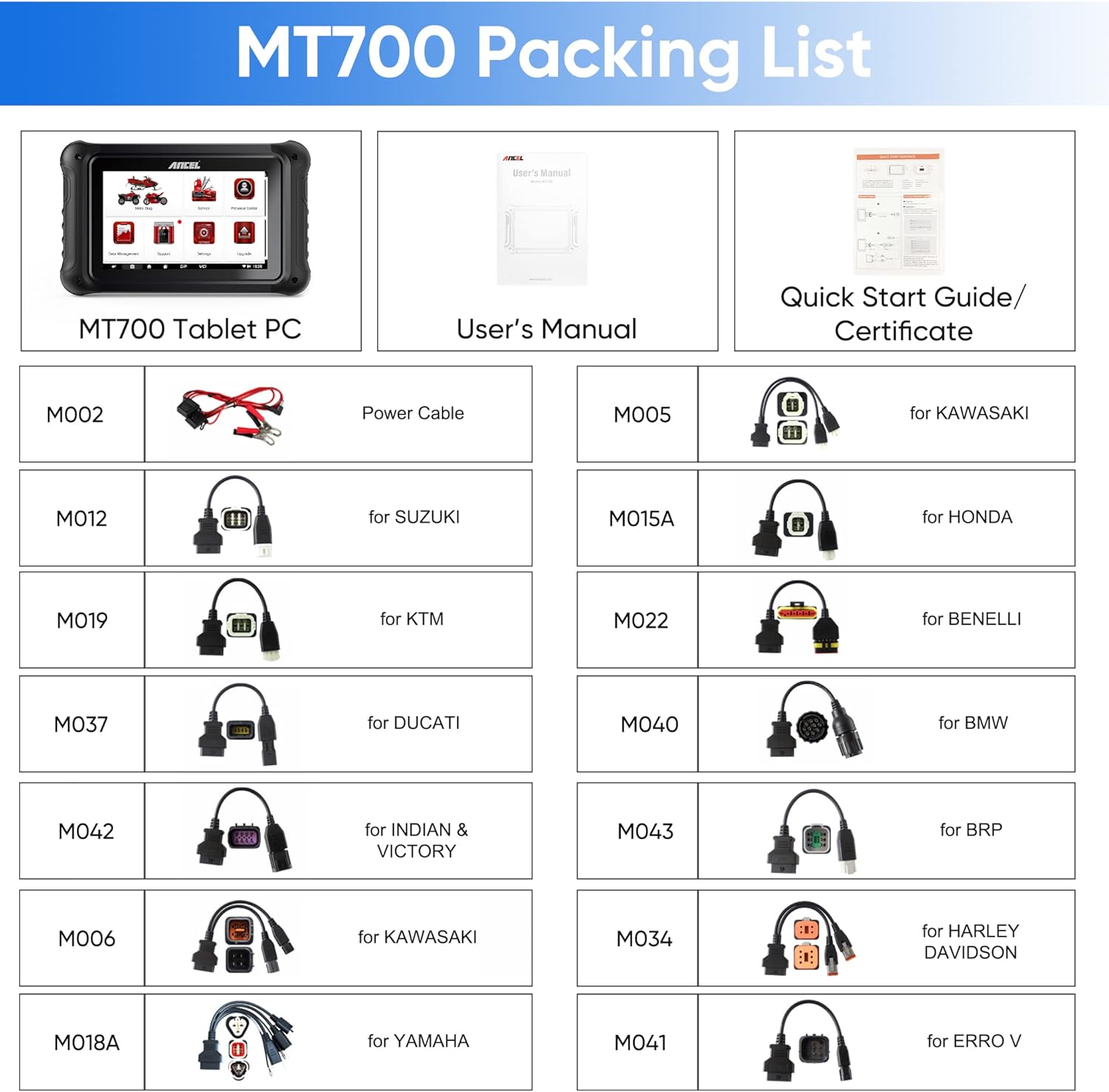
Image: A detailed layout of all items included in the ANCEL MT700 product package, including the tablet, manual, and various diagnostic cables.
Setup and First Use
- Unpacking: Carefully unpack all components from the box and verify against the packing list.
- Charging: Connect the MT700 Tablet PC to a power source using the provided power cable (M002) to ensure it is fully charged before first use. The device can be powered via Corded Electric.
- Power On: Press and hold the power button (usually located on the side or top of the device) to turn on the MT700.
- Initial Setup: Follow the on-screen prompts to select your preferred language (English, Portuguese, Spanish, German, French, Polish, Italian, Russian) and configure Wi-Fi settings for internet access.
- Software Update: It is highly recommended to perform a "One-Click Free Update Online" immediately after initial setup to ensure the latest software and vehicle coverage are installed. Navigate to the "Upgrade" icon on the main screen and follow the instructions.
- Connecting to Motorcycle:
- Identify the diagnostic port on your motorcycle.
- Select the appropriate diagnostic cable from the package that matches your motorcycle's brand and model (e.g., M015A for Honda, M034 for Harley Davidson).
- Connect one end of the diagnostic cable to the MT700's diagnostic main line port and the other end to your motorcycle's diagnostic port.
- Ensure the motorcycle's ignition is turned ON (engine can be off).
Operating Instructions
Performing Diagnostics
- From the main menu, tap on "Moto Diag" to begin a diagnostic session.
- The system will automatically identify the vehicle or prompt you to manually select the motorcycle brand, model, and year.
- Once connected, you can choose from various diagnostic functions:
- Read DTCs: To view current, pending, and historic diagnostic trouble codes.
- Clear DTCs: To erase diagnostic trouble codes from the vehicle's ECU. Ensure the underlying issue is resolved before clearing codes.
- Live Data: To view real-time parameters from various sensors and components. This data can be displayed in text, graph, or gauge format.
- Freeze Frame: To view a snapshot of vehicle conditions at the moment a DTC was set.
- Vehicle Information: To retrieve vehicle identification number (VIN) and other relevant information.
Performing Special Functions
The MT700 offers a wide array of special functions for maintenance and service. Access these functions from the "Service" icon on the main menu or within the diagnostic session.
- Oil/Service Reset: Resets the oil service light after an oil change.
- ABS Bleed: Performs automated bleeding procedures for the Anti-lock Braking System.
- ECU Reset: Resets the Engine Control Unit to factory default settings.
- Throttle Handle Reset: Relearns the throttle position sensor values.
- Idle Speed Adjustment: Adjusts the engine's idle speed.
- Instrument Coding: Programs or codes new instrument clusters.
- Refer to the on-screen instructions for each specific function, as procedures may vary by motorcycle model.
Maintenance
- Cleaning: Use a soft, damp cloth to clean the device. Avoid abrasive cleaners or solvents that could damage the screen or casing.
- Storage: Store the MT700 in a dry, cool place away from direct sunlight and extreme temperatures.
- Software Updates: Regularly check for and install software updates via the "Upgrade" function to ensure optimal performance and access to the latest vehicle data and functions.
- Battery Care: To prolong battery life, avoid fully discharging the battery frequently. If storing for extended periods, ensure the battery is charged to about 50-70%.
Troubleshooting
| Problem | Possible Cause | Solution |
|---|---|---|
| Device does not power on. | Low battery; Power button not pressed correctly; Device malfunction. | Charge the device fully. Press and hold the power button for several seconds. If problem persists, contact technical support. |
| Cannot connect to motorcycle. | Incorrect cable; Loose connection; Motorcycle ignition off; Software issue. | Ensure the correct diagnostic cable is used and securely connected. Turn motorcycle ignition ON. Perform a software update. |
| Diagnostic function not working. | Software outdated; Incompatible motorcycle model/year; Incorrect procedure. | Update software. Verify motorcycle compatibility. Follow on-screen instructions carefully. Contact technical support if needed. |
| Screen is unresponsive. | Software glitch; Hardware issue. | Restart the device. If unresponsive, perform a hard reset (refer to specific device instructions or contact support). |
Specifications
- Model: ANCEL MT700
- Operating System: Android 5.1.1
- Screen: 7-inch Touch Screen
- Power Source: Corded Electric
- Battery: 3700mAh (typical)
- Item Weight: Approximately 4.14 kg
- Connectivity: Wi-Fi, Bluetooth (for VCI)
- Supported Languages: English, Portuguese, Spanish, German, French, Polish, Italian, Russian

Image: An exploded view illustrating the hardware components and interfaces of the ANCEL MT700, including the 7-inch touch screen, Android 5.1.1 system, 3700mAh battery, and various ports.
Warranty and Support
ANCEL provides comprehensive support for the MT700 diagnostic scanner:
- Free Software Updates: Enjoy 2 years of free online software updates to keep your device current with the latest vehicle models and diagnostic functions.
- Technical Support: 24/7 technical support is available to assist with any operational or technical issues. Remote technical support is also offered via TeamViewer.
- Returns Policy: A 30-day free returns policy is in place for customer satisfaction.
- Maintenance: The product is covered by a 24-month maintenance period.

Image: A visual representation of ANCEL's professional service, highlighting 2 years free update, 24/7 tech support, 30-day free returns, and 24-month maintenance.
For further assistance, please visit the official ANCEL website or contact their customer service directly.
Related documentsMT700


Ask a question about this manual
Ask about setup, troubleshooting, compatibility, parts, safety, or missing instructions. Manuals+ will review the question and use this page’s manual context to help answer it.