
1. Introduction
This user manual provides essential information for the safe and effective use of your KFD 27V 500mA Power Adapter. This adapter is designed as a replacement charger for a variety of cordless vacuum cleaner models, ensuring your device receives stable and protected power. Please read this manual thoroughly before use to ensure proper operation and to maximize the lifespan of your adapter and connected devices.

Figure 1.1: KFD 27V 500mA Power Adapter, showing the main unit with European plug and the DC output connector.
2. Product Features and Safety
The KFD power adapter is engineered with advanced safety features to protect your devices and ensure reliable performance. It meets and exceeds OEM specifications, providing a secure charging solution.
- Global Input Voltage: Supports AC 100-240V ~ 50/60Hz, making it suitable for international use.
- Output Power: Delivers 27V 500mA, with a maximum power of 13.5W.
- Multiple Safety Protections:
- OVP (Over Voltage Protection): Prevents damage from excessive voltage.
- OCP (Over Current Protection): Safeguards against excessive output current.
- SCP (Short Circuit Protection): Protects against short circuits.
- Overcharging Prevention: Ensures battery longevity.
- Over-Discharge Prevention: Protects battery from deep discharge.
- Overheating Prevention: Manages internal temperature for safe operation.
- Over-Output Protection: Prevents excessive power output.
- Low Electromagnetic Interference: Minimizes interference with other electronic devices.
- Quality Components: Features pure copper and aluminum sheet for better and faster cooling, ensuring efficient heat dissipation.
- Compact and Portable Design: Lightweight and small, ideal for travel and various situations.

Figure 2.1: Overview of the multiple safety protection features integrated into the adapter.

Figure 2.2: Illustration of the internal cooling components (pure copper and aluminum) for efficient heat dissipation.
3. Setup and Connection
Before connecting the adapter, ensure that the output voltage, output current, and plug size of this adapter match the requirements of your original power supply and your device.
- Verify Compatibility: Check your vacuum cleaner's specifications or original charger for required voltage (27V), current (500mA), and the DC connector size. This adapter is compatible with models such as:
- Bosch BBH321/01 Flexxo 21.6V Serie 4, BBH32101/03, BBH32101/04
- Bosch BBH2P214L/01 Readyy'y Lithium 21.6V
- Bosch BBHL22140/01 Readyy'y Lithium 21.6V, BBHL22141/01, BBHL2GOLD/01
- Bosch BCH3P210 Flexxo 21.6V Serie 4
- Bosch BBH32WHITE/03 Flexxo 21.6V Serie 4
- Bosch BCH3P2301/01, BCH3P2301/03, BCH3P2301/04
- Bosch 12019021, K12S270050G
- Bosch BCH3K210/01, BCH3K210/03, BCH3K210/04
- Bosch BCH3ALL21 Flexxo 21.6V Serie 4, BCH3ALL21/01
- Bosch BHN2140L Move Lithium 21.6V
- Bosch BHNL21PRO/01 Move ProfessionalCare 21.6V
- Bosch BCH3K2301/01, BCH3K2301/03, BCH3K2301/04
- Bosch BCH3P2300/01, BCH3P2300/03, BCH3P2300/04
- Bosch BHN24L/01 Move Lithium 24Vmax, BHN24L/04
- Bosch BBH3ALL23/04 Flexxo Gen2 23Vmax Serie 4
- VACTechPro V15, Xiaomi Vacuum Cleaner G20, JONR ED12, Stanew ST-609, Rowenta X-Pert 3.60 RH6921WO, RH6933WO.
- Connect to Device: Insert the DC output connector of the KFD adapter firmly into the charging port of your vacuum cleaner.
- Plug into Power Outlet: Insert the European plug of the adapter into a standard AC 100-240V wall outlet.

Figure 3.1: Examples of connecting the KFD power adapter to different cordless vacuum cleaner models for charging.
4. Operating Instructions
Once connected, the adapter will begin charging your device. Most devices will have an indicator light to show charging status (e.g., red for charging, green for fully charged). Refer to your vacuum cleaner's manual for specific charging indicators.
- Ensure the adapter is placed in a well-ventilated area during charging to prevent overheating.
- Do not cover the adapter while it is in use.
- Disconnect the adapter from the power outlet when not in use for extended periods.
5. Maintenance and Care
Proper maintenance ensures the longevity and safe operation of your KFD power adapter.
- Cleaning: Use a dry, soft cloth to clean the adapter. Do not use liquid cleaners or sprays.
- Storage: Store the adapter in a cool, dry place away from direct sunlight and moisture when not in use. Avoid tightly coiling the cable to prevent damage.
- Handling: Do not drop, disassemble, or attempt to repair the adapter yourself. This can void the warranty and pose safety risks.
- Cable Care: Regularly inspect the cable for any signs of damage, fraying, or exposed wires. If damage is found, discontinue use immediately and replace the adapter.
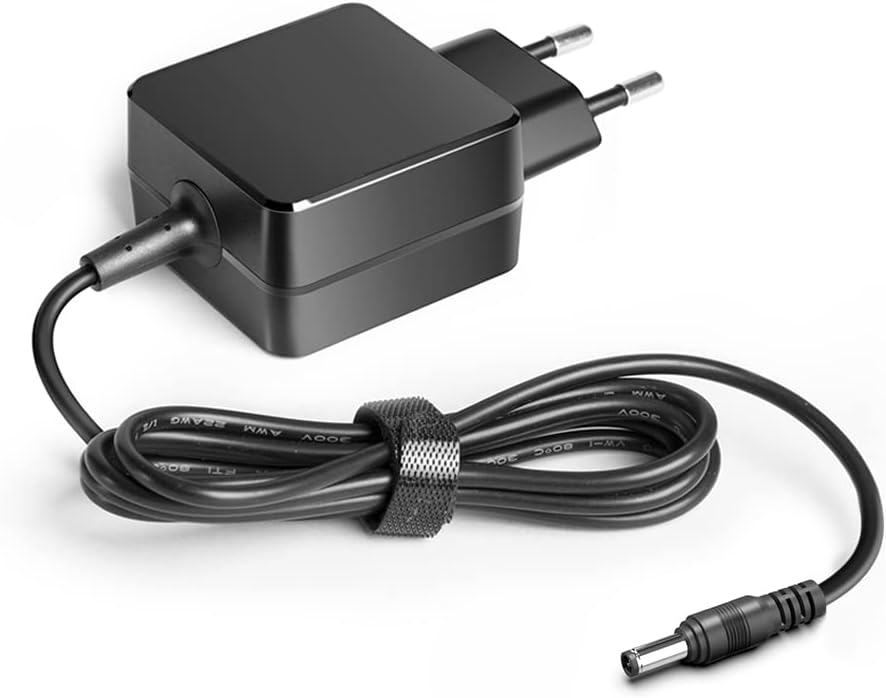
Figure 5.1: The KFD power adapter with its cable neatly coiled, demonstrating proper storage to prevent damage.
6. Troubleshooting
If you encounter issues with your KFD power adapter, refer to the following common problems and solutions:
| Problem | Possible Cause | Solution |
|---|---|---|
| Adapter not charging device. |
|
|
| Adapter gets excessively hot. |
|
|
| Device charges slowly. |
|
|
If the issue persists after trying these solutions, please contact KFD customer support for assistance.
7. Specifications
| Feature | Specification |
|---|---|
| Brand | KFD |
| Model Number | TDW-1601-DE-1 |
| Input Voltage | AC 100-240V ~ 50/60Hz |
| Output Voltage | 27V |
| Output Current | 500mA |
| Max Power Output | 13.5W |
| Connector Type | DC Plug (2-pin) |
| Special Features | Short Circuit Protection, Over Voltage Protection, Over Current Protection |
| Compatible Devices | Cordless Vacuum Cleaners (various models, see Section 3) |
| Product Dimensions | 47mm*47mm*29mm (approx.) |
| Product Weight | 105g (approx.) |

Figure 7.1: The compact size and weight of the KFD power adapter, highlighting its portability.
8. Warranty and Support
KFD products are manufactured to high standards and undergo rigorous testing to ensure quality and reliability.
- Warranty: This product comes with a 3-year warranty. Please retain your proof of purchase for warranty claims.
- Customer Support: For any questions, technical assistance, or warranty inquiries, please contact KFD customer support. Refer to the product packaging or the seller's information for contact details.
- Included Components: The package includes one KFD charger with a European plug and one user manual.

Figure 8.1: The 3-year warranty and CE certification for the KFD power adapter, indicating compliance with European safety standards.