
Introduction
The NOVOO Portable Adjustable Foldable Tablet Stand (Model: NVTS10BHPY-10) is designed to enhance your tablet experience by providing versatile, hands-free viewing. Its innovative origami-inspired design allows for easy adjustment to various ergonomic angles, making it ideal for a wide range of activities. Crafted from high-quality, durable PU material, this stand is ultra-thin, lightweight, and compatible with tablets 10 inches and larger.
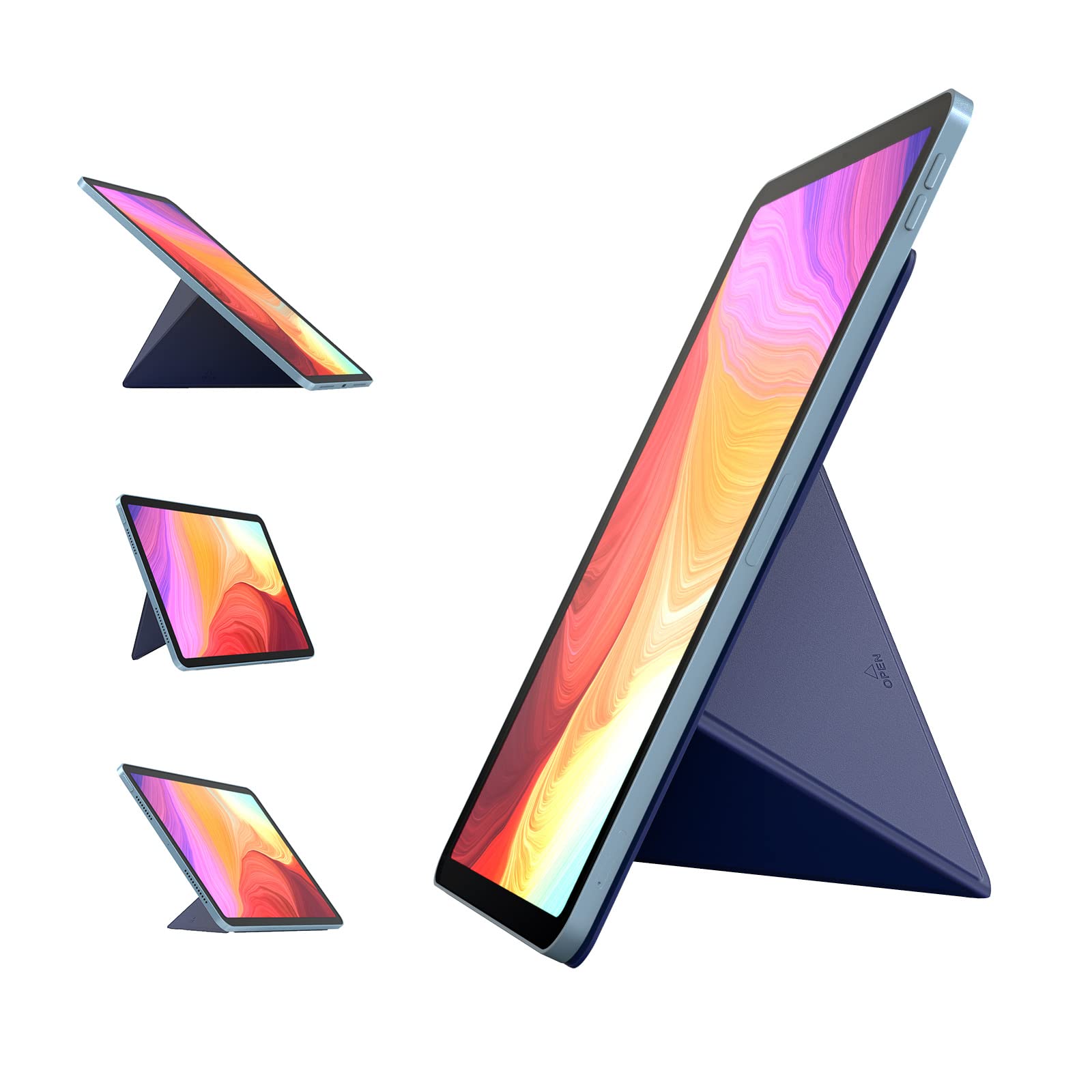
NOVOO Portable Adjustable Foldable Tablet Stand in dark blue.
Setup Instructions
Follow these steps to properly attach and set up your NOVOO Tablet Stand:
- Prepare your tablet: Ensure the back surface of your tablet is clean and dry.
- Attach the stand: Carefully peel off the protective film from the adhesive side of the NOVOO Tablet Stand. Align the stand centrally on the back of your tablet and press firmly to secure it. The adhesive is designed for strong hold and residue-free removal.
- Initial fold: Locate the "OPEN" arrow on the stand. Gently lift the section indicated by the arrow upwards.
- Form the stand: Rotate the lifted section counterclockwise as shown by the arrow on the stand until it forms a stable triangular support.
- Adjust the angle: Depending on your viewing preference, adjust the folds to achieve one of the four ergonomic angles (40°, 50°, 60°, 66°).

Visual guide for attaching and folding the tablet stand.

Illustration of the stand's dimensions and residue-free adhesive removal.
Operating Instructions
The NOVOO Tablet Stand offers flexible angle adjustments to suit various activities and viewing preferences.
- Adjusting the Angle: The stand features four distinct ergonomic angles. By manipulating the folds, you can switch between 40°, 50°, 60°, and 66° to find the most comfortable viewing position.
- Orientation: The stand supports both horizontal (landscape) and vertical (portrait) tablet orientations, providing stability without wobbling or tipping.
- Recommended Uses:
- Online Learning/Work: Position your tablet for comfortable video calls or document viewing.
- Kitchen Cooking: Keep recipes visible and your hands free while preparing meals.
- Watching Movies/Videos: Enjoy media content at an optimal viewing angle.
- Playing Games: Enhance your gaming experience with a stable display.
- Reading/Browsing: Maintain an ergonomic posture to reduce strain.
- Portability: When not in use, the stand folds flat to a thickness of just 0.4 cm, allowing it to be easily carried in any bag or backpack.

The stand's ultra-thin design and adjustable angles for various uses.

Examples of how the NOVOO Tablet Stand can be used in daily life.
Maintenance
Proper care will ensure the longevity and performance of your NOVOO Tablet Stand:
- Cleaning: The stand is made of durable PU material. To clean, gently wipe with a soft, damp cloth. Avoid using harsh chemicals or abrasive cleaners, as these may damage the material.
- Adhesive Care: The adhesive is designed for strong hold and residue-free removal. If you need to re-position or remove the stand, do so gently. Ensure the tablet surface is clean before re-applying to maintain optimal adhesion.
- Storage: When not attached to a tablet, store the stand flat to maintain its shape and adhesive integrity.
Troubleshooting
If you encounter any issues with your NOVOO Tablet Stand, refer to the following common solutions:
- Stand not stable: Ensure the stand is correctly folded into one of the designated ergonomic angles. Refer to the "Setup Instructions" section for proper folding.
- Tablet not adhering properly: Verify that the back surface of your tablet is clean, dry, and free of dust or oils before applying the adhesive.
- Stand feels less sturdy with a heavy case: The stand is designed for direct attachment to the tablet. While it may work with some thin cases, very heavy or bulky cases might affect its stability. For optimal performance, attach directly to the tablet.
- Difficulty achieving a low angle for writing: The stand offers specific viewing angles. If a very low angle for writing is required, consider using the tablet flat on a surface or exploring other accessories designed for that specific purpose.
- Compatibility concerns: This stand is compatible with tablets 10 inches and above. If you are unsure about your device's compatibility, please contact NOVOO customer support.
Specifications
| Feature | Detail |
| Brand | NOVOO |
| Model Number | NVTS10BHPY-10 |
| Material Type | Polyurethane |
| Thickness (Folded) | 0.4 cm (0.15 inches) |
| Length | 21 cm (8.27 inches) |
| Width | 15 cm (5.90 inches) |
| Product Weight | 214 grams |
| Compatible Devices | Tablets 10 inches and above (e.g., iPad 10.2, iPad Pro 10.5/12.9, Google Pixel C, Surface 3) |
| Key Features | Adjustable, Foldable, Portable |

Universal compatibility with various tablet sizes.
Warranty and Support
NOVOO products are designed for quality and durability. For any questions, technical assistance, or warranty inquiries regarding your NOVOO Portable Adjustable Foldable Tablet Stand, please contact NOVOO customer support through their official website or the retailer where the product was purchased. Please retain your proof of purchase for warranty claims.