
Moose 30382
Moose Magic Mixies Crystal Ball Instruction Manual
Model: 30382 | Brand: Moose
Introduction
The Magic Mixies Crystal Ball allows you to create a fantastic little being. Your Mixie can interact with you, predict the future, and much more. This product offers over 60 unique audio responses and reactions, providing an engaging magical experience.

Image: The Magic Mixies Crystal Ball, presented in its retail packaging. The packaging highlights the product's features, including the ability to "Cast your Spell, Create your Pet!" and "80+ Lights, Sounds & Reactions!". A pink Mixie creature is visible inside the crystal ball, with a golden wand positioned next to it.
Key Features:
- Awaken the magic of your crystal ball with your wand, evoking mist to reveal your Mixie.
- Personalize your Mixie by giving it a color, a voice, and teaching it to predict the future.
- Engage in spell-casting activities, allowing your Mixie to complete spells.
- Continue playing after revealing your Mixie, including predicting the future and replaying magical moments.
- Discover multiple Mixies to reveal and care for.
- Features over 60 interactive audio responses and reactions.
What's in the Box
Carefully unpack the contents and ensure all items listed below are present:
- 1 x Magic Crystal Ball (Colour Pink)
- 1 x Magic Mixie Figure
- 1 x Magic Wand
- 1 x Instruction Manual
- 4 x AAA Batteries (for wand)
- 6 x AA Batteries (for crystal ball)
- 1 x Parent/Guardian Letter

Image: The individual components of the Magic Mixies Crystal Ball set are displayed. This includes the purple and gold crystal ball base with a clear dome, a fluffy pink and purple Mixie creature, a golden magic wand, and two instruction booklets titled "Instruction Book 1: Create your Mixie!" and "Instruction Book 2".
Setup
- Unpacking: Carefully remove all components from the packaging. Retain the packaging for future storage or transport.
- Battery Installation (Crystal Ball):
Locate the battery compartment on the underside of the crystal ball base. Using a Phillips head screwdriver, open the compartment. Insert 6 x AA batteries, ensuring correct polarity (+/-). Close the compartment securely.
- Battery Installation (Wand):
Locate the battery compartment on the wand. Using a Phillips head screwdriver, open the compartment. Insert 4 x AAA batteries, ensuring correct polarity (+/-). Close the compartment securely.
- Initial Placement: Place the crystal ball on a flat, stable surface. Ensure there is enough clear space around it for interaction.
- Power On: Locate the power switch on the crystal ball base and switch it to the 'ON' position. The crystal ball will emit a sound or light to indicate it is ready.
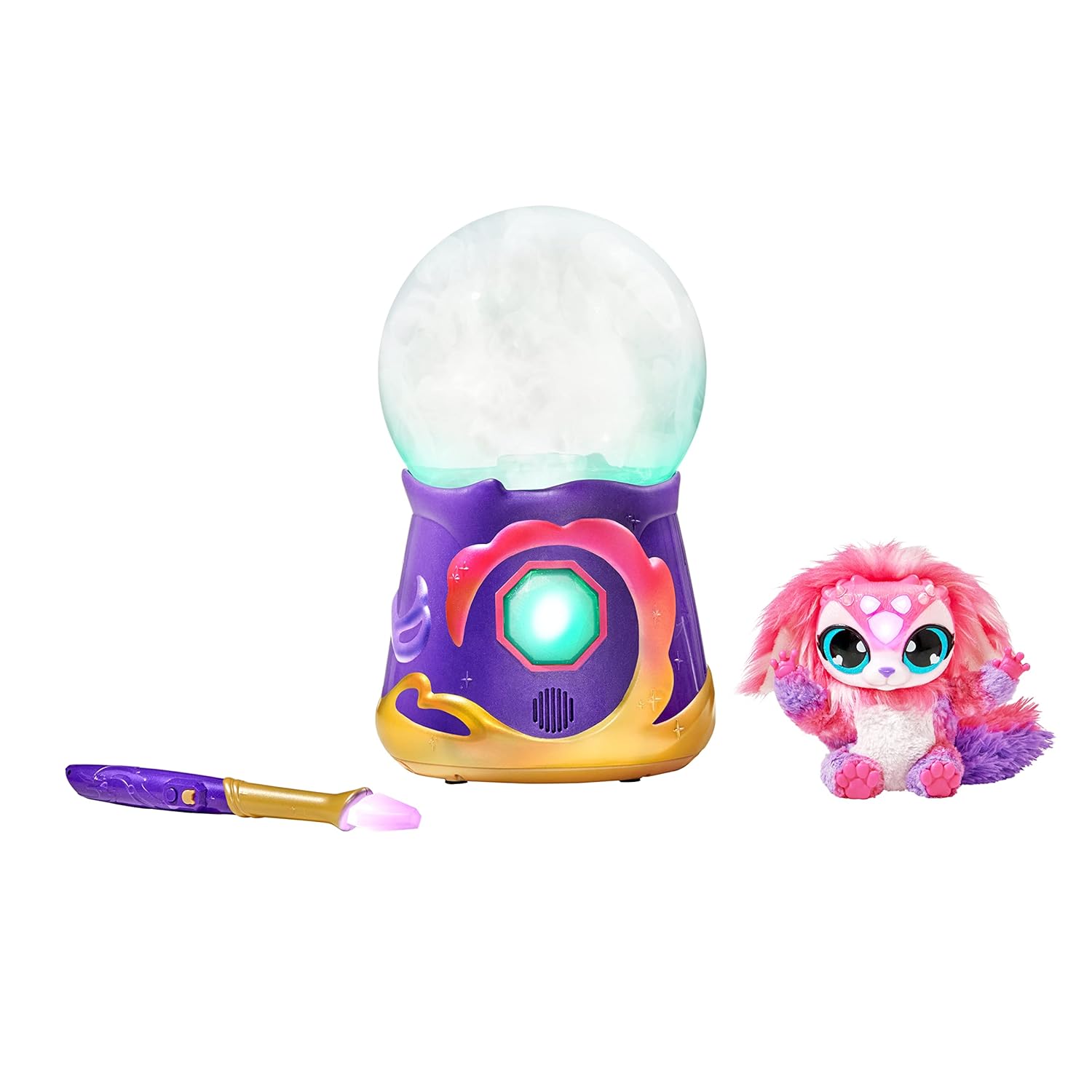
Image: The Magic Mixies Crystal Ball base, a separate pink Mixie creature, and the golden magic wand are displayed on a white background. This shows the main interactive components of the toy, ready for assembly and play after battery installation.
Operating Instructions
Follow these steps to interact with your Magic Mixies Crystal Ball and reveal your Mixie:
- Awakening the Crystal Ball:
With the crystal ball powered on, use the magic wand to interact with the ball. Follow the prompts from the crystal ball, which will guide you through a series of magical steps.
- Casting Spells:
The crystal ball will instruct you on how to cast spells. This typically involves specific wand movements or pressing buttons on the wand in response to the ball's lights and sounds. Each spell contributes to the revelation of your Mixie.
- Evoking Mist and Revelation:
As you successfully complete spells, the crystal ball will begin to fill with mist. This mist effect signifies the magical process of your Mixie being created. Continue interacting with the wand as instructed until the mist clears to reveal your Magic Mixie.
- Interacting with Your Mixie:
Once revealed, your Mixie can interact with you. Use the wand to activate different modes, such as giving your Mixie a color, a voice, or teaching it to predict the future. Refer to the included "Instruction Book 1: Create your Mixie!" for detailed interaction guides.
- Replaying and Future Predictions:
The crystal ball and Mixie offer replayability. You can re-engage in spell-casting or use your Mixie to predict the future. Consult "Instruction Book 2" for advanced play modes and future prediction features.
Maintenance
- Cleaning:
Wipe the crystal ball and Mixie with a soft, dry cloth. Do not use abrasive cleaners or immerse any part of the product in water. For stubborn marks, a slightly damp cloth can be used, followed by immediate drying.
- Battery Care:
If the product will not be used for an extended period, remove all batteries to prevent leakage and damage. Dispose of used batteries responsibly according to local regulations.
- Storage:
Store the Magic Mixies Crystal Ball and its components in a cool, dry place, away from direct sunlight and extreme temperatures. Keep it in its original packaging if possible to protect it from dust and damage.
Troubleshooting
| Problem | Possible Cause | Solution |
|---|---|---|
| Product does not turn on. | Batteries are dead or incorrectly installed. | Check battery polarity and replace with fresh batteries. Ensure the power switch is in the 'ON' position. |
| Wand is not interacting with the crystal ball. | Wand batteries are low or dead; wand is too far from the crystal ball. | Replace wand batteries. Ensure the wand is held within close proximity to the crystal ball during interaction. |
| Mist effect is not appearing. | Spell sequence not completed correctly; mist reservoir is empty (if applicable). | Review operating instructions and ensure all spell steps are followed precisely. Check the instruction manual for details on mist generation and potential refills. |
| Mixie is not responding. | Mixie batteries are low or dead; Mixie is not properly placed in the crystal ball (if applicable). | Ensure Mixie is correctly positioned. Check and replace Mixie's internal batteries if it has them (refer to specific Mixie instructions). |
Specifications
| Model Number | 30382 |
| Brand | Moose |
| Product Dimensions | 7.09 x 7.09 x 13.39 inches |
| Item Weight | 4.09 pounds |
| Batteries Required | 6 x AA (Crystal Ball), 4 x AAA (Wand) - Included |
| Language | English |
| Manufacturer | Moose |
| Date First Available | December 25, 2022 |
Warranty and Support
For warranty information, please refer to the specific warranty card included with your product or visit the official Moose Toys website. Keep your proof of purchase for any warranty claims.
If you encounter any issues not covered in the troubleshooting section or require further assistance, please contact Moose Toys customer support. Contact details can typically be found on the product packaging or their official website.
Online Resources: For additional tips, FAQs, and product updates, visit the official Moose Toys website: www.moosetoys.com
Related documents30382


Ask a question about this manual
Ask about setup, troubleshooting, compatibility, parts, safety, or missing instructions. Manuals+ will review the question and use this page’s manual context to help answer it.